
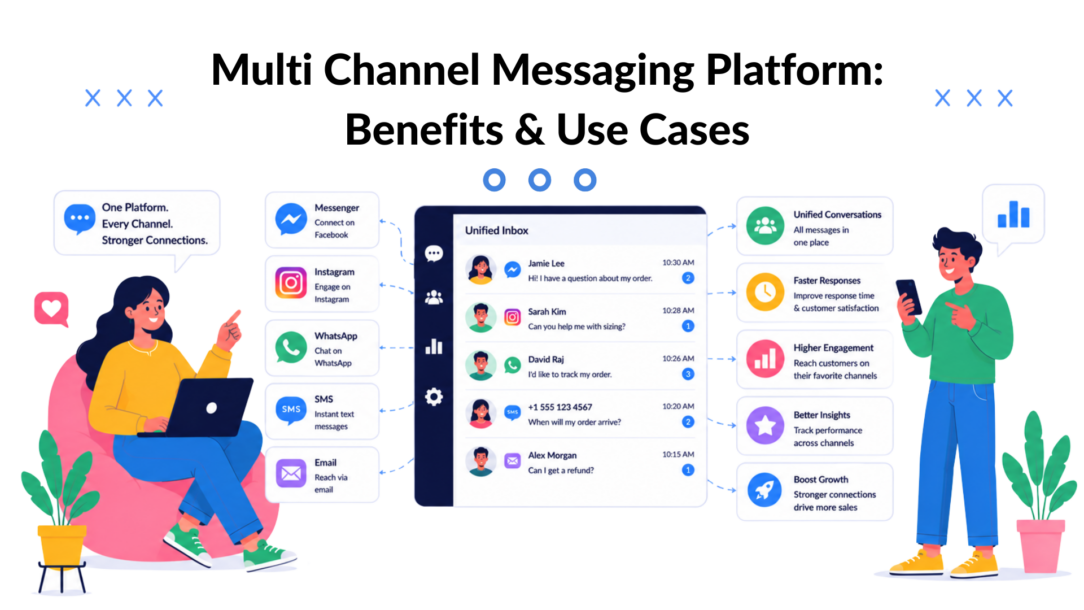
91% of businesses use two or more social media channels, and B2C marketers already spread activity across email (82.4%), social media (66.7%), and mobile apps (51.6%), according to Beehiiv’s 2025 multi-channel marketing statistics. In the same dataset, WhatsApp marketing usage rose from 13.5% to 34.8% in a year, which tells you something important. Customers aren’t waiting for brands to catch up. They’re already moving between inboxes, social apps, web chat, and messaging platforms.
Most businesses still operate as if each channel is its own department. Marketing sends email. Support handles web chat. Sales replies to Instagram DMs when someone remembers to check them. The result is predictable. Customers repeat themselves, teams lose context, and simple conversations turn into broken handoffs.
A multi-channel messaging platform fixes that operational mess. Not by adding more channels for the sake of it, but by giving your team one place to manage conversations, automate follow-up, and keep customer context attached to the interaction instead of trapped inside one app.
Why Your Customer Conversations Are Disconnected
Fragmentation usually starts small.
A prospect clicks an Instagram ad, sends a DM, gets a reply, then visits your site and opens chat. Later they reply to an email campaign with a pricing question. Internally, those moments often live in different tools, with different owners, and no shared history. The customer sees one company. Your team sees three unrelated threads.
That disconnect is more expensive than often understood. It creates delays, duplicate work, missed follow-ups, and awkward moments where support has no idea what marketing promised.
The channel problem is now a coordination problem
The old question was which channels matter. That part is settled. Customers are already active across multiple digital touchpoints, and businesses have followed them there. What’s changed is the operational burden of keeping those conversations aligned.
When a business runs email, Instagram, Messenger, WhatsApp, website chat, and in-app messaging separately, it usually creates these problems:
- Lost context: A customer has to repeat their issue because the previous exchange lives in another inbox.
- Inconsistent messaging: Sales, support, and marketing use different language, offers, or expectations.
- Slow response cycles: Teams switch tabs, re-check notifications, and manually forward screenshots.
- No clear ownership: One lead touches multiple channels, and no one knows who should reply next.
Customers don’t judge your internal tool stack. They judge whether your company remembers the conversation.
That’s why businesses trying to improve service quality often find themselves moving beyond isolated channel tools and toward coordinated systems. If you’re comparing multi-channel operations with a more connected service model, this guide on omnichannel customer service is useful because it shows where separate inboxes stop being manageable.
What fragmented communication looks like in practice
A few patterns show up over and over:
- E-commerce teams answer pre-purchase questions in social DMs but can’t connect them to post-purchase support.
- Agencies manage client conversations across separate logins, making approvals and response ownership messy.
- SaaS companies capture leads on-site, then lose conversational history when accounts move into support.
- Local businesses rely quickly on one app and ignore another because no one monitors both consistently.
A disconnected setup doesn’t just create inconvenience. It weakens revenue follow-up, customer trust, and team accountability. That’s why a multi-channel messaging platform is no longer a nice-to-have tool category. It’s basic infrastructure for any business that communicates across more than one digital touchpoint.
What Is a Multi-Channel Messaging Platform
A multi-channel messaging platform is a central system that brings customer conversations from multiple channels into one operating layer. Think of it as a communication hub. Instead of logging into separate tools for Instagram DMs, website chat, WhatsApp, SMS, or email, your team works from a unified environment.
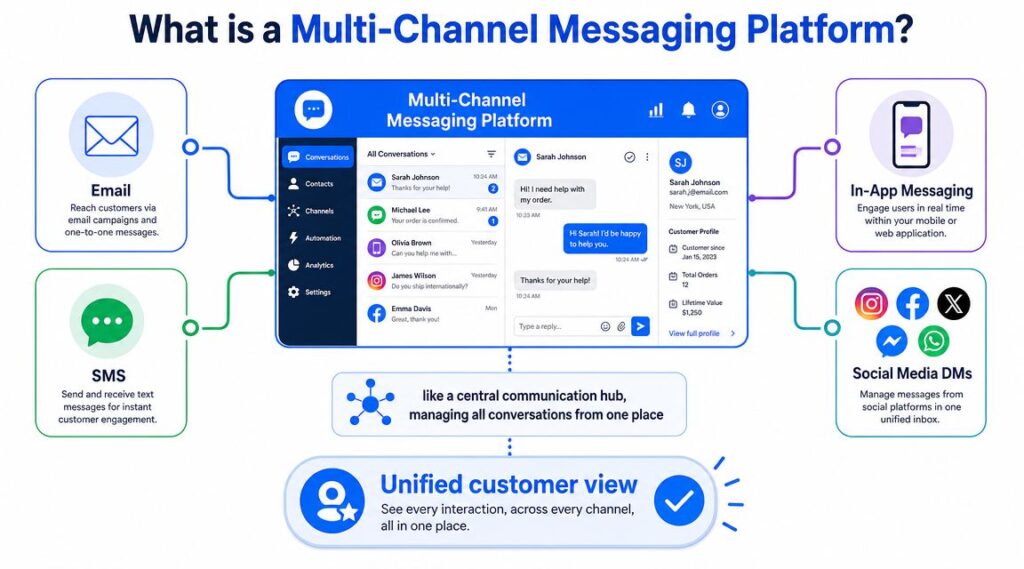
Multi-channel Messaging Platform Dashboard
The simplest version is a shared inbox. The better version is a system that also handles routing, automation, segmentation, handoff to live agents, and customer context. That difference matters. A shared inbox helps you see messages. A platform helps you run a process.
What it actually does day to day
At the practical level, a good platform lets a team:
- Collect conversations in one view from social DMs, chat widgets, and messaging apps
- Route messages intelligently to support, sales, or an automated workflow
- Store customer context such as tags, prior conversations, and form inputs
- Trigger follow-up sequences based on behavior or message intent
- Maintain consistency across templates, responses, and qualification flows
The strategic value is coordination. As Infobip’s guidance on multichannel communication points out, adding channels alone can create silos. The key differentiator is a single source of truth, shared segmentation, and consistent templates across SMS, email, and messaging platforms.
Multi-channel versus omnichannel
These terms often get blurred, but the distinction matters.
Multi-channel means you operate across several communication channels. Customers can reach you through different touchpoints, but those interactions may still be managed separately across different communication platforms.
Omnichannel means the experience follows the customer across channels. Context carries over. Data is unified. Teams can personalize interactions based on recent behavior, enabling stronger customer engagement rather than relying on static lists.
A strong multi-channel messaging platform sits in the middle of that journey. It provides the operational foundation needed to move from scattered inboxes to a more connected, real-time customer experience. With the right API integrations, data and conversations can flow seamlessly between systems instead of being trapped in separate tools.
Practical rule: If your team is still asking, “Which app did that message come from?” you’re not managing conversations. You’re sorting notifications.
That’s why the category matters. It’s not just another messaging tool. It’s the system that prevents channels from becoming isolated workflows and helps businesses deliver consistent, personalized experiences across every customer interaction.
Essential Features and Their Business Impact
The strongest platforms don’t win because they have the longest feature list. They win because each feature removes a specific operational bottleneck.
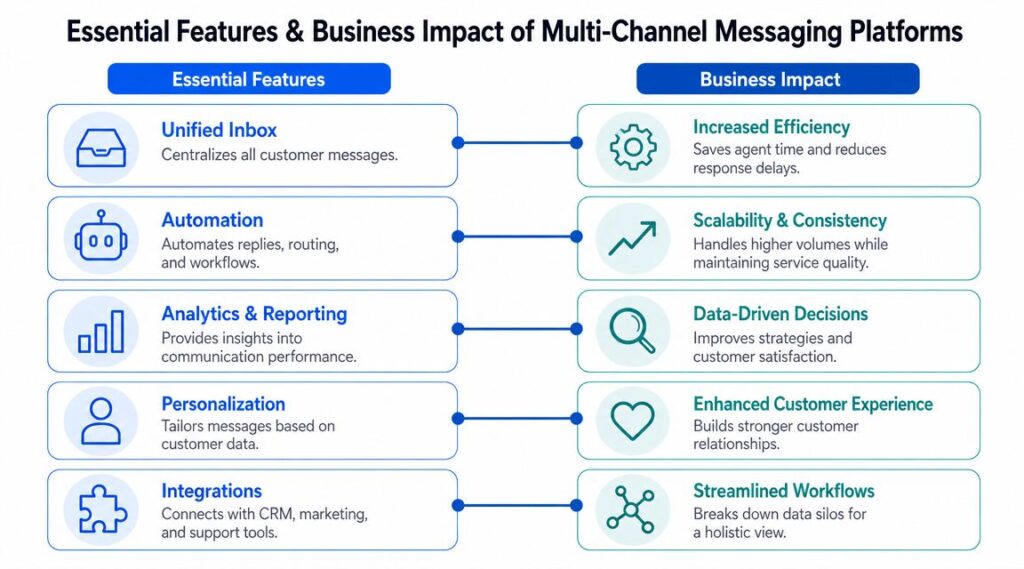
Multi-channel Messaging Platform Features Impact
Unified inbox and conversation history
This is the baseline. If the platform can’t centralize incoming messages clearly, everything else becomes harder.
Business impact:
- Faster replies: Agents don’t waste time switching between apps.
- Cleaner handoffs: Support can see what sales already said.
- Better continuity: The customer doesn’t need to restate the issue every time they change channels.
A unified inbox matters most when message volume starts spreading across several sources. That’s the point where separate native apps stop being manageable.
Automation and reusable workflows
Automation is where a multi-channel messaging platform starts changing outcomes, not just the organization.
A welcome flow can greet a new website visitor. An abandoned-cart prompt can continue the conversation in a messaging app. A lead qualification flow can collect budget, timeline, or service interest before a human steps in.
Later in the buyer journey, the same logic can handle FAQs, order updates, booking confirmations, and support triage.
To see how conversational automation fits into broader growth operations, this overview of a conversational marketing platform is a useful companion.
After you’ve mapped your channels, it also helps to compare the management layer around them. Teams evaluating social messaging workflows often use Website Builder Australia’s reviews of social platforms to understand how publishing, inbox management, and response coordination differ across tools.
Integrations, transcripts, and governance
Here, many buyers underestimate the category.
A platform shouldn’t just collect conversations. It should connect those conversations to the rest of your operation, including CRM records, automation tools, support workflows, and reporting.
According to Solution Patterns’ multi-channel messaging architecture overview, an extendable architecture unifies multiple channels into one system and adds services such as transcript storage, compliance workflows, and automation through event-driven components. The same guidance notes that a single chatbot can be reused across social, mobile, and messaging channels, which improves consistency and lowers integration overhead.
That matters in real business terms:
- Sales teams keep lead capture and qualification connected.
- Support teams can review transcripts instead of piecing together screenshots.
- Operations teams can add automation without rebuilding the whole system.
Here’s a quick visual summary before going further.
The technical layer most teams never ask about
Under the hood, well-architected messaging systems rely on architecture choices that directly affect reliability. Persistent connections, presence tracking, offline notification delivery, and reconnection logic all shape whether conversations feel instant and dependable. In distributed setups, service registries, eventual consistency, and multi-region replication help keep messaging available across devices and geographies.
That sounds technical, but the business takeaway is simple. If the platform can’t stay stable during traffic spikes, live chat handoff, or channel switching, your team ends up doing manual recovery work.
Real-World Use Cases for Your Business
A multi-channel messaging platform isn’t equally valuable to every business for the same reason. The use case changes with the business model. The common thread is that each one replaces a messy communication gap with a more structured system.
Multi-channel messaging use cases by business type
| Business Type | Common Challenge | Platform Solution | Key Result |
|---|---|---|---|
| E-commerce brand | Product questions arrive through Instagram or Messenger, but the store treats them separately from website activity | Use automated pre-purchase flows, live agent handoff, and post-purchase follow-up in one system | Fewer dropped conversations and more consistent conversion support |
| Agency | Teams juggle multiple client pages, campaigns, and inboxes across separate apps | Centralize client messaging operations with shared visibility, routing, and reusable automations | Better response ownership and less account chaos |
| Creator or course seller | Leads ask the same questions before buying, then need onboarding after purchase | Build FAQ flows, enrollment follow-up, and onboarding sequences across messaging channels | Less repetitive manual support and smoother buyer onboarding |
| SaaS company | Demo requests, onboarding questions, and support conversations live in different tools | Connect website chat, lead qualification, and support routing into one workflow | Faster handoff from prospect to customer support |
| Local business | Inquiries come through social DMs and messaging apps, but no one follows up consistently | Use templates, autoresponders, booking prompts, and campaign messaging in one place | More reliable lead capture and better day-to-day responsiveness |
What this looks like in the field
E-commerce brands usually benefit first from faster pre-sale response and recovery flows. Someone asks about sizing on Instagram, gets an instant answer, then receives a follow-up if they don’t buy right away. That beats relying on a generic email capture form and hoping they come back.
Agencies need control more than novelty. When account managers, media buyers, and client stakeholders all touch the same campaigns, the messaging layer has to show status, ownership, and history clearly.
The biggest gain for agencies isn’t automation alone. It’s removing ambiguity about who replied, what was promised, and which client thread needs action.
Creators and coaches often have repeated buying objections. A platform helps turn those into structured flows. Pricing, module access, scheduling, and onboarding can be answered automatically, while edge cases still go to a human.
SaaS teams usually need a blend of lead capture and support continuity. Web chat starts the conversation, then qualification, booking, onboarding, and support need to stay connected. If the tool stack breaks that chain, customers feel the disconnect immediately.
Local businesses need simplicity. They don’t need enterprise complexity. They need every inquiry answered, every booking opportunity captured, and every promotion delivered without checking five apps.
If you’re exploring practical automation patterns for these workflows, this roundup of chatbot use cases is a good starting point because it maps common business tasks to conversational flows instead of abstract feature lists.
How to Choose the Right Messaging Platform
Most buying mistakes happen before implementation. Teams pick a platform based on channel count, flashy demos, or a broad promise of automation. Then they discover it doesn’t fit their workflow, can’t connect to their stack, or creates another silo.
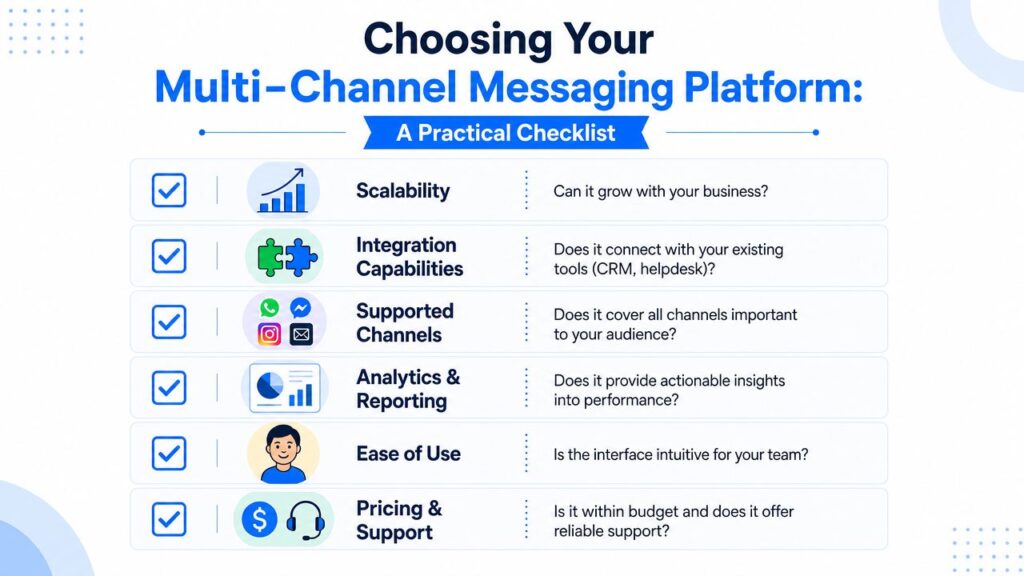
Multi-channel Messaging Platform Checklist
Start with your actual communication model
Don’t ask which platform has the most channels. Ask which channels your customers already use, and which conversations create the most friction today.
Use this shortlist:
- Supported channels: Does it cover the touchpoints your audience prefers?
- Workflow fit: Can your team route, assign, and resolve conversations without workarounds?
- Automation depth: Can it handle qualification, follow-up, and handoff, not just canned replies?
- Integration options: Does it connect to your CRM, helpdesk, email platform, or no-code automation stack?
- Usability: Can non-technical staff build and maintain flows without developer support?
Don’t ignore governance
Experienced buyers separate from casual evaluators at this point.
A platform that routes messages well but fails on transcript retention, privacy controls, and auditability will become a problem later. According to Red Hat’s guidance on extendable multichannel messaging platforms, a strong architecture should persist communication exchanges, generate transcripts, and support compliance with data-privacy and security policies. That’s essential for businesses that need to prove consent, document customer history, or retain records across teams.
If a conversation affects revenue, support obligations, or compliance, treat message history as an operational record, not a disposable chat thread.
Match platform depth to business complexity
A local business may only need social messaging, web chat, autoresponders, and a clean inbox. A SaaS company may need ticketing handoff, segmentation, workflow logic, and transcript retention. An agency may care most about account separation and team visibility.
For teams focused on conversational automation across website chat, Messenger, Instagram, and WhatsApp, Clepher is one example of a no-code platform that supports flows, broadcasts, audience segmentation, live chat, and integrations through tools such as Zapier and Make. That kind of setup fits businesses that want to launch and iterate quickly without building custom infrastructure.
The right choice isn’t the platform with the most features. It’s the one that fits your channels, your operating model, and your tolerance for fragmentation.
Your First Steps to Implementation
Organizations often stall because they think implementation has to begin with a full channel rollout. It doesn’t. Start with one journey that already matters.
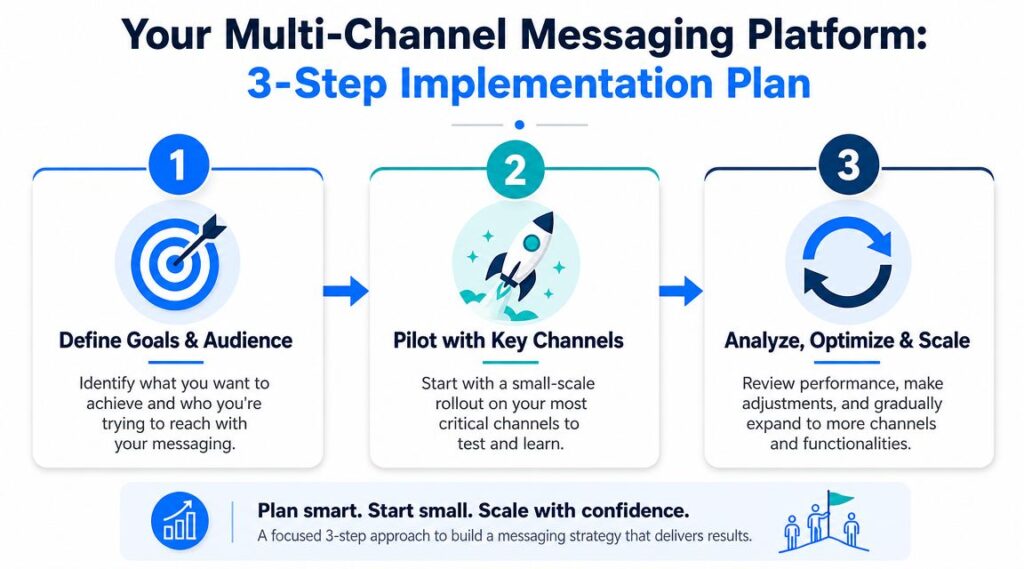
Multi-channel Messaging Platform Implementation Plan
Step 1
Pick a single customer path that breaks most often.
That might be first-contact lead response, abandoned-cart follow-up, appointment booking, demo qualification, or post-purchase support. Map what happens now, including every handoff, delay, and missing context point. Keep it simple. One journey is enough to expose the friction.
Step 2
Choose your core channel pair.
A website plus Instagram DMs. Messenger plus email handoff. WhatsApp plus booking flow. The goal isn’t broad coverage. It’s proving that one connected workflow works better than two disconnected inboxes.
Step 3
Build the first automated flow and leave room for human takeover.
Start with something useful and repeatable:
- Welcome and routing: Identify the user’s intent and send them down the right path
- FAQ deflection: Answer common questions before a team member gets involved
- Lead capture: Collect details that help sales or support respond with context
- Fallback handoff: Let a person step in when the issue needs judgment
The fastest wins usually come from reducing missed messages and making follow-ups consistent. Once that works, add more channels, more segmentation, and stronger reporting.
If your team is juggling customer conversations across website chat, Messenger, WhatsApp, Facebook, and Instagram, Clepher gives you a practical way to centralize those interactions, automate follow-up, and build no-code conversational flows without stitching together a custom stack.

Related Posts
Automated Checkout Bot: Build and Launch Guide
October 7, 2026AI Agent Framework: Architecture, Tools, and Use Cases
October 6, 2026Master Lead Generation Automation for Business Growth
October 5, 2026
Founder Clepher