
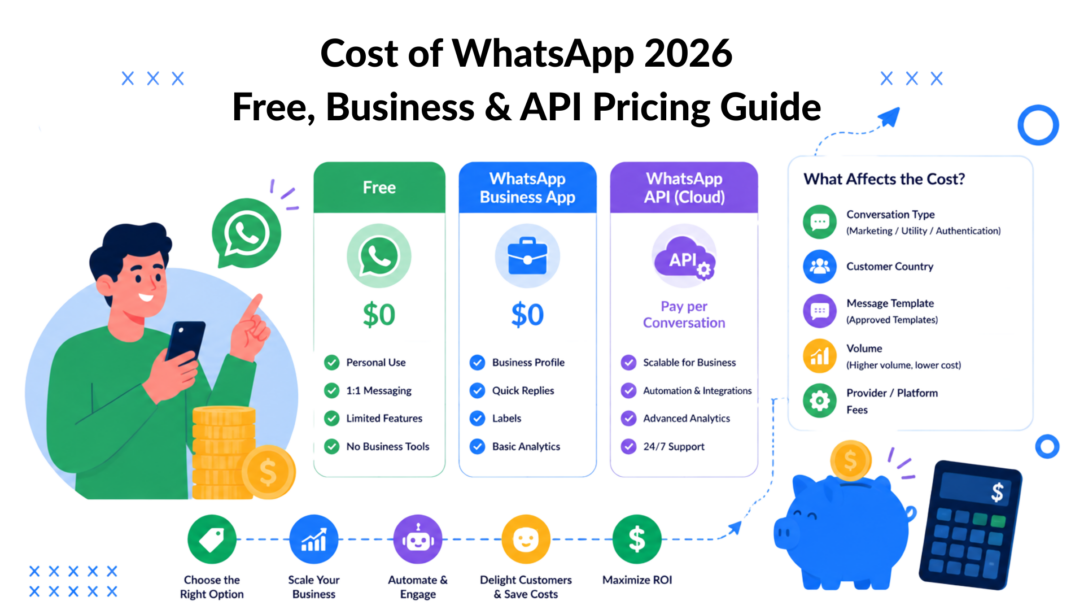
You’re probably here because you asked a simple question, “What does WhatsApp cost for my business?” and got a messy answer.
One website says WhatsApp is free. Another shows message fees. A software vendor quotes a monthly platform fee. Then an automation tool adds another line item. By the time you compare options, it feels like everyone is talking about a different product.
That confusion is real. The cost of WhatsApp depends on which version of WhatsApp you use, how many messages you send, where your customers live, and which software sits between your team and Meta. If you only budget for the message fee, you can underestimate your real spend. If you only look at software subscription pricing, you can miss the usage costs that grow with every campaign.
The practical way to think about WhatsApp is as a stack with three cost layers:
- Meta fees for certain business messages on the WhatsApp Business Platform
- BSP platform fees paid to a Business Solution Provider that connects you to the platform
- Third-party automation software for workflows, chatbots, reporting, CRM syncing, and campaign execution
A small bakery answering customer questions from one phone won’t pay the same as a DTC brand running order updates, abandoned cart flows, and promotional broadcasts. That’s why there isn’t one universal price tag.
Why Is WhatsApp Pricing So Confusing
Most business owners get tripped up because “WhatsApp” isn’t one thing in practice. It’s three different operating modes that happen to share the same brand name.
The first is personal WhatsApp. That’s what people use to chat with friends and family. For personal use, the app feels free and simple, so many owners assume the business side works the same way.
The second is the WhatsApp Business App. This is also free to use and works well for smaller teams that mainly handle manual conversations. It’s the version many local businesses start with.
The third is the WhatsApp Business Platform, often called the API. This is the version companies use when they need automation, integrations, approved template messages, multiple agents, and structured workflows. That’s where paid messaging and software costs enter the picture.
Three flavors of WhatsApp
Here’s the easiest way to separate them:
- Personal app: Best for one-to-one personal communication.
- Business app: Best for small businesses that want a business profile and simple customer messaging.
- Business Platform API: Best for brands that need scale, systems, and automation.
Think of it like transportation. Walking is free. Driving your own car adds fuel and maintenance. Running a delivery fleet adds dispatch software, drivers, and route planning. All three move people or goods, but they don’t have the same economics.
Where budget surprises happen
Confusion usually starts when a business jumps from the free app to the API without realizing that the billing model changes completely.
At that point, you’re no longer just “using WhatsApp.” You’re operating a business messaging channel with infrastructure behind it. That channel may include Meta’s message charges, a provider’s monthly access fee, and software that makes the whole system useful for marketing or support.
If you remember one thing, make it this: the cost of WhatsApp is really the cost of your chosen setup.
The Free Tiers WhatsApp Business App and Personal Use
For many businesses, the smartest first step is still free.
The WhatsApp Business ecosystem is divided into two pricing tiers: the WhatsApp Business App is completely free for iOS and Android with zero subscription fees for up to five users, whereas the WhatsApp Business Platform (API) is a paid solution requiring businesses to pay both variable Meta fees per message and monthly subscription fees to a Business Solution Provider (BSP), according to Chatarmin’s breakdown of WhatsApp Business costs.

Cost of WhatsApp Business
Personal WhatsApp versus WhatsApp Business App
The personal app is fine if you’re a freelancer who occasionally replies to clients. But it gets messy fast when customers need store hours, booking details, product questions, or follow-ups.
The WhatsApp Business App is built for that middle ground. It gives you a more professional front desk without charging a subscription fee.
A typical small business uses it for:
- Business profile: Add your address, business description, hours, and contact details so people know they’ve reached the right place.
- Quick replies: Save common responses for questions like shipping times, availability, or pricing.
- Catalogs: Show products or services directly inside the chat experience.
- Basic team access: Support up to five users, which is enough for many owner-led businesses.
A local bakery is a good example. The owner can list cake options in a catalog, answer pickup questions with saved replies, and confirm custom orders manually. No API. No monthly platform bill. No complicated setup.
Where the free app starts to break
The free business app works well until your process stops being manual.
That usually happens when one of these problems shows up:
- Too many chats: Team members lose track of who replied and what was promised.
- Need for automation: You want order updates, lead qualification, or FAQ handling without someone typing each response.
- System integration: You need customer data to sync with a CRM, shop system, or help desk.
- Campaigns at scale: You want structured outbound messaging instead of one-by-one outreach.
Practical rule: Stay on the free app as long as your team can manage conversations manually without dropped leads, slow replies, or spreadsheet workarounds.
If you’re still evaluating whether the app is enough, it helps to compare your current workflow against a fuller WhatsApp for Business setup. The key question isn’t whether the free tool exists. It’s whether it still fits the way your business operates today.
Decoding WhatsApp Business Platform API Pricing
The API is where WhatsApp turns from a messaging app into a business channel with usage-based billing.
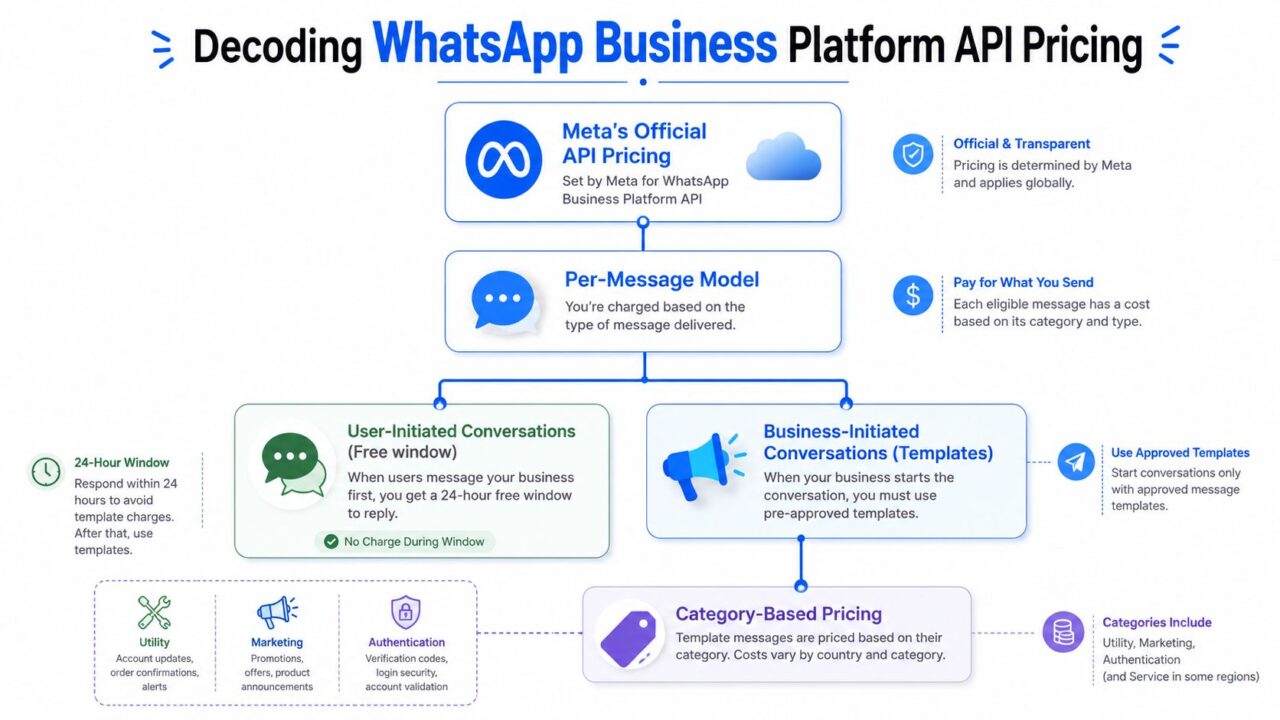
As of July 1, 2025, Meta changed pricing for the WhatsApp Business Platform to a per-message model. Costs now vary by message category and recipient country. In the UK, marketing messages cost £0.0382, utility messages cost £0.0159, and service conversations are free if handled within 24 hours, as outlined in Hello Charles’ WhatsApp Business pricing guide.
A simple way to understand this is to think about postage. Not every piece of mail costs the same to send. A postcard, a bill, and a secure identity document can all carry different postage rules. WhatsApp works in a similar way.
Cost of WhatsApp API Pricing
The four message types that matter
Marketing: Promotional messages such as product launches, sales alerts, win-back campaigns, and abandoned cart nudges.
Utility: Practical updates like order confirmations, shipping notices, appointment reminders, and account updates.
Authentication: Identity verification messages such as one-time passcodes.
Service: User-initiated support chats where the customer messages you first and you reply within the open service window.
That last category causes the most confusion. Service conversations are not the same as outbound campaigns. They’re closer to customer support replies.
A business owner usually asks, “So when do I pay?” The answer is straightforward:
- If your business initiates communication with an approved template, pricing applies based on category and country.
- If the customer initiates the chat and you reply within the service window, that reply can be free under the current rules described above.
Why country matters so much
A lot of teams estimate their spend using one market and assume it applies globally. That’s risky.
For example, Kraya AI’s pricing overview notes that under the per-message model, a Marketing message to a US recipient costs approximately $0.025 per message, while the same category to Germany costs $0.1323, a 5.3x cost variance. The same source notes that a Utility message is $0.004 in the US versus $0.0456 in high-cost markets.
If you sell in one country, forecasting is simpler. If you sell across several, the same campaign can produce very different costs based only on destination.
Here’s a practical example from the UK. Sinch’s pricing write-up states that sending 10,000 promotional product announcements monthly to UK recipients would cost roughly £382 at £0.0382 per message.
That single example shows why the cost of WhatsApp is no longer something you can estimate with a flat “per campaign” assumption.
What changed after the pricing shift
Under the old setup, businesses often thought in terms of conversations. Under the newer model, they need to think in individual delivered template messages.
That matters most for automation. A multi-step promotional flow now creates cost on each delivered template. If you run reminders, follow-ups, and offer sequences, your budget should reflect every step in the flow, not just the fact that it’s one customer journey.
The Mandatory Cost of Business Solution Providers
This is the layer many articles blur or skip.
Meta may own the channel, but most businesses don’t operate the WhatsApp Business Platform in a raw, direct form. They use a Business Solution Provider, or BSP, to connect, manage, and operate that setup.
The easiest analogy is internet service. Meta is like the wider internet. A BSP is like the provider that gets your business connected and keeps the service usable.
What a BSP actually does
A BSP usually handles the practical plumbing that a growing business doesn’t want to build itself.
That often includes:
- Account connection: Linking your business to the WhatsApp Business Platform
- Message management tools: Dashboards, inboxes, user roles, and template handling
- Operational support: Help with setup, troubleshooting, and ongoing usage
- Infrastructure reliability: The software layer that lets your team use WhatsApp consistently
Without that layer, the API is like buying industrial kitchen equipment without a kitchen team, ordering system, or service counter. The machinery exists, but it’s not operational for a normal business.
What BSP fees look like
According to Respond.io’s explanation of WhatsApp account pricing, Meta’s base Cloud API access is free, but the total cost is often dominated by BSP infrastructure fees that typically range from $50 to $500+ monthly. The same source notes that Meta’s per-message rate is only a fraction of the actual bill once BSP platform fees are included.
That’s why two businesses can send similar message volumes and still pay noticeably different total bills. One may choose a simple provider with basic access. Another may pay more for stronger inbox features, support, routing, or integrations.
Your budget should treat Meta and your BSP as two separate vendors. One charges for message delivery mechanics. The other charges for access and usability.
If customer records, sales conversations, and support workflows matter, review how your provider connects with tools like a CRM for WhatsApp. The software fit often matters as much as the published monthly fee, because poor integrations create hidden labor costs your finance sheet won’t show upfront.
Real-World Monthly Cost Scenarios
The easiest way to make sense of the cost of WhatsApp is to stop thinking in abstract pricing models and look at business situations.
Below are three common setups. The first two are qualitative because actual bills depend heavily on message mix, markets, and provider choices. The third uses a verified scenario with published numbers.
Scenario one. Local service business
A dental clinic, salon, or repair service usually uses WhatsApp for appointment reminders, simple follow-ups, and support replies.
In that case, the owner should first ask whether the free business app is enough. If the team mainly answers inbound questions, confirms bookings, and handles a manageable number of chats, a paid API setup may be unnecessary.
If the clinic later moves to automated reminders and multi-staff routing, then the budget needs to include:
- Meta fees for business-initiated template messages such as appointment reminders
- A BSP fee for access to the platform
- Possible software costs if they want automation, CRM sync, or chatbot flows
The practical takeaway is simple. A local service business often keeps costs low by treating WhatsApp primarily as a support and reminder channel, not as a broadcast channel.
Scenario two. Growing e-commerce brand
A growing online store usually has a more layered message mix.
It might send order confirmations, shipping updates, return support, and occasional promotional campaigns. Owners often underestimate spend on these because they only calculate the promotional blast and forget the software stack behind it.
A realistic monthly bill for this type of setup usually includes three buckets:
- Meta charges for utility, marketing, and possibly authentication messages
- BSP platform charges for the actual API access layer
- Automation software for segmentation, campaigns, routing, and customer journeys
This is also the kind of business that benefits most from cost discipline. If every campaign is broad and every update is sent to everyone, spend rises quickly without improving results.
Scenario three. DTC brand at meaningful scale
For a more concrete benchmark, Flowcall’s WhatsApp API pricing analysis states that a DTC brand sending 50,000 mixed messages to UK users has a total monthly cost of $2,000–$2,200, with Meta fees accounting for roughly 60% and BSP or platform overheads accounting for 40%.
That example is useful because it shows the underlying structure of a production setup. Message charges are important, but they are not the whole bill.
Estimated monthly WhatsApp cost by business type
| Business Type | Message Volume (Monthly) | Estimated Meta Fees | Typical BSP Fee | Total Estimated Monthly Cost |
|---|---|---|---|---|
| Local service business | Low to moderate | Depends on how many business-initiated templates are sent | Usually lower than larger automation-heavy setups | Often modest if most chats are inbound support |
| Growing e-commerce brand | Moderate to high | Depends on the mix of utility, marketing, and authentication messages | Varies by provider and tool stack | Can rise quickly when campaigns and automations expand |
| DTC brand sending 50,000 mixed messages to UK users | 50,000 | Roughly 60% of total cost based on the verified example | Roughly 40% of total cost based on the verified example | $2,000–$2,200 |
How to use these scenarios
Don’t copy another company’s budget line by line. Use these examples to map your own setup.
Ask yourself:
- Are most of your chats inbound support or outbound campaigns?
- Do you serve one country or several?
- Will you run manual messaging or automated flows?
- Do you need only access, or do you also need campaign and workflow software?
Those four answers tell you far more about your likely spend than any generic “WhatsApp starts at” price ever will.
Actionable Tips to Reduce Your WhatsApp Costs
Most businesses don’t need to slash WhatsApp usage. They need to use it with more precision.
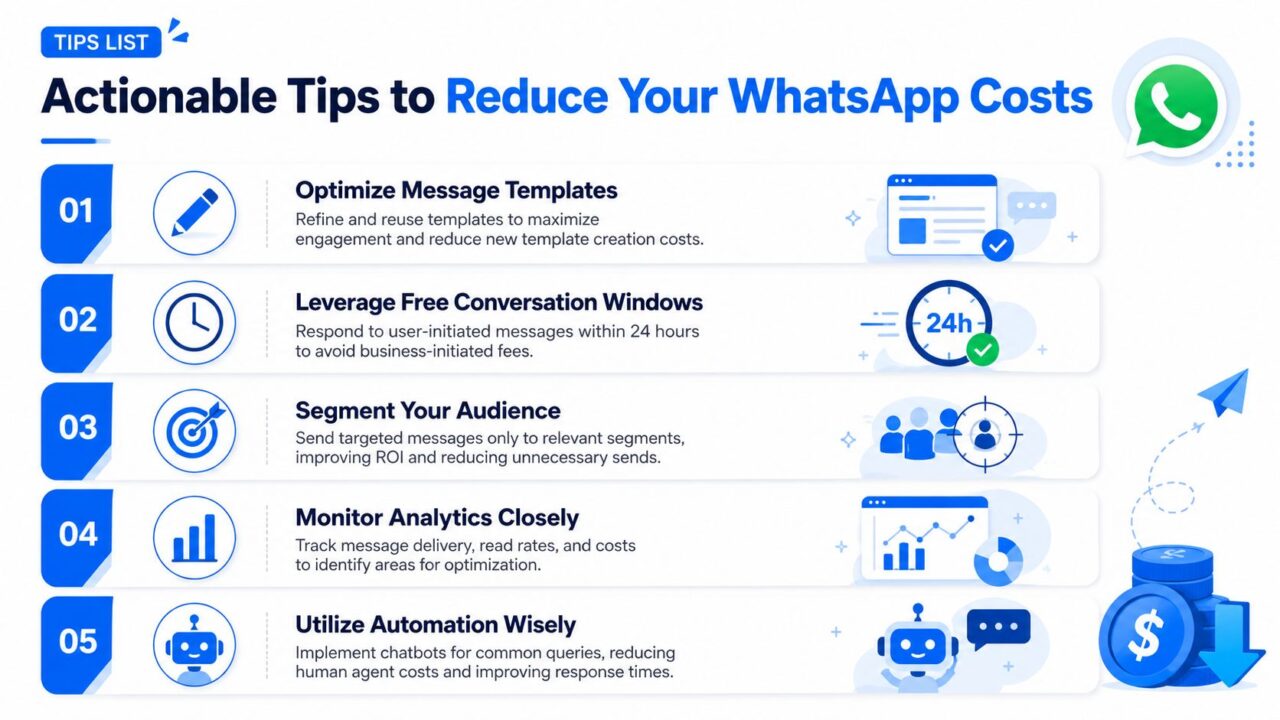
The most effective approach is to design your customer experience around the service window. According to Trengo’s breakdown of WhatsApp Business costs, service conversations remain free if the business replies within the 24-hour open customer service window. The same source gives a clear example: a DTC brand receiving 5,000 customer questions about shipping status can reply to all within 24 hours and incur $0 in Meta fees by using that mechanic.
Cost of WhatsApp Business Tips
Use the service window on purpose
If your support team is slow, simple inbound questions can spill into paid outbound follow-ups later. Fast replies don’t just improve service. They also protect your budget.
That means your team should:
- Route chats quickly: Make sure the right person sees the message fast enough to answer within the open window.
- Standardize common responses: Use approved workflows and saved reply logic to avoid delays.
- Prioritize support-first journeys: Encourage customers to start the conversation when possible, especially for order and delivery issues.
A support workflow that keeps customers inside the active service window can be cheaper than a marketing workflow that tries to restart the conversation later.
Cut waste before you cut volume
Some businesses react to rising costs by sending fewer messages across the board. That’s too blunt.
A better approach is to remove low-value sends:
- Segment audiences better: Don’t send every promotion to every subscriber.
- Tighten message timing: A well-timed update often beats a sequence of generic nudges.
- Review template usage: If a template rarely drives action, it may not deserve a place in your flow.
- Monitor operational leakage: Duplicate notifications, unclear routing, and manual re-sends all create avoidable spend.
This logic aligns with broader operational discipline. If you want a useful outside framework, SelfServe’s cost reduction strategies are worth reading because they focus on reducing waste through process design, not just cutting spend after the fact.
Make relevance do the heavy lifting
WhatsApp is powerful because it’s direct. That’s also why irrelevant messaging gets expensive fast.
A tighter program usually looks like this:
- A customer receives only messages tied to real intent or lifecycle stage.
- Support requests get handled quickly while the service window is active.
- Automation covers repetitive work so staff doesn’t spend time on copy-paste responses.
- Campaigns go to narrower segments with a clearer reason to act.
That combination lowers unnecessary message volume and usually improves the business value of each paid send.
How Platforms Like Clepher Impact Your Total Spend
Once a business reaches the API stage, another question appears: what role does an automation platform play in the total cost?
It helps to separate responsibilities. Meta handles the messaging network. A BSP provides the access layer. An automation platform sits above both and gives your team the application layer where campaigns, bots, journeys, and customer logic happen.
Cost of WhatsApp Chatbot Marketing
The extra layer that changes the economics
At first glance, adding software looks like one more cost line. In practice, it can change how efficiently you use the other two layers.
For example, a team using an automation platform can usually do a better job of:
- Building structured customer journeys instead of one-off sends
- Routing support automatically before chats go stale
- Segmenting audiences so promotions go only to relevant buyers
- Syncing customer data across systems instead of managing lists manually
- Running repeatable workflows without extra headcount
That matters because labor waste is part of total cost of ownership even when it doesn’t show up as a Meta fee.
Cost versus return
The wrong way to assess software is to ask only, “Does this add a subscription?”
The better question is, “Does this reduce wasted messages, manual work, and missed sales opportunities enough to justify itself?” For many brands, the answer depends less on the sticker price and more on whether the platform helps the team operate WhatsApp like a real revenue and support channel.
If you’re evaluating that application layer, compare the workflow depth and automation options available in WhatsApp marketing tools. The important point is not the label on the software. It’s whether the tool helps you get more value from the Meta and BSP layers you’re already paying for.
The cost of WhatsApp gets easier to manage once you stop treating it as a single fee. It’s a stack. Businesses that understand the stack usually make better decisions, spend with fewer surprises, and build a channel that scales.
If you want to turn WhatsApp into a practical channel for marketing, sales, and support, Clepher can help you build automated flows, manage conversations, and make better use of the infrastructure you’re already paying for. It’s a useful next step when your team has outgrown manual messaging and needs a more scalable system.
