
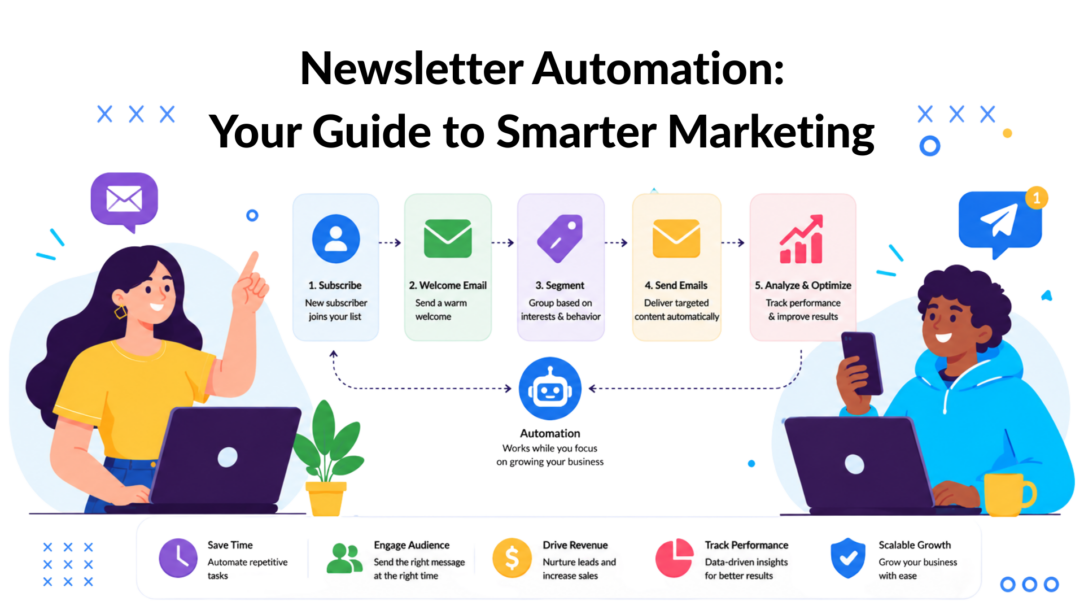
Automated email changed the economics of newsletter marketing. Industry summaries report that automated emails can generate 320% more revenue than standard non-automated emails, while trigger-based messages see a 70% higher open rate and a 332% higher click rate than generic sends according to Stripo’s roundup of email automation statistics.
That’s the essence of newsletter automation. It isn’t just a faster way to send email. It’s a way to stop treating every subscriber the same.
A manual newsletter blast works like a loudspeaker. Everyone hears the same message, at the same time, whether it fits or not. Newsletter automation works more like a conversation system. Someone signs up, clicks a topic, abandons a cart, finishes onboarding, or goes quiet for a while. Your marketing responds based on that behavior.
For busy marketers, that shift matters because it improves two things at once. You save production time, and you make each message more relevant. That combination is what turns email from a repetitive task into a dependable growth channel.
What Is Newsletter Automation and Why It Matters Now
Newsletter automation is the use of software to send emails based on rules, timing, and subscriber behavior instead of building every send manually.
The simplest version is a welcome email that goes out when someone joins your list. A more advanced version is a system that notices what someone browsed, what they clicked, what they bought, and what channel they came from, then sends a more fitting follow-up.
The old model was batch-and-blast. You wrote one campaign, scheduled it, and hoped it landed well enough across your entire database.
The modern model is behavior-based delivery. The message changes because the customer changed.
The before and after
Here’s the practical difference:
-
Manual newsletter process
A marketer exports a list, writes one email, picks a send time, and delivers the same content to everyone. -
Automated newsletter process
A system notices a trigger, chooses the right segment, inserts relevant content, and sends a message that matches the subscriber’s situation.
That sounds technical, but the idea is simple. You’re replacing one big generic send with many smaller, smarter interactions.
Practical rule: If a subscriber’s behavior tells you what they need next, you shouldn’t make them wait for your next scheduled blast.
That’s why newsletter automation matters now. Buyers move across channels quickly. They browse on mobile, ask questions in chat, return from an ad, and open email later. If your email strategy still depends on someone manually assembling every campaign, you’re always reacting late.
Why smart marketers treat it as infrastructure
Good newsletter automation does more than save time:
- It supports conversion paths like welcome sequences, onboarding, cart recovery, and re-engagement.
- It protects consistency because follow-ups happen even when your team is busy.
- It improves relevance because subscribers receive messages tied to actions and interests.
- It fits a broader conversational strategy where email works alongside chat and SMS instead of in isolation.
Once you see automation this way, email stops being a calendar activity. It becomes an always-on response system for customer intent.
The Core Components of Newsletter Automation
A useful way to think about newsletter automation is as an engine. If one part is missing, the whole thing runs poorly. If the parts work together, the system keeps moving with much less manual effort.
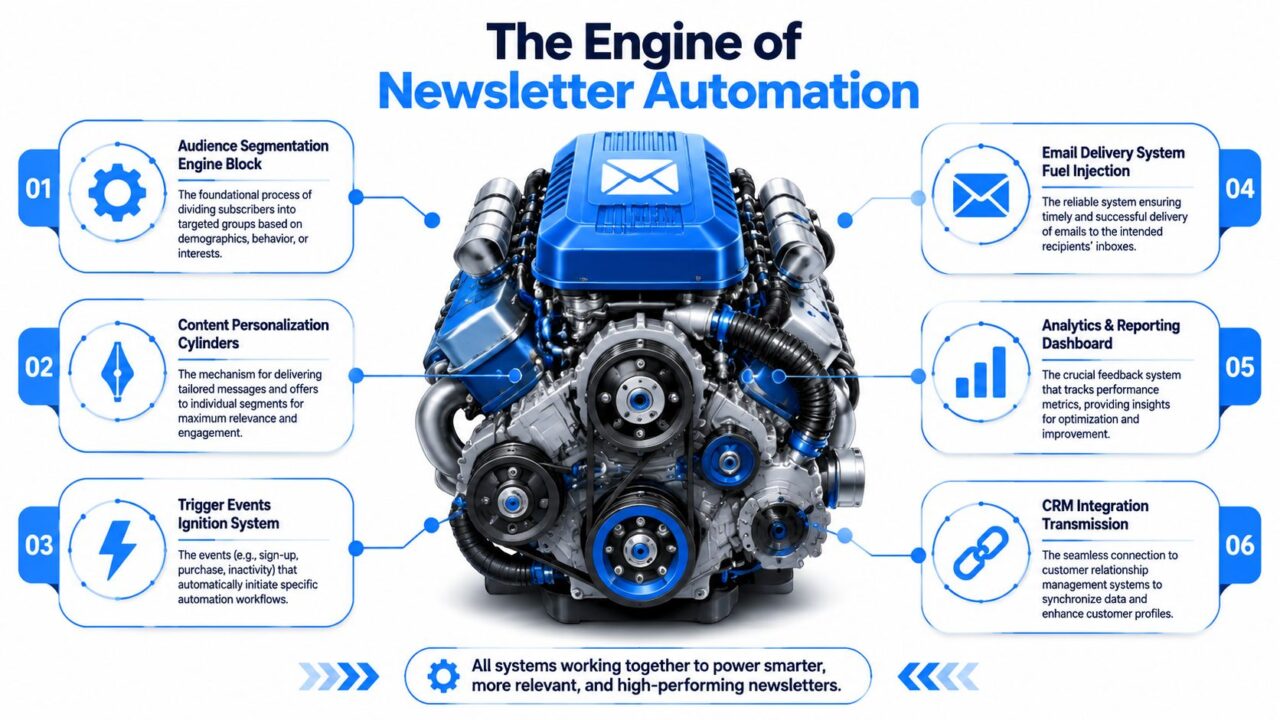
Newsletter Automation Engine Diagram
Capture and CRM connection
Every automation starts with input. That usually comes from a signup form, chatbot, checkout flow, lead magnet, webinar registration, or CRM update.
Think of this as fuel intake. If your system only collects an email address, your automations stay basic. If it also captures product interest, business type, location, lifecycle stage, or source channel, your automation gets much smarter.
A CRM or subscriber database acts like the transmission. It carries customer data across the system so email logic can respond to it.
Segmentation and personalization
Segmentation is how you divide subscribers into meaningful groups. New leads, active customers, repeat buyers, churn-risk users, and people interested in a specific topic all need different messages.
Personalization is what each segment sees. That could be:
- Topic-based content for subscribers who clicked a category
- Product recommendations tied to browsing or purchase behavior
- Different calls to action for trial users versus paying customers
- Location-specific messaging for local services or events
Segmentation is the sorting step. Personalization is the tailoring step.
Without segmentation, personalization usually means little more than adding a first name to the top of an email. That’s not enough.
Triggers and scheduling
Triggers are the spark plugs. They fire the automation when a specific event happens.
A trigger can be simple:
- A new subscriber joins
- A customer makes a purchase
- A lead books a demo
- A subscriber hasn’t engaged for a while
It can also be content-driven. Letterhead’s explanation of event-driven newsletter workflows describes how a new blog post can trigger a sequence that pulls in the headline, description, and link, then routes it to segmented subscribers based on predefined rules.
That’s a big leap from copying blog content into an email by hand every week.
Scheduling then controls timing. Some messages should send immediately. Others work better after a pause. A welcome note might go out right away, while a product education email may wait until the subscriber has had time to explore.
A trigger is just an “if this, then that” rule for marketing. If someone does X, your system sends Y.
Delivery and reporting
Delivery is the part first noticed because it’s the visible output. But good delivery depends on everything upstream being set up well.
Then comes reporting. This is your dashboard. You track open rate, click behavior, unsubscribe patterns, and conversion signals to learn whether the automation is helping or annoying the audience.
A basic newsletter process asks, “Did we send it?”
A strong automation process asks, “Did the right people receive the right version, and what did they do next?”
Powerful Automation Workflows for Your Business
The easiest way to understand newsletter automation is to see it in motion. Different businesses use different workflows, but the structure is usually the same. A trigger starts the sequence, subscriber data shapes the path, and the messages move the person toward a decision.
Here’s a simple welcome flow as a visual reference.
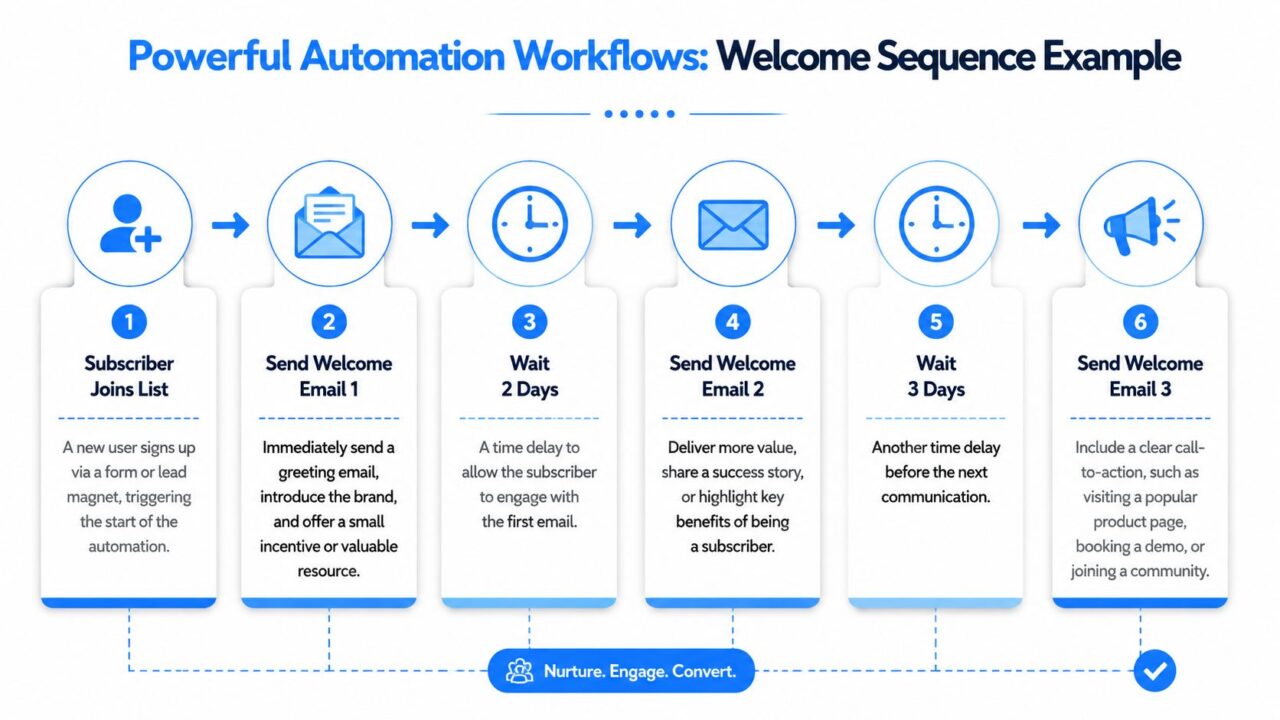
Newsletter Automation Email Sequence
E-commerce workflow
An online store often gets stuck sending broad promotional newsletters to everyone. That misses the moment when buyer intent is highest.
A stronger setup looks like this:
-
Trigger
A shopper views a product, adds it to cart, or purchases from a specific collection. -
Segmentation logic
The system checks whether the shopper is a first-time visitor, repeat customer, high-intent browser, or recent buyer. -
Message path
A first-time cart abandoner gets reassurance, product details, and a reason to return.
A repeat customer might get complementary product suggestions instead.
A buyer receives post-purchase education rather than another sales push.
Conversational marketing helps by enabling a chatbot to ask what the shopper is looking for before they ever join the email list. That answer becomes segmentation data, which improves the follow-up emails.
For service-area brands, this same logic can support local lead generation. If you work with firms that depend on geographic targeting and qualification, these actionable strategies for local firms are a useful companion to email workflows.
SaaS workflow
SaaS teams often need email to do more than announce updates. They need it to drive activation.
A common sequence starts when a user signs up for a trial or freemium account. The first email confirms value and helps them complete one key action. The next message highlights a feature they haven’t used yet. If the user stalls, the system shifts into a nudge sequence with help content, use cases, or an invitation to book a demo.
This works best when segmentation and performance tracking stay connected. Rasa’s overview of newsletter marketing automation explains that platforms use CRM data to create distinct segments that receive different newsletter versions, and that stronger relevance improves engagement by increasing clicks and reducing unsubscribes.
If you want a practical model for this kind of sequence design, Clepher’s guide to a drip campaign definition is a helpful reference point.
Creator and coach workflow
Creators, educators, and coaches usually don’t need more emails. They need a cleaner path from interest to trust.
A strong welcome series might work like this:
- Email one delivers the lead magnet and sets expectations.
- Email two shares the creator’s best teaching or most useful framework.
- Email three points the subscriber toward the next logical action, such as joining a workshop, booking a call, or exploring a paid offer.
The key is continuity. The sequence should feel like a thoughtful guide, not a stack of disconnected promos.
A good workflow doesn’t just send messages. It removes the guesswork about what a subscriber should receive next.
How to Implement Newsletter Automation
For teams, there are two practical ways to build newsletter automation. They either use the automation features inside their email platform, or they connect several tools into a broader stack.
Neither option is automatically better. The right choice depends on how complex your customer journey is, how many channels you use, and how much control your team needs.
Two common setup paths
| Approach | Best fit | Strength | Trade-off |
|---|---|---|---|
| Native ESP automation | Smaller teams, simple funnels, faster setup | Easier to launch and manage in one place | Can feel limiting when journeys span chat, CRM, and SMS |
| Integrated stack | Growing brands, agencies, SaaS, multi-channel programs | Better control over data, segmentation, and orchestration | More setup work and more moving parts |
If you’re early, your email service provider may be enough. Many brands can start with welcome flows, post-purchase emails, and re-engagement campaigns inside tools like Mailchimp, Klaviyo, or similar platforms.
If you’re coordinating lead capture across website chat, Instagram, Messenger, SMS, and email, you’ll usually need tighter integrations. In that case, a connected setup makes more sense because each tool handles a specific job well.
What to look for in a platform
When evaluating tools, ignore flashy claims and focus on workflow basics.
Look for:
- A visual builder so your team can see the logic clearly
- Reliable integrations with your CRM, forms, ecommerce platform, and messaging tools
- Flexible triggers based on actions, tags, field changes, and inactivity
- Segmentation controls that let you create paths based on behavior and profile data
- Analytics that show performance at the sequence and message level
- Approval steps when multiple people review copy or campaign logic
That last point matters more than many teams realize.
ChangeCrab’s guidance on automating newsletters without sacrificing quality makes a strong case for automating operational steps around editorial judgment, such as draft assembly and review checkpoints, instead of blindly auto-publishing everything at scale. That approach helps protect sender reputation and keeps weak content from spreading faster.
A practical rollout model
Start small. Build one automation that solves a recurring problem.
For many businesses, that means:
- Welcome and nurture for new subscribers
- Follow-up and reminders after a lead magnet or demo request
- Post-purchase education for new customers
- Re-engagement for people who’ve gone quiet
If you’re already using Mailchimp, a guide on how to integrate Mailchimp into a broader automation setup can help you connect email to the rest of your marketing stack.
Coaches, consultants, and knowledge businesses often prefer unified systems because they need forms, scheduling, nurture, and client communication in one place. In that context, an all-in-one coaching platform can be a useful example of how operational simplicity supports follow-up consistency.
Integrating Chatbots for Smarter Automation
Most newsletter systems start with a static form. Name, email, submit. That works, but it gives you very little to build on.
A chatbot can do more useful work before the subscriber ever enters an email flow. It can ask what the visitor wants, what product they’re interested in, whether they’re a new or returning customer, or which service fits their situation. That turns lead capture into qualification.
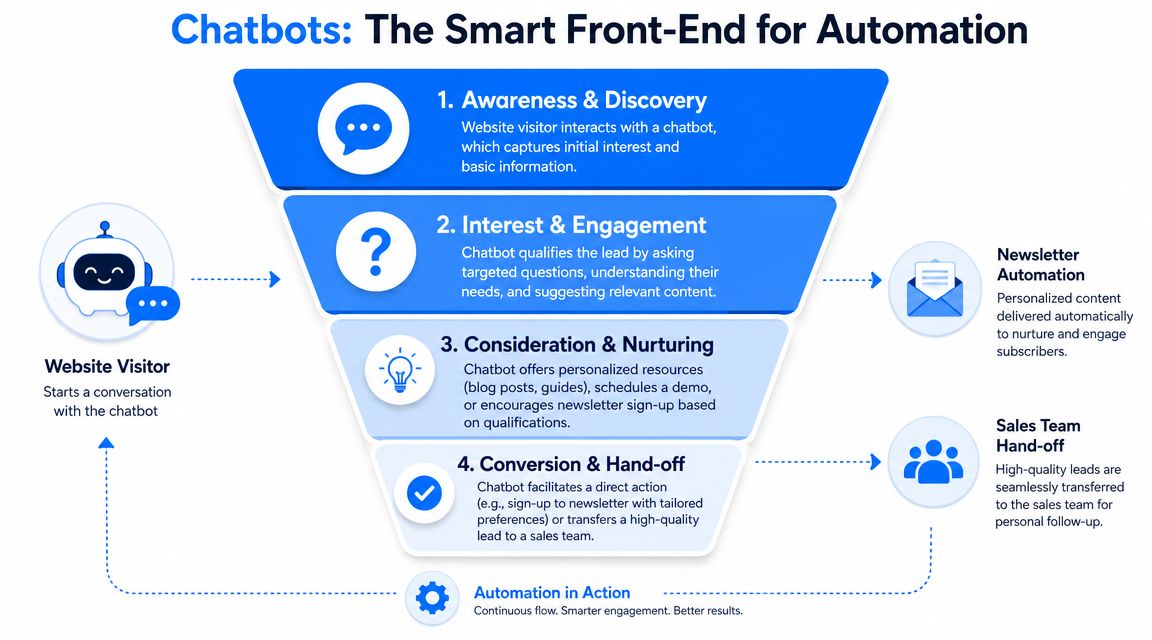
Newsletter Automation Chatbot Funnel
Why chat adds better inputs
Think about the difference between a paper signup sheet and a store associate asking three smart questions.
The form captures contact details. The conversation captures intent.
That matters because newsletter automation becomes more effective when segmentation starts earlier. Instead of dropping every subscriber into one welcome sequence, you can route people by:
- Interest area
- Purchase readiness
- Business type
- Support need
- Preferred channel
A visitor who asks for pricing probably needs a different path than someone browsing educational content. A customer asking a support question may need help content and human handoff, not a promotional email.
The strongest automations begin before the email send. They begin at the moment the customer tells you what they need.
How multi-channel journeys work
Once a chatbot collects those signals, the rest of the system gets easier to design.
A practical multi-channel journey might look like this:
-
Website chat captures intent
The visitor selects a product category or use case. -
Subscriber data syncs to your CRM or automation platform
Tags and custom fields update immediately. -
Email sequence starts
The subscriber receives a topic-specific welcome flow. -
SMS or chat follow-up supports urgency
Time-sensitive reminders go through a faster channel when appropriate. -
Sales or support steps in when needed
High-intent or complex conversations move to a human.
This is why newsletter automation shouldn’t sit alone as an email tactic. In a conversational marketing strategy, email is one part of a coordinated response system. Chatbots improve the quality of your data, email handles deeper nurturing, and SMS or messaging apps support timely nudges and handoffs.
Best Practices for High-Performing Automations
Strong automations don’t stay strong by accident. They need maintenance, testing, and clear rules. The encouraging part is that even modest improvements can compound when the workflow runs every day.
Industry data summarized by Grantbot reports that 80% of marketing automation users saw more leads, 77% reported more conversions, and teams can cut campaign production time by up to 40% through automation in its overview of newsletter automation strategies.
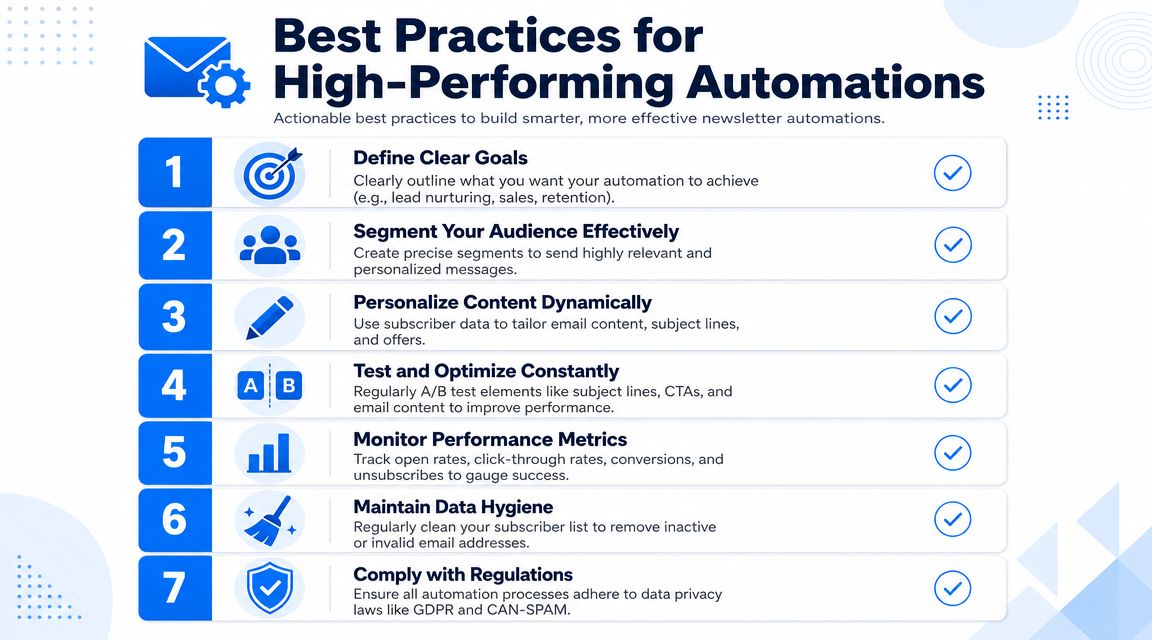
Newsletter Automation Best Practices
The rules that keep automations healthy
-
Set one clear job per workflow
Don’t mix onboarding, promotion, and retention into the same sequence. Each automation should have a single purpose. -
Keep segments current
Old tags and stale lists create bad experiences. If someone becomes a customer, remove them from prospect messaging. If someone stops engaging, treat them differently. -
Write like a person
Automated doesn’t mean robotic. Use plain language, clear calls to action, and helpful context. If the message sounds canned, the automation will feel lazy even if the logic is solid. -
Test one element at a time
Subject lines, send times, content format, and calls to action all affect performance. Change one variable so you can learn what actually moved the result.
What to watch in your dashboard
Your dashboard should answer simple questions:
| Metric | What it tells you |
|---|---|
| Open rate | Whether your subject line and timing earned attention |
| Click rate | Whether the content and call to action were relevant |
| Unsubscribe rate | Whether the message frequency or fit is off |
| Conversion signal | Whether the workflow drove the business action you wanted |
If your open rate is weak, start with the promise you made in the subject line. If clicks are low, the message may be too broad or the offer may not match the segment. If unsubscribes climb, the system may be sending the wrong content to the wrong people.
For teams trying to improve message engagement, this guide on how to increase email open rates is a useful next read.
Don’t ignore data hygiene and compliance
List hygiene and compliance aren’t glamorous, but they protect the entire system.
Review your lists regularly. Remove invalid contacts, suppress audiences that shouldn’t receive specific campaigns, and make consent rules clear. If you operate across regions, make sure your collection and messaging practices align with privacy requirements such as GDPR and CAN-SPAM.
Poor hygiene doesn’t just create clutter. It weakens deliverability, muddies reporting, and makes your automations look worse than they really are.
The Future Is Automated and Conversational
Newsletter automation works best when you stop thinking of it as a publishing shortcut and start treating it as a customer journey system.
The real upgrade isn’t that software sends the email for you. It’s that your marketing can respond to behavior, preferences, and timing without waiting for a manual campaign cycle. That’s what makes automation valuable for ecommerce teams, SaaS marketers, agencies, creators, and local businesses alike.
The next step is broader orchestration. Email still matters, but it works even better when it connects with chat, SMS, and live support. A visitor asks a question in chat, gets segmented instantly, enters the right email flow, receives a reminder in another channel when appropriate, and reaches a human when the conversation needs one.
That’s where modern marketing is headed. Less blasting. More listening. Less manual assembly. More coordinated response.
If you’re ready to connect email with chat-based lead capture, audience segmentation, and cross-channel automation, Clepher gives you a practical way to build those journeys across your website, Messenger, WhatsApp, and Instagram without heavy technical setup.
