
WhatsApp is no longer a side channel. It’s a revenue channel.
More than 50 million businesses use WhatsApp Business worldwide, with 98% open rates, 45 to 60% click-through rates, and 175 million people engaging in business chats daily, according to global WhatsApp Business statistics for 2025. That changes how businesses should think about customer communication. Email still matters. SMS still matters. But if your buyers already live in WhatsApp, web whatsapp business becomes one of the fastest ways to meet them where attention already exists.
For many, the browser version is the easiest place to start. You link your account, answer from a real keyboard, share files faster, and keep customer conversations open while you work. That alone improves response speed and reduces the friction of handling sales and support from a phone.
But WhatsApp Web is only the first step.
Used well, it helps a small team move faster. Used too long, it becomes a bottleneck. Manual replies pile up. Shared inbox habits get messy. Tracking gets weak. Automation hits a ceiling. Its greatest upside appears when you treat web whatsapp business as an entry point into a larger conversational commerce system.
That larger system is what many operators now connect to broader concepts like Agentic Commerce, where conversations don’t just answer questions. They guide product discovery, qualify intent, recover abandoned carts, and move buyers closer to purchase.
Your Gateway to Conversational Commerce on WhatsApp
Web WhatsApp Business Chat Shop
WhatsApp wins commercial attention because customers reply there. Web whatsapp business turns that attention into a workable desktop process fast. A team can answer inbound questions, share product details, send payment instructions, and keep sales conversations moving without forcing customers into a new channel.
That speed matters in the moments that decide revenue. A buyer asks whether a size is available. A lead wants pricing before they disappear to a competitor. A past customer is ready to reorder if someone sends the right link within minutes.
For an early-stage team, the web version is often the right starting point because it exposes real buying behavior. You see the exact objections customers raise, the phrases that trigger purchase intent, and the handoffs that slow deals down. Those patterns are far more useful than guessing at an automation plan before you have message volume.
A few common revenue uses stand out:
- Local service teams answer quote requests from a browser, then send a payment or booking link while intent is still high.
- Ecommerce brands handle product questions, recommend alternatives, and recover hesitant shoppers with photos, videos, and direct checkout prompts.
- Consultants, coaches, and sales-led B2B teams qualify inbound leads, then route serious prospects to the next step with a custom WhatsApp click-to-chat link generator.
This is also where teams learn the limits of manual chat handling. One person can manage a modest flow from WhatsApp Web. Growth changes the math. Repeated questions eat time. Shared access gets messy. Follow-ups depend on individual discipline. Reporting stays thin, so it becomes harder to tie conversations to pipeline, bookings, or orders.
That is why I treat web whatsapp business as phase one, not the finished setup. Start here to prove demand and map the conversations that generate revenue. Then move the high-frequency work into the API, where automations, routing, CRM sync, and campaign logic can handle volume cleanly. That shift is what turns a useful inbox into a scalable conversational commerce engine, and it lines up with broader models such as Agentic Commerce, where chat guides discovery, qualification, and purchase instead of stopping at support.
A practical rule holds up across industries. If your team types the same answer every day, document it. If that answer influences conversion, automate it next.
Linking Your Account to WhatsApp Web in Minutes
Web WhatsApp Business QR Code
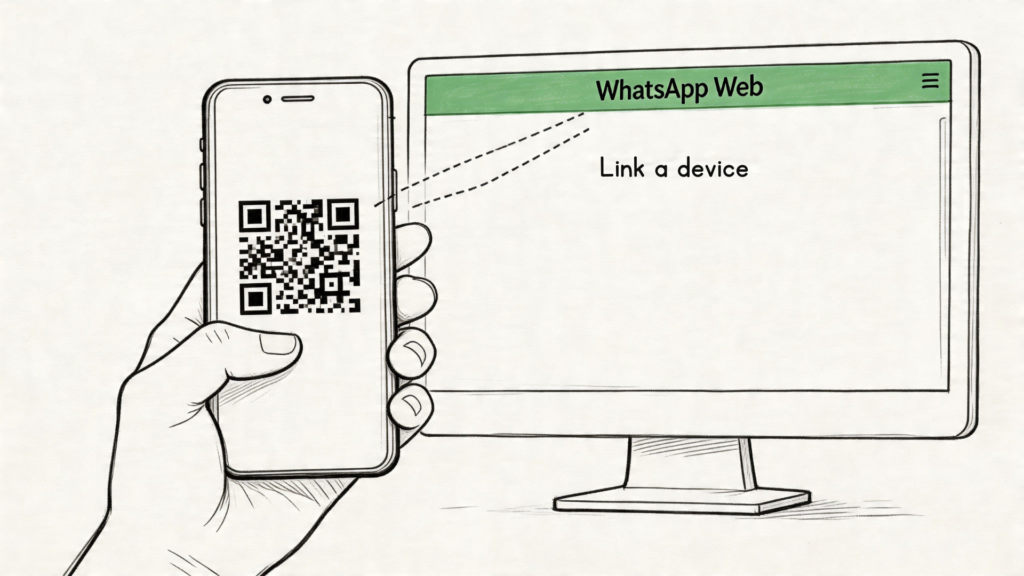
Getting started with web whatsapp business is simple. Open your browser, go to WhatsApp Web, and keep your phone nearby. In your WhatsApp Business app, open the menu, find Linked Devices, then choose Link a Device. Scan the QR code on your screen and your chats will sync.
That’s the whole setup. Many live in minutes.
The payoff is immediate. Typing gets easier. Copying order details gets faster. Sending PDFs, images, price lists, or onboarding documents from your desktop becomes much less clumsy than doing it from a phone.
What to look at after login
Once you’re in, don’t just start replying. Set up the basics that make the inbox usable.
Focus on these first:
- Labels: Use them to separate leads, active customers, paid orders, pending follow-ups, and support issues.
- Quick replies: Save your most common answers so your team doesn’t rewrite the same message all day.
- Catalog visibility: Make sure product information is current, especially if customers ask for recommendations in chat.
- Notifications: Turn on browser notifications so your team doesn’t miss high-intent conversations.
- Profile details: Check business hours, description, and contact details so customers don’t need to ask for basics.
If you also want a direct click-to-chat entry point from your website, product page, or Instagram bio, a WhatsApp link generator helps turn traffic into conversations without sending people through extra steps.
What smooth daily use looks like
The teams that get value from WhatsApp Web keep the workflow tight. One person handles sales questions. Another watches post-purchase support. Everyone uses the same label logic and saved replies.
That avoids the usual mess where chats sit unanswered because nobody knows who owns what.
A simple operating rhythm works well:
| Task | Best habit in WhatsApp Web |
|---|---|
| New inquiries | Label immediately by intent |
| Pricing questions | Use a saved response, then personalize |
| Order issues | Ask for the order reference early |
| Hot leads | Star the message and set a same-day follow-up |
Later, if you want a quick visual walkthrough, this overview helps:
Fast setup doesn’t mean casual operations. Even a simple inbox needs naming rules, ownership rules, and follow-up discipline.
WhatsApp App vs Web vs API: Which Is Right for You
The mistake most businesses make is treating all WhatsApp options as interchangeable. They aren’t.
The App, Web, and API sit at different maturity levels. They support different workloads. They also break in different ways when the volume rises.
Web WhatsApp Business Comparison
The practical difference
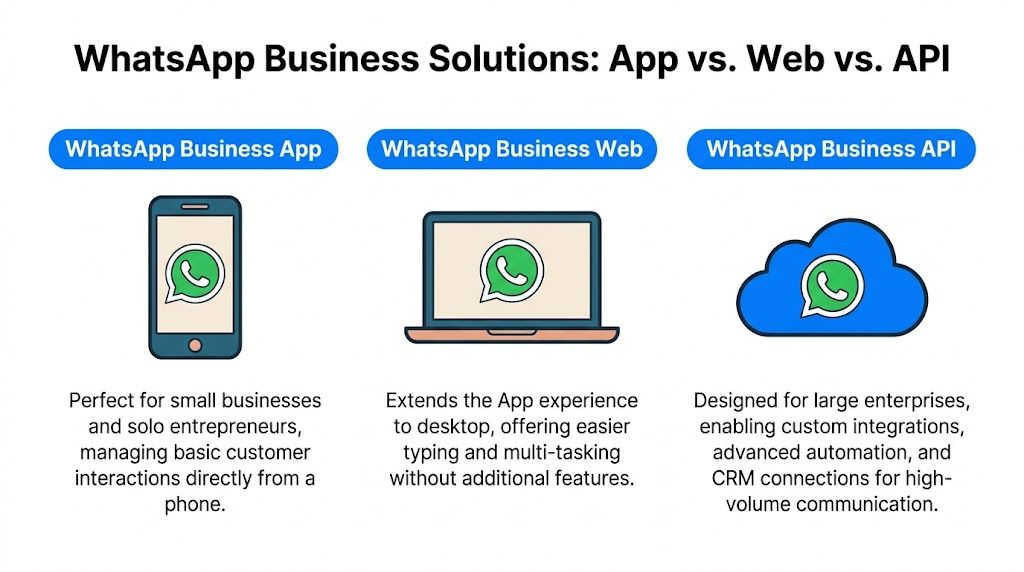
The mobile app is for owner-led communication. It works when the founder, shop manager, or one support person handles most chats directly from a phone.
Web whatsapp business extends that experience to desktop. It’s better for faster typing, multitasking, and day-to-day handling from a laptop. But it doesn’t significantly alter the operating model. It’s still a manual communication layer.
The API is different. It’s for teams that need automation, integrations, structured messaging, and a more serious operating setup. That’s where WhatsApp moves from “an inbox we answer” to “a channel we orchestrate.”
Side-by-side comparison
| Option | Best for | Strength | Limitation |
|---|---|---|---|
| WhatsApp Business App | Solo operators, local businesses, founders | Easy setup from mobile | Hard to manage at scale |
| WhatsApp Business Web | Small teams handling chats from desktop | Faster replies and easier multitasking | Still mostly manual |
| WhatsApp Business API | Scaling brands, agencies, support teams | Automation, integrations, structured workflows | Setup is more involved |
Where each version starts to fail
The app starts to fail when too much of the business depends on one person’s phone.
The web version starts to fail when your team needs repeatable flows. Common pressure points include lead routing, campaign follow-up, handoff between agents, and tracking what happened after the first conversation.
The API starts to make sense when WhatsApp is tied to revenue. That usually means one of these is true:
- Your team repeats the same answers constantly
- You need customer data connected to a CRM, helpdesk, or store platform
- You want automated notifications, qualification, or cart recovery
- You need a cleaner approval and template process for outbound messaging
The onboarding trade-off
The main reason some businesses delay moving to the API is setup complexity. That concern is real. The traditional WhatsApp Business API onboarding process typically spans 3 to 4 weeks, including phone number setup, Facebook Business Manager validation, and a 10 to 15 business day wait for Meta approval, according to Bloomreach’s WhatsApp onboarding documentation.
That timeline is why many small teams stay in the web version longer than they should.
The web version is efficient for handling conversations. It isn’t built to become your long-term automation layer.
A simple way to choose
Use this rule of thumb:
- Choose the app if one person handles low message volume and needs mobility more than process.
- Choose web whatsapp business if a small team needs faster keyboard-based communication and can still manage manually.
- Choose the API when missed follow-ups, fragmented handoffs, or repetitive support work start costing sales.
A DTC founder answering product questions from a phone can stay in the app for now. A five-person support team handling order updates and sales chats from desktops is usually fine with web whatsapp business for a while. A brand running campaigns, abandoned-cart recovery, and lifecycle messaging needs the API.
The decision isn’t about features alone. It’s about where manual work starts blocking growth.
From Manual Replies to Automated Flows
Manual replies work until they don’t.
At first, they feel manageable. You answer product questions, send payment info, follow up on leads, and check in after purchase. Then the message volume increases. The same questions keep coming in. People expect quick answers at odd hours. Your team spends more time copying and pasting than selling.
What basic automation can handle
The standard Business app and its web counterpart can help with light automation. Greeting messages, away messages, labels, and quick replies are useful. They reduce repetitive typing and give customers a faster first response.
That’s enough for:
- Opening conversations when someone messages after hours
- Answering routine questions about shipping, availability, or office hours
- Keeping tone consistent across multiple team members
- Flagging next actions with labels so hot leads don’t disappear
This is good operational hygiene. It is not true workflow automation.
Where the real leverage starts
Real advantage begins when conversations become flows.
That’s the shift from replying to every chat manually to designing responses based on customer intent. Someone asks about a product. They get guided options. Someone abandons checkout. They receive a structured follow-up. Someone requests support. They’re routed to the right path instead of sitting in a generic inbox.
Modern API onboarding is also less painful than many teams assume. Embedded Signup can activate WhatsApp Business API in as little as 48 hours and reduce setup costs by up to 70%, according to FreJun’s embedded signup guide.
That changes the upgrade equation. You no longer need to treat the API as a long, developer-heavy project by default.
Three automation patterns that drive business value
A few patterns show up again and again.
Abandoned cart recovery
A shopper clicks through products, adds items, and leaves. A manual team might remember to follow up later. An automated flow does it consistently. The message can confirm interest, answer common objections, and route the person back to checkout.
Lead qualification
A coach, agency, or SaaS company can ask a short sequence before a human gets involved. Budget, timeline, use case, and urgency can all be captured before a sales rep joins the conversation.
Post-purchase onboarding
Subscription brands and software teams can use WhatsApp to confirm what happens next, deliver setup guidance, and reduce support load in the first days after purchase.
Don’t automate the whole relationship. Automate the predictable parts so humans can focus on decisions, exceptions, and closing.
If you’ve built automation on other channels, the logic carries over. A strong DM automation guide on X is useful because the principles are similar: trigger on intent, keep branching simple, and hand off to a person when the conversation becomes nuanced.
For teams that want customer service workflows without heavy custom development, automating customer service on WhatsApp usually means combining triggers, routing, tags, and handoff logic inside one system. Tools in this category can connect the API to no-code flows and integrations. Clepher is one example of that approach for building WhatsApp automation, segmentation, and support flows without managing everything manually inside the inbox.
Messaging That Converts and Stays Secure
A fast reply isn’t enough. It has to be the right reply, sent in a way your business can stand behind.
Many teams using WhatsApp Business often encounter two different problems at once. Their messages are too vague to convert, and their setup is too loose to protect customer data properly.
Do this for higher-converting chats
Short, direct messages usually perform better than overloaded replies. Customers don’t want a brochure pasted into chat. They want clarity.
Use this structure instead:
- Start with the immediate answer: If the item is in stock, say that first.
- Add one next step: Send the checkout link, booking link, or product option.
- Reduce decision friction: Offer two clear choices instead of five.
- Use the catalog intentionally: If products are visual or variant-heavy, send the most relevant item rather than asking the customer to browse everything.
Template quality matters too. If your business uses structured outbound communication, review examples of WhatsApp Business message templates so your outreach feels useful instead of robotic.
Avoid this if you want replies
Some habits undermine conversion:
- Slow handoffs: A customer asks a buying question and gets bounced between team members.
- Paragraph overload: Long walls of text make simple buying decisions feel harder.
- Generic follow-up: “Just checking in” rarely moves a conversation forward unless it adds context.
- Too many asks at once: Don’t request email, phone, order number, budget, and preferences in the same opening message.
A better follow-up sounds like a person who knows what the buyer is trying to get done.
A message converts when it removes one obstacle. It doesn’t need to explain your whole business.
Where WhatsApp Web becomes risky
The convenience of WhatsApp Web can hide its risk profile. Security and compliance gaps in WhatsApp Web for Business create problems for regulated industries because it lacks real-time authentication and adequate compliance tools, and it creates data sovereignty issues, according to WebEngage’s discussion of WhatsApp marketing and security gaps.
That matters even more because customer behavior rewards speed on the channel. The same source notes that 69% of users are more likely to purchase from a company on WhatsApp, while 56% abandon carts due to slow response times.
So businesses face a real tension. They need fast responses, but they also need control.
A safer operating standard
If you’re staying on web WhatsApp business for now, keep your operating rules tight:
- Use dedicated devices: Don’t leave business chats open on shared computers.
- Limit sensitive data handling: If customers send payment, health, or financial details, move that process into a more controlled workflow.
- Log out aggressively: Especially on temporary or multi-user machines.
- Document ownership: Every active conversation should have a clear responsible person.
The API matters here because it gives businesses a more structured path for permissions, templates, integrations, and governance. For brands in ecommerce, finance, healthcare-adjacent services, or any business handling personal data at scale, that structure stops being optional.
Common Questions About Web WhatsApp Business
If your team has outgrown manual replies, Clepher is one option for turning WhatsApp into a more structured sales and support channel through no-code flows, automation, segmentation, and AI-assisted customer conversations.

Related Posts
Automated Checkout Bot: Build and Launch Guide
October 7, 2026AI Agent Framework: Architecture, Tools, and Use Cases
October 6, 2026Master Lead Generation Automation for Business Growth
October 5, 2026
Founder Clepher