
What do visitors ask when a chat widget appears: “What’s in it for me, and what happens next?” A friendly “Hello” doesn’t answer either question. Effective website welcome messages connect a visitor’s intent to one useful action, whether that means finding a product, explaining a pain point, comparing options, or starting a conversation.
That distinction matters because welcome prompts can influence the first conversion path. In an independent report covering more than 32 million live-chat greetings, 2.4 million chats were generated, with an average conversion rate of 7.28%. The live-chat greeting efficiency report also recorded a median conversion rate of 8.07%, meaning roughly every 12th greeting led to a chat.
The eight templates below are organized by mechanism: value, recognition, proof, urgency, dialogue, outcomes, relevance, and clarity. Choose according to the visitor and funnel stage, then test the complete unit: message, CTA, timing, personalization, and hypothesis. A local retailer looking to buy local from Loyaltie needs a different opening from a SaaS evaluator comparing onboarding tools.
1. The Value Stack Welcome Message
Visitors engage faster when the opening gives them a concrete reason to continue. The value stack places two or three specific benefits before the chatbot asks for contact details, qualification answers, or a booking.
A strong version doesn’t list every feature. It selects the outcomes closest to the visitor’s current decision.
E-commerce example
“Get a personalized shopping assistant and a discount on your first order. Find your best match in a few quick answers.”
SaaS example
“Reduce repetitive support work, qualify leads faster, and build follow-up flows without code. See how it works.”
Agency example
“Turn more conversations into qualified opportunities, recover missed demand, and give every client a faster response path. Show me the workflow.”
The opening should create interest before requesting an email. If the visitor hasn’t seen any value yet, “Enter your email” feels like a toll gate.
How to apply it
Start with the two or three metrics closest to the conversion goal. An online store might lead with product discovery and the first-order incentive. A SaaS company might lead with setup simplicity and lead qualification. An agency could emphasize repeatable client delivery and reporting.
Clepher users can put those benefits inside a no-code Flow, then route people into different paths based on their selections. Refresh the top-line benefit when the campaign changes, but don’t rewrite it to make the greeting sound new.
Practical rule: Lead with the benefit that reaches the visitor’s next decision fastest, not the benefit your internal team talks about most.
A/B test to run
Create a generic control with one broad benefit. Variant A leads with time savings. Variant B leads with revenue or conversion value. Keep audience, placement, timing, and CTA consistent. Compare the primary action, then inspect whether the people who engage continue to a qualified lead, booking, purchase, or activation event.
2. The Problem-Recognition Welcome Message
A problem-recognition greeting works by reflecting the friction already occupying the visitor’s mind. It doesn’t begin with a product pitch. It begins with the situation the product is designed to improve.
For a business using Clepher, that might be manual lead qualification, slow customer replies, repeated onboarding questions, or abandoned conversations. The chatbot becomes a problem-solver instead of another sales surface.
E-commerce example
“Losing shoppers because they can’t get quick answers? Tell us what you’re looking for, and we’ll help you narrow the options.”
Coach example
“Spending too much time answering the same onboarding questions? Let’s build a simpler first step.”
Local business example
“Busy serving customers and missing inquiries? Get answers to common questions while your team is occupied.”
The wording should feel specific without pretending to know more than you do. “You’re losing thousands every day” is aggressive if the visitor hasn’t supplied evidence. “Missing inquiries while your team is busy” recognizes a plausible problem without making an unsupported claim.
Match the problem to the page
A product page can mention uncertainty about fit. A pricing page can address comparison friction. An abandoned-cart flow can ask about shipping, payment, or product concerns. New visitors, returning customers, and people who have already started checkout shouldn’t necessarily see the same prompt.
Use analytics to identify repeated questions and drop-off points. Then write problem statements around time, money, effort, or uncertainty, depending on what the data supports.
Use a low-pressure CTA such as “Show me how,” “Help me choose,” or “Let’s solve this.” “Buy now” skips the conversation the visitor may need.
A/B test to run
Use one problem category per variant. The control can be a neutral greeting. Variant A references time pressure. Variant B references uncertainty or lost opportunity. Route each audience segment consistently, then compare completed chats and downstream actions. If one version attracts more conversations but fewer qualified outcomes, its recognition may be broad but not commercially useful.
3. The Social Proof Welcome Message
Some visitors aren’t asking whether your offer sounds attractive. They’re asking whether it’s safe to trust. Social proof helps answer that question, but only when it’s specific, current, and relevant to the visitor’s situation.
A B2B buyer may respond to recognizable customer categories, a short testimonial, or a verified implementation outcome. An online shopper may need reviews, product popularity, or evidence that people with similar needs chose the item.
Agency example
“See how agencies use automated conversations to qualify inquiries and keep client follow-up moving. Explore an agency workflow.”
E-commerce example
“Need help choosing? Browse the products customers return to most often, or ask our assistant for a recommendation.”
SaaS example
“Evaluating onboarding automation? See the flow teams use to guide new users from first question to first action.”
Don’t manufacture proof. The plan notes for this template include numerical customer claims, but those figures aren’t part of the verified data available here. Use only customer logos, testimonials, usage figures, or results that your organization can substantiate.
For broader conversion strategy, connect the greeting to guidance on increasing sales conversion rates. If you’re evaluating tools for testimonials and reviews, compare options for the right social proof platform.
Website Welcome Messages Brand Trust
Make proof relevant
An agency visitor should see agency evidence. A DTC shopper should see product-level reassurance. A SaaS evaluator should see a workflow or result tied to the job they need completed.
A/B test to run
Test proof type, not five changes at once. Keep the CTA constant while comparing a testimonial-led opening with a customer-category opening. A second experiment can compare a logo or review cue with a practical case-study link. Measure the primary click or chat start, then check whether the proof-led visitors progress further than visitors who only engage with the widget.
4. The Exclusive Offer Welcome Message
An exclusive offer gives the visitor a reason to act now rather than postpone the decision. It can be a discount, early access, a useful guide, a consultation, or a product-specific bonus.
The mechanism depends on a credible exchange. The visitor gives an email, answers a question, completes a quiz, or starts a trial. In return, they receive something clearly described.
E-commerce example
“Unlock a first-order offer and free delivery. Get the code after you tell us what you’re shopping for.”
SaaS example
“Start a guided product tour with no setup call. See the workflow before you decide whether it fits.”
Coach example
“Get the client onboarding template when you join this week’s conversation. Start with one question.”
Avoid artificial scarcity. If an offer “expires tonight” but returns tomorrow, visitors learn that the urgency is decorative. Credibility compounds when the stated condition is real and consistently enforced.
Email welcome research provides useful context for this mechanism. Campaign Monitor cites a 91.43% open rate for welcome emails and reports that welcome emails can deliver about four times the open rate and five times the click-through rate of a standard email campaign in its benchmark summary, as detailed in its welcome email effectiveness research. Those email benchmarks don’t guarantee chatbot performance, but they support the broader principle that first-contact messages deserve deliberate treatment.
Design the exchange
Make the benefit visible before the capture step. “Enter your email” is weaker than “Get the product finder and your recommendations.” For returning visitors, consider replacing a generic incentive with progress toward an unfinished action.
A/B test to run
Compare three offer categories across equivalent traffic: a price incentive, a useful free resource, and early access. Track not only immediate captures but also later quality, such as purchase, booked call, or activated account. The offer that produces the most contacts may not produce the best customers.
5. The Conversation-Starter Welcome Message
A conversation starter asks one useful question instead of broadcasting a pitch. It works well when the visitor’s intent is unclear or when the answer can improve routing.
E-commerce example
“What usually makes it hard to finish your purchase?”
SaaS example
“Are you managing customer conversations in several places or mainly in one inbox?”
Agency example
“Which is taking most of your team’s time right now, onboarding, support, or lead follow-up?”
The question should be easy to answer and connected to a real next step. Don’t ask for a biography. One thoughtful question gives the visitor a clear response path and gives the business a useful signal.
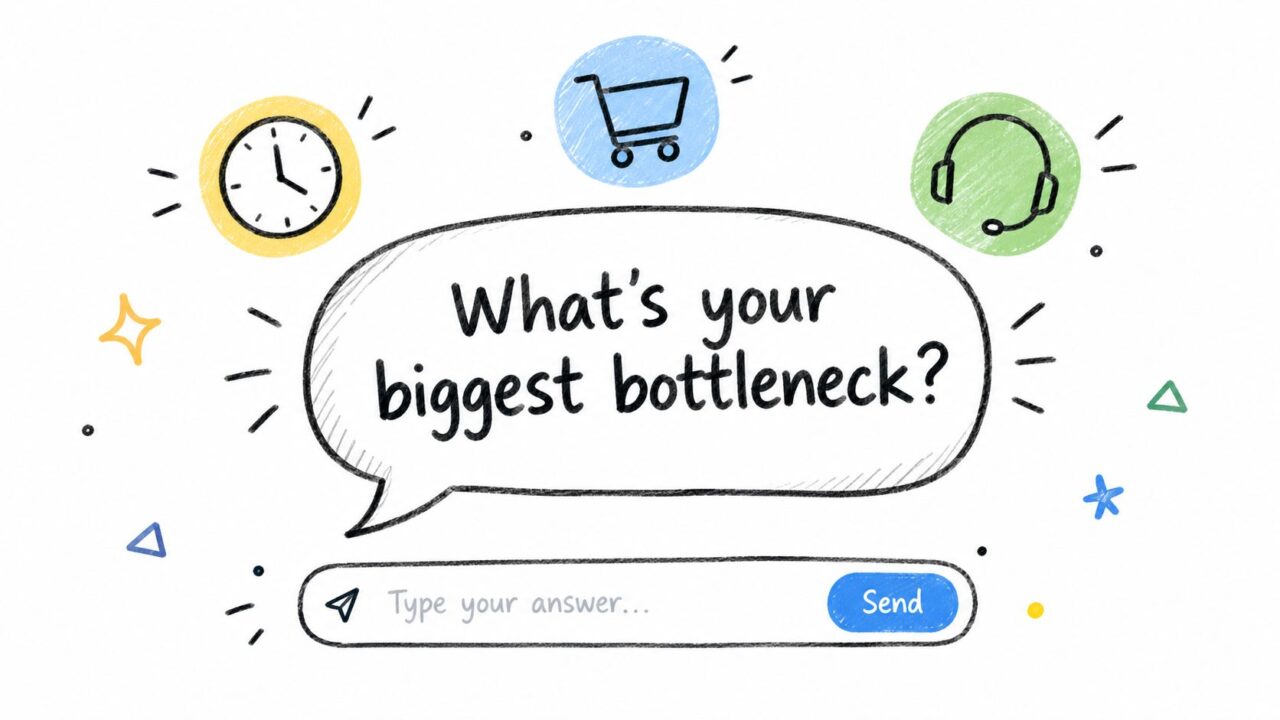
Website Welcome Messages Bottleneck Question
Route the answer immediately
A chatbot shouldn’t collect an answer and then provide a generic paragraph. Use the response to branch the Flow. Someone selecting “support” should see support automation. Someone selecting “lead follow-up” should see qualification or notification options.
Reference context when it helps: “I see you’re reviewing our automation features. Which part are you trying to improve?” That sounds more attentive than a question displayed identically on every page.
Capture the answer in a custom field where appropriate. Later messages can reflect the visitor’s stated concern, but avoid over-personalizing or repeating it so often that the experience feels mechanical.
A/B test to run
Test the question, not the entire Flow. Keep the answer buttons and routing logic stable while comparing a workflow question with a pain-point question. Measure response rate, route completion, and downstream conversion. A question that generates many replies but sends people into dead ends needs better routing, not necessarily better copy.
6. The Results-Focused Welcome Message
Results-focused website welcome messages answer the visitor’s practical question: “What will this do for me?” They lead with a transformation rather than a feature list.
Use quantified results only when they come from your own verified data and apply to the audience seeing the message. The available research includes a published welcome-series case study reporting an 82% higher open rate, a 208% lift in revenue per email, a 400% lift on one downstream monetary metric, and an 800% CTR lift. Those figures belong to that case study and shouldn’t be presented as a general promise for every business. You can review the published welcome-series case study for its specific context.
For a chatbot, use language such as:
E-commerce
“Find the products that fit your needs without sorting through the full catalog. Start a guided recommendation.”
Local business
“Get answers to common questions quickly, then contact the right person when you’re ready.”
SaaS
“Move from first question to a useful next action with a guided onboarding Flow.”
These statements promise a concrete experience without borrowing unsupported performance claims.
Separate outcome from guarantee
“See how this can shorten your workflow” invites exploration. “You’ll cut your workload in half” is a guarantee that requires strong evidence and careful qualification. Results messaging should build belief, not create compliance or trust problems.
Use “See how,” “Get the workflow,” or “Start the assessment” when the visitor needs proof of fit. Use “Learn more” only when the next page answers the question.
A/B test to run
Compare the same offer framed around three outcome categories: time saved, revenue opportunity, or improved customer experience. Keep the audience and CTA fixed. Evaluate the primary event alongside later quality, because a dramatic promise can increase clicks while attracting visitors who aren’t a good fit.
7. The Personalized Welcome Message
Personalization works when it changes the message according to something the visitor has done or clearly signaled. A returning visitor, a person arriving from a campaign, and someone who abandoned checkout each have different context.
Behavioral personalization generally beats name-only personalization because it connects the greeting to an action. Guidance from welcome message performance statistics describes name personalization as necessary but no longer sufficient, and emphasizes references to viewed products or completed actions.
Campaign visitor
“Looking for a faster way to manage Messenger conversations? Start with the automation Flow connected to the campaign you just viewed.”
Returning visitor
“Welcome back. Continue where you left off, or ask a question about the setup.”
Abandoned checkout visitor
“Still deciding? Tell us what’s holding you back, and we’ll point you to the relevant answer.”
Start with a small number of useful segments. Referrer source, first-time versus returning status, page category, and prior interaction are usually more actionable than a large set of inferred attributes. First-party behavior also tends to feel less intrusive than assumptions about location or industry.
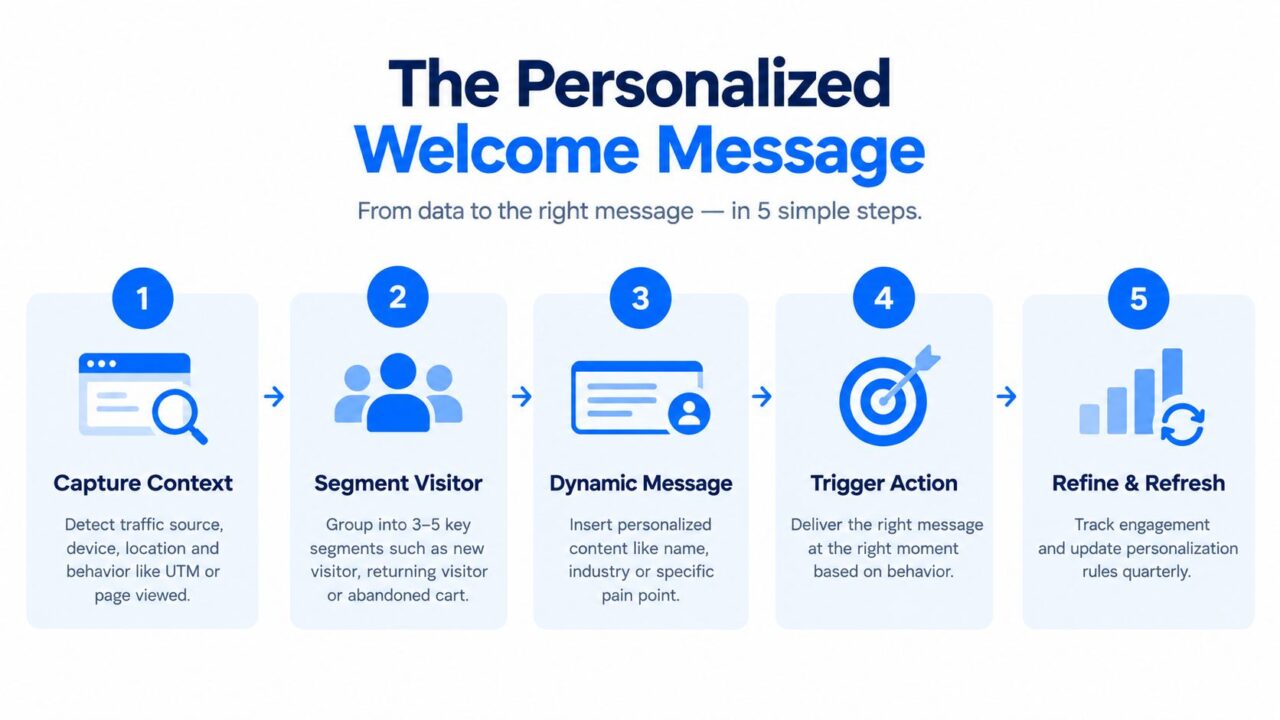
Website Welcome Messages Personalization Steps
Build personalization safely
Use UTM parameters, tags, custom fields, and behavioral conditions to control which message appears. Keep a generic fallback for visitors whose context is missing or unreliable. Don’t expose hidden inferences in the copy. “You viewed running shoes” can feel useful. “You’re a high-value athlete from this neighborhood” can feel unsettling.
For a deeper framework, see personalization in digital marketing.
A/B test to run
For each segment, compare a generic control with one behavioral personalization. Keep the CTA and timing unchanged. Test whether the personalized version improves not just engagement, but completion of the intended next action. If the segment is too small or the data is weak, keep the rule simple rather than adding fragile personalization logic.
8. The Clear Next Step Welcome Message
Clarity is the right mechanism when visitors appear interested but don’t know what to do. “How can we help?” sounds polite, yet it puts the entire burden of navigation on the visitor.
A clear next-step message explains the action, the effort, and the benefit.
E-commerce example
“Find your best match. Answer two quick questions, and we’ll show you the products most relevant to you.”
SaaS example
“See which workflow fits your team. Choose your main use case, and we’ll take you to the right example.”
Coaching example
“Start your free assessment. Answer a few focused questions to identify your biggest growth opportunity.”
The promised step must match the actual Flow. If the message says two questions, ask two questions. If it says no email is required, don’t introduce an email gate before delivering the result.
Remove small sources of hesitation
Micro-copy can resolve practical objections:
- Low effort: “Start with one question.”
- Privacy: “Your answers stay private.”
- Commitment: “No call required.”
- Speed: “Get the recommendation in the next step.”
Don’t add all four to every greeting. Choose the reassurance that addresses the actual friction on that page.
Verb choice is worth testing because it changes the visitor’s perception of effort. “Start,” “Get,” and “Find” can each create a different expectation. The best option depends on whether the visitor is beginning a process, receiving something, or discovering a recommendation.
For broader conversion guidance, connect this Flow to ways to improve conversion rates.
A/B test to run
Use a generic greeting as the control. Variant A states the action and benefit. Variant B states the action, benefit, and effort requirement. Track the percentage of visitors who complete the next step, then inspect whether the additional reassurance improves completion or adds more copy.
8-Point Website Welcome Message Comparison
| Template | Implementation Complexity 🔄 | Resource Requirements ⚡ | Expected Outcomes ⭐📊 | Ideal Use Cases | Key Advantages 💡 |
|---|---|---|---|---|---|
| The Value Stack Welcome Message | Low–Medium 🔄, needs clear metrics & copy | Low ⚡, copy + A/B testing | High ⭐⭐⭐, faster qualification, higher conversions 📊 | DTC, SaaS, conversion-focused landing pages | Immediate ROI clarity; quick visitor self‑segmentation |
| The Problem-Recognition Welcome Message | Medium 🔄, requires audience insight | Medium ⚡, customer research, analytics | High ⭐⭐⭐, emotional buy‑in; increased engagement 📊 | All funnel stages; B2B & service sites | Triggers recognition; positions bot as problem‑solver |
| The Social Proof Welcome Message | Low 🔄, simple if proof exists | Medium ⚡, testimonials, logos, metrics | High ⭐⭐, trust boost; reduces skepticism 📊 | B2B, high‑consideration purchases, new market entries | Rapid credibility build; persuasive for cautious buyers |
| The Exclusive Offer Welcome Message | Low 🔄, straightforward offer setup | Medium ⚡, discounts, tracking, fulfillment | High (short term) ⭐⭐, immediate lead capture & conversions 📊 | E‑commerce, DTC, first‑time visitors, paid traffic | Urgency-driven lift; easily measurable ROI |
| The Conversation-Starter Welcome Message | Medium 🔄, needs flow design & follow‑up | Medium–High ⚡, routing, AI/ops to handle replies | Moderate ⭐⭐, quality engagement; zero‑party data 📊 | Relationship-building, discovery pages, support flows | Generates direct insights; builds rapport over time |
| The Results-Focused Welcome Message | Medium 🔄, must verify & quantify outcomes | Medium ⚡, analytics, case data | Very High ⭐⭐⭐, strong ROI persuasion; conversion lift 📊 | Agencies, SaaS, decision‑maker audiences | Answers “so what?”; highly credible when backed by data |
| The Personalized Welcome Message | High 🔄, segmentation & triggers required | High ⚡, tracking, integrations, dynamic content | Very High ⭐⭐⭐, relevance → engagement → conversions 📊 | All funnels where segments differ (ads, returning users) | Tailored experience; significantly higher relevance |
| The Clear Next Step Welcome Message | Low 🔄, simple flow and CTA | Low ⚡, clear CTA + conditional flow | High ⭐⭐, reduces friction; improves completion rates 📊 | Overwhelmed visitors, checkout pages, onboarding | Eliminates decision paralysis; easy to measure impact |
Turn Good Greetings Into Tested Flows
Choose the template according to the visitor’s dominant intent. Value and results suit people already focused on an outcome. Problem recognition fits pain-led pages where the visitor has arrived with a clear frustration. Social proof helps skeptical buyers who need reassurance before they invest attention or money.
Use an exclusive offer when cold traffic needs a reason to engage now, but keep the condition genuine. Use a conversation starter when discovery matters more than an immediate pitch. Choose personalization when you have reliable behavioral context. Choose clarity when the visitor seems interested but faces decision friction.
The live-chat evidence supports treating the greeting as a serious conversion surface. The independent report covering more than 32 million greetings found 23.8 million custom greetings and 8.2 million default greetings in its dataset. Default greetings converted at 8.17% and generated more than 670,000 chats, while custom greetings converted at 6.96% and generated 1.6 million chats, according to the same live-chat greeting report. The result isn’t a license to assume custom copy always wins. It’s a reminder to test the actual message and audience rather than relying on intuition.
A practical testing sequence looks like this:
- Establish a control: Use your current generic greeting, CTA, placement, and timing.
- Change one variable: Test the mechanism, such as value versus recognition, while leaving the rest stable.
- Route consistently: Keep each audience group on the same variant during the observation period.
- Measure the primary event: Track chat start, answer completion, product view, signup, booking, or purchase.
- Check downstream quality: Review qualified leads, activated accounts, completed setup, or eventual customer value.
- Keep the winner carefully: Retain a version only after it has had enough consistent observation to support a decision, not after a brief spike.
Clepher can turn this process into an operational workflow through no-code Flows, segmentation, personalization tags, conditions, analytics, and A/B testing. A team can show a value-led prompt to one segment, a problem-led prompt to another, capture answers in custom fields, and route each person toward a relevant action. The welcome message then becomes part of a measured customer journey rather than a decorative greeting.
The best website welcome messages aren’t necessarily the cleverest. They’re the ones that make the next action obvious, keep the promise they make, and give the team enough data to improve the following version.
Clepher gives businesses a no-code way to build chatbot Flows, capture visitors, personalize messages, segment audiences, and test different welcome paths across website and social channels. Visit Clepher to turn your next website welcome message into a practical, measurable customer journey.
