

Analysts project the AI customer service market will grow sharply over the next decade, and the reason is straightforward. Support demand is spreading across more channels, response-time expectations keep tightening, and the old model of adding headcount every time volume rises gets expensive fast.
What matters for operators is where that demand now shows up. Customers are no longer starting and finishing support conversations only on a website chat widget. They ask for order updates in WhatsApp, reply to promotions in Messenger, and expect a business to keep context across those touchpoints without forcing them back into email or a ticket form.
That shift changes what AI customer service software needs to do. The useful platforms are not just FAQ bots. They handle routine conversations across messaging channels, pass high-risk cases to a human, give agents context before takeover, and let teams control tone, routing, escalation rules, and what the system should never answer on its own.
For e-commerce brands, SaaS teams, agencies, and local service businesses, the decision is not whether to turn on a bot and hope for the best. The decision is where automation should start, which conversations still need human judgment, and how much control the team keeps as volume grows.
Why AI in Customer Service Is No Longer Optional
Support economics have changed. A team that handles every conversation manually will hit a ceiling on cost, speed, or quality, and often all three at once.
What changed is not only volume. It is where conversations now start and how fast customers expect them to move. A buyer might ask for an order update in WhatsApp, reply to a campaign in Messenger, then expect the next agent or system to know the full history. If your setup still treats those as separate interactions, service starts to break down in ways customers notice immediately.
For operators, the pressure usually shows up in a few places:
- Coverage gaps after hours: questions keep arriving when the team is offline.
- High-volume repeat work: shipping updates, billing questions, password resets, booking changes, and policy checks consume agent time.
- Messaging fragmentation: conversations now happen across site chat, social DMs, and apps like WhatsApp and Messenger.
- Poor use of skilled reps: experienced agents get buried in low-risk requests instead of handling escalations and retention-critical cases.
The practical response is to automate the work that follows a clear pattern and keep human involvement where judgment, compliance, or empathy matter. That sounds obvious, but execution is where many teams get it wrong. They switch on a generic bot, leave default settings in place, and then wonder why resolution rates stay flat or customer frustration rises.
Control matters more than automation volume.
Strong AI customer service programs are built around guardrails. Teams define which intents the system can answer, which channels it should operate in, when it must hand off, what context the agent sees at takeover, and which actions require approval. If you need a clearer framework for that setup, this guide on what conversational AI does in customer service is a useful starting point.
Old support models break first when every new ticket means more labor. AI changes that equation by handling routine conversations instantly across the channels customers already use, while preserving a clear path to a person for exceptions. For businesses trying to grow without turning support into a headcount treadmill, that shift is no longer optional.
Beyond Chatbots: What AI Customer Service Software Is
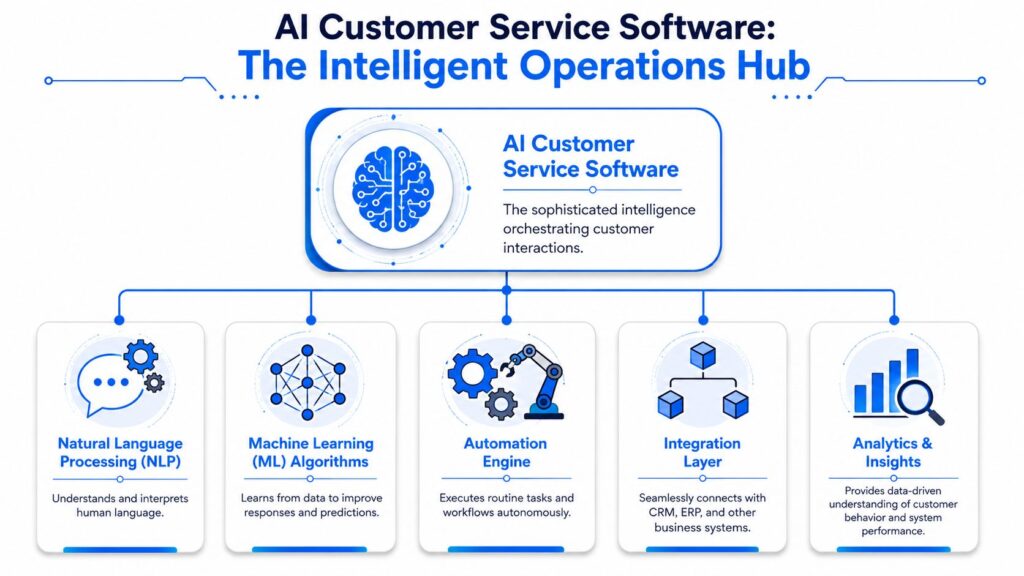
A basic chatbot is like a calculator. It can produce an answer when the input is predictable. Modern AI customer service software is closer to a spreadsheet model tied into live business systems. It can interpret intent, pull the right information, trigger actions, and support both customers and the support team.
The difference becomes even clearer with an AI agent. Instead of simply responding to predefined questions, it can understand context, complete tasks, and work across multiple systems to resolve issues more efficiently.
That distinction matters because many buyers still evaluate AI tools as if they’re just decision trees with nicer wording. In reality, today’s AI-powered solutions function as a comprehensive customer service tool, helping organizations automate routine work while improving service quality. As businesses invest more in AI for customer experience, the focus is shifting from answering questions to delivering faster, more personalized, and more effective support.
AI Customer Service Software Operations Hub
What the software actually does
Under the hood, these systems combine a few capabilities.
- Language understanding: The software interprets what the customer means, not just the exact words they typed.
- Pattern learning: It improves routing, suggestions, and response quality over time based on conversation history and outcomes.
- Workflow execution: It doesn’t stop at answering. It can trigger actions like tagging a conversation, collecting information, or sending the user into the right flow.
- System connectivity: It becomes more useful when connected to order data, CRM records, help docs, appointment tools, and internal support processes.
If you want a clean primer on how these systems work in practice, this guide to conversational AI is a useful reference point.
Why the chatbot label undersells the category
The term “chatbot” makes teams think in narrow terms. They picture a widget that answers a few top questions and frustrates people when the script breaks. That’s still common, but it isn’t the model serious teams are buying anymore.
Modern AI customer service software usually sits in one or more of these roles:
| Role | What it handles | Business use case |
|---|---|---|
| Customer-facing assistant | Answers common questions and guides next steps | Product info, shipping questions, and onboarding help |
| Agent-assist layer | Surfaces context and suggested replies | Faster handling of nuanced tickets |
| Routing and triage engine | Identifies intent and sends conversations to the right queue | Billing, technical support, returns, urgent complaints |
| Workflow automation layer | Collects fields and triggers follow-up actions | Lead qualification, support intake, and appointment requests |
The best systems feel less like a bot and more like a digital operations layer sitting between customer demand and your team.
Where teams get this wrong
A lot of failed implementations start with the wrong goal. They try to make AI sound human before they make it useful. That’s backwards.
What works is narrower and more disciplined:
- Start with high-volume questions.
- Tie answers to actual business data or approved content.
- Add clear human handoff paths.
- Expand only after the basics are reliable.
When teams skip those steps, they don’t get automation. They get a prettier dead end.
Core Features That Drive Automation and Growth
Feature lists are where buyers get distracted. Every vendor says they have AI, automation, omnichannel support, analytics, and integrations. The key question is which features change outcomes in production.
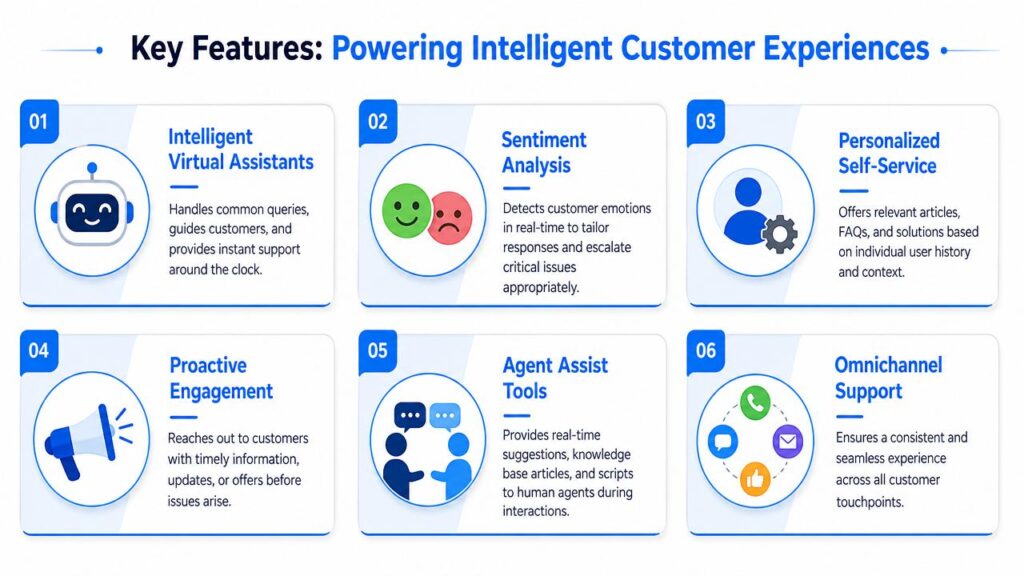
The most important technical pattern is retrieval-augmented generation, or RAG. Instead of relying only on model memory, the system pulls answers from a controlled knowledge base. That reduces hallucinated responses and makes answers easier to trace. Guidance on AI support features also identifies NLP, omnichannel support, and RAG as core capabilities, and notes that these systems can handle up to 80% of interactions autonomously, while also cutting call times by 38% and boosting agent productivity by 60%, according to Chatspark’s feature analysis for AI customer support software.
AI Customer Service Software Features
The features that matter most
Knowledge-grounded answers
If the model answers from your approved help center, policy docs, product information, and live support content, you get far better control than with open-ended generation. This approach helps ensure accurate responses to customer inquiries while reducing the risk of outdated or inconsistent information.
For a SaaS company, that means onboarding and troubleshooting answers stay aligned with the current product. For an e-commerce brand, it means the assistant can answer return or shipping questions based on the rules you enforce.
Knowledge grounding is also what separates a top AI customer service tool from basic AI chatbots that rely primarily on generic training data. Whether customers engage through chat or voice AI experiences, responses remain consistent, reliable, and tied to approved business information.
As businesses expand globally, this foundation becomes even more important when providing multilingual support, ensuring customers receive accurate answers regardless of language. The result is faster resolution times, more confident handling of customer inquiries, and ultimately higher customer satisfaction across support channels.
Omnichannel support
Many evaluations fall short. A tool might perform well on web chat and still be weak where your audience is most responsive, such as Messenger, Instagram Direct Message, or WhatsApp.
If your support and conversion conversations already happen in messaging, channel coverage isn’t a nice extra. It determines adoption.
Intent recognition and routing
Some of the highest value work happens before a reply is even generated. Good AI customer service software identifies what the customer needs, classifies urgency, and routes the conversation correctly.
That matters more than flashy conversation demos. A perfect answer in the wrong queue still creates a delay.
Features tied to business outcomes
Here’s the practical checklist I use when assessing platforms:
- RAG and knowledge sync: Keeps answers grounded in your approved content.
- Omnichannel inbox coverage: Supports the places customers already message you.
- Agent assist: Gives reps suggested replies, summaries, or relevant help content during live conversations.
- Workflow automation: Updates records, tags users, and triggers follow-up actions.
- Human handoff logic: Moves edge cases to the right person with context intact.
- Analytics: Shows where automation succeeds, fails, or creates drop-off.
Field note: If a vendor demo focuses on witty responses more than knowledge control, handoff rules, and workflow execution, the product is probably optimized for demos, not operations.
What usually works first
For many organizations, the strongest early use cases are not broad “ask me anything” bots. They’re focused on automations such as:
- Order and shipping support: Deflects repetitive status requests.
- Pre-purchase product questions: Helps customers choose before they bounce.
- Lead qualification: Collects information and routes high-intent buyers.
- Account and billing triage: Sends sensitive issues to people fast.
- Onboarding guidance: Answers setup questions without requiring a rep every time.
That’s where AI customer service software starts paying for itself. Not by pretending to be human, but by making support more accurate, available, and operationally useful.
Measuring the True Business Impact and ROI
Once AI is live, the wrong way to judge it is by asking whether customers “liked the bot.” The better test is whether support becomes faster, more consistent, and less expensive to run.
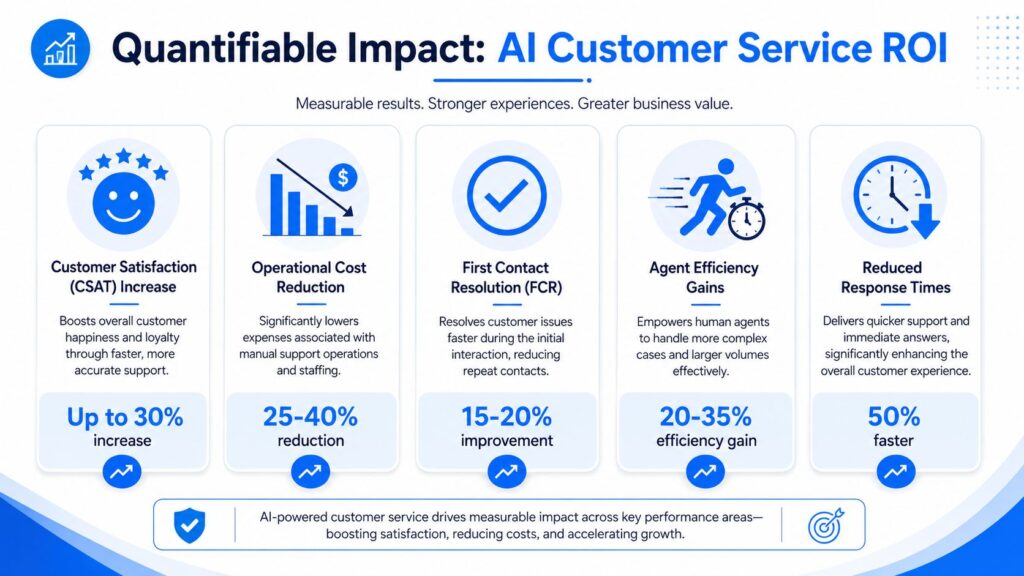
Benchmarks shared in IBM’s overview of AI in customer service show that AI-enhanced deployments commonly reach 80–85% first-contact resolution compared with 70–75% for traditional centers. The same benchmark set reports first response time falling from over 6 hours to under 4 minutes and resolution time from 32 hours to 32 minutes when AI is deployed effectively.
A visual summary helps frame what teams should measure in practice.
AI Customer Service ROI
The metrics that actually matter
The strongest AI deployments improve more than one number at once. Better routing reduces delays. Faster answers increase first-contact resolution. Fewer repeat contacts reduce load on the team.
Use these as your core scorecard:
- First-contact resolution: Are more issues getting solved without a second interaction?
- First response time: Are customers getting an initial answer quickly enough to stay engaged?
- Resolution time: Are complete cases closing faster?
- Deflection quality: Are routine issues handled cleanly without creating more work later?
- Agent workload mix: Are people spending more time on exceptions and revenue-relevant conversations?
Here’s a useful mental model. Automation ROI doesn’t come from replacing every support interaction. It comes from moving the right interactions out of the manual queue.
A practical way to build the business case
For e-commerce, start with the conversations that already affect revenue. Product questions, stock concerns, delivery timelines, and return policy confusion all influence conversion and repeat purchase behavior.
For SaaS, focus on onboarding friction, account access questions, plan clarification, and repetitive support requests that interrupt account managers and success teams.
If you need to connect support performance to broader acquisition and revenue analysis, it helps to tie support events back to campaign and lifecycle data. This overview of marketing attribution is useful because it shows how operational touchpoints can be connected to actual business outcomes.
A quick operational review also helps identify where AI belongs:
| Support area | Good fit for AI | Better kept human-led |
|---|---|---|
| FAQs and policy questions | Yes | Only if policy exceptions are common |
| Order updates and routine account tasks | Yes, with system access | Human review for edge cases |
| Technical troubleshooting | Often as a first line | Escalate when the diagnosis gets complex |
| Billing disputes and complaints | Triage first | Yes |
| Retention and high-value account conversations | Assist only | Yes |
Here’s a useful sanity check. If the workflow is repeatable and your team already answers it the same way most of the time, AI usually belongs there. If the answer depends on judgment, negotiation, or emotional nuance, keep a human close to the interaction.
Later in vendor evaluation, watch this explainer for a grounded look at where support automation tends to create advantage.
How to Choose the Right AI Platform for Your Business
A lot of software buyers ask the wrong first question. They ask, “How smart is the AI?” The better question is, “How much control do we keep when the AI is live?”
That’s not a minor concern. Front’s guidance on AI customer service software selection puts the issue in operational terms: strong platforms should let teams define exactly which interactions AI automates, which route to humans, and how managers can intervene when needed.
Start with governance, not the demo
Organizations don’t fail because the AI couldn’t answer a simple FAQ. They fail because the platform gave them weak controls over routing, escalation, approvals, and visibility.
You need to know:
- What can the AI handle alone
- What must always go to a person
- Who can intervene
- How the handoff works
- What the customer sees during that transition
If a vendor can’t show those controls clearly, the implementation risk goes up fast.
Don’t buy automation you can’t supervise.
Match the platform to your channel mix
A support stack should fit your specific conversation volume, not an idealized support model built around email tickets. If your customers ask presale and post-sale questions in social DMs, then a web-chat-first product may not solve the operational problem you face.
Use this evaluation checklist when scoring vendors.
| Criterion | What to Look For | Why It Matters |
|---|---|---|
| Channel support | Website chat, Messenger, Instagram Direct Message, WhatsApp, and any channels your customers already use | The system only helps if it works where conversations already happen |
| Governance controls | Rules for automation, escalation logic, human takeover, approvals, and manager visibility | Prevents over-automation and reduces risk |
| Knowledge grounding | Controlled knowledge base access and content sync | Improves answer accuracy and consistency |
| Integration depth | CRM, order systems, support tools, calendars, help center, and internal workflows | Turns conversations into actions |
| AI customization | Custom prompts, workflow branching, branded tone, and audience segmentation | Makes automation fit your business instead of forcing generic behavior |
| Analytics | Reporting on intent, drop-off, handoff, resolution, and conversation outcomes | Shows what’s working and what needs tuning |
| Setup model | No-code tools, admin usability, and change management support | Determines how quickly your team can iterate |
Questions worth asking in every demo
Skip generic “show me the AI” requests. Ask scenario-based questions instead.
- How does the platform handle an order issue that starts in Instagram DM and needs a human?
- How are sensitive requests blocked from full automation?
- What happens if the knowledge base has conflicting information?
- Can non-technical staff change routing and response logic?
- How do you review and improve failed conversations?
Those questions usually reveal more than the polished part of the pitch.
Activating Your AI Strategy with Clepher
The most interesting shift in AI customer service software isn’t happening only on websites. Industry attention is moving toward higher-touch channels like SMS and social messaging, where fast responses often matter most. That shift is reflected in Y Combinator’s Toma profile, which points to AI handling inbound calls and outbound messaging in a vertical workflow, and it lines up with the growing importance of Messenger, Instagram Direct Message, and WhatsApp.
That matters because many brands already have customer conversations happening there. They just haven’t operationalized them.
A practical messaging use case
Take a DTC brand selling skincare or apparel. A shopper taps into Instagram DM after seeing a post or ad and asks whether a product fits their needs, whether a size is in stock, or how long shipping takes.
A good messaging setup can do several things in one flow:
- Answer common presale questions
- Collect product preferences
- Route special cases to a human
- Recover the conversation later if the buyer leaves
- Keep post-purchase support in the same channel
A platform like Clepher’s AI customer service automation fits practically. It gives teams a no-code way to build conversation flows across website chat, Facebook, Instagram Direct Message, and WhatsApp, with AI-driven responses, live chat, segmentation, and handoff options.
What strategic implementation looks like
The useful rollout pattern is usually narrow at first.
Start with one or two messaging journeys:
- product questions from social traffic
- order support after purchase
- lead capture and qualification for a service business
- onboarding prompts for a SaaS trial
Then add rules. Decide which intents stay automated, which go to a rep, and which need follow-up later through another channel in your stack.
Messaging automation works best when it behaves like a staffed process, not a novelty feature.
Where teams create lift
The gains usually come from consistency and speed, not from making conversations sound magical. If the AI can answer quickly, collect the right details, and pass a clean context to a human when needed, the business gets more value from the same inbound demand.
That’s especially true for brands that rely on social attention. Website support matters, but for many marketers, the core buying and support intent is happening in DMs long before someone opens a ticket.
Your Questions on AI Customer Service Answered
If you want to turn support and sales conversations into structured automation across website chat, Messenger, Instagram Direct Message, and WhatsApp, Clepher is worth exploring. It gives teams a no-code way to build AI-driven flows, route conversations, manage handoffs, and connect customer messaging to the rest of their marketing and support stack.

Related Posts
Client Account Management: A Practical Playbook
October 13, 2026Chat Bot Responses That Convert: A Practical Guide
October 12, 202610 Broadcast Automation Software Platforms Compared
October 11, 2026
Founder Clepher