

Your WhatsApp inbox probably already looks like this. New product questions during dinner. Order tracking messages after your team signs off. Leads from ads arriving while nobody is watching. Some of those people will wait. A lot of them won’t.
That’s why a serious autoresponder for WA matters. Not the basic “we’ll get back to you soon” message. A real setup that greets, qualifies, routes, answers, follows up, and hands off to a human when needed.
Most businesses start with the wrong goal. They try to automate replies. The better goal is to automate momentum. If someone shows intent, your system should keep the conversation moving while that intent is still warm.
Why Your Business Needs a WhatsApp Autoresponder
A missed WhatsApp message is rarely just a missed message. It’s usually a lost sale, a support escalation, or a lead that cools off before your team even opens the chat.
That’s why WhatsApp works so well as a frontline channel. WhatsApp autoresponder tools enable businesses to achieve a 96% open rate for automated replies, which is the core reason businesses keep shifting support and sales conversations into WhatsApp instead of relying only on email forms or inboxes.
Speed changes the customer experience
When someone messages your store about sizing, delivery, or stock, they don’t want a ticket number. They want movement. A good autoresponder gives them that immediately.
It can:
- Acknowledge the message instantly so the customer knows the request landed
- Collect useful context like order number, product name, or issue type
- Route the chat correctly to sales, support, returns, or a live agent
- Answer common questions automatically before your team touches the conversation
That shift matters because customers judge the business by the first response, not by your internal process.
Practical rule: If a customer has to repeat basic information after your first automated reply, your flow is too shallow.
It’s not just for support
The best autoresponder for WA setups does more than defend after-hours support. They help sales teams capture intent while people are ready to buy.
An e-commerce brand can use it to move shoppers from “Do you have this in medium?” to product links, upsells, and checkout support. An agency can use it to qualify inbound leads before a strategist ever joins the thread. A local business can use it to separate service inquiries from quote requests without forcing people through a clunky form.
For businesses that manage high-intent inbound leads, the same thinking also applies beyond chat. Teams working with automotive CRM solutions already know that fast routing, lead context, and follow-up discipline often make the difference between a booked appointment and a dead lead.
If you want practical ways to tighten the rest of your WhatsApp funnel, these WhatsApp marketing strategies are a good next layer after your autoresponder foundation.
What changes when you build it properly
A strong setup turns WhatsApp into an always-on operator for your business. It doesn’t replace your team. It protects their time and makes their replies better.
Use it well, and your system can welcome new contacts, handle repetitive queries, sync conversation data with the rest of your stack, and keep buyers moving instead of waiting in silence. That’s its core value. Less dead air. More progress.
Choosing Your Autoresponder Platform
Most businesses pick a WhatsApp setup based on what’s easiest to launch. That’s usually a mistake. The right choice depends on reliability, scale, and policy risk, not just convenience.
There are really three paths. The basic WhatsApp Business app. Unofficial third-party apps that scrape notifications. The official API through a proper platform.
The quick comparison
| Feature | Basic WA Business App | 3rd Party Scraper Apps | Official API (via Clepher) |
|---|---|---|---|
| Setup difficulty | Easy | Easy to moderate | Moderate |
| Works without phone dependency | No | No | Yes |
| Suitable for teams | Limited | Poor | Yes |
| Compliance and policy safety | Better than scrapers, but limited for serious operations | High risk | Strongest option |
| Reliability | Depends on device connection | Unstable in real-world use | Built for business use |
| Advanced automation | Very limited | Limited and brittle | Strong |
| CRM and commerce integration | Limited | Limited | Strong |
| Best fit | Solo or very small business | Not recommended for serious business use | E-commerce brands, agencies, support teams |
What the basic app is good at
The native WhatsApp Business app is fine for simple greeting and away messages. If you’re a solo operator getting a small volume of chats, it can handle the basics.
But it’s still tied to the device. That matters more than most businesses realize. Once your phone loses connection, your automation reliability drops with it.
Why scraper apps are a bad bet
This is the route a lot of people take when they search “autoresponder for WA” and want something cheap and fast. It looks clever until it breaks.
WhatsApp Business’s native auto-reply feature requires an active internet connection on the device, and third-party apps that scrape notifications can cause up to 15–20% message delivery failures in certain markets and carry a 30–40% account ban risk due to WhatsApp’s policies.
That’s not a small trade-off. If your business depends on inbound leads, unstable delivery and ban risk are not acceptable costs.
The cheapest setup often becomes the most expensive one once missed leads, failed messages, and account problems start stacking up.
Why the official API is the professional route
If you’re running paid traffic, handling support volume, or managing multiple client brands, use the official API. That gives you the structure the basic app and scraper tools can’t.
What you gain:
- Stable automation that isn’t hanging off one employee’s phone
- Template-based outbound messaging for proactive workflows
- System integrations with CRM, forms, and e-commerce tools
- Team operations with cleaner handoffs and routing
- Scalable logic for segmentation, support, and lifecycle messaging
You also gain room to build real flows instead of patching together reactive replies.
If you’re comparing platforms in this category, review dedicated WhatsApp marketing tools with a close eye on official API access, workflow logic, template support, segmentation, and handoff controls. Those are the features that matter once your volume grows.
The practical decision rule
Use the basic app if WhatsApp is a side channel.
Use the official API if WhatsApp is part of your sales or support engine.
Skip scraper apps unless you’re comfortable building on a fragile setup that can fail at the exact moment you need it most.
Building Your First Intelligent Auto-Reply Flow
A useful autoresponder for WA doesn’t start with technology. It starts with one question. What should happen in the first minute after someone messages you?
For most businesses, that minute needs to do three jobs at once. Set expectations. Identify intent. Move the person into the right next step.
Autoresponder for WA Chatbot Software
Start with a menu that reduces friction
Don’t open with a blank “How can we help?” unless you have a live team ready to read and respond immediately. Vague prompts often elicit vague messages, which creates work instead of reducing it.
A better opening looks like this:
- Track an order
- Ask a product question
- Talk to sales
- Returns or exchanges
That single choice step does two things. It helps the customer feel guided, and it gives your system a clean branch to follow.
Build the first three branches
For most e-commerce brands and agencies, these are the branches worth launching first.
Order status branch
Ask for the order number right away. Then confirm receipt and explain what happens next. If your backend can fetch tracking details, return them automatically. If not, tag the chat for support and confirm a human will step in.
This branch removes a large chunk of repetitive support traffic because people usually want one thing. Reassurance that the order exists and is moving.
Sales qualification branch
If someone taps “Talk to sales,” don’t dump them into a dead queue. Ask two or three questions that help the team.
A practical sequence:
- Name
- What are you looking for
- Best email for the quote, recommendation, or follow-up
Save every answer into a field you can reuse later. That way, the next message doesn’t feel generic, and your team inherits context instead of a cold lead.
FAQ branch
Basic tutorials usually stop at keyword matching. That’s not enough for most real conversations.
Most guides focus on simple keyword-response pairs, but true AI bots can now be trained on entire document sets like PDFs to handle 80% of repetitive, complex customer queries without human intervention.
That changes the build approach. Instead of writing a separate response for every possible phrasing, you create a knowledge layer your bot can pull from. Product policies, shipping rules, return steps, onboarding docs, service explanations, even pricing FAQs can live there.
For service businesses, this same shift is showing up well beyond retail. Teams exploring using AI for trades marketing are applying the same logic to quote requests, service explanations, and lead filtering before a human ever picks up the conversation.
Don’t try to automate every edge case on day one. Automate the repeat questions first, then review what still needs a human.
Add data capture early
A smart flow should capture information before the conversation gets messy.
Use fields for:
- Customer name so replies can personalize naturally
- Order number for support use cases
- Product interest for follow-up targeting
- Lead source if the contact came from a form or ad
- Intent tag such as support, sales, returns, wholesale, or booking
Once those fields exist, your later automation gets better fast. You can personalize template messages, route chats to the right team, and trigger follow-ups that match what the person wanted.
Keep the tone human
The best automation sounds decisive, not robotic. Short messages work better than dense blocks. Clear options work better than clever copy. If the user needs help, your system should sound like a competent operator, not a chatbot trying to impress them.
A practical pattern is:
- acknowledge
- ask one thing
- confirm progress
- present the next choice
That rhythm keeps chats moving.
Where message templates fit
As soon as you move beyond reactive replies and start proactive outreach, templates matter. That includes confirmation messages, follow-ups, lead reactivation, and other business-initiated messages.
It helps to plan those early, so your flows don’t stall when you want to expand. A good reference point is this guide to WhatsApp Business message templates, especially if you want your welcome flow to evolve into a full sales and support system.
Advanced Strategies for Sales and Personalization
Once the foundation is live, the next win comes from making your autoresponder for WA proactive, segmented, and commercially useful.
The biggest gap in most setups is simple. They wait for the customer to message first. Serious operators don’t always wait.
Trigger messages from lead forms
If someone fills out a quote form, product inquiry form, or ad lead form, your system should contact them immediately through the approved workflow you’ve set up. That’s one of the most impactful automations you can build.
Existing content on “autoresponder for WA” often misses triggered lead conversion, even though messaging leads within 5 minutes of a form submission can increase conversion rates by 9x.
That matters for two reasons:
- Intent is still fresh, and the person still remembers why they submitted
- Manual handoffs create decay because someone has to export, assign, and send later
An agency can use this for inbound campaign leads. A DTC brand can use it for high-ticket product inquiries or restock requests. A local service business can use it for estimates, bookings, or callbacks.
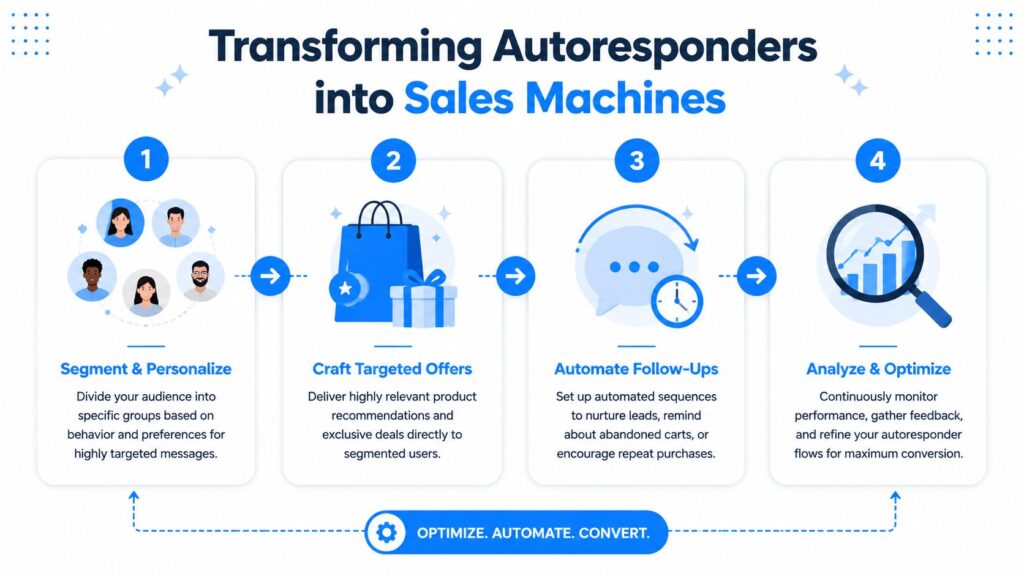
Autoresponder for WA Sales Automation
Segment first, then broadcast
Broadcasts fail when every contact gets the same message. Segmentation fixes that.
Use tags and fields to separate:
- New leads who need education
- Recent buyers who need onboarding or cross-sell offers
- Abandoned interest contacts who asked questions but didn’t buy
- VIP or repeat customers who can receive early access and priority updates
That makes every campaign more relevant. A flash sale message should not go to someone waiting on a return. A restock alert should go to people who asked about a specific product, not your entire list.
Better targeting usually beats more volume on WhatsApp because relevance feels personal fast, and irrelevance feels spammy even faster.
Build short follow-up sequences
Don’t think in terms of one autoresponse. Think in sequences.
For e-commerce, useful sequences include:
- Abandoned cart support with product help, not just a discount
- Post-purchase onboarding with care instructions, setup help, or order updates
- Win-back flows for customers who stopped buying
For agencies, useful sequences look different:
- Lead intake follow-up after an ad form submission
- Proposal nudges when a prospect goes quiet
- Client onboarding messages that collect assets or next-step approvals
Keep these sequences short and tied to a clear outcome. Most businesses overbuild and create automation clutter. Three focused messages usually outperform a bloated sequence that tries to do everything.
Personalization that actually helps
Real personalization is not just using the first name field. It’s using behavior and context.
Strong examples:
- A customer asked about a specific product category, so future messages reference that category
- A lead selected “wholesale,” so the next branch sends wholesale-specific questions
- A buyer completed purchase but hasn’t activated or used the product, so onboarding content changes accordingly
That’s where WhatsApp stops being a basic support line and starts acting like a revenue channel.
Staying Compliant with WhatsApp Policies and GDPR
A powerful autoresponder for WA only works long-term if your compliance is clean. Most problems come from two mistakes. Messaging people without proper consent, and sending the wrong type of message in the wrong context.
The good news is that compliance is manageable when you build around a few operational rules.
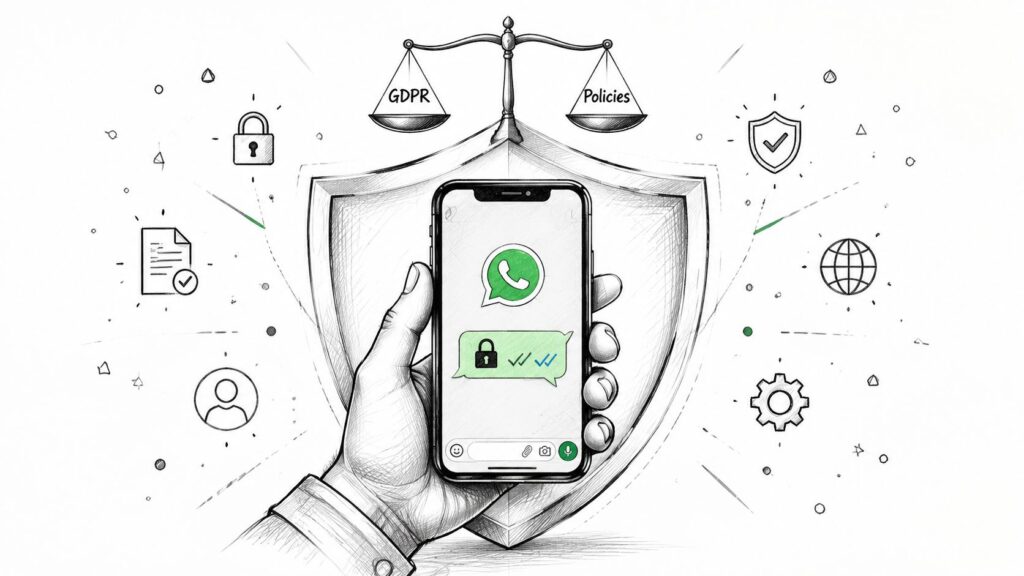
Autoresponder for WA Data Privacy
Know what kind of message you are sending
Not every automated WhatsApp message works the same way.
WhatsApp Auto-Reply systems automatically send a greeting message to customers who contact a business for the first time or after 14 days of inactivity since their last message. That’s useful for welcoming new contacts and re-engaging dormant conversations inside the normal reply flow.
But once the business initiates outreach, you need to think more carefully. In practice, that means keeping a clear line between customer-initiated conversations and proactive business messaging that uses approved templates.
The compliance checklist that matters
Get clear opt-in
Don’t bury permission in vague form language. If you plan to contact people on WhatsApp, say so clearly when they submit the form, request the quote, or join the list.
Good opt-in is specific. It tells the user what they’re agreeing to receive and why.
Match the message to the consent
If someone opted in for order updates, don’t treat that as blanket permission for promotional blasts. If they asked for a quote, keep the follow-up connected to that request unless they’ve separately agreed to broader marketing.
Be transparent about automation
Tell users they may first interact with an automated assistant. This builds trust and lowers frustration when the first reply asks for an order number or offers menu options.
Make human handoff easy
Compliance is not just legal. It’s operational. People should be able to reach a human when the bot can’t solve the issue.
If your automation makes deletion requests, unsubscribe requests, or support escalations hard to complete, your process is broken even if your copy looks compliant.
GDPR in day-to-day operations
For GDPR, think practically.
- Collect only what you need for service, sales qualification, or support
- Store data with purpose so your team knows why each field exists
- Delete when requested and make that process part of your operating routine
- Avoid hidden enrichment or unnecessary data collection through automation
- Keep auditability in mind, so consent and message purpose are clear internally
For agencies, this is even more important because you may be handling customer data on behalf of clients. Build consent capture, data access, and deletion workflows into the service itself instead of trying to patch them later.
Compliance supports performance
Businesses often treat policy and GDPR as a brake on automation. In practice, they improve it. Better consent creates cleaner lists. Cleaner lists create better engagement. Clear expectations reduce complaints and confused replies.
That’s not bureaucracy. It’s just disciplined messaging.
Measuring Success and Optimizing Your Flows
Once your autoresponder for WA is live, don’t judge it by whether messages are going out. Judge it by what happens next.
A healthy setup should tell you three things. Are messages reaching people? Are people engaging with them? Are the flows moving them toward the right outcome?
The metrics that actually matter
Start with a tight scorecard:
- Delivery quality so you can spot trigger failures, template issues, or operational gaps
- Open behavior because visibility matters before anything else
- Clicks and replies to understand whether your calls to action are clear
- Conversion outcome such as purchase intent, booked call, support resolution, or captured lead data
If opens look strong but replies are weak, the issue is usually message relevance or too much friction in the next step. If replies happen but conversions don’t, the handoff or offer probably needs work.
What to test first
Don’t run random experiments. Test the pieces most likely to change behavior.
Good first tests include:
- Welcome message framing. Direct menu vs conversational opener
- CTA wording. “Track your order” vs “Check delivery status”
- Flow length. One qualifying question vs three
- Branch order. Put the most common customer intent first
Small changes here can improve clarity fast, especially if your current flow asks too much too soon.
A lot of underperforming automations don’t need more complexity. They need fewer steps and cleaner choices.
Common issues to troubleshoot
If a flow underperforms, check the basics before rebuilding it.
- Trigger problems often come from the wrong event, missing field mapping, or a broken integration step
- Template issues usually come from weak wording, unclear purpose, or approval mismatch
- Low engagement often means the message arrived at the wrong moment or didn’t match the user’s intent
- Poor handoff experience usually shows up when the bot collects data, but the human agent can’t see or use it
The best operators review transcripts, not just dashboards. Read real conversations. You’ll spot confusion, dead ends, and missed opportunities much faster there than in a chart.
If you want to turn WhatsApp into an effective sales and support channel instead of a loosely managed inbox, Clepher is a strong place to start. It gives teams a no-code way to build intelligent flows, connect channels, segment audiences, and run automation that’s useful in practice, not just impressive in a demo.
