
Discord isn’t a niche chat app anymore. By 2025, it had grown to more than 231 million monthly active users, over 30 million servers, and more than 1.1 billion messages sent daily, while 42% of U.S. Gen Z internet users used it weekly. In that same ecosystem, one 2025 roundup estimated more than 12 million active bots, 28% of all server messages coming from bots, and over 680,000 developers building or maintaining bots each month, according to this Discord statistics roundup.
That scale changes how you should think about the bot API Discord ecosystem. This isn’t just a hobby surface for moderation commands and meme replies. It’s infrastructure for support flows, onboarding, community ops, product education, lead qualification, and audience engagement inside spaces where people already spend time.
If you’re building your first production bot, the hard part isn’t getting a hello-world command to run. The hard part is choosing an architecture that won’t become painful six months later, when your server grows, your command set expands, and every shortcut starts showing up in operations. That’s the same mindset behind managing technical debt effectively. Early bot decisions compound.
For teams exploring conversational automation beyond Discord, it’s also useful to compare bot design patterns across channels. A web-focused API chatbot implementation will solve different UX and identity problems than a Discord bot, even when the backend logic looks similar.
Why Master the Discord Bot API in 2026
Most developers approach Discord bots as a coding exercise. Smart teams treat them as a delivery channel.
A well-built Discord bot can answer common questions, route members to the right resources, trigger announcements, collect structured input through forms, and reduce moderator workload. For a SaaS company, that can mean smoother onboarding inside a customer community. For a DTC brand, it can mean running gated drops, loyalty interactions, or ambassador programs. For creators and course sellers, it can mean turning a busy server into an organized member experience.
What the platform scale means in practice
The numbers matter because they change your design assumptions. On a platform with that much daily activity, bots aren’t decorative. They’re part of how communities function.
That has two practical consequences:
- Reliability matters early: If your bot handles support triage or onboarding, downtime creates visible friction fast.
- UX matters more than code elegance: Members won’t care that your event loop is clever if commands are confusing or slow.
Practical rule: Build your Discord bot like a customer-facing product, not a side script.
Where businesses actually get value
The biggest wins usually come from structured workflows, not from trying to automate every conversation.
A few examples:
- Support communities: Route users to docs, bug forms, status channels, and escalation paths.
- Membership businesses: Gate channels, verify access, and deliver welcome flows.
- Marketing communities: Run slash-command-driven campaigns, feedback prompts, and event registration.
- Internal teams: Use bots for incident coordination, release notifications, or lightweight approvals.
The common thread is simple. Discord gives you a place where conversation already happens. The API lets you add a process without making the space feel like enterprise software.
Core Architecture Gateway vs REST API
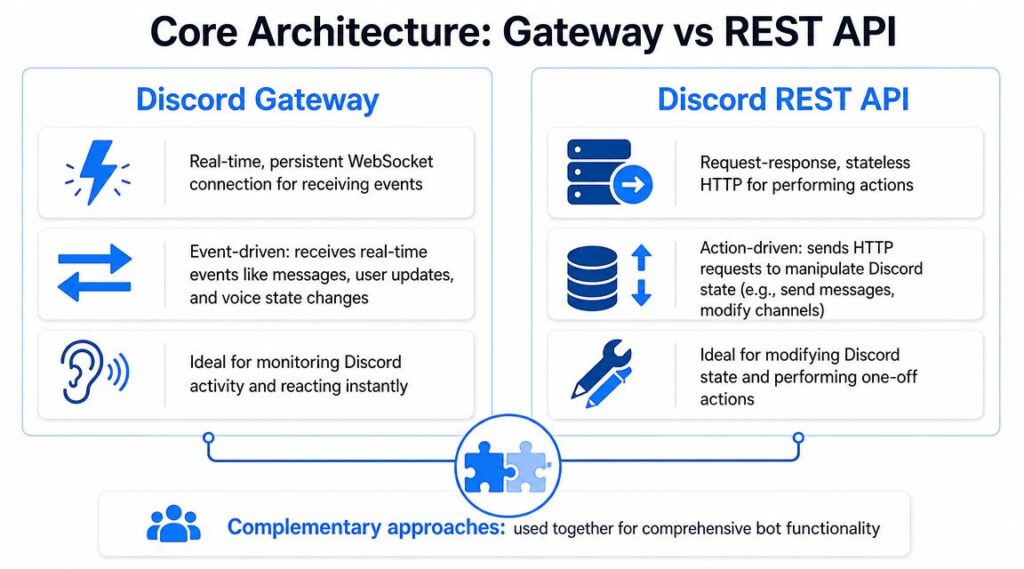
The first architectural mistake new developers make is treating the Gateway and REST API like competing choices. They aren’t. Discord’s own bot overview describes the recommended model as using the Gateway for real-time events and the HTTP API for REST actions, while also emphasizing modern interaction surfaces like slash commands, context menus, buttons, select menus, and modals in the Discord bot overview.
The Gateway is a live radio broadcast; your bot stays connected and listens for events as they happen. The REST API is like sending a letter: your bot makes a specific request, gets a response, and that exchange ends.
Bot API Discord Gateway Rest
The practical difference
If a user joins a server, clicks a button, or triggers an interaction, your bot usually learns about that through the Gateway. If your bot needs to send a message, edit a response, create a channel, or fetch resource details, it typically does that through REST.
That split keeps your system clean:
- Gateway listens
- REST acts
A lot of architectural confusion disappears once you adopt that mental model.
Side-by-side comparison
| Component | Best for | Strength | Weakness | Typical business use |
|---|---|---|---|---|
| Gateway | Real-time subscriptions | Immediate event delivery | Requires connection lifecycle management | Welcome flows, live moderation, interaction handling |
| REST API | On-demand actions | Predictable request-response model | Not event-driven by itself | Posting announcements, managing channels, updating messages |
What works and what doesn’t
What works is a hybrid design. Let the Gateway receive events, then call REST only when you need to change the Discord state.
What doesn’t work is overloading your bot with logic directly inside event handlers. New developers often write giant messageCreate or interaction callbacks that do validation, database writes, outbound API calls, formatting, and retries all in one place. That’s fine on day one and painful later.
A better pattern looks like this:
- Receive the event through the Gateway.
- Validate quickly and extract only the fields you need.
- Pass the job to an application service.
- Respond through REST with the final user-facing result.
Keep the Discord layer thin. Put business logic in services you could test without Discord running.
That approach also makes it easier to reuse logic elsewhere. If you ever add a web dashboard, Slack integration, or internal admin tool, your core workflows won’t be trapped inside Discord-specific handlers.
For teams comparing bot ecosystems, this is one reason many developers start with Slack examples first. The patterns translate well. A walkthrough on building a Slack bot is often useful because it reinforces the same separation between event intake, business logic, and outbound actions.
Authentication and Authorization Deep Dive
Authentication is where hobby bots and production bots start to diverge.
Discord’s developer reference states that the API supports authentication with either a bot token or an OAuth2 bearer token, that bots authenticate through the Authorization HTTP header, and that Discord IDs are 64-bit snowflake values returned as strings in the HTTP API to avoid integer overflow issues, as documented in the Discord developer reference.
Bot token vs OAuth2
Use a bot token when your application is acting as the bot itself. That’s the standard path for moderation bots, onboarding bots, notification bots, and most community automation.
Use OAuth2 when your application needs to act on behalf of a user or connect a user account to an external product. A common example is a dashboard where a community manager signs in with Discord, selects a server they manage, and configures settings from your web app.
Here’s the short version:
- Bot token: The application acts as the bot
- OAuth2 bearer token: The application acts in a user-authorized context
If you’re building a third-party analytics dashboard, admin console, or account linking flow, OAuth2 isn’t optional. It’s the correct model.
How to handle bot tokens safely
A bot token is effectively a credential with real operational power. Treat it like you would any other secret.
Use these habits from the start:
- Store it in environment variables: Never hardcode it in source files.
- Keep it out of logs: Don’t print headers or request objects casually during debugging.
- Avoid committing local config files: A leaked token turns into an incident fast.
- Rotate when exposed: If a token appears in a repo, screenshot, or shared snippet, replace it.
Why Snowflake IDs being strings matters
This trips up junior developers all the time. Discord IDs may look numeric, but the API returns them as strings for a reason.
If you parse them into a number type blindly, you risk precision issues in some languages and runtimes. That creates subtle bugs. Role checks fail. Cache lookups miss. Message references don’t match.
Treat Discord IDs as opaque string identifiers unless you have a very specific reason not to.
A Discord ID isn’t a value to do math on. It’s a key to preserve exactly.
A practical request example
When you call the Discord REST API as a bot, the shape is straightforward:
- Add an
Authorizationheader with your bot credential - Send JSON payloads
- Preserve all IDs as strings in your app model
That design has a business upside, too. Once your auth model is clean, you can safely support things like:
- a customer community dashboard
- role-based access workflows
- cross-platform identity mapping
- admin tooling for support teams
Most bot failures that look like “Discord issues” are really auth design mistakes. Wrong token type. Mixed user and bot context. IDs coerced into unsafe types. Fix those early and the rest of your integration gets much easier.
Understanding Privileged Gateway Intents
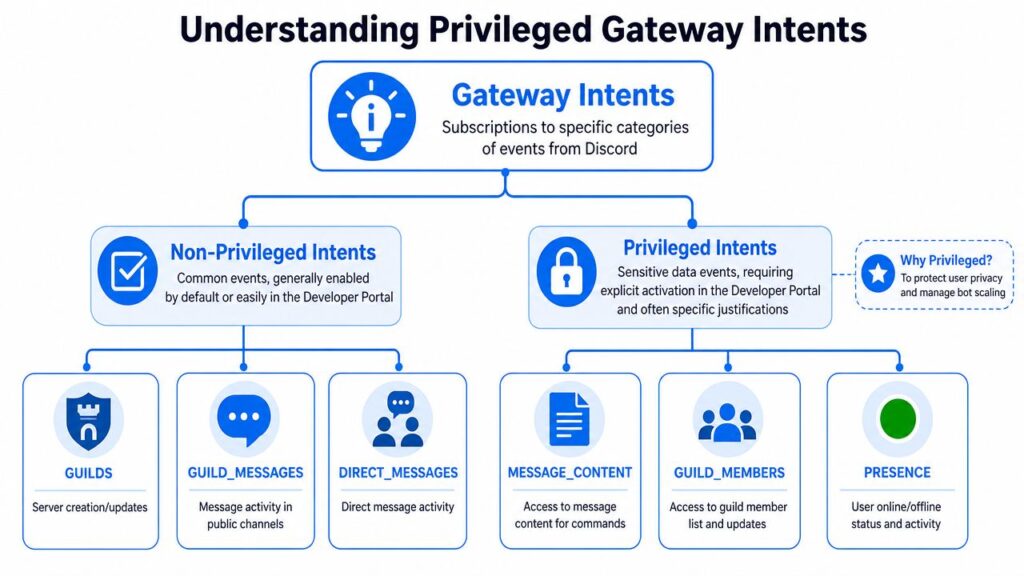
Gateway intents are subscriptions. They tell Discord which categories of events your bot wants to receive.
That sounds like a low-level implementation detail, but it has strategic consequences. Intents affect privacy exposure, event volume, deployment approvals, and how much maintenance your bot will require over time.
Bot API Discord Gateway Intents
Why Discord uses intents
Discord didn’t add intents to make your life harder. Intents let bots ask for only the data they need.
That’s good engineering for two reasons:
- Privacy: Bots shouldn’t ingest sensitive categories of user data by default.
- Efficiency: Fewer subscribed events means less processing, less memory pressure, and less noisy code paths.
If your bot only handles slash commands and button clicks, it shouldn’t be receiving broad message streams it never uses.
The intents that get teams into trouble
The three privileged categories developers talk about most are:
- Message Content
- Guild Members
- Presence
These are powerful, but they also increase the amount of sensitive or heavy event data your bot handles.
The common mistake is enabling privileged intents because a tutorial did. Then months later, the team realizes the bot architecture depends on access it never really needed.
A better design standard
If you’re building a modern bot today, start with the assumption that you should avoid privileged intents unless the product requires them.
That usually means:
- Choose slash commands instead of parsing raw messages
- Use buttons, select menus, and modals for structured input
- Fetch member or user details only when needed
- Keep event subscriptions narrow
This produces cleaner bots. It also lowers the chance that a future review, scaling hurdle, or privacy concern will force a redesign.
The easiest privileged intent to maintain is the one you never requested.
Business implications
This isn’t only about compliance or technical neatness. It affects delivery speed.
A bot built around interactions is easier to explain to stakeholders, easier to reason about for security reviews, and easier to support when staff changes. A bot built around broad message scraping often grows messy because every free-form sentence becomes an unofficial API surface.
Here’s a practical way to decide:
| If your bot needs to… | Prefer |
|---|---|
| Respond to explicit commands | Slash commands |
| Collect structured choices | Buttons or select menus |
| Gather multi-field input | Modals |
| Monitor broad free-form chat continuously | Only then consider message-content dependence |
For support, marketing, and community workflows, interaction-first design usually wins. Members get clearer prompts. Moderators get fewer false triggers. Developers spend less time chasing edge cases from natural language parsing.
Mastering Interactions and Slash Commands
If you’re starting a new Discord bot today, build around interactions first. Don’t default to old message-command patterns unless you have a clear reason.
A 2024 tutorial highlighted the shift toward slash commands and interaction-based architectures instead of message-content parsing and pointed out slash commands as a convenient webhook-driven model for interactive bots, as discussed in this tutorial on recent Discord bot strategy changes. That matches what works in production. Interactions are cleaner for users and easier to maintain for developers.
Bot API Discord Slash Commands
Why slash commands win
Slash commands solve problems that old prefix commands created.
With message parsing, users had to remember syntax, argument order, and command names. Bots had to inspect message text, handle ambiguous input, and often rely on broader content access than they really needed.
Slash commands improve that immediately:
- Discoverability: Users see available commands in the client.
- Structure: Arguments are typed and constrained.
- Fewer parsing bugs: Discord does part of the input shaping for you.
- Better privacy posture: You can avoid building around free-form message reading.
For customer communities, this matters more than people expect. A support command like /report-bug or /request-access feels more professional than “type !bug product=... and hope formatting is right.”
The interaction flow in real life
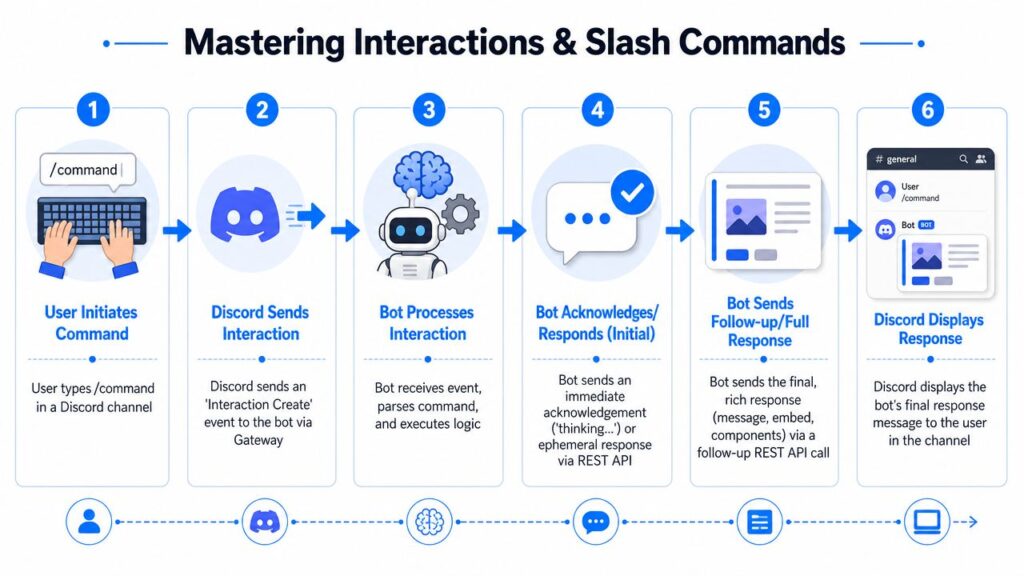
A slash command lifecycle is simple once you stop treating it as magic.
- A user types something like
/demo. - Discord sends an interaction event to your bot.
- Your bot validates the command and extracts arguments.
- Your bot acknowledges quickly if the work may take time.
- Your bot sends the final response, often with buttons or embeds.
- The user sees a structured result in the channel or as an ephemeral response.
That flow is ideal for business use cases because it supports guided experiences.
A few examples:
/book-callcan return scheduling options/couponcan show current promotion details/verify-ordercan open a secure support flow/join-waitlistcan collect segmented interest
Buttons, select menus, and modals are where UX improves
Slash commands get users into the workflow. Components finish the job.
Use them intentionally:
- Buttons: Good for yes/no, confirm/cancel, next-step actions
- Select menus: Good for choosing plans, categories, or teams
- Modals: Good for collecting support details, applications, or campaign submissions
A lot of developers stop at slash commands. That leaves value on the table. The full power of the bot API Discord stack shows up when command entry leads into a guided interaction.
Build for the user who doesn’t know your bot exists yet. Interactions make that possible.
What I recommend for a first production bot
Start with a narrow interaction set:
- One slash command for entry
- One modal for structured input
- One follow-up response with buttons
- One internal service that handles the business logic
That gives you a maintainable baseline. Later, you can add richer workflows without rewriting the foundation.
Navigating Common API Endpoints with Examples
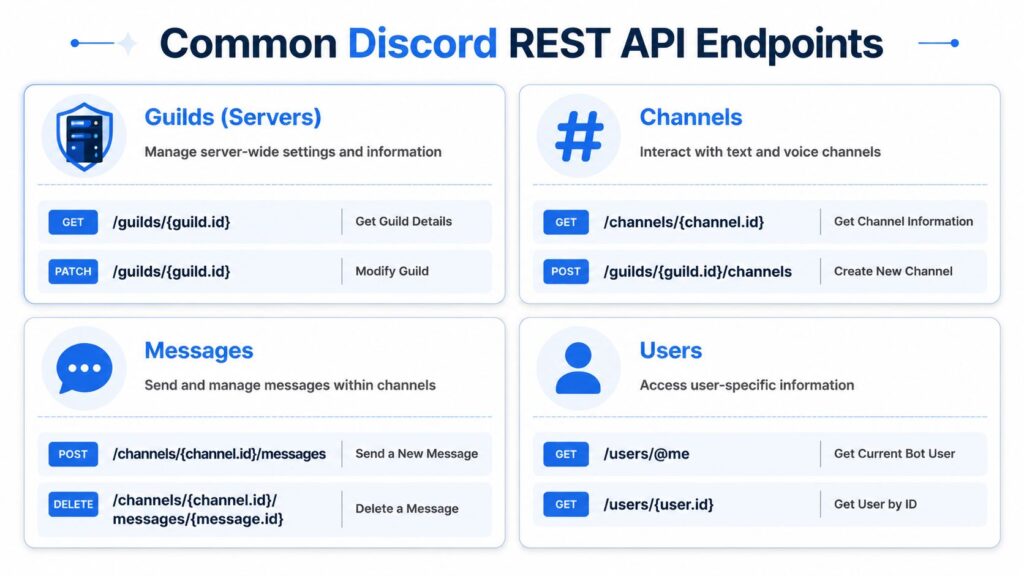
A production bot usually depends on a small group of REST endpoints. The difference between a bot that feels reliable and one that feels brittle is not route count. It is whether each endpoint maps cleanly to a business action your team cares about.
Bot API Discord Endpoints
If you are building for support, community growth, or customer education, focus on four endpoint families first: guilds, channels, messages, and users. This handles the majority of operational work without turning your codebase into a pile of one-off HTTP calls.
Guild and channel endpoints
Guild and channel routes control the spaces where your workflows happen. They matter because channel structure affects user behavior. A support request dropped into the wrong place gets ignored. A launch announcement posted in a noisy channel gets missed.
What they do: read or modify server and channel resources
Common uses: onboarding spaces, campaign channels, support routing, permissions-aware workflows
Example patterns:
GET /guilds/{guild.id}PATCH /guilds/{guild.id}GET /channels/{channel.id}POST /guilds/{guild.id}/channels
A simple cURL-style example for reading a channel:
curl -X GET "https://discord.com/api/v10/channels/CHANNEL_ID"
  -H "Authorization: Bot YOUR_BOT_TOKEN"
A simplified response shape might look like:
{
  "id": "123456789012345678",
  "type": 0,
  "name": "announcements"
}
Business use case: Create campaign-specific channels for product launches, private customer groups, or event attendees. For support teams, create intake channels automatically, then rename or archive them as the case moves from open to resolved. That reduces manual sorting and gives customers a clearer path to help.
Message endpoints
Message routes do the day-to-day work. They send confirmations, reminders, warnings, summaries, and follow-ups. If your bot produces customer-facing value, message endpoints are usually where that value becomes visible.
What they do: send, edit, and delete messages inside channels
Common uses: alerts, confirmations, onboarding prompts, moderation actions
Example patterns:
POST /channels/{channel.id}/messagesDELETE /channels/{channel.id}/messages/{message.id}
A typical send-message request:
curl -X POST "https://discord.com/api/v10/channels/CHANNEL_ID/messages"
  -H "Authorization: Bot YOUR_BOT_TOKEN"
  -H "Content-Type: application/json"
  -d '{
    "content": "Welcome to the server"
  }'
Simplified response:
{
  "id": "223456789012345678",
  "channel_id": "123456789012345678",
  "content": "Welcome to the server"
}
Business use case: Post onboarding checklists, event reminders, renewal prompts, or status updates after a user completes an interaction. Good message design reduces moderator workload and gives users immediate feedback, which is a direct customer experience win.
One practical note. Do not treat every notification as a new message. In many support and campaign flows, editing an existing message keeps the channel cleaner and gives users a single source of truth.
User endpoints
User routes should stay narrow. Discord gives you enough identity data to support operational use cases, but production bots should request and store only what the workflow needs.
Examples:
GET /users/@meGET /users/{user.id}
A lightweight example:
curl -X GET "https://discord.com/api/v10/users/@me"
  -H "Authorization: Bot YOUR_BOT_TOKEN"
Simplified response:
{
  "id": "323456789012345678",
  "username": "example-bot"
}
Business use case: Confirm bot identity during diagnostics, support account-linking flows, or attach safe user references to internal logs. For marketers and founders, that means cleaner attribution without turning the bot into a data collection liability.
How to keep endpoint usage maintainable
Wrap common routes in service methods named after business intent. That sounds simple, but it prevents a lot of pain later.
Good examples:
sendWelcomeMessage(channelId, payload)createCampaignChannel(guildId, name)fetchBotProfile()
Bad examples:
callDiscordApi1()postToDiscord()
The trade-off is straightforward. Raw HTTP calls feel faster during a prototype. Intent-based service methods take longer up front, but they make testing easier, reduce duplicate logic, and let you swap transport details without rewriting product logic. That matters once your bot supports real customers, active communities, or revenue-linked campaigns.
Rate Limits and Error Handling Strategies
A bot that works in a quiet test server can fail badly in a live community.
Most failures don’t come from “Discord being unstable.” They come from developers assuming that if a request succeeded once, they can repeat it freely at production volume. That’s not how a professional integration works.
Rate limits are part of the API contract
Discord enforces rate limits so clients behave predictably and platform resources stay protected. Your bot has to respect that. This is not optional plumbing. It’s part of building a stable product.
In practice, you should expect two categories of pressure:
- Per-route limits: A specific endpoint or route family gets hit too often.
- Global limits: Your bot is generating too much outbound traffic overall.
The wrong response is to retry immediately in a loop. That turns a temporary throttle into a self-inflicted outage.
What your code should do on a 429
When Discord returns 429 Too Many Requests, Your code should pause and retry according to the response information. If you’re using a mature Discord library, part of this may already be handled. If you’re making custom REST calls, you need your own guardrails.
A sensible strategy looks like this:
- Read the response headers or retry guidance
- Wait for the allowed retry window
- Back off further if repeated throttling continues
- Log route, context, and request purpose
- Drop non-essential retries for low-priority actions
Key takeaway: A throttled bot isn’t failing because it’s slow. It’s failing because it ignored the platform’s pacing rules.
Common HTTP errors and what they usually mean
Here’s the operational view your team should keep handy:
| Status | What it usually means | Typical fix |
|---|---|---|
| 400 | Bad request shape or invalid payload | Validate fields before sending |
| 401 | Missing or invalid authentication | Check token handling and headers |
| 403 | Authenticated, but not allowed | Review bot permissions or resource access |
| 429 | Too many requests | Respect retry timing and reduce burstiness |
Design choices that reduce incidents
You can prevent a lot of errors before they happen.
- Queue bursty work: Don’t let one event trigger dozens of immediate writes.
- Batch where possible: Combine related actions instead of sending many small calls.
- Separate critical from optional actions: A welcome message may be critical. A cosmetic follow-up reaction may not be.
- Instrument your failures: Log route names, response codes, and user-facing consequences.
A production-ready Discord bot should degrade gracefully. If a non-critical announcement update gets delayed, that’s acceptable. If your support intake flow collapses because every retry is aggressive and unbounded, that’s an engineering problem.
Security Best Practices and Deployment Notes
Security and deployment decisions shape your bot long before users notice them. If your architecture is shaky here, every new feature sits on top of avoidable risk.
Security habits that should exist on day one
Start with the obvious and enforce it.
- Use environment-based secret storage: Tokens and keys shouldn’t live in source control.
- Limit who can access production credentials: Developers don’t all need direct secret visibility.
- Validate incoming interaction signatures: If you’re using interaction webhooks, verify that requests really came from Discord.
- Treat logs as sensitive: Payload logging can leak IDs, content, and operational details.
If a junior dev asks whether signature validation can wait until later, the answer is no. Forged requests are a real category of failure, not a theoretical one.
Deployment patterns that fit different bot types
The right hosting model depends on how your bot receives and processes work.
For Gateway-heavy bots with persistent event streams, teams often use an always-on service on a VPS, container host, or managed platform. That model is straightforward when you need a long-lived connection and background workers.
For interaction-driven bots, stateless execution can be attractive. Slash-command and webhook-driven flows map well to serverless or lightweight HTTP services because the platform sends a request, your code computes a result, and the request ends.
A practical way to choose:
| Bot pattern | Good fit |
|---|---|
| Persistent real-time listener | Always-on container or VM |
| Mostly slash commands and webhooks | Stateless service or serverless endpoint |
| Mixed workloads | Hybrid architecture |
Migrating older bots without breaking everything
A lot of bots still depend on legacy message-based commands. Don’t rewrite everything at once.
Do this instead:
-
- Add slash commands for the highest-value workflows first.
- Keep old commands as compatibility paths for a limited period.
- Move business logic into shared services.
- Retire message parsing once usage drops and moderators are trained.
That migration pattern is usually less risky than a big-bang replacement.
One practical tooling note
If your broader business stack includes website or social messaging automation, a platform like Clepher’s no-code chatbot builder can handle non-Discord conversational flows while your custom Discord bot focuses on server-native interactions, permissions, and community operations. That’s a cleaner split than forcing one tool to do every channel’s job.
Security isn’t a final checklist item. It’s part of the bot design itself.
Discord Bot API FAQs
If you want to build conversational automation across more channels than Discord, Clepher is an option to evaluate for website, Messenger, WhatsApp, and Instagram flows. It gives teams a no-code way to design chat journeys, capture leads, automate support, and connect those conversations to the rest of their stack, while a custom Discord bot can stay focused on community-specific workflows.

Related Posts
Automated Checkout Bot: Build and Launch Guide
October 7, 2026AI Agent Framework: Architecture, Tools, and Use Cases
October 6, 2026Master Lead Generation Automation for Business Growth
October 5, 2026
Founder Clepher