
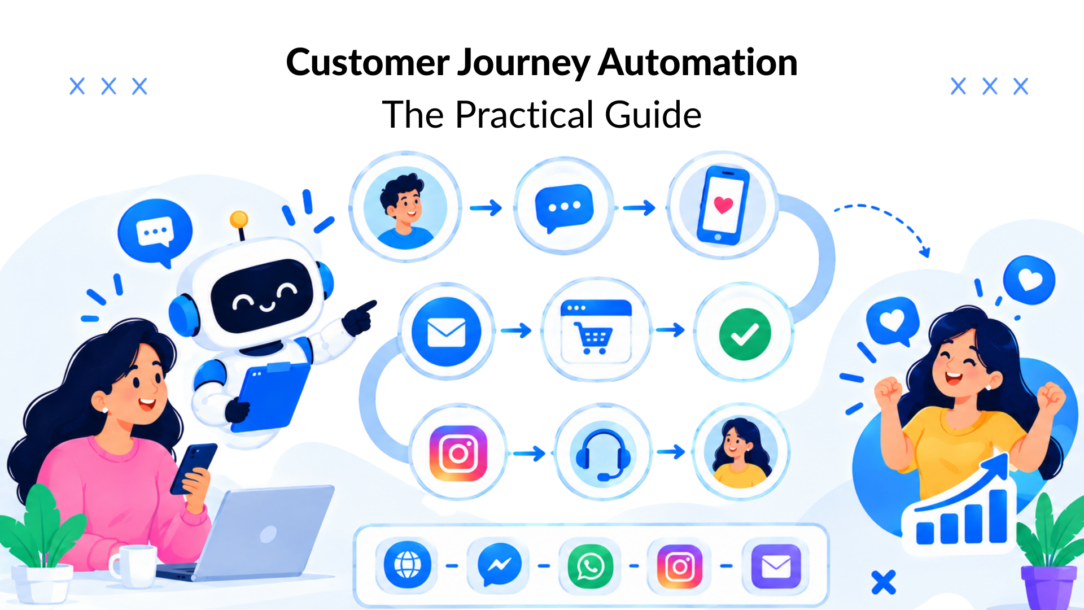
You’ve probably seen this happen: a shopper clicks an Instagram ad, browses two product pages, adds an item to cart, asks a question in Messenger, and then receives a generic email that ignores everything they just did. Your shipping tool, email platform, chatbot, CRM, and help desk each know part of the story. The customer experiences the gaps between them.
That’s the problem customer journey automation solves. It doesn’t mean sending more messages or replacing every human interaction with a bot. It means coordinating signals, decisions, content, and handoffs so each customer receives the next useful action for their current stage.
Why Most Brands Are Losing Customers Between Touchpoints
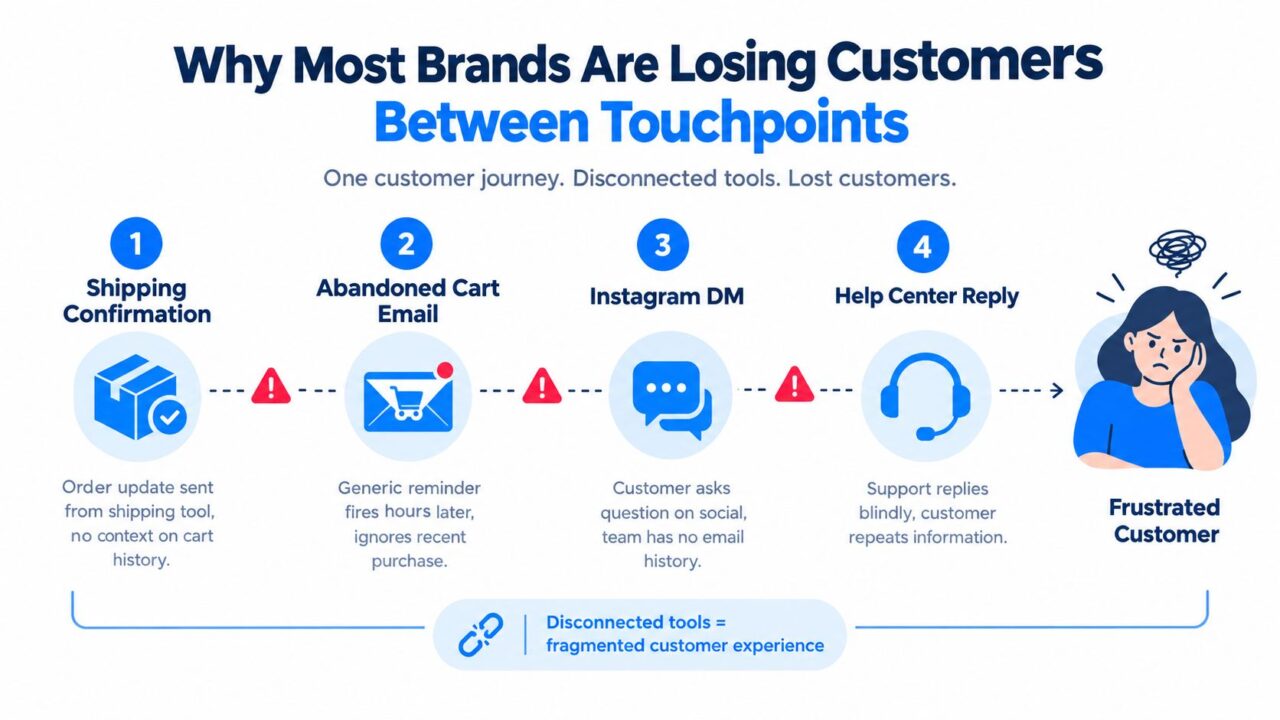
A DTC founder might start the morning by checking abandoned carts, answering Instagram DMs, reviewing support tickets, and looking for yesterday’s orders. The shipping platform sends a confirmation to a new buyer. The email tool sends an abandoned-cart reminder to someone who may have already purchased. The social team answers a product question without seeing the customer’s browsing history. Support then asks the same person to repeat details they already shared.
Customer Journey Automation Disconnected Tools
The operational cost is easy to recognize, even without a large analytics team:
- Duplicate messages: A customer gets a promotion after placing an order.
- Missed follow-ups: A qualified question sits in a social inbox while a sales email goes out automatically.
- Slow responses: The team searches across tools before it can answer a simple delivery or product question.
- Lost reviews can significantly impact customer satisfaction and retention. Nobody asks for feedback after the customer has had enough time to use the product.
- Poor timing: A retention message reaches someone who is still waiting for their first delivery.
None of these failures necessarily means the brand lacks traffic. They mean the brand can’t coordinate customer intent across touchpoints. The buyer slips through a seam between systems, not because the buyer stopped caring, but because the business responded to an outdated version of the buyer.
Practical rule: Treat every touchpoint as part of one stage-based conversation, not as an independent campaign.
Customer journey automation creates that shared choreography. A purchase can suppress abandoned-cart messaging. A product question can route a shopper into a human-assisted conversation. A delivery event can start education content instead of another sales pitch. If your team is auditing the experience, resources on how to optimize multi-channel customer touchpoints can help you identify where the handoffs break.
The important shift is from “Which tool sends this message?” to “What does this customer need next?” That question gives your team a single map for capture, nurture, conversion, support, retention, and advocacy.
What Customer Journey Automation Actually Means
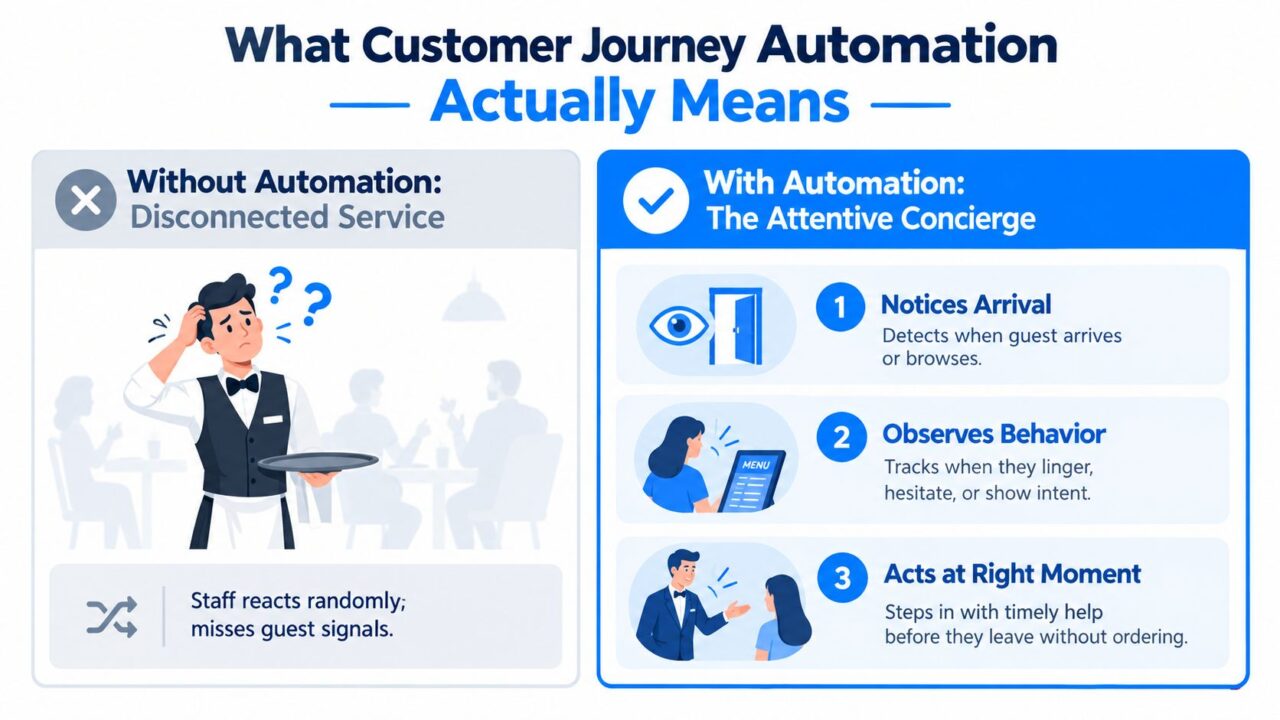
Think about a good concierge. They notice when a guest arrives, recognize when the guest is studying the menu, and offer help when the guest looks uncertain. They don’t deliver the same speech to every person at a fixed time. They respond to signals.
Customer journey automation applies that logic to digital interactions. A visitor lands on a product page, a lead submits a form, a shopper abandons a cart, or a customer opens a support conversation. Each event can start a relevant next step, provided the system knows the person, the stage, and the rules for moving forward.
Customer Journey Automation Service Comparison
Scheduled messages versus behavioral responses
A scheduled broadcast follows the calendar. You choose an audience, write a message, and send it at a selected time. That approach still has a place for launches, announcements, and broad promotions, but it treats customers as if they share the same context.
An event-based journey follows behavior. The system asks:
- What happened? A product was viewed, a form was submitted, or an order was delivered.
- Who is this customer? A first-time visitor, returning buyer, high-intent lead, or existing subscriber.
- What should happen next? Send education, ask a qualifying question, offer support, route to sales, or wait.
- What would change the path? A purchase, reply, appointment booking, unsubscribe, or human takeover.
This distinction matters because the same person can move between stages of the customer journey map quickly. A visitor who was researching in the morning may become a buyer after a live chat. A customer who needs support shouldn’t continue receiving acquisition messages. A lead who says their project starts later may need useful education rather than repeated booking requests.
Automation is routing, not removal
The best systems don’t remove human touch. They reserve human attention for situations where judgment, empathy, negotiation, or technical expertise matters. Automation handles detection, filtering, reminders, basic answers, and routing.
Chatbots are especially useful here because they can connect capture, nurture, and support in one conversation. A website bot can collect an email address, answer a common question, tag the visitor by interest, and pass the conversation to a person when the customer needs help. The customer doesn’t have to restart the story on another channel.
This guide uses a practical definition:
Customer journey automation is a stage-aware system that detects customer signals, selects the next action, delivers it through an appropriate channel, and measures whether the customer moved forward.
That definition keeps the focus on choreography. Tools matter, but the journey logic matters more.
The Core Building Blocks of an Automated Journey
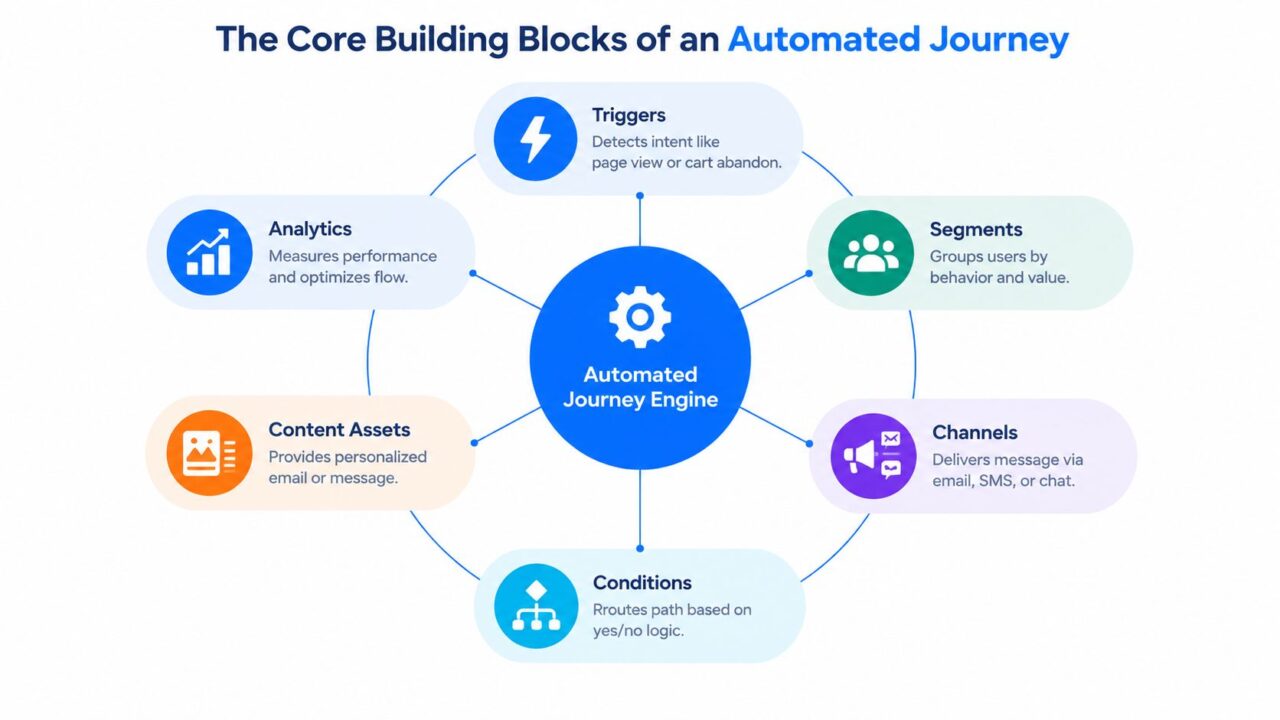
A reliable journey has six connected building blocks. They aren’t separate checklist items. Each one changes how the others should work, affecting customer retention strategies.
Customer Journey Automation Engine Diagram
Triggers detect intent
A trigger starts the flow. It might be a product view, cart abandonment, form submission, reply, purchase, support request, or period of inactivity. Strong triggers reflect meaningful behavior, not every minor interaction.
For example, a first-time visitor who views a product and leaves may enter a browse-recovery flow. If they add the item to cart, that event should move them to a stronger purchase-intent branch and stop the lighter browse reminder.
Segments add context
A trigger tells you what happened. A segment tells you who acted and what their history means. Useful segments can include first-time visitors, repeat buyers, customers interested in a specific category, leads with a defined timeline, or contacts who have already spoken with support.
Segments should update when behavior changes. A person who purchases shouldn’t remain in a prospect segment because an old tag still exists.
Channels deliver the next action
Email works well for longer explanations and receipts. SMS suits urgent reminders when consent exists. Website chat can answer questions while intent is fresh. Messenger, Instagram, and WhatsApp can support conversational capture and follow-up.
Use the channel that fits the action, not the channel your team happens to manage most comfortably. A short delivery question may deserve chat. Product education may work better in email. A qualified service lead may need a direct sales handoff.
For teams connecting these signals, customer data integration helps keep customer records, events, and workflow decisions aligned across the stack. If you’re testing SMS flows, a temporary phone for verification can help with controlled testing, but production journeys should use properly consented customer contact details.
Conditions route the journey
Conditions turn a sequence into a decision system. Ask questions such as:
- Cart status: Has the customer purchased since entering the flow?
- Value or priority: Does the cart or lead meet the threshold for a different treatment?
- Engagement: Did the customer click, reply, or ignore the previous message?
- Support state: Is a human already handling the issue?
- Preference: Which channel and content type has the customer selected for email marketing?
A condition should lead to a meaningful difference in customer satisfaction. If both branches send nearly identical content, simplify the flow.
Content gives each branch a purpose
Content isn’t just copy. It includes chatbot prompts, email templates, product recommendations, educational answers, discount logic, booking links, and fallback messages.
Consider a first-time visitor who abandons a cart. The first message might answer a shipping concern. If the shopper replies with a sizing question, the chatbot should address that question or route it to a person. If the shopper returns and buys, the flow should switch to marketing automation for order guidance and post-purchase support.
Analytics closes the loop
Analytics tells you whether the journey creates progress. Track stage conversion, time spent between events, response quality, handoff volume, opt-outs, and value generated by automated contacts.
The system becomes stronger when those results change the next version. If many customers stall after a delivery message, improve the education or support branch. If one segment responds to chat but another prefers email, change the channel rule rather than sending more messages to everyone.
The loop is simple: detect, classify, respond, observe, refine. That’s the operating model behind an adaptive journey.
Automated Journeys for E-commerce and Service Businesses
The same choreography works across business models, but the signals and desired outcomes differ. E-commerce teams usually optimize movement from intent to purchase and then toward repeat use. Service businesses often optimize qualification, booking, sales conversations, and readiness.
E-commerce journey
Start with a browse-abandon trigger. A visitor views a product, perhaps adds it to cart, and leaves without buying, illustrating typical customer behavior. Don’t immediately assume a discount will solve the problem. The customer may need product education, reassurance about delivery, or a clear answer about returns.
Use a branch based on cart value and intent to personalize the customer experience.
- Higher-value cart: Invite the shopper into a chatbot conversation that can answer objections and, where your offer strategy allows it, provide a relevant incentive.
- Lower-value cart: Send a concise reminder focused on the product, shipping information, or free-shipping eligibility.
- Known customer: Use purchase history to avoid recommending an item they already own.
The channel should match the customer’s available context. A chatbot can ask, “What’s holding you back?” and collect a useful answer. Email can show the product again with customer education. SMS can deliver a short reminder only when the customer has consented to that channel.
After purchase, suppress cart recovery immediately. Then start post-purchase guidance, such as care instructions, setup assistance, or a complementary product suggestion to enhance personalization. The next action should help the customer get value from the purchase, not ask for another order.
Later, a lapsed buyer can receive a review request, a restock alert, or a product recommendation connected to their previous purchase. Build the flow so a new purchase exits reactivation and enters the appropriate customer path. For implementation patterns specific to online stores, e-commerce automation provides a useful point of reference.
Service business journey
The service flow begins when a lead submits a contact form. The first automated action should acknowledge the inquiry and use a chatbot to collect practical qualification details, such as service interest, budget range, project timing, and the problem they want to solve.
Then branch based on the customer lifecycle stage.
- Ready and qualified: Send the booking link, notify the assigned sales representative, and include the collected context so the lead doesn’t repeat it.
- Interested but not ready: Start a nurture sequence with useful guidance, relevant examples, and a later invitation to book.
- Poor fit or unclear need: Route to a human review or a concise explanation of available options.
A nurture sequence should have a job at every step. One message can clarify the problem. Another can answer a common objection. A later message can show how the engagement works. The final step can invite a conversation when timing improves.
The expected outcome isn’t always an immediate sale. For e-commerce, it may be a completed checkout or useful product adoption. For services, it may be a qualified meeting, a clear disqualification, or a lead becoming sales-ready. Define that outcome before writing the messages.
Your Implementation Roadmap From Audit to Launch
Automation magnifies whatever process you give it. If the process is unclear, the system will deliver confusion faster. Start with the customer experience, then build the technology around it.
Begin with an audit
During the first week, list every customer touchpoint from first visit through support and retention. Include website forms, product pages, email campaigns, chat conversations, social DMs, order updates, sales calls, and help desk responses.
Mark the three moments where customers wait, repeat information, receive conflicting messages, or disappear without a clear next step. Then confirm the data you can access:
- Purchase history: Orders, products, dates, refunds, and status.
- Email engagement: Deliveries, clicks, replies, and unsubscribes.
- On-site behavior: Relevant page views, form activity, cart events, and return visits.
- Conversation context: Chat questions, tags, lead status, and human handoffs.
Don’t write the flow until you know which events are trustworthy.
Design one high-intent journey first
During the next two weeks, choose one segment with a clear business outcome. Recent cart abandoners or new service inquiries are usually easier to define than a broad “all customers” audience in the customer journey map.
Write the entry condition, exit rules, suppression rules, and frequency caps. A journey should stop when the customer purchases, books, unsubscribes, requests human help, or otherwise reaches the intended outcome. These exits protect customers from stale messages, enhancing their overall experience in the customer journey map.
Draw the path before opening a journey builder. If you can’t explain each branch on paper, the automation will be difficult to debug.
Build content around the stage
Use the fourth week for chatbot scripts, SMS copy, email templates, and fallback messages. Every asset should answer one question:
What decision or action should this message help the customer make?
A chatbot script should include recognition of uncertainty, not only a sales prompt. Give it approved answers, clear escalation language, and a way to collect context for the human team. Align the tone across channels, but don’t copy the same message everywhere.
Test before a staged launch
Run the flow with internal accounts. Test every condition, delay, exit rule, tag update, and handoff. Check how messages render on different devices and whether customers can unsubscribe or reach a person without friction.
Launch with a controlled cohort, monitor the first responses, and inspect conversations rather than relying only on dashboard totals. A staging process gives you time to catch a bad branch before it reaches the wider audience.
Use customer onboarding automation as a related planning reference when the journey continues beyond conversion.
Your go-live checklist should confirm:
- Consent: Each channel has the required permission.
- Suppression: Buyers, unsubscribed contacts, and active support cases are excluded where appropriate.
- Fallbacks: Missing data leads to a safe, useful message.
- Handoffs: A person receives the conversation with enough context.
- Ownership: Someone knows who monitors and maintains the flow.
KPIs and Troubleshooting That Actually Move the Needle
A journey can produce impressive send volumes while failing customers. Measure movement between stages instead of celebrating activity in isolation.
The most useful metrics connect a customer action to a business outcome. Track conversion at each stage, velocity from entry to conversion, dwell time between touchpoints, message-to-meeting ratio for service journeys, opt-outs by channel, and revenue per automated contact. Expert guidance recommends slicing these measures by segment, motion, region, and industry rather than relying on one blended total. Stage-level journey measurement guidance also emphasizes conversion, velocity, volume, and value as practical dimensions for evaluating touchpoints.
| KPI | What It Measures | Troubleshooting Move |
|---|---|---|
| Stage conversion | The share of customers moving from one defined stage to the next | Check whether the trigger fires correctly, the offer fits the stage, and the entry audience is relevant |
| Time to conversion | How quickly customers progress after entering the journey | Review delays, unanswered questions, friction in checkout or booking, and unnecessary branches |
| Dwell time | How long customers remain between touchpoints or inside a stage | Inspect whether the next event is captured and whether the customer has a clear action |
| Message-to-meeting ratio | How effectively service messages create qualified conversations or bookings | Tighten qualification questions, clarify the value of the meeting, and route strong leads sooner |
| Opt-out rate by channel | Whether a channel is creating unwanted pressure or poor relevance | Reduce frequency, improve consent handling, and move off-stage content out of the flow |
| Revenue per automated contact | The commercial value associated with contacts reached by the customer journey is crucial for email marketing strategies. | Compare cohorts and check whether attribution, suppression, and purchase events are recorded correctly |
A top-of-funnel drop often points to a weak trigger or an audience that’s too broad. A mid-funnel stall usually suggests broken branching, missing event capture, or content that doesn’t answer the customer’s actual concern. A sudden rise in opt-outs commonly indicates excessive frequency or a message that arrives at the wrong stage.
Triggered workflows can be materially stronger than scheduled broadcasts in some email contexts. One cited comparison reports 4 to 8 times higher open rates and 5 to 6 times higher click rates for behavior-based workflows, so use that evidence to justify event-based testing, not to promise a universal result. Triggered workflow performance comparison
Review performance weekly, but compare customer cohorts rather than calendar periods. A simple decision tree helps:
- Did the journey start? If not, audit event capture, consent, and entry conditions.
- Did customers reach the next stage? If not, inspect the branch logic, offer, and friction.
- Did they opt out or request help? If yes, reduce pressure and strengthen the human handoff.
Avoid treating total sends or open rate alone as success. Those metrics describe activity, not progress.
Putting It All Together With a 30-Day Action Plan
A practical 30-day sprint keeps the work focused:
- Week one: Audit touchpoints, identify the three biggest friction moments, and define one primary journey with one business outcome.
- Week two: Map triggers, segments, channels, conditions, exits, and suppression rules in a flowchart.
- Week three: Build the flow, connect customer data, and write the chatbot, email, SMS, fallback, and human-handoff scripts.
- Week four: Launch in shadow mode, run controlled tests, inspect conversations, compare branches, and train the team on escalation rules.
Before scaling, ask four uncomfortable questions:
- Where will volume expose weaknesses in the current stack?
- Which journey has the clearest path to meaningful revenue or customer value?
- How will the team keep brand voice consistent as AI drafts more replies?
- What governance prevents personal data from being misused across regions?
Customer journey automation works when your team treats it as an operating system for customer movement, not a collection of campaigns. Start with one stage transition, instrument it carefully, and expand only after the handoffs make sense.
Clepher gives teams a no-code way to build conversational journeys across website chat, Messenger, Instagram, and WhatsApp, using triggers, conditions, AI agents, segmentation, and human handoffs. Visit Clepher to see how those flows can connect capture, nurture, sales qualification, and support in one journey.
