
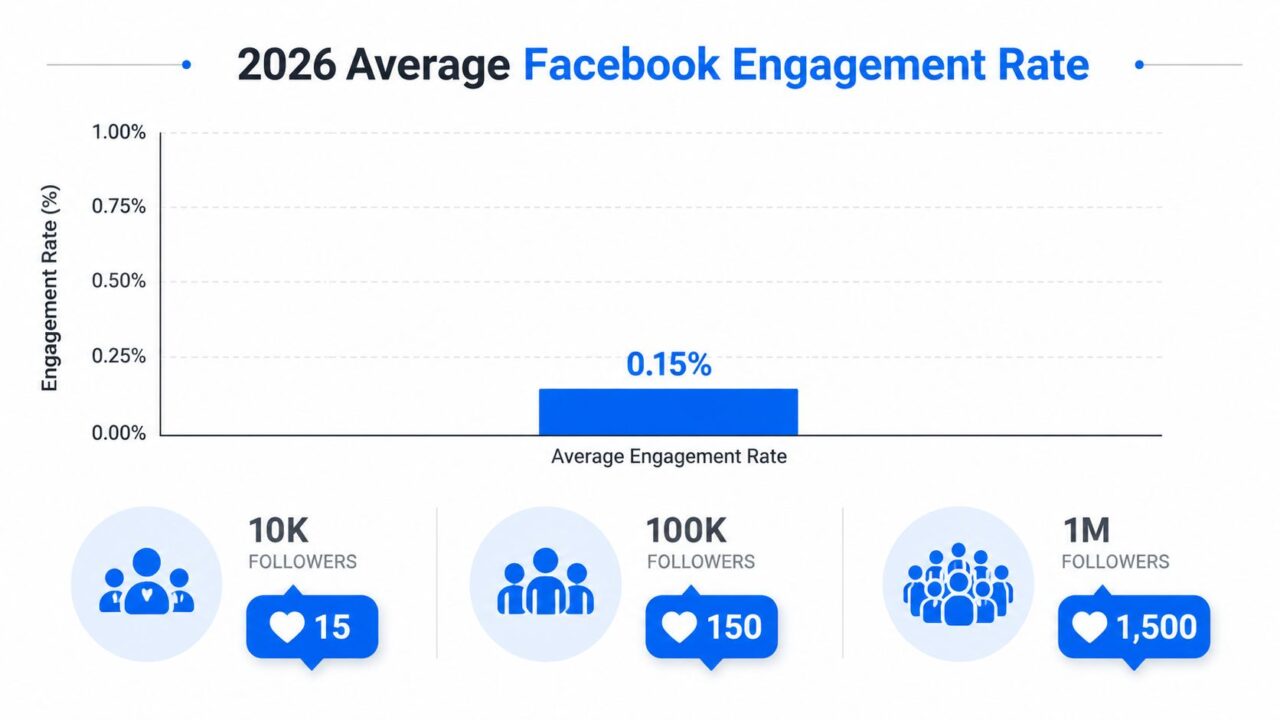
Facebook’s average engagement rate per post is reported at 0.15%, the lowest among major social platforms, and the benchmark is described as flat year over year (Sprout Social’s Facebook marketing benchmarks). At that rate, a page with 100,000 followers averages about 150 engagements per post, including reactions, comments, shares, and related interactions.
That changes the question. To get Facebook post likes, you can’t treat likes as a trophy you collect through more frequent posting. You have to earn enough relevant interaction to give each post a better chance of distribution, then turn that attention into conversations, leads, and sales.
Why Facebook Post Likes Are Harder to Earn in 2026
The organic baseline is unforgiving. A 0.15% average engagement rate means a page with 10,000 followers would average about 15 engagements, a page with 100,000 followers about 150, and a page with 1 million followers about 1,500, assuming the benchmark applies evenly. The benchmark includes reactions, comments, shares, and related interactions, so it isn’t a pure likes forecast, but it illustrates the scale challenge clearly.
Get Facebook Post Likes Engagement Rate
Socialinsider’s 2026 Facebook benchmark reports average organic engagement at about 0.15%, with image posts at 0.10% and status posts at 0.08% in Q2 2026. The same benchmark context points to a platform where organic interaction remains compressed, while private sharing has become more important than visible likes.
That’s why generic “get more likes” advice underperforms. Posting more often can create more opportunities, but it can’t compensate for weak relevance, poor creative, or an audience that doesn’t feel a reason to respond. A larger follower count also doesn’t guarantee proportional interaction.
Likes are a distribution signal
Likes still have value. They provide visible social proof, help a post demonstrate early relevance, and form part of the broader engagement signal used to evaluate content. Facebook’s engagement model includes reactions, comments, and shares, and industry benchmarks commonly calculate engagement by dividing those interactions by followers or reach (Buffer’s Facebook benchmarks).
The important distinction is between earning reactions and building distribution. A post can collect likes from an existing audience without generating meaningful reach, traffic, or conversation. Conversely, a post with a strong hook and useful content may earn comments and private shares that expand its practical impact beyond the visible like count.
Practical rule: Judge every like by what it helps the next person do. If it doesn’t improve reach, signal relevance, start a conversation, or support a conversion path, it’s only a surface metric.
For global brands and agencies, the benchmark also varies sharply by industry and market. Public datasets cited by Buffer show Facebook engagement ranging from around 0.02% to 2.2% across sectors, with retail, technology, and health-related categories often sitting within roughly 0.02% to 0.9%, while education and nonprofit categories can be higher. Those figures come from different benchmark contexts, so use them directionally, not as a promise for your page.
The operating mindset is simple: create posts that the right people want to react to, share, save, or discuss. Likes are one visible output of that process.
Post Formats and Creative Choices That Earn Reactions
Format affects the job a post can do. A product image can communicate quality quickly, while a founder video can create familiarity and a carousel can answer objections in sequence. The right choice depends on whether you want recognition, education, conversation, or a click.
| Format | Avg Engagement Rate | Best Use Case |
|---|---|---|
| Image post | 0.10% | Product context, social proof, visual announcements |
| Status post | 0.08% | Opinions, concise questions, community updates |
| Native video | Varies by audience and creative | Demonstrations, founder stories, customer education |
| Carousel | Varies by audience and creative | Step-by-step education, comparisons, product use cases |
| Link post | Varies by audience and creative | Articles, landing pages, product pages |
The benchmark figures for image and status posts come from Socialinsider’s Facebook benchmark report. The other formats don’t have a verified rate in the available data, so test them against your own reach and reaction patterns rather than assigning them a guaranteed advantage.
Build the creative around one reaction
Start with the first line. It should identify a problem, tension, preference, or outcome that your audience recognizes immediately. A skincare brand might open with, “Your cleanser may be doing more than removing makeup.” A SaaS founder might write, “We built the feature customers kept recreating in spreadsheets.”
Then make the visual prove the opening:
- Image posts: Show the product in use, not isolated against a generic background. Add a customer quote only when you have permission and a real source for it.
- Native video: Put the useful moment early. Demonstrate the workflow, ingredient texture, setup, or decision rather than opening with a long logo animation.
- Carousels: Give each card one job. Use the first card to create curiosity, the middle cards to explain, and the final card to offer a relevant next step.
- Text-only updates: Use a specific observation or an either-or question. “Which packaging would you choose?” gives people an easier response than “Thoughts?”
- Link posts: Make the caption useful on its own. Don’t force the reader to click before they understand why the destination matters.
For paid creative, keep captions concise when the ad’s purpose is immediate action. For organic storytelling, longer copy can work when every paragraph adds context or emotional stakes. The test isn’t caption length. It’s whether the reader has a reason to stop and respond.
Explore a broader framework for matching formats to goals in this guide to social media content types.
Two practical creative shifts
A DTC skincare team might replace polished product shots with a carousel showing real customer routines, texture, application, and the finished shelf setup. The likely gain comes from increased context and identification, not from the carousel label itself. People can see how the product fits into a life, which gives them more to react to.
A SaaS founder can record short videos explaining why a feature was built, what problem it solves, and what changed after customer feedback. Those videos often feel more credible than polished ads because the founder is addressing a real decision rather than presenting a generic promise. Track reactions per reach and comment quality before deciding which approach deserves more production time.
Cadence and Timing That Compound Reach
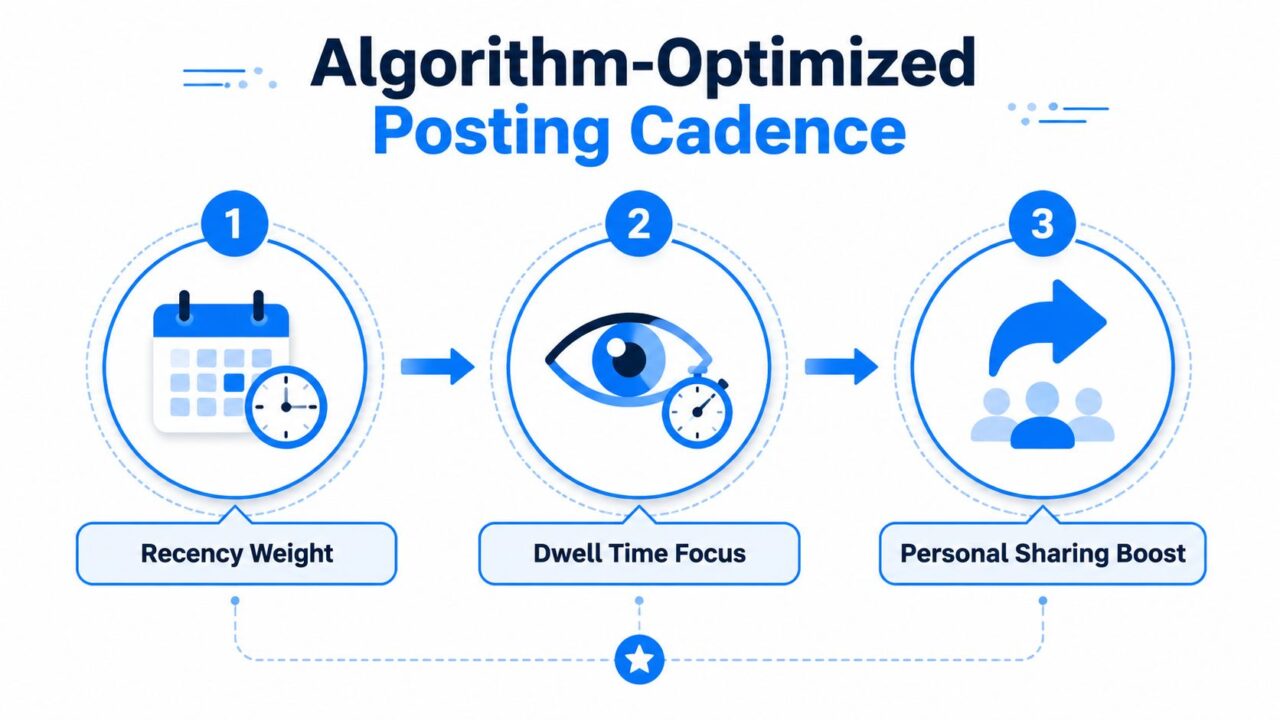
A posting schedule should create enough repetition for learning without flooding the audience with interchangeable content. The right cadence depends on your team, your format mix, and how quickly you can respond to comments.
Get Facebook Post Likes Posting Cadence
Use a sustainable weekly rhythm
For a small page, start with three to five posts a week. Give each post a distinct role, such as education, product proof, community discussion, and behind-the-scenes context. A mid-sized brand can publish daily while protecting one anchor post for the strongest creative, most useful offer, or most important announcement.
Creators with a deep content pipeline can publish two to three light posts a day, especially when they mix short updates and Stories-style formats. That pace only works when the content remains varied, and the creator can monitor responses. High frequency with low relevance trains people to scroll past.
Timing should come from your own Page Insights, not a universal posting chart. Review when your audience is active, then compare those windows with reactions per reach, comments, and meaningful clicks. The best time is the window in which your audience can respond, and your team can participate.
Coordinate the content calendar
Stagger evergreen reshares far enough apart that they feel useful rather than repetitive. Rewrite the opening, change the visual treatment, or add a new example before publishing again. Don’t recycle the same caption.
Coordinate Facebook with email sends, product drops, and ad flights. An email can introduce the problem, Facebook can demonstrate the solution, and Messenger can answer a product question after someone comments. The sequence gives each channel a job instead of forcing every post to carry the whole campaign.
The key to Facebook success isn’t just content; it’s the operating context around content, including timing, audience behavior, and the actions you take after people respond.
Publish when you can stay present. Early comments often need a human answer, not a scheduled post followed by silence.
Engagement Prompts That Don’t Trigger Meta’s Penalties
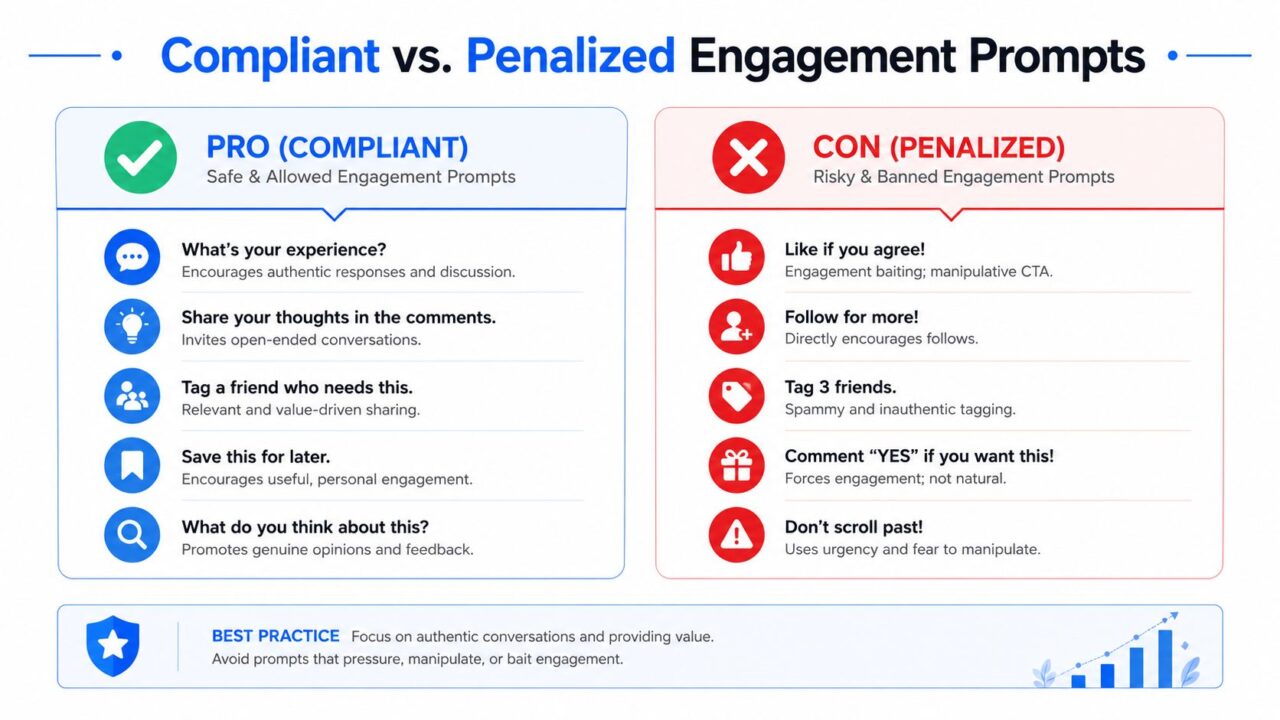
“Like if you agree” looks harmless, but it can turn a post into an empty engagement request. Meta defines engagement bait as posts that explicitly ask for likes, reactions, comments, tags, shares, or votes when the request isn’t tied to a specific useful call to action (Meta’s content distribution guidance).
That doesn’t mean you can’t invite interaction. It means the prompt needs to serve the content. Ask for a preference that helps someone choose a product, request an experience that informs the discussion, or invite a comment that gains a useful resource.
Get Facebook Post Likes Engagement Prompts
Replace empty asks with useful prompts
Use the post’s subject to create the interaction:
- Product preference: “Which finish would you use in a small room, matte or satin?”
- Experience question: “What made you switch from manual reporting to automation?”
- Fill in the blank: “The one skincare step I never skip is ____.”
- Decision prompt: “Would you rather have faster setup or deeper customization?”
- Feedback request: “Which part of this onboarding flow creates the most friction?”
- Specific reaction prompt: “React with the option you’d want us to explain in the next tutorial.”
A reaction prompt can be compliant when it’s connected to a meaningful choice. The problem is not the existence of a reaction request. The problem is asking for interaction as an end in itself.
Facebook also counts reactions as engagement in the same way it counts likes, and the platform uses that engagement value for ads and organic ranking (Ketchum’s explanation of Facebook reactions). Since a user can leave only one reaction per post or comment, design the post around one clear action rather than trying to extract repeated responses (Facebook’s reaction help documentation).
Audit your last ten posts
| Do | Don’t |
|---|---|
| Ask a product-specific question | Ask people to like the post without context |
| Request a useful preference | Demand tags from multiple friends |
| Invite a real customer experience | Use “like if you agree” as the entire CTA |
| Connect comments to a guide or answer | Offer no value after the interaction |
Public Facebook posts are likeable by everyone by default, including people who don’t follow the author, while page and profile owners can adjust who may like or comment through follower settings (Facebook’s audience and interaction settings). Check those settings before diagnosing a reach problem as a creative failure.
Paid Promotion Tactics That Buy Real Likes, Not Just Reach
Paid promotion works best when it amplifies a post that already earns genuine interest. It can’t make an irrelevant offer feel useful, and broad delivery can produce impressions without meaningful reactions.
Use the simple Boost control when speed matters and the post already has clear organic traction. Use Ads Manager when you need audience exclusions, retargeting, multiple creative variants, or a more controlled objective. A like-oriented campaign should still support a business purpose, such as building a warm audience for product education or opening a path to a conversation.
Build the audience around relevance
Start with people who resemble engaged followers or existing customers, where the necessary audience options are available. Retarget people who watched or interacted with the post, then exclude recent engagers from prospecting ad sets so you’re not paying to reacquire the same attention.
Your targeting checklist should include:
- Warm audiences: People who already interacted with your page, content, or video.
- Similarity audiences: Audiences modeled from engaged followers or customers.
- Geography: Locations your business can serve.
- Exclusions: Recent engagers, existing customers, or people who already completed the desired action.
- Creative alignment: A message that matches the audience’s awareness level.
For creative, reuse the winning organic hook and create three meaningful variants. Change one major element at a time, such as the opening line, visual, or CTA, so you can identify the reason for a difference. Don’t create a large batch of superficial variations that splits delivery and makes the result difficult to interpret.
A small local test
A local business could run a $15 per day test behind one flagship post, using a relevant local audience, a warm retargeting group where available, and exclusions for people who already engaged. The test should have one clear goal, such as reactions from potential customers who can visit or buy, rather than raw reach.
Review reactions per reach, comment relevance, profile visits, and downstream inquiries. If the post earns attention but no business action, improve the offer or follow-up before increasing spend. For a practical setup, compare the campaign structure with this guide to Facebook ads that convert.
Turning Post Engagement Into Conversations With Messenger Automation
A reaction is valuable, but a conversation is more useful. The strongest Facebook programs treat engagement as an opening signal, then give interested people an easy way to ask a question, receive a resource, or identify what they need next.
A typical post-comment flow starts with a specific offer. A DTC brand might publish a carousel about choosing a routine and ask people to comment with their skin concern. A SaaS company might invite comments from people who want a template. The automation responds privately, confirms the topic, and offers the next relevant step.
Get Facebook Post Likes Chatbot Marketing
A post-comment flow in practice
With a no-code Flow builder such as Clepher, the sequence can follow this structure:
- Comment trigger: A person comments on a selected Facebook post.
- Private message: The automation sends a Messenger reply acknowledging the interaction and presenting a clear option.
- Interest tag: The person selects a topic, such as product fit, pricing, setup, or a guide.
- Delivery: The bot provides the requested resource or directs the person to the relevant page.
- Human handoff: A sales or support representative takes over when the question needs judgment.
- Follow-up: The contact enters an appropriate broadcast segment for future educational content.
The key is consent and relevance. Don’t use a comment as permission to send unrelated promotions. Tell people what they’ll receive, keep the first message focused, and provide a clear route to a human when automation reaches its limit.
This approach changes the economics of a like. The reaction still contributes to visible engagement, but the associated conversation can reveal intent, answer objections, and create a permission-based follow-up opportunity. It also gives agencies a cleaner way to report value than presenting a larger reaction count without context.
See how brands can boost sales with Facebook Messenger automation by connecting engagement to qualification, support, and follow-up.
The flow can also support comment moderation and engagement operations, but automation shouldn’t impersonate a customer or manufacture enthusiasm. Use it to respond quickly and consistently, while keeping promotional claims accurate and the handoff obvious.
Tracking, Testing, and a 30-Day Action Plan
Likes are easier to improve when you stop treating them as the final KPI. Track reactions per reach, save behavior where available, comment quality, and link click-through rate. Then connect those signals to profile visits, qualified conversations, leads, or purchases.
A useful comment is not the same as a one-word reaction. A customer explaining a problem gives your team audience insight. A product preference can guide merchandising. A question about pricing can indicate purchase intent. Build reporting that separates those outcomes.
Run cleaner tests
Choose two creative variants for the same audience and publish them in comparable time windows. Change one major variable:
- Hook test: Problem-led opening versus outcome-led opening.
- Visual test: Customer context versus isolated product.
- Format test: Native video versus carousel.
- Prompt test: Preference question versus experience question.
Use the same measurement window and compare reactions per reach, comment quality, saves, and clicks. Don’t declare a winner because one post has more total likes if it also reached a much larger audience. Normalized metrics help you judge creative more fairly.
The 30-day operating plan
Week one is for the audit. Review recent posts, identify recurring themes, check your Page Insights, and record the formats and prompts attached to the strongest reactions. Confirm that public posts can receive the interaction you want, using the relevant Facebook settings.
Week two is for format testing. Publish a controlled mix of images, native video, carousels, and text updates. Keep the subject matter consistent enough to compare the creative decision rather than comparing unrelated offers.
Week three is for amplification. Put paid support behind the strongest organic post, use relevant targeting, and monitor whether the added reach produces qualified interaction instead of passive delivery.
Week four is for follow-up. Connect the best post to a Messenger flow, define the comment trigger, segment by interest, and route complex questions to a person. Document the result so the next month starts with a stronger hypothesis.
Operating loop: Post, measure, double down, automate. Then use the conversations to create the next post.
You don’t need a complicated dashboard. A spreadsheet with post URL, format, reach, reactions, useful comments, clicks, conversations, and business outcomes is enough to start. The discipline comes from reviewing it every week and making one deliberate change at a time.
Clepher helps teams connect Facebook engagement to Messenger conversations through no-code flows, comment triggers, segmentation, and human handoffs. Visit Clepher to see how you can turn more relevant post reactions into structured follow-up for your brand or clients.
