
Private messaging on Facebook isn’t a side feature anymore. Messenger has over 1 billion monthly active users, users send 8 billion messages per day, and start 260 million new conversations every day, according to Sprout Social’s Facebook stats roundup. That scale changes the meaning of a simple question like how to inbox someone on Facebook.
For businesses, creators, and service teams, the inbox is where interest turns into action. It’s where a buyer asks about stock, a lead requests details, or a customer tries to fix a problem before giving up. If you know the buttons to click, that helps. If you understand the context, filters, rules, and etiquette behind Facebook messaging, you’ll use it much more effectively.
Why Facebook Messaging Is a Skill Worth Mastering
As of early 2026, Facebook still reaches billions of users worldwide. For a business, that means the inbox is not a side feature. It is one of the fastest paths from interest to action.
A Facebook message can start a sale, recover a hesitant buyer, confirm a booking, or prevent a support issue from turning into a public complaint. Email still has a role. Contact forms still have a role. Messenger often wins when someone wants a quick answer inside an app they already use every day.
Why marketers care about the inbox
Messenger gets attention in a way many other channels do not. People open it casually, use it throughout the day, and expect shorter response times. That changes how businesses should view messaging.
If you run a small business, messaging needs a process. It should connect with the rest of your marketing and sales system, not sit off to the side. That is one reason many teams invest in systems that turn your website into a revenue engine instead of treating website traffic and social conversations as separate efforts.
Speed also affects results. A slow reply can send a buyer to another seller before your team even sees the message. If your team is still handling replies manually, this guide on responding fast enough on social media is useful because response time shapes what happens next in direct conversations.
Practical rule: The business that replies clearly and quickly in Messenger often gets the next step, whether that is a sale, a booking, or a support resolution.
Why basic tutorials miss the point
Many basic tutorials focus only on the mechanics of sending a message. The main challenge is choosing the right approach for the relationship, the setting, and the business goal.
Facebook messaging does not work the same way in every situation:
- A friend or personal contact usually sees a direct message in a familiar chat flow.
- A Page may respond through Messenger prompts, saved replies, or automation.
- A sales or support workflow may need opt-in, tagging, routing, or handoff rules.
- A non-friend may get your message as a request instead of in the main inbox.
That difference is the part that basic how-to articles skip. Knowing how to inbox someone on Facebook means understanding where your message will land, how the recipient is likely to see it, and what kind of reply experience you are creating. For marketers, service teams, and local businesses, that is not a small detail. It directly affects response rates, trust, and conversion.
The Core Methods for Sending a Facebook Message
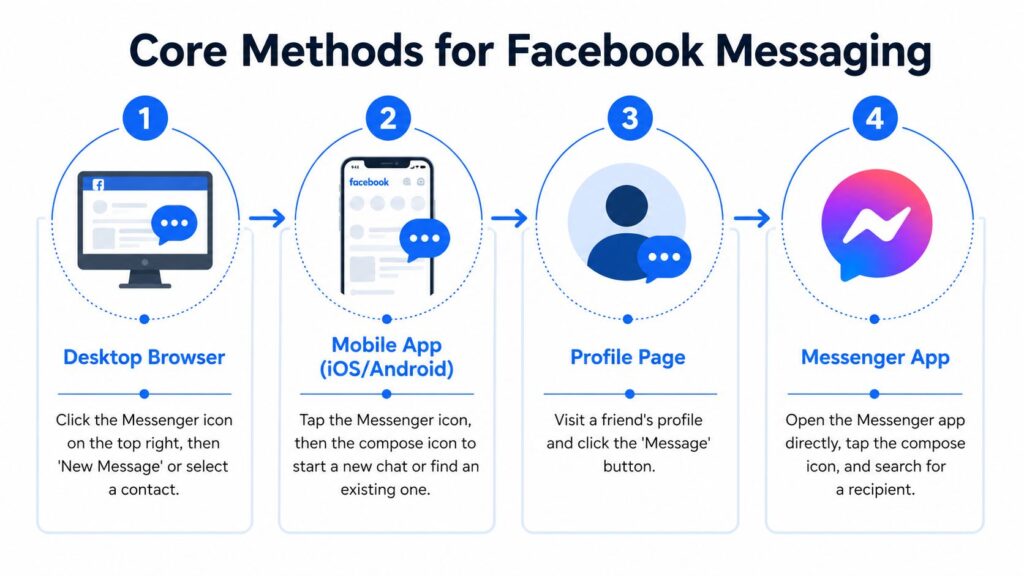
If you want the most reliable workflow, use Messenger directly instead of hunting around profiles and side menus. Facebook’s help documentation describes the desktop flow as opening Messenger, clicking Start a new message, typing a name into the To field, selecting the recipient, then writing the message and pressing Enter or clicking send through Facebook’s desktop messaging instructions.
How to Inbox Someone on Facebook Messaging Methods
Desktop browser
On a desktop, the cleanest approach is usually inside Facebook’s Messenger area.
Open Facebook, go to Messenger from the left-side navigation, and choose Start a new message. In the To field, begin typing the person’s name. Facebook will show matching accounts, and you should pause long enough to confirm you’ve picked the right one before typing anything.
After that, write your message and send it.
Desktop is strong for a few reasons:
- You can verify the account more carefully before sending.
- You can manage multiple threads faster if you’re handling support or leads.
- You’re less likely to lose your place than when jumping in from random profile pages.
From a person’s profile
Facebook also lets you message someone directly from their profile. If the profile has a Message button, click it and a chat window opens. That’s useful when you’re already viewing the right person and want to avoid searching again.
This route works well when context matters. For example, if you just checked a creator’s profile, a collaborator’s page, or a local customer’s account, messaging from the profile reduces the chance of picking the wrong John Smith in search.
When names are common, profile-first messaging is often safer than search-first messaging.
Mobile Facebook app
The mobile Facebook app can still get you to a conversation, but the exact flow depends on what kind of account you’re contacting.
In many cases, you’ll tap the Messenger icon from inside Facebook and continue in Messenger. If you’re trying to reach a person you already know, that handoff is simple. If you’re contacting a Page, the app may push you toward the separate Messenger app rather than handling everything natively.
On mobile, use this mental checklist:
- Check the profile or Page first so you know you’re contacting the right account.
- Expect an app switch if Facebook pushes the conversation into Messenger.
- Keep the first message concise because mobile typing increases the chance of rambling.
Messenger app
If you message people often, the standalone Messenger app is usually the fastest path.
Open Messenger, tap the compose option for a new chat, search the recipient, choose the right account, then type your message. For frequent messaging, this is usually more efficient than navigating through the main Facebook app.
A simple comparison helps:
| Method | Best use | Main advantage |
|---|---|---|
| Desktop Messenger | Workflows, support, outreach | Clearer recipient selection |
| Profile Message button | One-off contact from a known profile | Good context, fewer search errors |
| Facebook mobile app | Casual navigation into chat | Convenient if you’re already browsing |
| Messenger app | Frequent direct messaging | Fastest repeat behavior |
If your goal is just learning how to inbox someone on Facebook, any of these can work. If your goal is to do it consistently without mistakes, Messenger search or profile-based messaging are usually the safest choices.
Messaging Beyond Friends Pages, Marketplace, and Groups
Messaging on Facebook changes once you move outside personal contacts. The interface shifts, expectations shift, and the first message often matters more because the person doesn’t know you yet.

How to Inbox Someone on Facebook Marketing
Messaging a Facebook Page
A Facebook Page is not the same as messaging a friend. Some guides note that messaging a Page on mobile often requires the Messenger app, and the risk of sending to the wrong person increases because of autocomplete behavior in the To field, as explained in this guide to messaging a Facebook Page.
That has two practical effects.
First, don’t assume the Facebook app alone will handle everything cleanly on mobile. Second, verify the Page before you send, especially if several businesses have similar names.
Marketplace conversations
Marketplace messaging is more transactional.
People expect direct questions like availability, pickup details, condition, or delivery. Long introductions usually slow the exchange down. If you’re a seller, reply with specifics. If you’re a buyer, mention the item clearly so the seller doesn’t have to guess which listing you mean.
Good Marketplace messages usually include:
- The item reference so the other person knows what you mean.
- A clear question, such as availability or condition.
- A next action, like preferred pickup time or shipping question.
A good Marketplace message sounds like a transaction with a human, not a sales script.
Group-related messaging
Groups are more sensitive because they sit between public discussion and private outreach.
If someone comments in a Group and you immediately message them without context, that can feel intrusive. The better approach is to reference the thread, explain why you’re reaching out, and keep the message relevant to the conversation they already joined.
For agencies, coaches, and local businesses, restraint is especially important. A private message connected to a real discussion can build trust. A copy-paste pitch sent to multiple Group members usually damages it.
Navigating Message Requests and Privacy Filters
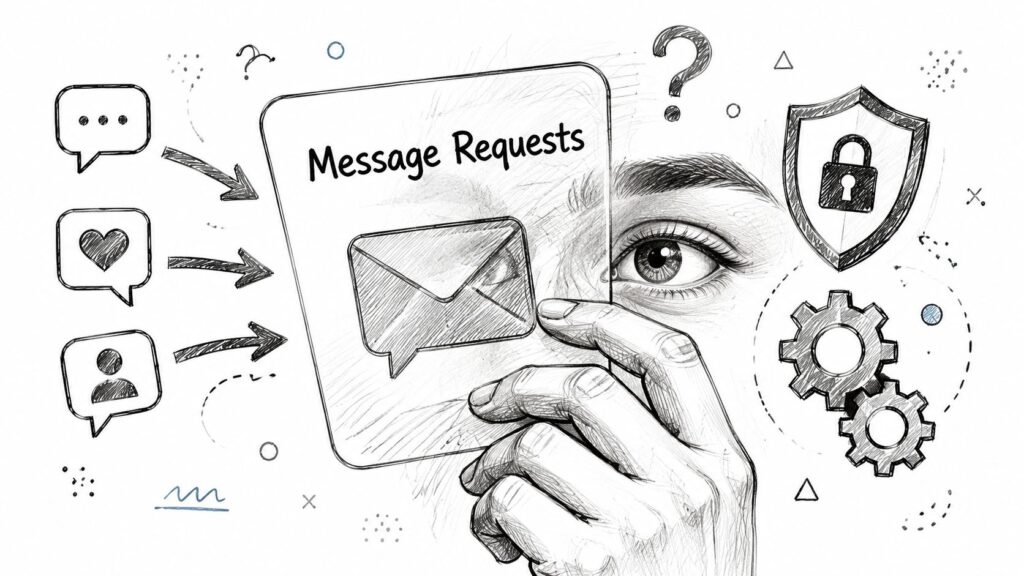
One reason Facebook messages seem to disappear is that not every message lands in the main inbox. Messages from people outside an established relationship may be filtered, which is why senders often wonder whether the other person even saw what they wrote.
How to Inbox Someone on Facebook Message Requests
Why your message may not feel delivered
If you’re messaging a non-friend, Facebook may treat that conversation differently from an existing contact thread. The platform uses request and filtering layers to separate familiar contacts from less certain ones.
That means your message can be technically sent but not immediately surfaced with the same visibility as a normal inbox conversation. This is often the hidden reason cold outreach performs worse than expected on Facebook.
Where to check your own requests
If you think someone messaged you and it didn’t show up in your primary conversations, check your message requests inside Messenger settings and inbox views. This walkthrough on Messenger settings and request management can help you find the relevant areas.
What to look for:
- Message Requests for people who aren’t in your regular contact list.
- Filtered or less prominent conversations that don’t appear in your main thread list.
- Spam-like requests if the message was generic or triggered suspicion.
What this means for outreach
If you’re sending a first message to someone new, write as if the preview text has to do the heavy lifting.
Use their name if appropriate. State the reason for contact early. Don’t drop a giant paragraph, a hard pitch, or a suspicious link in the opener. Those choices make it easier for the recipient to ignore the message even if Facebook delivers it.
The key question isn’t only “Did it send?” It’s “Did it land in a way the other person would want to open?”
Facebook Messaging Etiquette and Best Practices
The technical side of messaging is easy. The human side is where most conversations fail.
A Facebook inbox is a personal space. Even in business settings, people expect relevance, clarity, and respect. If your message feels copied, vague, or overly familiar, they’ll ignore it.
What gets better responses
A strong first message usually has three traits:
- It’s specific. Mention the product, post, service, or context that prompted the message.
- It’s short. Whether to continue is often decided at first glance.
- It respects the relationship. A warm lead can handle a direct ask. A stranger usually can’t.
For example, if someone asks about shipping on your post, reply with the answer and the next step. Don’t turn it into a full brand story.
Field note: The best Facebook messages sound like a helpful person continuing a conversation, not a funnel pretending to be one.
What to avoid
Some habits lower reply rates immediately:
- Copy-paste intros that could apply to anyone.
- Multiple follow-ups too fast when the other person hasn’t engaged.
- Overloaded first messages with links, offers, attachments, and long explanations.
- False familiarity, such as acting like you already have a relationship.
This matters for brands too. A business page shouldn’t sound robotic, but it also shouldn’t sound like a stranger trying too hard to be casual.
A simple messaging standard for teams
If more than one person handles your inbox, create a lightweight standard:
- Opening line rules so replies stay on-brand.
- Response priorities for support, sales, and spam.
- Escalation cues for refunds, complaints, or sensitive issues.
- Tone guidance so one teammate doesn’t sound polished while another sounds dismissive.
That kind of consistency makes Facebook messaging useful at scale, not just manageable.
From Manual Messages to Automated Conversations
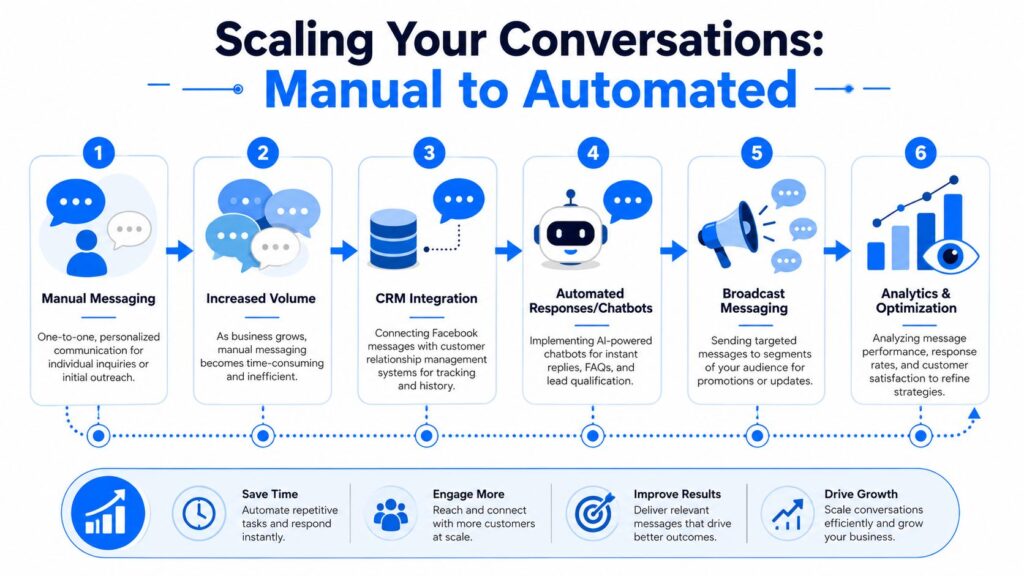
Manual messaging is enough until response volume starts costing you sales.
A founder can answer a few inbound questions. A local business can manage booking requests. An e-commerce team can handle product questions by hand for a while. Then the inbox fills up across evenings, weekends, ad campaigns, and comment-driven spikes. At that point, speed drops, replies get inconsistent, and good leads go cold before anyone gets back to them.
How to Inbox Someone on Facebook Automation Process
The rule that shapes everything
One platform rule changes how Messenger should be used for business. A business cannot programmatically start a Messenger conversation with a user. The person has to initiate it first, as stated in Meta’s Messenger send message documentation.
That has real strategic consequences. Messenger is not a cold outreach tool. It works best as a permission-based channel for support, lead qualification, appointment handling, and post-click sales conversations. Teams that ignore that distinction usually build the wrong workflow from the start.
What scaling looks like in practice
Once someone messages you first, automation can handle the repeatable parts of the conversation. That includes routing, FAQ replies, lead capture, intent tagging, and follow-up paths based on what the person asked. This makes tools like Facebook Messenger auto reply workflows practical because they help businesses reply fast without forcing staff to type the same answers all day.
The trade-off is simple. Automation improves speed and consistency, but only if the flow is narrow, clear, and easy to exit. If a customer has a basic question about hours, shipping, or availability, automation saves time. If they have a complaint, a pricing objection, or a high-value buying question, a human should take over quickly.
Clepher is one option in this category. It supports chatbot flows, broadcasts, segmentation, and live chat across Messenger and other channels. Used well, tools like that do not replace real conversations. They reduce repetitive work, so your team can focus on buyers, service issues, and conversations that need judgment.
That is the bigger point. Learning how to inbox someone on Facebook is the entry-level task. Building a system around those incoming messages is what creates business value through qualified leads, resolved support issues, and repeat purchases.
If Messenger is becoming a larger part of how customers ask questions, buy, and get support, Clepher offers a no-code way to automate Facebook Messenger conversations, organize inbound chats, and keep responses consistent without relying on manual replies for every interaction.

Related Posts
Customer Journey Automation: The Practical Guide
October 10, 2026Lead Qualification Marketing: A Practical 2026 Guide
October 9, 2026Customer Experience Optimization Playbook
October 8, 2026
Founder Clepher