A customer adds a cleanser, moisturizer, and serum to a cart, enters a phone number, then disappears before payment. Your email reminder may arrive after the shopping intent has cooled. Send a WhatsApp message instead, and it reaches the customer in the conversation channel they already use, but only if you’ve earned permission, selected the right message category, and built delivery logic that survives real-world failures.
That’s the difference between learning to send a WhatsApp message and building an automation that converts. The mechanics matter, but trust, consent, approved templates, language, timing, and measurement determine whether your number stays healthy and your campaigns produce useful replies.
Why Automating WhatsApp Messages Changes the Game
An abandoned cart is rarely a technology problem. The store already knows what the customer viewed, what they added, and where checkout stopped. The commercial problem is choosing a follow-up that feels expected rather than intrusive.
A permission-based WhatsApp flow can acknowledge the cart, answer a question, offer a direct route back to checkout, and hand the conversation to a person when automation reaches its limit. Email still has a role, especially for longer-form education and receipts, but WhatsApp brings the follow-up into a more conversational environment.
A WhatsApp Business source reports a 98% open rate for WhatsApp marketing messages, compared with an average email open rate of about 20%. The same source reports that 45% of text messages receive a response, eight times the response rate for email. Treat these reported WhatsApp and email engagement benchmarks as expectations, not promises. Audience quality, consent, relevance, market, and timing still decide the outcome.
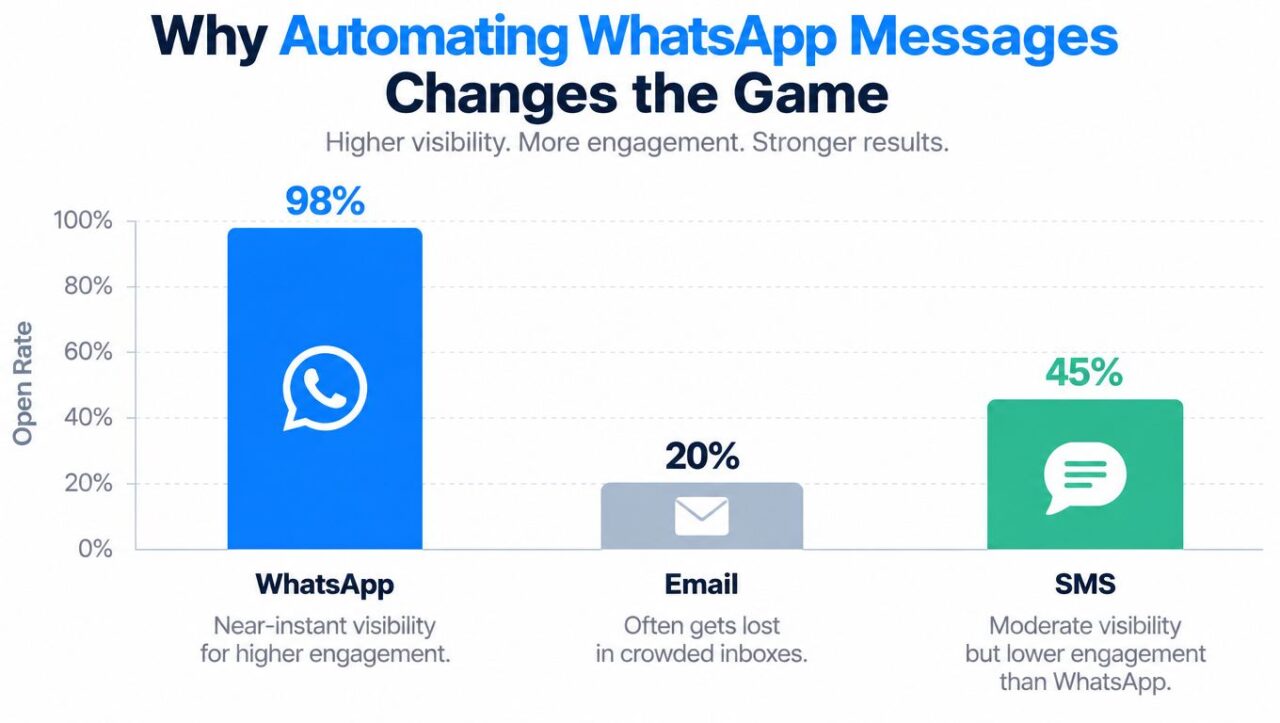
Send Whatsapp Message Open Rate Comparison
WhatsApp’s scale makes the channel commercially relevant beyond a narrow messaging niche. Brian Acton and Jan Koum founded WhatsApp in 2009, the iPhone version launched later that year, and the service grew from status sharing into direct messaging. It reached approximately 200 million active users by early 2013, 500 million users in 2014, more than 1 billion users by 2016, and crossed 2 billion users globally by 2020, according to Britannica’s WhatsApp history.
The rest of the work comes down to three operating foundations:
- Opt-in: The customer understands what they’ll receive and agrees to receive it.
- Templates: Each proactive message fits its approved purpose instead of disguising promotion as service.
- Delivery: Your workflow handles webhooks, retries, time limits, regional rules, and opt-outs.
If the checkout experience or campaign landing page creates doubt, messaging won’t repair it. Teams refining acquisition should also review resources such as best landing page design for UK firms because conversion friction often starts before the WhatsApp conversation.
For the channel and account fundamentals, see WhatsApp for Business. The practical target is simple: send a relevant message to a person who expects it, make the sender recognizable, and give the recipient an easy next action.
Choosing Your WhatsApp Setup Path
Your infrastructure choice affects how quickly you can launch, how much engineering you’ll maintain, and how much control you have over delivery data. There are three sensible paths for a business that wants to send WhatsApp messages beyond occasional manual replies.
| Path | Setup Time | Best For | Trade-off |
|---|---|---|---|
| WhatsApp Business Platform Cloud API direct | Longer, because your team owns configuration and integration | Engineering-led teams that need direct API control | More development, webhook handling, template operations, and monitoring |
| Meta-approved Business Solution Provider | Moderate, with onboarding support | Teams that need managed infrastructure, shared inbox features, or implementation help | Less direct control and an additional provider relationship |
| No-code automation platform | Shorter for marketing teams with approved access and connected WhatsApp infrastructure | E-commerce, agencies, SaaS, and small teams building flows without custom code | You work within the platform’s flow and integration model |
Direct Cloud API
The direct route gives developers the clearest control over phone-number validation, request handling, idempotency, webhook processing, retries, and analytics. It also gives your team the largest maintenance burden. A production integration must store consent, resolve template variables, process asynchronous status events, and route replies according to the customer-service window.
Choose it when your product already has strong engineering ownership, and WhatsApp is part of a larger application rather than only a campaign channel.
A Business Solution Provider
A Meta-approved Business Solution Provider can reduce implementation work and may add agent inboxes, onboarding, monitoring, and operational support. This suits companies where several people need to manage customer conversations or where the team doesn’t want to own every API detail.
The trade-off is dependency. Compare data access, template workflows, escalation tools, reporting depth, pricing, and exit terms before committing.
A no-code platform
A no-code platform fits marketers who need to connect triggers, tags, segments, conditions, approved templates, and follow-up logic without asking developers to build every campaign. Look for WhatsApp flow building, audience segmentation, template management, analytics, keyword triggers, and integrations that connect messaging to the rest of your marketing stack.
No-code doesn’t remove policy work. You still need explicit consent, approved templates, accurate variables, and delivery monitoring. It removes repetitive implementation so the team can spend more time on segmentation, copy, and response handling.
Getting Clean Opt-In Before You Send Anything
The most expensive mistake in WhatsApp marketing is treating a phone number as permission. It isn’t. WhatsApp’s policy requires businesses to have both the person’s mobile number and explicit opt-in permission before sending subsequent WhatsApp messages or calls. A customer messaging your business first doesn’t automatically authorize future promotional or proactive outreach. WhatsApp’s Business Messaging Policy makes that distinction operationally important.
Permission is a customer expectation, not a database field. Store what the person agreed to receive, when they agreed, and where the agreement happened.
Use an explicit consent moment
At checkout, separate transactional and promotional choices. A useful example is:
“Yes, send me order updates on WhatsApp.”
For marketing, use a different line:
“Yes, I’d like to receive product alerts and promotional offers from [Brand] on WhatsApp. I can opt out at any time.”
Don’t bundle marketing permission into a vague “agree to terms” statement. If a customer consents to delivery updates but not promotions, your data model must preserve that difference. WhatsApp’s Business Terms require businesses to obtain the necessary rights, consents, and permissions to share customer data with WhatsApp and communicate through the service. Read the operational requirements in WhatsApp’s Business Terms.
A click-to-WhatsApp ad can create a clear starting point. The ad should explain the destination and expected exchange, such as “Message us on WhatsApp for a skincare routine recommendation.” When the person opens the chat, capture the source, campaign, timestamp, and the stated purpose.
A website widget works well for support and lead capture. Use a prompt such as:
“Message us on WhatsApp to get help choosing a plan.”
The first interaction should make the business identity obvious and avoid asking for payment details or one-time codes before the recipient knows who is contacting them.
Record proof and make opting out easy
A keyword flow can also capture permission after a previous touchpoint:
“Reply ROUTINE to receive skincare recommendations and occasional product news on WhatsApp.”
Store the phone number, consent wording, timestamp, source URL or campaign, purpose, and opt-out status. Keep transactional and marketing tags separate. If the customer sends “STOP,” “UNSUBSCRIBE,” or an equivalent request, suppress the relevant message category promptly.
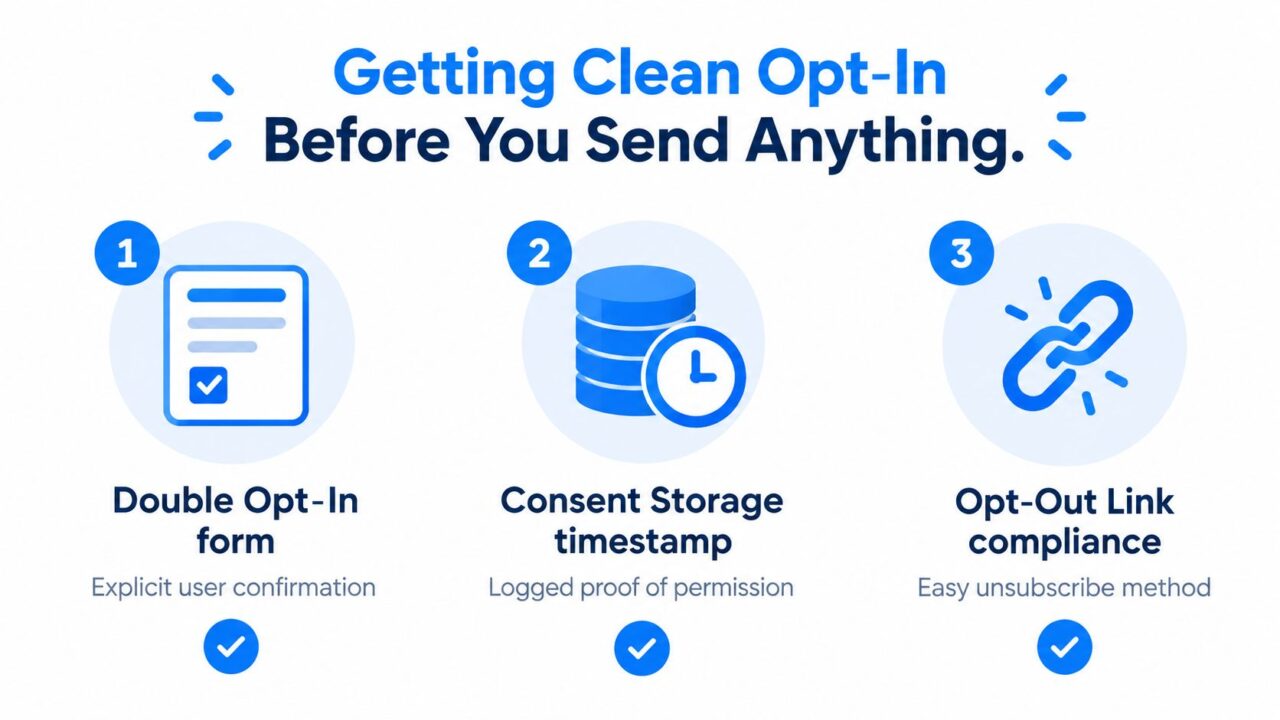
Send Whatsapp Message Opt In Guide
For the consent record, preference updates, and compliance workflow, see our guide to consent management and GDPR and align it with your existing customer data process. The key result isn’t a larger list. It’s a list you can explain and defend.
Building Templates That Meta Approves and Customers Read
Opt-in gives you permission to contact someone. It doesn’t approve every message you might want to send. Each proactive WhatsApp message must fit an approved template and a defined purpose.
Send Whatsapp Message Illustration
The three broad categories are:
- Marketing: Offers, product announcements, reactivation, recommendations, and promotional drops.
- Utility: Order updates, shipping notices, appointment changes, account alerts, and other requested service information.
- Authentication: One-time passcodes and identity verification messages.
The category must match the actual content. Calling a discount “an account update” won’t make it utility. Meta evaluates template quality through customer feedback and engagement. Negative feedback or low engagement can lead to a template being paused or disabled, while pacing may temporarily hold delivery so early feedback can be assessed.
A utility template
Header: Order update
Body: “Hi {{1}}, your order {{2}} has been packed and is being prepared for dispatch.”
Footer: “Reply HELP if you need assistance.”
Here, {{1}} maps to the customer’s name and {{2}} maps to the order number. Don’t put a promotional claim into the body or add a product recommendation to the footer. The purpose is service communication.
A marketing template
Header: New skincare drop
Body: “Hi {{1}}, the barrier-repair set you viewed is now available. See the collection: {{2}}.”
Footer: “Reply STOP to opt out.”
Here, {{1}} is the customer’s name and {{2}} is the approved collection URL. The message is clearly marketing, so submit it as marketing and ensure the recipient has the corresponding promotional opt-in.
Header, body, footer, and buttons each affect comprehension. Use the header to establish context, the body to deliver one clear idea, the footer for concise guidance, and call-to-action buttons for actions such as “View order” or “Speak to support.” Keep variables tightly scoped. Don’t insert a total where the template expects an order number, and don’t use an open-ended variable to inject copy that changes the message’s approved meaning.
Our guide to WhatsApp Business message templates covers how to organize the approved assets your flows need. Before submission, test names, order numbers, totals, URLs, missing values, long values, and language variants. Approval isn’t the finish line. A template that produces blocks or opt-outs is a deliverability liability even if Meta initially accepts it.
An accepted request is not the same as a delivered message, so treat every send as a controlled experiment, not a guaranteed result.
Wiring Up the Automation in a No-Code Builder
Once consent is recorded and templates are approved, the flow builder becomes the decision layer. The objective isn’t to blast a list. It’s to match a trigger, audience, language, message purpose, and next action.
Connect the channel and audience
Start by connecting the WhatsApp Business Platform account used for sending. Import or sync contacts with consent tags rather than importing a raw phone-number file. Useful fields include:
- Consent status: Transactional, marketing, both, or withdrawn.
- Source: Checkout, widget, click-to-WhatsApp ad, or keyword.
- Language: The customer’s stated or detected preference.
- Lifecycle stage: Subscriber, cart abandoner, customer, or support case.
- Last inbound time: Required for routing free-form replies inside the customer-service window.
Then create a flow around a meaningful trigger. An abandoned-cart event, new subscriber, birthday, order status change, or support keyword can start the path. The trigger should carry enough context to personalize the message without asking the recipient to repeat information they already provided.
Add conditions before the send node
A language condition can route English and French contacts to different approved templates. A segment condition can separate first-time buyers from existing customers. A consent condition should stop the flow when the required permission is absent or withdrawn.
Personalization tags can insert the customer’s name, order number, product, total, or checkout link. Use only values your system validates. A blank name is better handled with a neutral greeting than sent as “Hi {{name}}.”
Typing indicators and AI keywords can make a conversation feel less abrupt when the flow expects a reply. For example, a customer who replies “routine” can enter an AI-assisted product recommendation path, while “agent” can route directly to live chat. Keep escalation visible. Automation should reduce effort, not trap a customer inside an endless menu.
Place the approved template into the flow
Drop the relevant approved template into the node that sends the message. Map every variable explicitly, attach the correct media asset, and add a branch for failures or missing data. If the customer replies, hand the conversation to the reply path. If the customer doesn’t reply, use a separate delay node and check whether the cart, order, or support issue is still relevant before sending anything else.
The flow should also prevent duplicates. Store a campaign or journey identifier, check whether the customer already received the step, and avoid restarting the same sequence when an unrelated event arrives.
A Real Abandoned-Cart Sequence Walkthrough
A DTC skincare brand wants to recover carts without turning a purchase reminder into a pressure campaign. The customer arrives through a click-to-WhatsApp ad offering help with choosing a routine, then provides permission for product recommendations and promotional offers.
The first event creates the contact and applies the cart_abandoner tag. The flow stores the viewed product, cart URL, preferred language, and consent source. It doesn’t immediately send a discount. The brand first confirms that the customer’s selected item is still available and gives them a direct route back to the cart.
The first message after the cart event
After a short delay, a marketing template uses:
“Hi {{1}}, the {{2}} you added is still in your cart. You can review it here: {{3}}.”
Variable mapping:
{{1}}becomes the customer name.{{2}}becomes the product name.{{3}}becomes the customer’s cart URL.
The message contains no discount, but Meta generally classifies cart reminders as marketing, so submit it as a marketing template and send it only to contacts with marketing consent. If the customer replies with a product question, the flow routes to an AI keyword or human support path instead of continuing the reminder sequence.
The promotional follow-up
A later step can add an explicit offer, again as a marketing template sent only with marketing consent:
“Hi {{1}}, the {{2}} is still waiting in your cart. Use {{3}} to complete your routine.”
Here, {{3}} is a promotion code, not a generic order variable. The template must be submitted as marketing, and the flow should suppress it if the cart has already converted, the customer opted out, or the product is no longer eligible.
If the customer doesn’t reply, don’t assume silence means interest. Check delivery and read status, then allow the sequence to end cleanly. A final reminder can say:
“We’re closing this cart reminder. You can return to your saved items here: {{1}}.”
That message should only be sent if it matches the approved purpose and the cart remains relevant. Otherwise, stop after the earlier touchpoint.
This sequence works because each step has a different job. The first restores context, the second presents an explicit offer, and the last closes the loop. For broader lifecycle planning, effective email automation for 2025 is a useful complementary resource. WhatsApp shouldn’t replace every email. It should handle conversations where immediacy and reply access matter.
The 24-hour routing window is critical for the reply path. Free-form replies are permitted during the 24-hour customer-service window after the customer’s latest message. Outside that window, the flow must use an approved template. Store the latest inbound timestamp and route accordingly. A customer reply can change the next action, but it doesn’t erase consent or template requirements.
Testing and Measuring What Actually Works
A send request is not a delivery result. Before launching, validate the recipient’s international phone-number format, confirm that the template is approved, resolve every variable and media asset, check consent, segment by country and language, and run a small holdout test. Regional eligibility matters too. Meta stated that marketing template delivery to U.S. phone numbers was temporarily paused from April 1, 2025, so global campaigns need a current policy check rather than an assumption that one rule applies everywhere. Meta’s message-template documentation provides the relevant operational context.
| Stage | Event | What It Tells You |
|---|---|---|
| Request | Accepted | The API received the request. It isn’t proof of delivery. |
| Sending | Sent | The platform accepted the message for processing. |
| Delivery | Delivered | The message reached the recipient’s WhatsApp account. |
| Attention | Read | The recipient opened the message. |
| Conversation | Replied | The recipient took a measurable action. |
| Failure | Failed | The send needs diagnosis, not an automatic blind retry. |
| Risk | Blocked | The audience or message may be damaging sender quality. |
| Preference | Unsubscribed | Future messages in the relevant category must be suppressed. |
Use provider or API webhooks to track these events. Segment results by country, template, language, audience source, and send time. The dated benchmark of 100 billion WhatsApp messages per day in 2021, alongside approximately 2 billion monthly users, shows why aggregate platform scale isn’t a useful substitute for your own campaign data. The benchmark and its limitations are documented in WhatsApp’s messaging milestone reporting.
Pause a template when blocks rise, or replies fall, even if the sent count looks impressive. Check consent source, language comprehension, offer relevance, variable accuracy, and regional restrictions before changing copy and resubmitting. Don’t retry permanent failures, and use TTL, deduplication, and transient-error handling so stale messages and duplicate promotions don’t reach customers.
Operational rule: Scale only after delivered, replied, blocked, and unsubscribed events remain acceptable in the specific segment you tested.
Run the same routine before every broadcast. Permission first, approved purpose second, delivery evidence third, and customer action fourth.
WhatsApp automation works best as one part of a wider conversational strategy. If Messenger and Instagram are also in your mix, Clepher gives teams a no-code way to build triggers, conditions, segments, personalization, and conversational follow-up for those channels. Visit Clepher to build your first automated flow.