
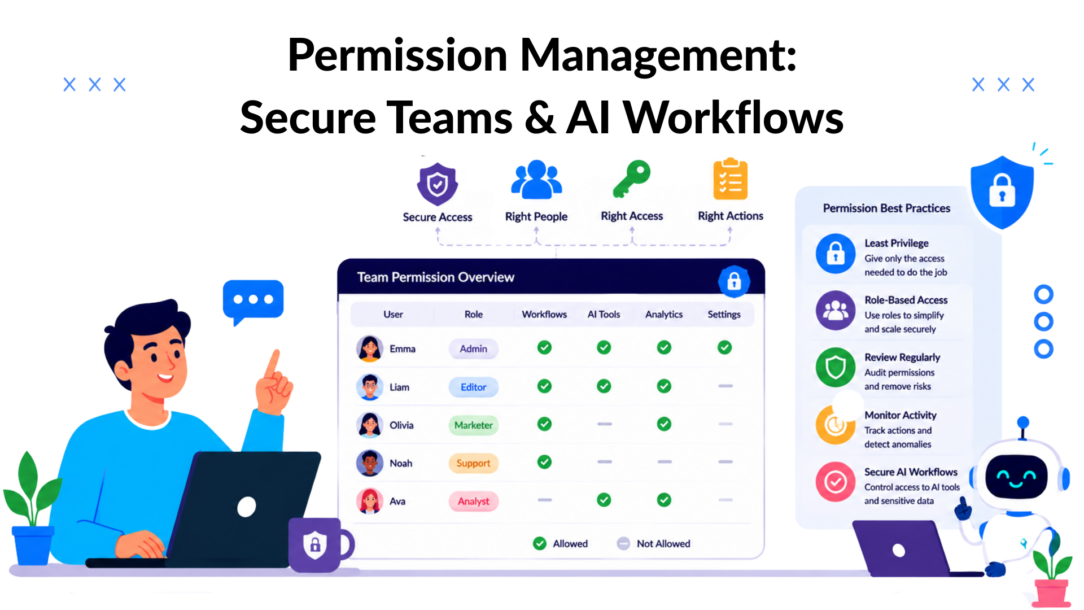
74% of all data breaches involved the misuse of a privileged account, according to Verizon’s 2019 Data Breach Investigations Report. That single number changes how marketing teams should think about permission management.
Many organizations still treat permissions like a back-office IT checklist. Add a user. Pick a role. Move on. That approach breaks fast when you’re running paid campaigns across multiple brands, giving freelancers temporary access, connecting AI agents to customer data, and handing support conversations between humans and bots.
For marketing operations, permission management isn’t just about blocking the wrong person. It’s about giving the right person, or the right AI workflow, access to the right data at the right time without slowing down campaign execution. When permissions are designed well, launch approvals move faster, client visibility improves, chatbot flows stay compliant, and teams stop tripping over each other.
When permissions are designed badly, you get access sprawl, delayed personalization, and a mess nobody wants to audit.
Why Permission Management Is a Marketing Superpower
Permission management becomes a growth lever the moment your team depends on shared customer data, campaign assets, and automation workflows.
A marketer needs access to audience segments but not billing controls. A support rep needs order status and conversation history but not full payment records. An AI chatbot needs enough context to qualify leads or recover carts, but it shouldn’t have broad access to everything in your stack. Those aren’t security edge cases. That’s everyday marketing execution.
Security and speed are the same system
The usual framing is wrong. Teams often think tighter permissions mean slower work. In practice, the opposite is usually true.
When access rules are clear, people stop asking for exceptions. Managers stop approving random one-off requests. Agencies stop giving every account manager admin rights just to avoid friction. AI workflows stop breaking because the bot can’t see the one field it needs.
Practical rule: Good permission management creates fast lanes for approved work and hard stops for risky work.
That matters even more in conversational marketing. Chatbots, live chat teams, and AI agents operate close to revenue. They touch lead qualification, abandoned cart recovery, promotions, onboarding, and support. If those systems have too little access, customer experiences become generic. If they have too much, risk spreads subtly across channels.
The growth payoff marketers actually care about
Permission management gives you three things that directly affect performance:
- Faster execution: People can launch, edit, approve, and report without waiting for an admin to untangle access.
- Safer personalization: Teams can use the customer data they need without exposing unrelated records or sensitive admin functions.
- Clean delegation: Junior staff, freelancers, and AI assistants can contribute without inheriting broad control they never needed.
That’s why permission management belongs in marketing operations, not just security reviews. The point isn’t to build more gates. It’s to build clear lanes so your team can move fast without creating hidden liabilities.
Choosing Your Access Control Model RBAC vs ABAC
Teams don’t need more jargon. They need a model they can run.
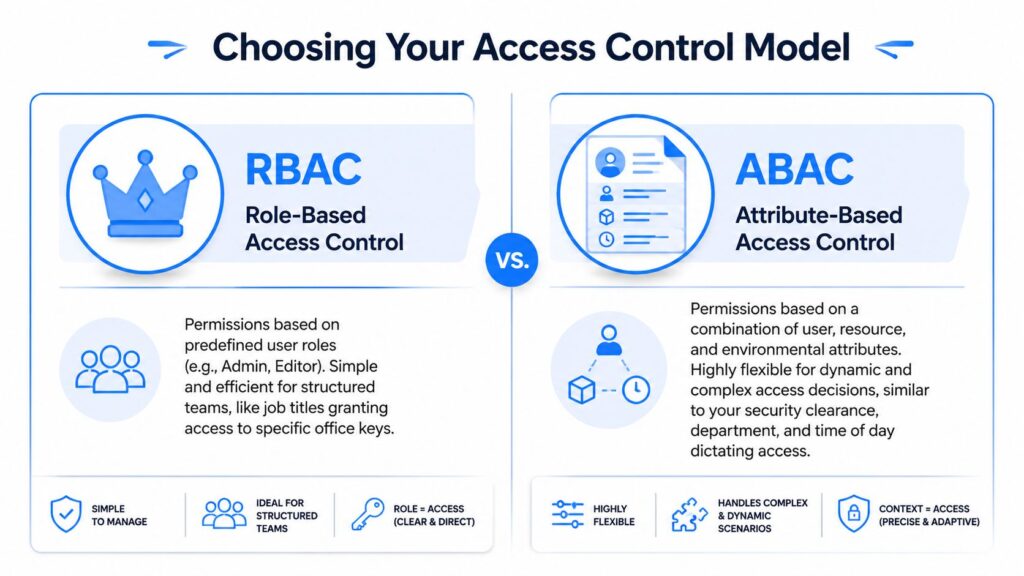
RBAC stands for role-based access control. ABAC stands for attribute-based access control. The easiest way to separate them is this: RBAC assigns access by job role, while ABAC assigns access by context.
Permission Management Access Control
RBAC works like job-title keycards
With RBAC, you define roles such as Admin, Campaign Manager, Content Editor, Support Agent, or Analyst. Each role gets a fixed set of permissions. Users inherit access from the role they’re assigned.
That simplicity is why RBAC remains the default starting point. ISACA’s reported findings on RBAC note that it can reduce administrative overhead by 40 to 60% in enterprise software and decrease the time needed for user access provisioning by 60%.
For a structured team, RBAC is often enough. An e-commerce brand can give:
- Support Agents: access to conversations, shipping status, and refund request notes
- Marketers: access to segments, broadcasts, and analytics
- Admins: access to integrations, billing, and role settings
That setup is easy to explain, easy to audit, and easy to train around.
ABAC works like a smart access policy
ABAC adds conditions. Access depends on attributes such as department, location, client account, subscription tier, region, campaign assignment, or workflow state.
A simple marketing example helps. A campaign manager might be allowed to edit flows only if they belong to the assigned brand, are working inside their regional account, and the campaign is still in draft. That’s not just role-based. That’s contextual.
ABAC becomes useful when your team structure is fluid:
- agencies managing many client accounts
- brands with regional teams
- temporary contractors assigned to one launch
- AI agents that should act only within a narrow workflow
RBAC answers “Who are you in the org?” ABAC answers “Under what conditions should you be allowed to act?”
Comparison of Permission Management Models
| Feature | RBAC (Role-Based) | ABAC (Attribute-Based) |
|---|---|---|
| Core logic | Access is tied to user role | Access is tied to user, resource, and context attributes |
| Best fit | Stable teams with clear job functions | Dynamic teams, multi-brand operations, complex workflows |
| Setup effort | Lower | Higher |
| Audit clarity | Usually straightforward | More detailed, but can become harder to reason about |
| Flexibility | Moderate | High |
| Typical marketing use case | Assigning standard access to support, ops, and campaign roles | Limiting access by region, client account, campaign status, or data sensitivity |
What works and what usually fails
RBAC works well when the organization has repeatable roles and clean ownership. It fails when teams keep creating exceptions. If every request becomes “give Sarah the Editor role, but also let her approve finance exports for one client,” your roles are already drifting.
ABAC solves that drift, but only if your underlying data is clean. If team assignments, account ownership, and campaign metadata are inconsistent, ABAC turns into policy spaghetti.
The practical choice for most marketing teams is simple. Start with RBAC. Add ABAC-style conditions only where the business needs context-aware access. Don’t build a complex policy engine for a team that still hasn’t agreed on who owns final campaign approval.
Key Best Practices for Marketing and Chatbot Teams
The biggest permission failures in marketing rarely start with a malicious actor. They start with convenience.
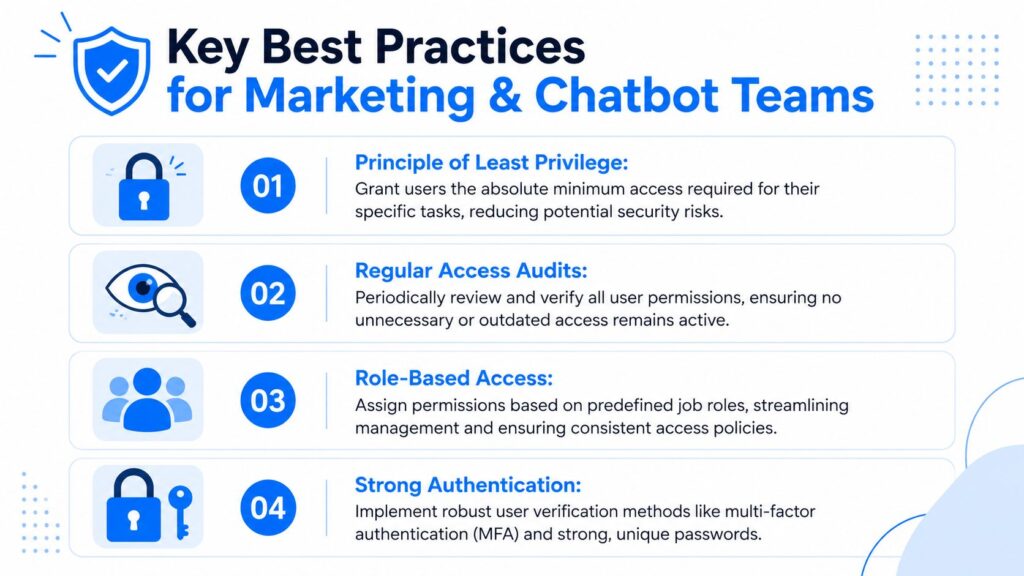
Someone needs temporary access for a launch. A freelancer gets added during peak season. An agency keeps an old contractor in the account because “we might use them again.” Over time, nobody knows who still has access to what. Gartner has projected that 68% of marketing data breaches come from access sprawl caused by temporary team members retaining access after projects end, according to Gartner’s 2025 research overview.
Permission Management Security Best Practices
Start with the minimum, not the maximum
The principle of least privilege sounds technical, but the operational rule is simple. Give people only the access needed for the task in front of them.
If a contractor is writing Instagram DM reply flows, they don’t need billing access, integration settings, or export rights. If a support rep handles subscription questions, they don’t need to edit campaign automation.
What doesn’t work is assigning broad admin access because it’s faster in the moment. That trade-off always comes back later as cleanup work, approval confusion, or data exposure.
Separate high-impact actions
Marketing stacks often bundle too much power into one account. One user can edit flows, publish broadcasts, export contacts, change integrations, and remove audit evidence. That’s a bad design for any team that handles customer data.
Split responsibilities where the business impact is high.
- Publishing rights: Keep draft creation and final publishing separate for major campaigns.
- Data exports: Restrict exports to a smaller group than the people who can view dashboards.
- Integration control: Limit API and app connection changes to a technical owner or ops lead.
A practical guide to RBAC for UK business security is useful here because it shows how role design works when you need clarity, not just technical enforcement.
Treat onboarding and offboarding like campaign operations
Teams are careful with launch checklists and sloppy with access changes. That’s backwards.
Use a repeatable workflow for every joiner, mover, and leaver. In a platform such as Clepher’s resource management system, that means tying team roles to actual functions instead of ad hoc permissions that nobody remembers six weeks later.
Remove access based on project end dates, not on someone remembering to clean up later.
Audit what people and bots actually use
Audit logs aren’t glamorous, but they’re how you catch stale access before it becomes a problem. Review human users, shared inbox access, AI publishing rights, and old campaign collaborators on a schedule your team can stick to.
A short review often catches the same issues:
- Dormant users: Accounts that still exist after a project or contract ends
- Overloaded roles: “Manager” roles that evolved into pseudo-admin
- Bot overreach: AI tools that can see or change more than their use case requires
- Client bleed: Agency users with visibility across accounts they no longer manage
The best practice isn’t “lock everything down.” It’s to make access deliberate, time-bound, and easy to verify.
Navigating GDPR Consent and Data Access
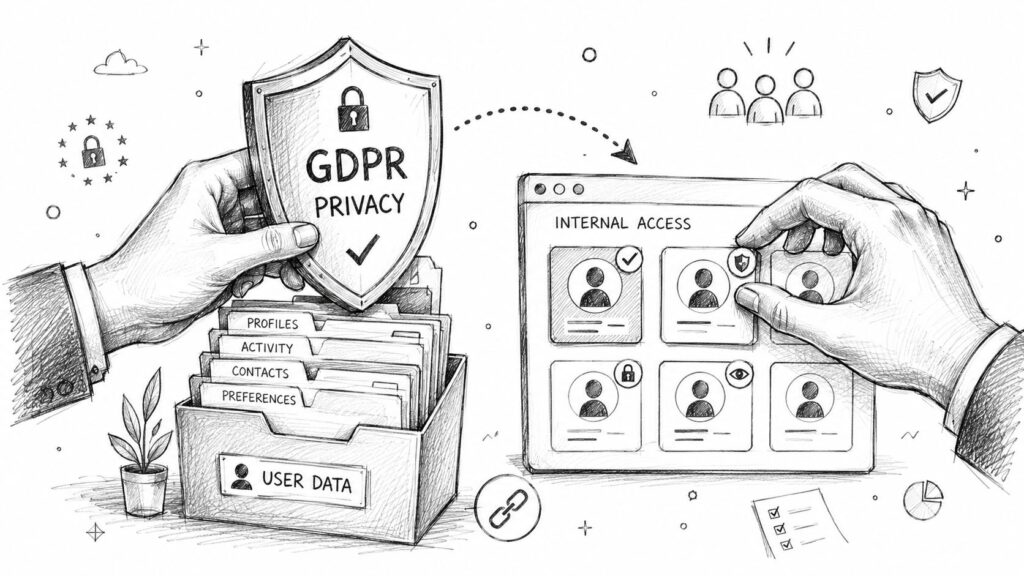
GDPR work falls apart when companies separate privacy policy language from system design. Consent lives in legal text, but compliance lives in permissions.
Permission Management Data Security
If your team can’t prove who accessed customer records, who changed consent settings, or who processed a deletion request, then your compliance process is weak even if your policy page is polished.
Consent should shape access design
A customer may consent to receiving promotional messages on one channel and not another. They may request access to their data, ask for correction, or ask for deletion. Your platform permissions should reflect those real actions.
That usually means defining specific responsibilities such as:
- Data Protection Officer access: rights to review consent history, process requests, and confirm deletion workflows
- Support access: ability to verify a customer request without exposing unrelated audience data
- Marketing access: permission to use segmentation and tags within the boundaries of recorded consent
- Admin access: control over retention settings, integrations, and workflow configuration
A permission model that ignores these distinctions forces teams into messy workarounds. Someone exports data because they can’t access the right view. Someone shares screenshots because they can’t verify status directly. That’s where privacy risk grows.
Auditability matters as much as restriction
A good GDPR setup doesn’t just block the wrong actions. It leaves a reliable trail for the right ones.
The strongest compliance posture is operational. You can show who did what, when they did it, and why they had permission.
For marketing teams, the practical takeaway is simple. Build permissions around customer rights, not just around internal hierarchy. That’s how you make chatbot automation, audience segmentation, and support handoffs more defensible when privacy questions show up.
Putting Permissions to Work: Real-World Examples
The value of permission management shows up in daily execution, not in policy documents.
McKinsey has projected that 45% of marketing personalization failures stem from permission friction, where teams can’t access the granular customer data needed to build effective AI flows because access is too rigid, according to McKinsey’s 2025 digital marketing research. That’s the key tension. Too much access creates risk. Too little access kills useful personalization.
E-commerce brand with support and retention teams
A fast-growing store usually wants support to move quickly without exposing payment or admin systems. The clean model is a Support role that can view conversation history, shipping status, order notes, and approved customer tags.
That role should not be able to export full customer lists, edit billing settings, or alter campaign-wide automation. The retention marketer gets segment and broadcast access, but not refund controls.
The result is better handoff quality. Support can answer “Where’s my order?” and “Can I change my address?” without waiting on an admin, while retention can trigger follow-up journeys based on behavior without touching regulated or financial settings.
Agency managing multiple client accounts
Agency access gets messy fast because the team needs speed across brands, but clients want separation and visibility.
A practical model uses tiered access. Account Managers can edit flows, audiences, and reports only for assigned accounts. Strategists can review performance across the accounts they oversee. Clients get read-only dashboard access. Finance or technical admins handle shared integrations and account-level controls.
Contextual permissioning matters more than broad titles. “Manager” alone isn’t enough. Access should follow client assignment, not internal seniority. If your team is also experimenting with AI agents in marketing workflows, the same rule applies to automation. Each agent should be scoped to one account, one channel, or one workflow family.
SaaS company with approvals before publishing
SaaS teams often want junior marketers to build onboarding or expansion flows while keeping brand and compliance review centralized. This is where permissions-based access management becomes a practical operational decision, not just a security checkbox.
The best setup gives junior users the ability to draft chatbot paths, update copy, and test branches in a staging workflow. A senior manager or lifecycle lead holds final publish rights. Support can suggest edits through comments or ticket-linked feedback, but can’t push changes live. Effective permissions management makes this structure easy to enforce without building friction into every task.
Restricting final publication doesn’t slow work when draft access is broad enough for contributors to build without bottlenecks. The ability to manage permissions at the role level means you can authorize the right actions for each team member without giving everyone the same level of control.
This model reduces accidental launches and still lets the team move. What’s more, it creates a clean chain of responsibility. The people closest to customers can build. The people accountable for risk and consistency approve. User permissions tied to workflow stage — draft, review, publish — keep that structure intact as the team scales.
Your Implementation Checklist for Any Chatbot Platform
Many teams don’t need a six-month permissions overhaul. They need a short project plan and someone to own it.

Permission Management Chatbot Marketing
A one-week rollout plan
- Map real roles
Start with what people do, not their job titles. “Growth lead,” “client success,” “freelance copywriter,” and “support rep” are more useful than broad labels like “marketing.”
-
List sensitive actions
Write down the actions that can change data, expose data, or affect live customer experience. Publishing flows, exporting contacts, editing integrations, deleting records, changing consent settings, and assigning roles should be on that list.
-
Create role bundles
Group permissions into practical bundles. Keep your first version small. Organizations typically need only a handful of roles if they define them well.
-
Assign users and test edge cases
Before rollout, test the role design with real tasks. Can support solve common tickets? Can marketers build campaigns without needing admin help? Can managers approve without inheriting every other control? If your stack includes connected support workflows, map permissions alongside tools such as a CRM and ticketing system so access doesn’t break handoffs.
-
Schedule the first review
Put the next audit on the calendar now. Review leavers, temporary users, old campaigns, AI automations, and any role exceptions created during launch.
What to avoid during implementation
- Don’t copy your org chart: Teams often need access based on workflow, not hierarchy.
- Don’t create dozens of custom exceptions: If everyone is special, your model is broken.
- Don’t ignore non-human access: Bots, integrations, and shared inbox automations need governance too.
The strongest rollout is the one your team can maintain. Clean roles beat clever complexity every time.
Frequently Asked Questions About Permission Management
If your team is building chatbot-led sales, support, or retention workflows, Clepher is one option to evaluate for structuring team access alongside conversational automation. The practical goal is simple: give marketers, support staff, and AI workflows the access they need to move faster, while keeping sensitive controls in the right hands.

Related Posts
10 Broadcast Automation Software Platforms Compared
October 11, 2026Customer Journey Automation: The Practical Guide
October 10, 2026Lead Qualification Marketing: A Practical 2026 Guide
October 9, 2026
Founder Clepher