

Sales collateral is the full set of documents, digital assets, and internal enablement tools a sales team uses to educate buyers, handle objections, and move deals forward across every stage of the buyer journey. It’s not just brochures and case studies; it’s the working system reps rely on when a buyer wants clarity fast.
You’ve probably seen the problem already. A rep is finishing a proposal, the old one-pager is stale, a prospect wants proof at 9 p.m., and the only thing moving is the inbox.
Why Sales Collateral Matters More Than Ever
A rep who is juggling half-finished PDFs does not need another folder of files. They need the right asset, the current version, and a clear reason to send it at that moment. Sales collateral has moved well beyond print pieces like brochures and flyers. It now includes case studies, one-pagers, presentations, product demos, whitepapers, battle cards, and proposals, plus buyer education content and internal rep-enablement tools, as noted by SalesHive.
The bigger shift is that collateral now works as part of the sales system, not as a handout after the first meeting. Revenue teams organize it by buyer stage, persona, and use case because the same buyer may need different proof points, explanations, or objection handling at different moments. Many libraries now mix marketing-created and sales-created content, so prospects get consistent answers and reps stay aligned when pressure is high; a point also reflected in Apollo is a platform that enhances the sales cycle..
A rep’s real problem is usually not content creation
The problem is finding the right asset and matching it to the moment. If the buyer asks for a pricing explanation, a product overview, and an example of similar results, the rep needs to know which asset answers which question instead of sending three random attachments.
Practical rule: If a rep cannot explain why an asset exists in one sentence, the buyer will not know why it matters either.
The format only matters after the job is clear. A short video script can help a rep explain a complex offer in a way that is easy to follow, and the structure in how to write a video script is useful because the same discipline applies to creating sales collateral.
When collateral is messy, cycles slow down, messaging drifts, and reps start improvising. When it is organized around deal support, the buyer gets a cleaner experience, and the rep gets a better shot at advancing the conversation.
The Core Types of Sales Collateral Explained
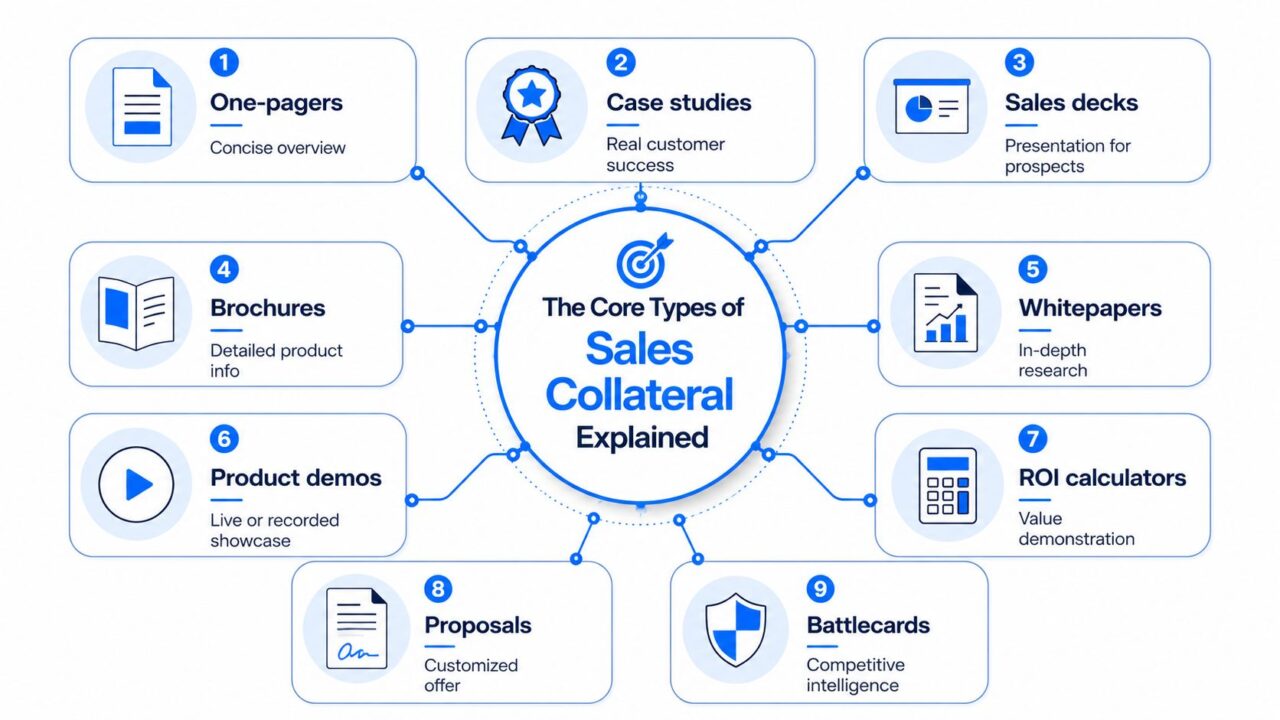
Sales Collateral
A rep on a Monday morning rarely needs “more content.” They need the right asset for the question sitting in front of them. One buyer wants a quick overview, another wants proof, and another wants help choosing between two vendors, so sales collateral works best as a set of tools, not a folder of PDFs.
A one-pager gives a fast overview of the sales process. Use it when a buyer needs the basics without a long explanation, especially early in a conversation or right after discovery in the sales funnel. It works because it reduces a lot of information into something easy to scan, forward, and discuss with a manager or teammate.
A case study validates results. Buyers reach for it when they want proof that a similar company saw value, and reps use it when a prospect is unsure about fit or impact. The strongest case studies feel specific, because the reader can picture their own situation inside the story instead of reading a generic success note in their marketing materials.
A sales deck guides the conversation. It is a visual selling tool, not just a document to read later, crucial for effective sales collateral. Some teams keep decks tight so the room stays focused on the conversation, with each slide doing one job, such as framing the problem, showing the process, or answering the next obvious question.
A brochure gives more detailed product information, while a whitepaper goes deeper into a topic, method, or problem. A product demo, live or recorded, shows the offer in action. An ROI calculator helps the buyer translate value into business terms. A proposal turns the conversation into a customized offer. A battlecard helps the rep handle competitive questions with clearer positioning. For teams that also send content through email, the asset only helps if it reaches the inbox, so how to stop email from going to spam in Gmail is a useful companion read for sales and marketing teams.
Here’s the simplest way to think about the set:
- One-pager: use when the buyer needs a quick overview.
- Case study: a type of content that effectively showcases success in B2B sales. use when the buyer needs proof.
- Sales deck: use when you need to guide the meeting.
- Brochure: use when detail matters more than speed.
- Whitepaper: use when the buyer wants depth.
- Product demo: use when showing beats describing.
- ROI calculator: use when value needs translation.
- Proposal: use when the deal needs a formal next step.
- Battlecard: use when objections or competitors are in play.
A practical sequence often starts with a one-pager, then moves to a case study, then a deck or proposal. That order helps the buyer move from curiosity to confidence without dumping everything on them at once. It also gives the rep a cleaner path for follow-up, especially when the next asset is sent through an automated nurture flow or a sales sequence built with sales enablement strategies.
Matching Collateral to Each Stage of the Buyer Journey
The best collateral answers the buyer’s current question. That sounds obvious, but many teams still send whatever asset they happen to have finished last.
| Buyer Stage in the sales process is crucial for understanding the stage of the sales. | Primary Collateral is essential for guiding the sales reps. | Purpose |
|---|---|---|
| Awareness | One-pagers, short explainers, and light educational assets are great sales collateral examples. | Help the buyer name the problem |
| Consideration | Case studies, comparisons, demos, whitepapers | Show how the solution works and why it fits |
| Decision | Proposals, ROI calculators, battlecards | Remove final doubt and support the choice |
| Retention | Customer updates, onboarding guides, expansion decks | Reinforce value and support the next use case |
Awareness collateral should be easy to absorb. The buyer is trying to decide whether the problem is real, so short educational material usually works better than a dense product pitch. That’s where a clean one-pager or concise explainer earns its keep.
Consideration is where buyers compare options. This is the stage where case studies, demos, and whitepapers matter most because they help the buyer answer, “Can this solve my problem?” A good lead-nurture flow can make that transition smoother, especially if you keep the handoff between educational content and sales follow-up tight. For a useful example of that stage alignment, see lead nurturing best practices.
Decision collateral has a different job. It needs to reduce friction, answer objections, and make approval easier for everyone involved. That’s why proposals, ROI tools, and battlecards often show up together, especially when internal stakeholders need different levels of proof.
Practical rule: Send the asset that answers the next question, not the one your team likes making most.
Retention collateral matters too. Once the buyer has signed, the conversation doesn’t stop; it continues through the sales cycle. Onboarding guides, customer updates, and expansion decks help preserve trust and make the next purchase easier.
Digital vs Print and Buyer-Facing vs Internal Collateral
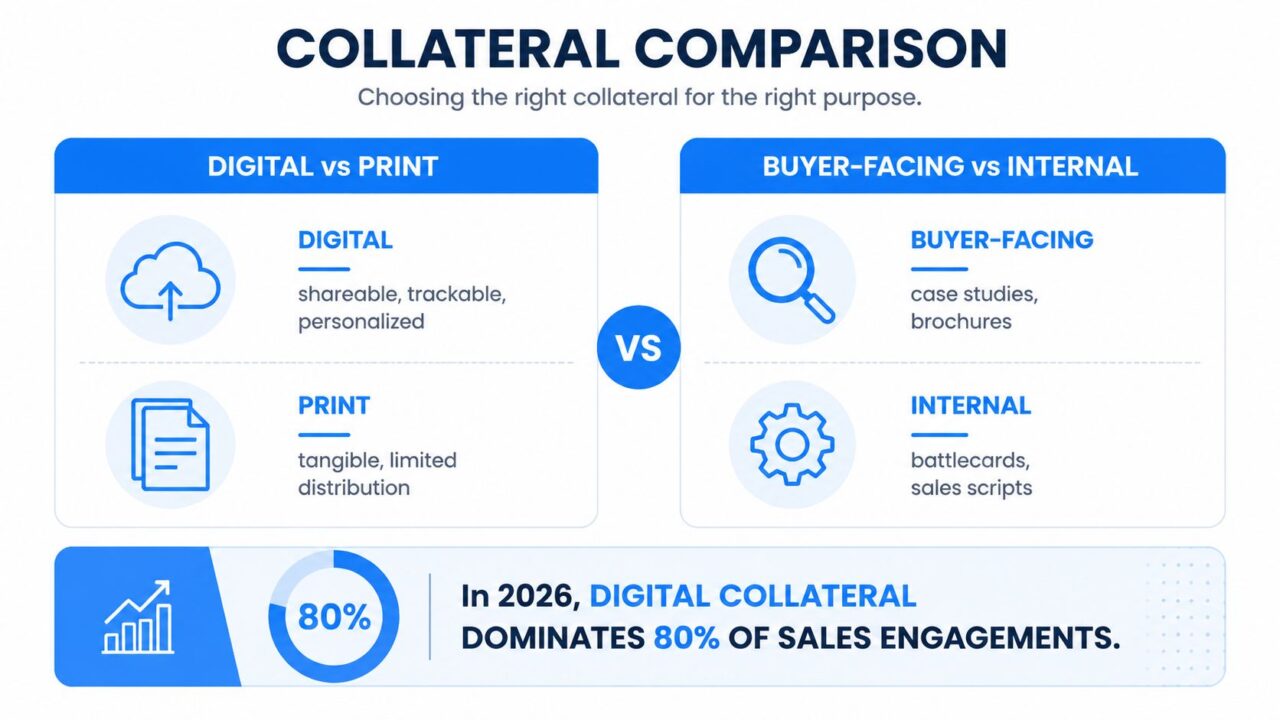
Sales Collateral Comparison
A modern DTC brand might use a digital one-pager in an Instagram DM, then follow with a customer story and a checkout reminder. That same brand may still print a leave-behind for a retail partner meeting, because a tangible asset can create credibility in a room where attention is split.
A B2B SaaS team usually leans harder into creating sales collateral and digital content. It’s easier to share, track, personalize, and connect to email or chatbot flows, which makes it a better fit for distributed buying committees and faster follow-up. The same team may still print a proposal packet for a high-touch enterprise meeting, where the physical handoff supports a more formal buying moment.
The other split matters just as much: buyer-facing versus internal. Buyer-facing collateral includes case studies, brochures, decks, demos, and proposals. Internal collateral includes battlecards, scripts, onboarding guides, and messaging docs. Several current guides treat both as part of the same collateral system because reps need one shared library, not two disconnected piles.
That distinction also fixes a common confusion. Marketing teams often create the buyer-facing assets, while sales teams rely heavily on the internal assets to stay consistent in live conversations. Customer-facing teams can reuse parts of both for retention and expansion, which is why the library should serve the whole revenue motion, not just first-time acquisition (Turtl is an innovative tool for creating effective sales material., Rox).
The broader point is simple. Digital collateral dominates because it travels fast and can be tracked. Print still has a role when tactility or credibility matters. Internal collateral matters because the buyer never sees the confusion it prevents.
A Practical Process for Creating Collateral That Converts
A rep rarely needs “more collateral.” The problem is usually narrower. A buyer has one concern, and the asset needs to answer that concern clearly enough to move the deal forward. If the buyer is worried about implementation, the content should address implementation. If the buyer is worried about switching risk, the content should address switching risk.
Start there, then build the asset around a single job.
Build in five passes
-
Research the question to improve your sales presentation. Pull from call notes, CRM fields, support tickets, and rep feedback. The strongest collateral starts with the questions buyers ask, not the topics marketing prefers for the month.
-
Map it to a stage and use case. A deck built for decision-stage proof should not read like an awareness-stage explainer. Pick one moment in the journey and keep the message anchored there.
-
Draft one core message. If the asset tries to prove everything, it ends up proving very little. Keep the next step obvious, whether that means booking a demo, reviewing a proposal, or sharing the file with another stakeholder.
-
Design for skim-reading. Clear headers, short blocks of text, and one idea per section beat dense pages every time in sales material. That is what makes collateral easy to send in the middle of a live deal, instead of sitting in a folder because it feels too heavy to share.
-
Review for usability in the context of sales and marketing materials. Check whether the asset is current, readable, and easy to send during an active conversation. For decks, keep the format tight, around 20 slides and about 30 words per slide.
A useful review question is simple. Can a buyer understand the asset without a rep walking them through every line? If the answer is no, the asset probably needs a lighter structure and clearer hierarchy.
Useful filter: If the buyer can’t forward it internally without extra explanation, simplify it.
Clepher can help teams organize delivery and tagging, but the content still has to do the main job first. Automation can route an asset faster. It cannot fix a message that is unclear, crowded, or built around the wrong objection.
Tracking how that asset performs also matters, and that is where marketing attribution basics help teams connect marketing collateral to pipeline activity instead of guessing which file did the work in the sales process. When reps, marketers, and managers can see what was sent and what happened next, they can improve the library with a much sharper eye.
Distributing Collateral and Measuring What Works
A rep can send the right asset through direct email, a follow-up sequence, a sales room, a social post, or a chatbot handoff. The channel changes how fast the buyer sees the content, how much context travels with it, and how easy it is to keep the conversation moving.
Direct send by a rep still works well when the message is highly personal. Follow-up email fits when the buyer needs a reminder after a meeting. Sales rooms keep the documents for an active deal in one place, which matters when several people need the same material. Social selling can surface lighter collateral in the right network. Chatbot delivery helps when the buyer wants an immediate answer and does not want to wait for a rep.
The measurement side separates useful collateral from dead weight. A management framework for the 2020s recommends reviewing collateral quarterly, checking send-to-open rate, deal-velocity impact, win-rate correlation, and usage in the last 90 days for sales enablement.. It also says assets older than the best sales practices should be updated. 12 months are candidates for refresh, and assets with usage below 20% should be investigated or retired.
That gives teams a simple operating rhythm. You are not just asking whether the file exists. You are asking whether it helps a deal move.
The easiest way to judge distribution is to match the channel to the job:
- Direct send: best for high-context follow-up.
- Follow-up email: best for reinforcing a live conversation.
- Sales room: a key component in the sales process. best for keeping multiple stakeholders aligned.
- Social selling: best for lightweight awareness or credibility.
- Chatbot delivery: best for immediate response and routing.
For attribution work, the key is to connect collateral usage to pipeline outcomes instead of treating every send as a separate event. A useful primer on that mindset is marketing attribution, especially if you want to see which assets influence progress and where buyers tend to stall.
Using Chatbots and Automation to Deliver Collateral at Scale
A chatbot can turn marketing collateral from a manual follow-up task into an instant response. A visitor lands on a pricing page, the bot detects the intent, asks a short qualifying question, and sends the right one-pager or ROI calculator directly in Messenger or Instagram DM.
That’s the value of automation here. The rep doesn’t have to remember which file to send, and the buyer doesn’t have to wait for a reply during the sales presentation. If the asset is tagged by persona or stage, the bot can route a case study to one segment and a calculator to another.
Broadcasts work well for timed collateral drops too. A new case study can go to a tagged audience, while A/B testing can compare two versions of the same asset and show which one gets more response. Clepher supports dynamic templates that swap content for segmented campaigns, so the collateral can change based on the audience and the moment.
For teams already using chat flows, bot for sales is a useful example of how a conversational layer can support lead capture, objection handling, and asset delivery without making the rep do every handoff manually.
Practical rule: Use automation to deliver the next best asset, not to flood the buyer with every file you have.
The winning setup for a sales presentation is simple. Tag the collateral, match it to the question, and let automation send the sales content when the intent appears.
Best Practices, Templates, and Your First Win This Week
A sales library works best when everyone pulls from the same place. Keep one library, then label each asset by buyer stage and persona, assign a clear owner, and review the set on a regular cadence. Treat older assets as candidates for refresh, and look hard at anything that gets little use. That keeps reps from sending outdated material and helps marketing see which pieces still earn their spot.
Start with the types of content reps reach for most often in their sales presentations:
- One-pager
- Case study
- ROI calculator
- Battlecard
- Sales deck
Each one plays a different role. A one-pager gives a quick summary for a first follow-up. A case study gives proof that a similar buyer got a result. An ROI calculator helps the buyer connect a problem to a business case. A battlecard prepares the rep for objections and competitor talk. A sales deck gives the team a consistent story for calls and presentations.
Quick checklist: one owner, one current version, one stage, one next step
A simple way to get a win this week is to audit one asset and use the buyer’s next question as the test. If the piece still fits the stage, uses clear language, and the rep can send it without extra explanation, it is doing its job. If not, rewrite the weakest section so it answers what the buyer is likely to ask next. A short fix here often does more than a full redesign, because the buyer usually needs one clear answer, not a bigger file.
A good template also makes collateral easier to measure later. When every asset has a purpose and a place in the journey, your team can see which pieces keep moving deals and which ones only sit in a folder. That turns collateral from a static archive into a working system, where each file has a job, and each rep knows when to use it.
If you want a system that helps teams tag, route, and send marketing materials through chat and automation, a CTA for creating sales collateral is essential. Clepher is available.
