
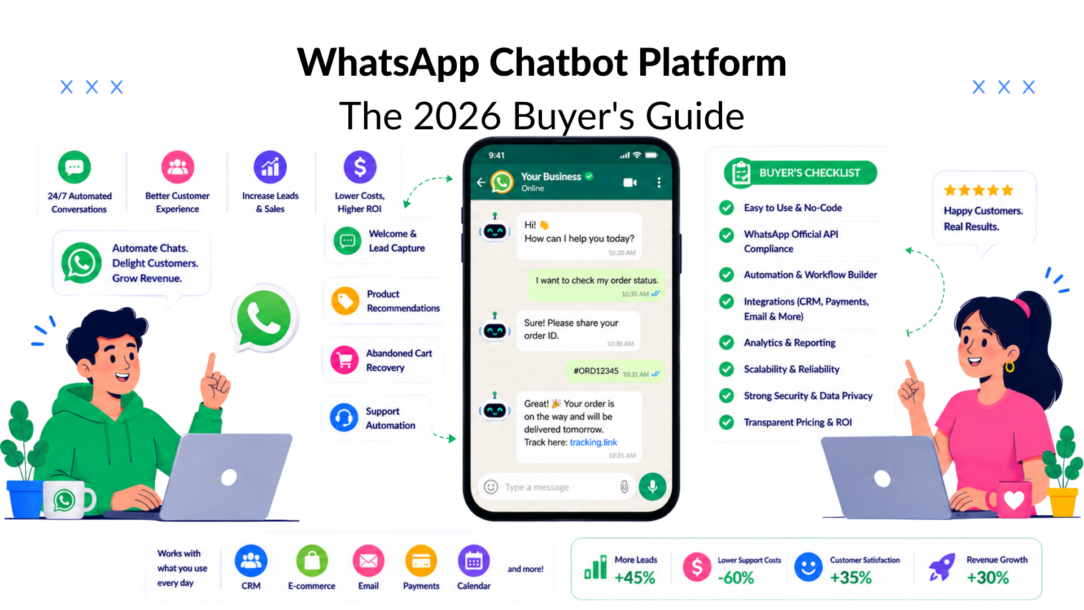
Your WhatsApp inbox looked manageable last month. Then a campaign hit, replies stacked up, and now your team is doing the worst kind of work, copying the same answers, missing hot leads, and trying to keep up while customers expect instant replies. That’s the point where a WhatsApp chatbot platform stops being a “nice automation idea” and becomes the difference between a channel that prints revenue and a channel that burns your team out.
The hard truth is simple. If WhatsApp is already where your customers prefer to talk, hand-typing every response is a scaling mistake. WhatsApp’s business reach is enormous, with more than 3.3 billion monthly active users on the WhatsApp business platform, and industry summaries also point to over 200 million businesses and more than 2 billion business messages sent daily on the app, which is why the platform is now a serious distribution layer, not a side channel (WhatsApp business statistics). If you’re still treating it like an inbox, you’re already behind.
The Moment Every WhatsApp-First Business Hits a Wall
The wall shows up in the same way for different businesses. A DTC brand launches a promo, the WhatsApp number starts lighting up, and the team realizes the “quick replies” they used in low volume are useless when dozens of people want shipping updates, discount codes, and order changes at once. An agency sees client leads pour in from click-to-WhatsApp ads, then loses the best prospects because no one responds fast enough. A local business gets appointment requests after hours and wakes up to a small mess of missed opportunities.
That’s when the platform question stops being theoretical. You don’t need a prettier inbox; you need a system that captures intent, answers common questions, and hands off edge cases without making your team babysit every thread. If you’re still deciding whether WhatsApp should sit inside your broader marketing stack, this WhatsApp for Business resource is useful context, but the bigger point is this: once WhatsApp becomes your conversion channel, manual handling becomes the bottleneck.
A real WhatsApp chatbot platform doesn’t just save time. It protects response speed, keeps lead capture consistent, and makes sure the same offer or policy answer gets delivered the same way every time. That consistency is what keeps a channel profitable after the novelty wears off.
Practical rule: If the same question shows up every day, it should already be automated.
The day-90 problem starts here, particularly for businesses leveraging a WhatsApp business account. Day one is easy, because any demo can send a greeting. Day ninety is harder, because the bot has to stay accurate, stay compliant, and not wreck your team’s trust in automation. That’s the standard you should use from the start.
What a WhatsApp Chatbot Platform Actually Is
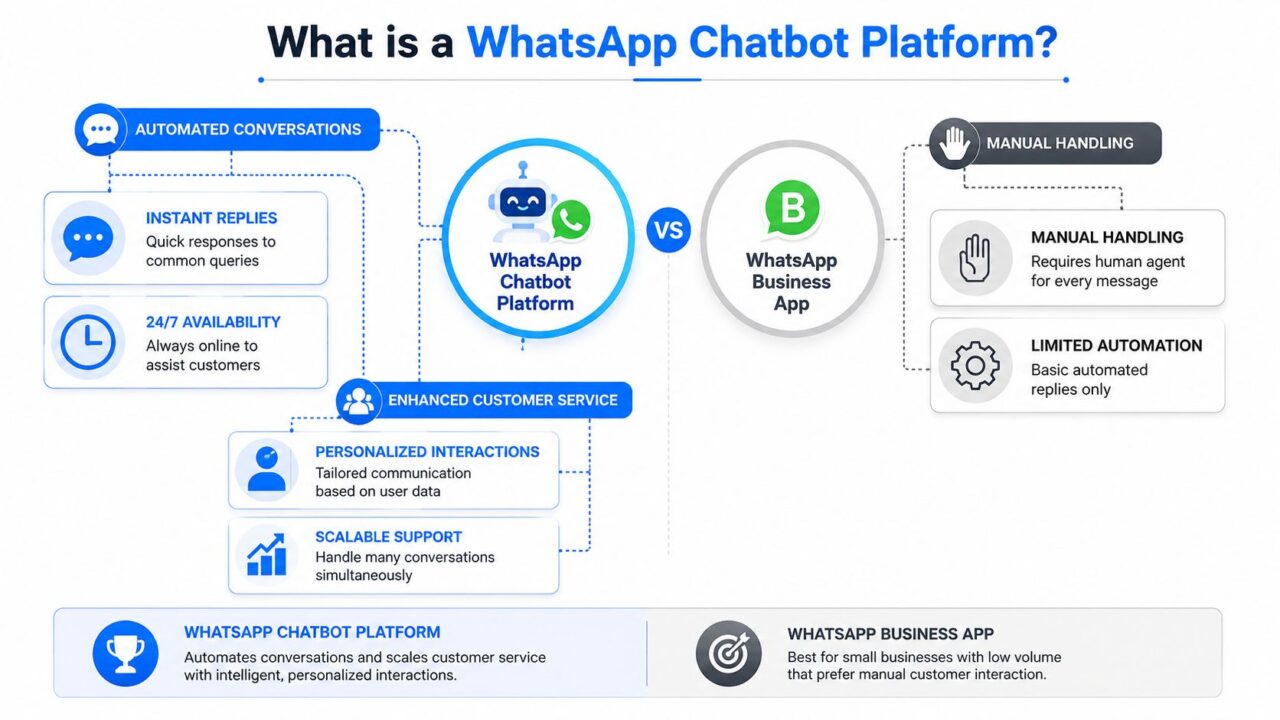
A WhatsApp chatbot platform is software that lets you automate conversations on WhatsApp without building everything from scratch. At a minimum, it sits between your business and the WhatsApp Business API, then adds a flow builder for automation and a live inbox for human agents. The free WhatsApp Business app is useful for small-scale manual handling, but it doesn’t give you the orchestration layer you need once conversations become frequent, segmented, or revenue-critical.
The cleanest way to think about it is in three parts.
Whatsapp Chatbot Platform Comparison
First, there’s the builder. That’s where you create greetings, capture leads, route people by keyword or intent, and set up follow-up logic without writing a full custom app, especially when using WhatsApp chatbots for seamless communication. Second, there’s the connection to WhatsApp’s official API for your WhatsApp chatbot in minutes, which is what makes large-scale messaging, templates, and automation possible for a WhatsApp business account. Third, there’s the human layer, the inbox where agents take over when the bot should stop talking.
Hosted SaaS or custom stack
Most buyers fall into one of two camps. A hosted SaaS platform is the fast path. You install it quickly, the pricing is easier to predict, and your marketing team can use it without waiting on engineering. A custom stack gives more control, but it also turns your team into the owner of integration work, maintenance, and edge-case debugging.
If your business lives on launches, lead gen, or customer support volume, SaaS is usually the sane choice. If you have serious engineering resources and a niche workflow that needs deep customization, custom can make sense. The decision isn’t philosophical. It’s whether you want to spend your time improving funnels or maintaining plumbing.
For teams comparing automation platforms, the AI agents for ecommerce guide is a useful adjacent read because it shows how conversational automation is being pushed closer to real buying workflows.
Core Features That Separate Platforms from Toys
The feature list looks crowded until you separate it into tiers. Most vendors dump everything into one endless page. That’s useful for sales, not for buying. A production-ready WhatsApp chatbot platform needs to earn its keep in operations, not just in a product tour, especially when considering the best WhatsApp strategies for engagement and the future of WhatsApp chatbot technology in 2026.
Must-have features
Start with the basics that drive revenue and reduce workload through a free plan for your WhatsApp business account.
- Official WhatsApp API access: If a platform can’t connect cleanly to the official channel, you’re building on sand.
- Drag-and-drop flow builder: Your team needs to build and edit journeys without waiting on developers, particularly when using a WhatsApp bot.
- Broadcast and segment tools: Promotions and re-engagement only work when you can target the right audience.
- Template message management: Template approval and reuse matter because outbound messaging on WhatsApp isn’t a free-for-all.
- Unified inbox: essential for managing your WhatsApp business account efficiently When a bot hands off to a human, agents need every message, tag, and context thread in one place.
These are the features that keep your team from reverting to manual chaos.
Growth features that move the needle
Once the basics are in place, look for tools that improve conversion and routing. AI agents, keyword triggers, A/B testing, random path distribution, personalization tags, and custom fields matter because they help you learn which messages and branches create action, not just clicks. CRM-grade segmentation matters too, because a lead who clicked a pricing message should not get the same follow-up as a support contact.
A platform stops being a chatbot and becomes part of your revenue system when it can personalize interactions through WhatsApp conversations. If your vendor can’t personalize based on behavior or history, you’ll end up with generic automations that feel automated in the bad way.
Governance features you’ll thank yourself for later
The unsexy layer is the one that saves accounts, particularly when integrated with an AI chatbot for proactive support. Look for GDPR tools, quality rating monitoring, fallback analytics, role-based access, and support for multiple accounts or pages if you’re an agency. These aren’t bonus features. They’re what keep one client’s workflow from breaking another client’s channel.
A platform that wins the sale but can’t protect quality ratings will cost you more than it makes.
The buyer mistake is obvious. Teams get distracted by polished AI demos and ignore the governance layer. Then the bot goes live, the fallback rate climbs, and no one knows where the breakdown started.
Best Use Cases and Where WhatsApp Actually Wins
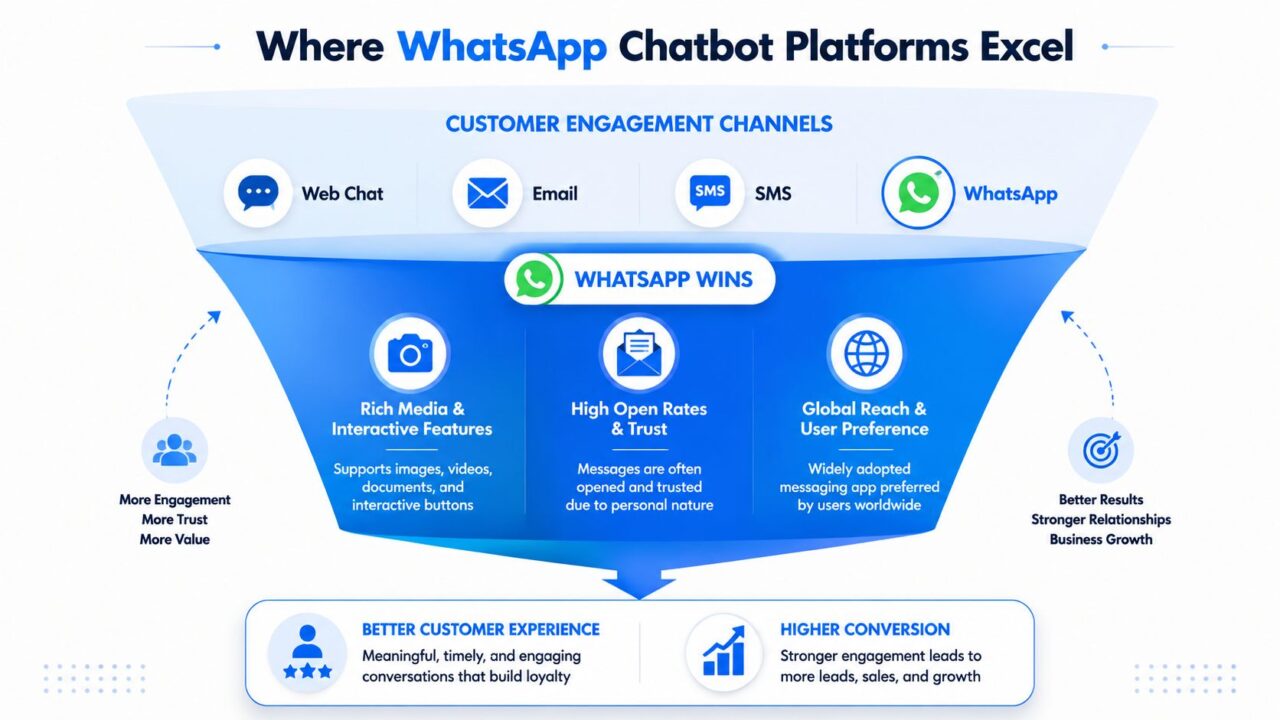
WhatsApp wins when the message is tied to intent, timing, or trust. It loses when you force it into the wrong job. That sounds obvious, but it’s the single biggest reason chatbot ROI gets inflated in sales decks and under-delivered in real life.
Whatsapp Chatbot Platform Wins
Where it beats email and web chat
For DTC ecommerce, WhatsApp is strongest for abandoned cart recovery, order updates, and back-in-stock alerts. Those are high-intent moments where speed matters and the customer already expects a fast reply. If the bot can trigger the right message, present the right offer, and hand off a high-value cart to a human when needed, you’ve got a real revenue path.
For agencies, WhatsApp works well for campaign-driven lead capture across multiple brands, making it an ideal platform for building a WhatsApp chatbot. The value is in fast qualification and segmented follow-up, not in sprawling conversations that drag on for days.
For coaches, creators, SaaS, and local businesses, it’s strong for lead qualification and appointment booking. A prospect replies to one short prompt, the bot tags the lead, asks a few qualifying questions, and either books the slot or routes the conversation to a person.
Where it is the wrong tool
WhatsApp is a poor fit for long-form support threads that need multiple detailed attachments, back-and-forth troubleshooting, or deep documentation, unlike an advanced AI chatbot designed for such tasks. It’s also the wrong place for sloppy cold outreach. If the contact hasn’t shown intent, you’re just adding friction and risking opt-outs.
Use this channel when the journey is short, immediate, and commercially meaningful. Use email or web chat when the thread is longer, lower urgency, or better suited to a help center.
WhatsApp also rewards richer interactions than plain text, which is why messaging flows often outperform generic outreach on this channel. That’s one reason teams increasingly prefer it for transactional and conversion-focused journeys, while keeping more complex conversations elsewhere. From a channel strategy standpoint, that’s the useful filter. Don’t ask whether WhatsApp is fashionable. Ask whether the user already wants the outcome now.
How a Production-Grade Platform Works Under the Hood
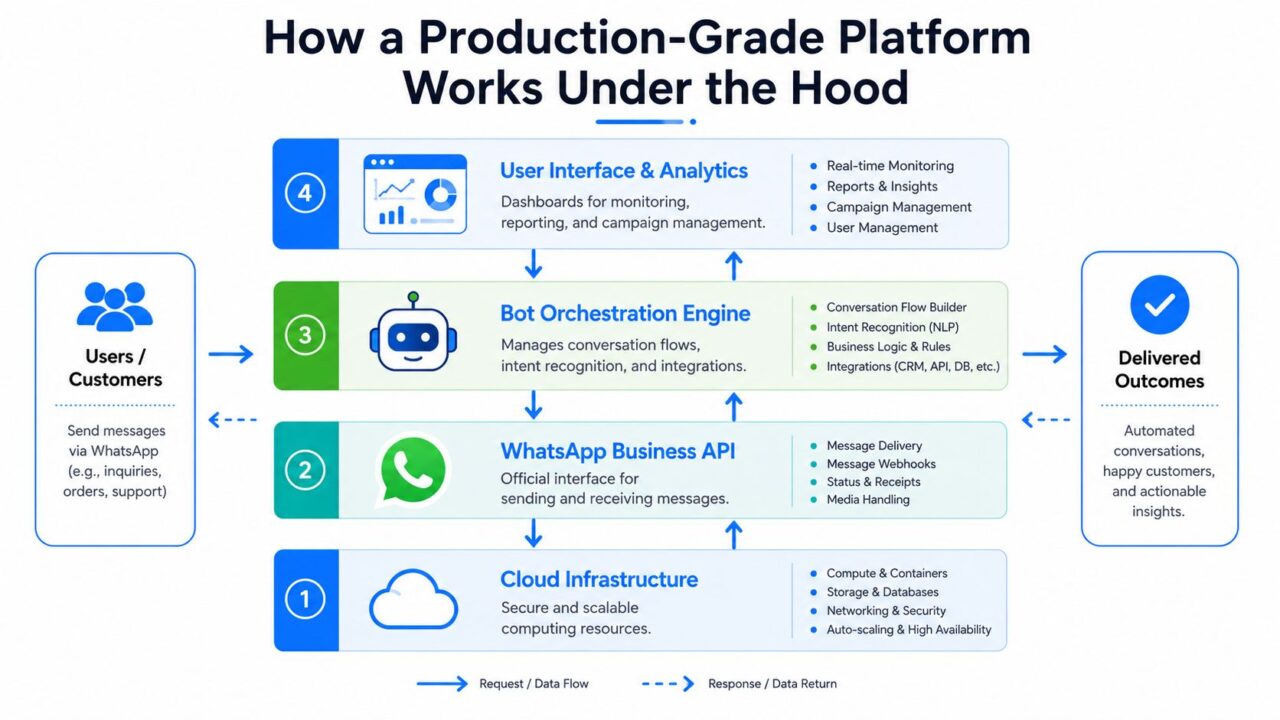
A serious WhatsApp chatbot platform is a pipeline, not a gadget. The architecture matters because failures happen at different layers, and if the vendor can’t explain those layers clearly, they probably built for demos instead of traffic spikes. The most reliable designs use a multi-layer structure with a Cloud API webhook, a routing layer, a model-and-memory layer (crucial for advanced AI chatbots that learn from WhatsApp conversations to improve user experience), and an escalation layer (production-grade architecture overview).
Whatsapp Chatbot Platform Architecture Diagram
The layers that matter
The webhook layer receives inbound messages from WhatsApp. It has to acknowledge requests fast and reliably, or you’ll get retries and duplicate events. The routing layer decides what the message means, whether it should go to a flow, a model, a search source, or a human.
The model-and-memory layer combines an LLM with persistent retrieval, often backed by tools like Postgres and pgvector, so the bot can answer with context instead of acting forgetful. The escalation layer routes uncertain, sensitive, or high-value conversations to humans before the bot creates a mess.
The plumbing nobody markets well
Production systems distinguish themselves from toy builders, especially in the context of developing a WhatsApp bot. Good designs utilize a queue like RabbitMQ, SQS, or BullMQ, short-term state in Redis, and durable history in Postgres. That decoupling protects you when WhatsApp or Meta retries failed webhook deliveries, because idempotency and async workers prevent duplicate actions and keep throughput stable during spikes (queueing and state management guidance).
If you’re evaluating vendors, ask a blunt question about their capabilities with the WhatsApp Business Platform. What happens when inbound volume triples in one hour, and what happens when the same message is delivered twice in a WhatsApp conversation? If they can’t answer that cleanly, especially in the context of WhatsApp conversations, they’re not ready for your busiest campaign.
For implementation teams, the operational side matters just as much as the conversation design. A useful internal reference on how chat systems connect with support workflows is this CRM and ticketing system guide, because the bot is only useful if the handoff lands in the right queue with the right context.
You can also use broader lead generation resources to pressure-test how these flows support acquisition, not just support.
Compliance, Governance, and the Day-90 Problem
The difference between a bot that works and a bot that gets sidelined is what happens after launch. Day one is setup. Day ninety is maintenance, and that’s where teams discover whether the platform was built for governance or for a slide deck. A bot that ignores fallback patterns, template changes, and handoff logic will eventually become expensive noise.
What to watch every week
You need a routine, not a vibe. Review your quality ratings in WhatsApp Manager, check fallback rates, look at which paths are leading to human escalation, and update template messages before policy shifts or campaign changes create friction. If the bot keeps missing the same intent, fix the intent handling to improve your conversational AI. If the bot is answering confidently but incorrectly, tighten the knowledge source or the rule path.
Selective automation beats reckless automation every time, particularly when utilizing advanced AI for better decision-making.
Consent matters too. Use clean opt-in and opt-out flows, keep data retention disciplined, and make sure your internal team knows what gets stored and why. WhatsApp has also been moving toward tighter, policy-aware automation, so narrow business workflows are safer than broad, open-ended bots that try to do everything and end up doing it badly.
The mistake that burns trust
The fastest way to damage a WhatsApp channel is to automate high-intent conversations without a human escape hatch. A customer trying to solve a billing issue does not want a clever bot loop. They want resolution. If the bot can’t get there quickly, hand off.
That’s especially important in ecommerce, where a bot that mishandles an order change or refund question doesn’t just waste time. It can create support debt and frustrate a buyer who was already ready to convert. The best platforms treat humans as part of the workflow, not as a failure state.
If you’re using templates heavily, keep your team close to the message library. This WhatsApp Business message templates guide is a practical reminder that template quality is a governance issue, not just a copywriting task.
Buyer’s Checklist and a 30-60-90 Launch Plan
The buying decision gets easier when you score vendors on the things that matter in production, not on the things that look nice in a demo. Price is one line item. Reliability, integration depth, and support quality are key differentiators.
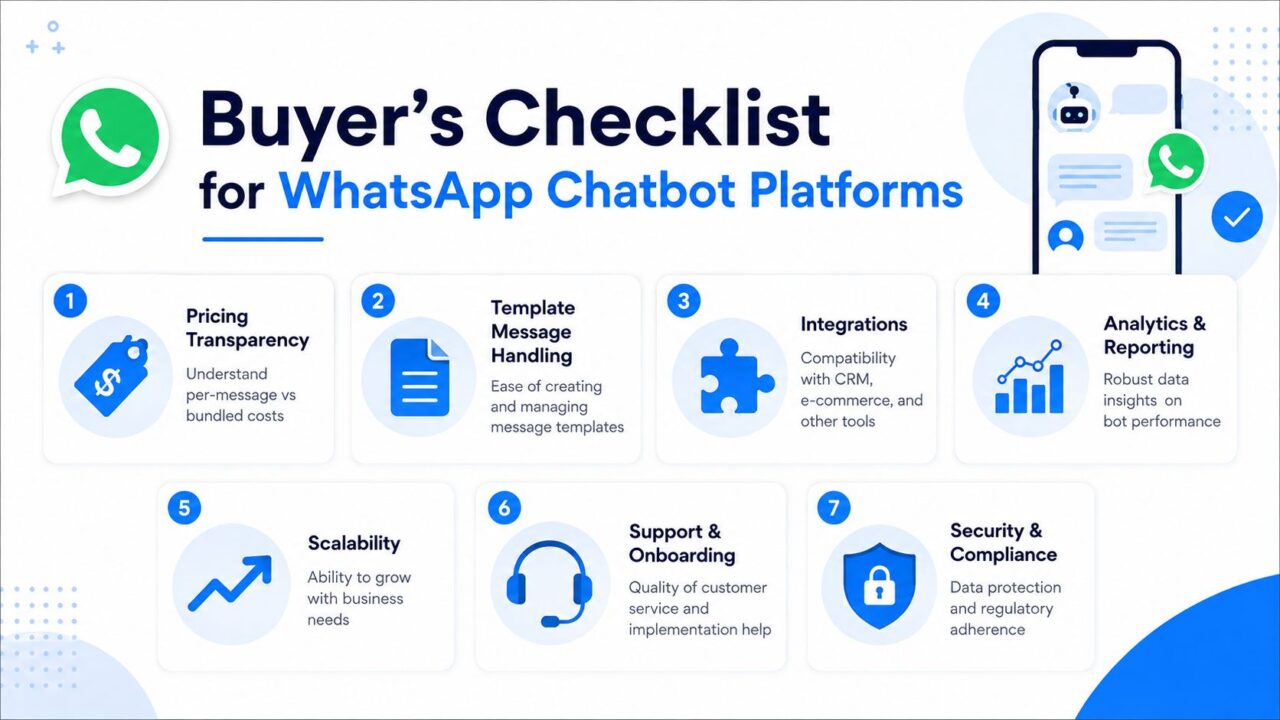
Whatsapp Chatbot Platform Checklist
Buyer’s checklist
- Pricing transparency is essential for businesses that want to build a WhatsApp chatbot and ensure customer trust. You should understand whether the platform charges per message, by seat, by account, or in bundles.
- Template handling: Creating, organizing, and updating templates should be simple enough that marketing can manage it.
- Integration depth: Check real connections to ecommerce and CRM tools, not just vague “integrates with everything” language.
- Analytics and attribution: If you can’t see what each flow is doing, you can’t improve it.
- Support quality: Ask how onboarding works and how quickly issues get resolved.
- Platform lock-in risk: Find out how easy it is to export data and move if needed.
- Security and compliance: Make sure the vendor treats consent, access control, and data handling as first-class concerns.
A 30-60-90 launch plan
In the first 30 days, connect the API, verify the business profile, and build the first two flows. Keep it simple. One should handle a high-volume FAQ, and one should capture a lead or booking request.
In 60 days, add segmentation, AI agents where they help, and the integrations that make the bot useful to sales or support. Don’t add complexity just to say you did.
In 90 days, run A/B tests, review broadcast timing, and audit your quality ratings. If the bot is live and nobody is measuring fallback or handoff performance, you don’t have automation. You have an expensive guessing machine.
Example Workflows You Can Copy This Week
A good workflow is a conversation that does one job well. Here’s how that looks in practice.
Abandoned cart recovery for DTC
A shopper leaves checkout. The bot sends a reminder with the item in question, then offers a small incentive only if the cart value or customer segment justifies it. If the customer replies with a question about shipping, the bot answers. If the cart is high-value or the customer shows purchase intent, it routes to a human.
Lead qualification and appointment booking
A prospect taps a WhatsApp ad or scans a QR code. The bot asks one qualifier, tags the contact, checks calendar availability, and books the call. If the lead fits a premium segment, the follow-up broadcast is different from the one sent to a colder contact.
Tier-one support deflection for SaaS
A customer asks a repeat question. The bot answers from the knowledge base, creates a ticket if the issue needs tracking, and escalates when confidence is low or the request is account-specific. That keeps support from drowning in repetitive tickets while still protecting the human path.
One illustrative option is to create a WhatsApp chatbot in 2026. Clepher, which supports a no-code builder, AI agents, broadcasts, and integrations with 50+ apps are available to enhance your WhatsApp chatbot experience and streamline customer interactions. Plus 5,000+ more via Zapier, Make, n8n, or Pabbly, so teams can stitch these workflows together without building a custom stack. That’s useful when speed matters more than engineering theater.
Can a WhatsApp chatbot replace support reps? No. It should absorb repetitive work and route the rest.
Should every message be automated? Absolutely not. Automate the predictable parts and keep humans on the conversations that carry risk or value.
What should you launch first? The highest-frequency flow tied to revenue or service pressure. That’s usually the one that shows payoff fastest when utilizing a WhatsApp bot effectively.
If you want a platform that handles WhatsApp automation without turning your team into full-time operators, Clepher is worth a look. It’s built for no-code flows, AI agents, broadcasts, and handoff-driven automation, which makes it a practical fit for the day-90 reality this guide is about.

Related Posts
Revenue Optimization: A Practical Playbook for Growth
October 19, 202610 Lead Capture Software Tools Compared for 2026
October 18, 2026WhatsApp Chatbot for Ecommerce: A Practical 2026 Guide
October 17, 2026
Founder Clepher