
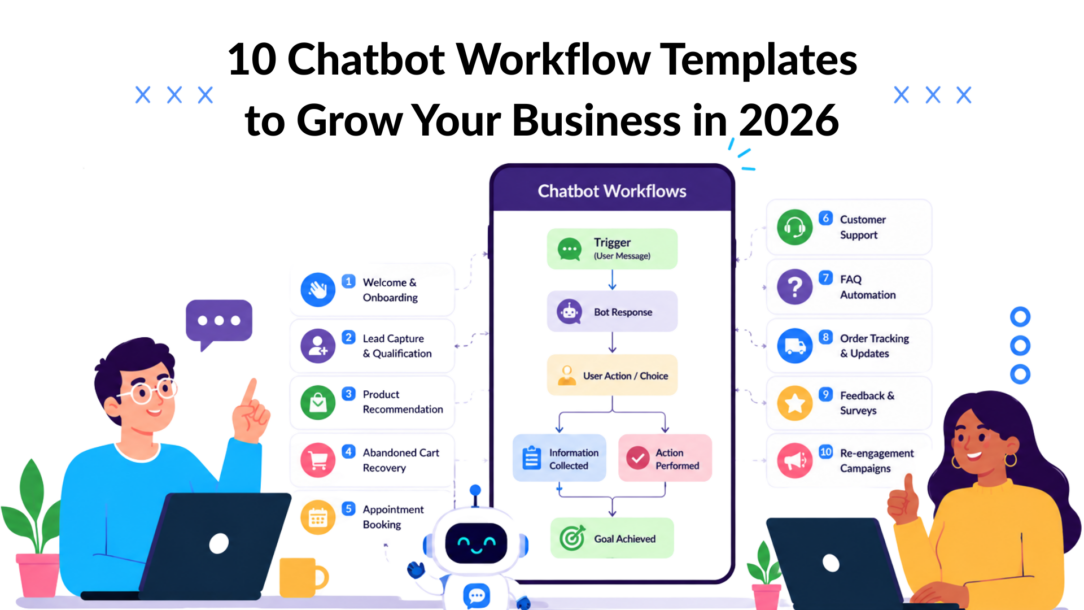
Only 4% of businesses have fully automated their workflows. That gap matters because the businesses that automate the right conversations stop relying on slow follow-ups, overloaded inboxes, and support queues that leak revenue every day.
Chatbot workflow templates fix that problem fast. They turn repeatable conversations into predefined flows, which is exactly why workflow templates have become a standard operating tool in modern work management: they give teams a reusable structure for roles, handoffs, and decision points instead of forcing everyone to start from scratch each time (Atlassian’s workflow examples). For marketers, that means fewer dropped leads, cleaner segmentation, and faster launches.
The shift is bigger than convenience. Workflow templates have moved from static documentation into interactive, software-based automation that teams can preview, customize, assign, track, and improve over time (reproducible workflow guidance). That’s why a chatbot playbook works so well in 2026. You’re not just writing canned replies. You’re building repeatable growth systems.
If you’re comparing tools before you build, you can also discover automation products. But the fastest path is simpler: pick one workflow, launch it, and refine it from live conversations.
1. The Lead Magnet Delivery & Nurture Workflow
Workflow Templates Chatbot Marketing
This is usually the first workflow I launch because it fixes two common leaks at once. It gets the asset into the prospect’s hands immediately, and it turns a simple download into a qualified conversation you can route, score, and follow up on.
A lot of teams stop at delivery. They send the PDF, collect the email, and call it done. That leaves useful intent data sitting unused. If someone asks for a “Facebook ads audit checklist,” they have already revealed channel interest, problem awareness, and likely budget range. A strong process workflow template captures that signal before the lead goes cold.
That is the difference between a list of free workflow templates and a working growth blueprint. When you create a workflow around lead delivery, it should streamline every step that follows — not just the handoff. Think of it less like a single automation and more like a workflow diagram that maps the full sequence: the message flow, the branching logic, the tag rules, the follow-up copy, and the operational setup inside your chatbot platform.
Project management of these sequences gets easier once the logic is documented. A solid template lets your team replicate the setup across campaigns without rebuilding from scratch each time.
Step-by-step flow
- Trigger the workflow from a lead ad, landing page widget, pop-up, or keyword such as “checklist” or “guide.”
- Confirm the exact asset so the user knows they are in the right place.
- Ask for an email only when it is needed for backup delivery, CRM sync, or later nurture.
- Deliver the asset right away inside the chat, by email, or both.
- Ask one short segmentation question tied to sales follow-up.
- Apply a tag based on interest, business type, funnel stage, or offer fit.
- Send one follow-up message later with a single next action, such as booking a call, viewing a case study, or taking a quiz.
Example copy:
“Your guide is ready. Do you want the PDF here, by email, or both?”
“One quick question before I send the next resource. Are you an e-commerce brand, an agency, or a service business?”
Use Clepher for lead generation when you need capture widgets, tagging, and follow-up paths connected in one place across messaging channels.
- Best segmentation field: Business model, product category, team size, or primary growth challenge.
- Success metrics: Asset delivery completion rate, response rate to the segmentation prompt, qualified lead rate, and lead-to-meeting conversion.
- Clepher implementation note: Build one base template, then duplicate it for each lead magnet. Change only the asset link, the qualifying question, the tags, and the follow-up branch.
One practical rule matters here. Ask only one qualifying question before delivery unless the offer is high intent and high value. More than that, and completion rates usually drop. The goal is to earn the next interaction, not extract every field upfront.
2. The Interactive Quiz Funnel Template
Workflow Templates Zapier Automation
Quiz funnels work because they make qualification feel useful instead of intrusive. A chatbot is a strong format for this because each question appears one at a time, the user stays in the conversation, and the result can feel personalized rather than generic.
A good quiz doesn’t ask everything. It asks only enough to route the person into the right next step. For a skincare brand, that might be skin type, top concern, and routine complexity. For a SaaS company, it might be team size, use case, and urgency. Once the answers come in, you can use this template logic to trigger the right follow-up automatically, whether that’s a product recommendation, a booking link, or an approval workflow that flags high-fit leads for your sales team.
The same structure works across industries. A construction workflow template, for example, might qualify leads by project type, timeline, and location before routing them to the right contractor or service line.
Build the flow around branching
Start with a promise that’s specific: “Find your best starter plan,” “Get your product match,” or “See which channel fits your store.”
Then use 3 to 5 questions max:
- Question one: Identify category or use case.
- Question two: Identify the friction or the goal.
- Question three: Identify buying readiness.
- Optional question: Capture email before showing detailed results.
Example copy:
“Answer 3 quick questions and I’ll recommend the best setup for your business.”
“What’s your biggest priority right now? More leads, more repeat sales, or less support workload?”
The result message should include a recommendation, a reason, and one CTA. Don’t dump every option into the chat.
Better quiz funnels feel like assisted selling. Weak ones feel like forms with chat bubbles.
- Best segmentation tip: Tag both the outcome and the pain point.
- Success metrics: Quiz completion, result click-through, and qualified lead tagging accuracy.
- Clepher implementation note: Use conditional paths so the final recommendation changes based on answers, then pass those tags into broadcasts or retargeting syncs.
3. Sales & Conversion Templates
Workflow Templates AI Automation
Sales workflows drive revenue when they remove a specific buying obstacle quickly. The buyer wants one answer, one recommendation, or one next step. If the bot tries to entertain, explain every option, and qualify at the same time, conversion usually drops.
The practical advantage of templates is speed. Teams can launch proven sales paths faster, keep offer messaging consistent across campaigns, and spend their time refining objections and routing logic instead of rebuilding the same flow from scratch. That matters even more during promos, product launches, and seasonal pushes, when delay costs sales. The right workflow automation software makes this repeatable without adding complexity.
This section works best as a blueprint, not a swipe file. The strongest sales and conversion templates define the trigger, the branch logic, the reply copy, the segmentation tags, and the business metric tied to the workflow. Think of it like a management workflow template for your entire sales sequence — every role, handoff, and outcome mapped in advance. In Clepher, that usually means keeping each automation focused on one commercial outcome, then passing intent signals into the next campaign, handoff, or retargeting audience.
The same discipline applies when you adapt this for other use cases. A recruiting workflow template, for instance, follows identical logic: one clear outcome per flow, clean branching, and routing that moves the right person to the right next step without friction.
What works in revenue-driving bots
Strong sales workflows usually handle one of four jobs:
- Remove objections: Answer questions about returns, pricing, shipping, fit, or compatibility before the buyer leaves.
- Guide selection: Recommend the right product, plan, package, or next step based on stated needs.
- Route high intent: Send buyers with urgency or budget signals to a human rep before momentum fades.
- Re-engage stalled prospects: Follow up after a click, pricing view, or partial action without forcing the person to restart.
The trade-off is focus versus flexibility. A broad bot can cover more scenarios, but it often creates long conversations that stall buying intent. A narrow workflow converts better because it asks less, answers faster, and moves the buyer forward with less friction.
A simple sales flow often looks like this:
- Trigger on a high-intent action such as a pricing-page visit, offer click, or product detail engagement.
- Open with one useful prompt tied to that action.
- Present two to four quick-reply options based on likely objections or buying goals.
- Branch to a short answer, proof point, or recommendation.
- Capture intent with tags such as product interest, urgency, or objection type.
- Route to checkout, booking, or a sales handoff.
Example copy:
“Need help choosing the right option? I can recommend one based on your budget, timeline, or use case.”
“Before you leave, do you want the fastest setup, the lowest-cost option, or the best fit for your team?”
For teams focused on recovering lost revenue, these same principles apply to any conversion workflow. Match the message to the exact point of hesitation, then give the buyer a fast path forward.
- Success metrics: Assisted conversion rate, sales-qualified handoff rate, workflow completion rate, objection-to-purchase resolution rate.
- Segmentation tip: Tag both the commercial intent and the blocker. “High intent + pricing concern” is more useful than “sales lead.”
- Clepher implementation note: Build separate templates for product selection, objection handling, and rep handoff. Then reuse tags and branches across campaigns instead of trying to run every sales motion through one oversized bot.
4. The Abandoned Cart Recovery Workflow
Workflow Templates Shopify Homepage
Abandoned cart messages usually fail for one reason. They sound automated in the worst way. “You left something behind” isn’t enough if the shopper still has a sizing question, is comparing options, or got distracted mid-checkout.
A better recovery workflow acts like a store associate who steps in at the right moment. It reminds, reassures, and resolves friction. That’s where chat works better than a single reminder email because the shopper can reply.
Recovery sequence that feels useful
Start with a short reminder, then branch based on the likely reason for abandonment.
Example flow:
- Trigger when checkout starts, but the purchase doesn’t complete.
- Wait briefly.
- Send a reminder with product reference.
- Offer quick-help buttons such as “Sizing help,” “Shipping question,” “Still deciding.”
- Route to the right branch.
- If needed, escalate to live chat or send the shopper back to checkout.
Example copy:
“You’re one step away from finishing your order. Need help with sizing, shipping, or choosing the right option?”
“I can pull up your cart and get you back to checkout.”
For more strategy around recovering lost revenue, pair reminder timing with objection-specific reply buttons.
- Best segmentation tip: Split by first-time shopper vs returning customer, and by product type if hesitation usually varies by category.
- Success metrics: Cart return rate, recovered checkout completions, support-assisted saves.
- Clepher implementation note: Use cart-triggered entry, product variables where available, and separate branches for discount-sensitive shoppers versus question-driven shoppers.
5. The Sales Funnel Lead Qualification Template
Only a fraction of inbound leads are ready for sales. A qualification workflow helps the team spend time on the right conversations, while still giving early-stage prospects a useful path forward.
The goal is not to ask every possible screening question. The goal is to collect just enough information to decide what happens next. In practice, that usually means routing a lead to one of three outcomes: book a call, enter a nurture track, or go to a human rep for review.
Qualification flow that protects pipeline quality
A practical template looks like this:
- Trigger when a visitor requests pricing, asks for sales, or shows high-intent behavior.
- Open with one context-setting question about their goal.
- Ask 2 to 4 qualification questions based on fit, urgency, and scale.
- Score or tag the responses in real time.
- Branch to the right outcome based on that score.
- Send booking, pricing follow-up, or nurture content based on intent.
The strongest qualification flows ask questions in the same order a good rep would. Start with the problem. Then confirm the company type or use case. After that, ask about timing and volume. Save sensitive questions for later unless they directly affect routing.
Example copy:
“I can help route you to the right next step. What are you trying to solve right now?”
“Which best describes your business: agency, ecommerce brand, SaaS company, or something else?”
“Are you looking to make a change this month, or researching options for later?”
One rule matters here. Do not ask for a budget in the first message unless your sales process requires it. In many funnels, that question lowers completion rate before you have earned enough trust to ask it.
- Best segmentation tip: Tag intent level and use case as separate fields. A high-intent ecommerce lead should not be grouped with a high-intent agency lead if the handoff path differs.
- Success metrics: Qualified lead rate, sales acceptance rate, booked meeting rate, and meeting-show rate from chatbot-sourced leads.
- Clepher implementation note: Use tags or custom fields for scoring, then map each score range to a clear action. High-fit leads get an instant booking path. Mid-fit leads get customized follow-up. Low-fit or early-stage leads enter nurture without reaching sales.
6. The Book a Demo/Consultation Workflow
Workflow Templates N8N Automation
A booking workflow should do two jobs at once. It should increase appointment volume, and it should protect calendar quality. If you optimize only for booked calls, your team ends up with bad-fit meetings and no-shows.
The strongest version pre-frames the call before the booking link appears. That means the bot confirms what the person wants, sets expectations, and only then sends them to schedule.
Booking flow that improves show quality
A practical flow looks like this:
- Greet and identify the visitor’s goal.
- Confirm fit with 2 to 4 questions.
- Present the right call type.
- Offer time slots or send to the scheduler.
- Capture fallback contact details.
- Trigger reminder and pre-call prep messages.
Example copy:
“I can help you book the right session. Are you looking for a strategy call, product demo, or onboarding help?”
“Before I send times, what are you hoping to solve on the call?”
This structure is especially effective for agencies, coaches, consultants, and B2B SaaS teams. The chat gathers context that a scheduler page usually misses.
- Best segmentation tip: Branch by lead source. Someone from a pricing page should get a different path than someone from a blog post.
- Success metrics: Booked call rate, completed call rate, and close rate from chatbot-booked appointments.
- Clepher implementation note: Add pre-booking qualification tags, then sync call context to your CRM or calendar stack so the rep sees answers before the meeting.
7. Customer Support & Success Templates
Workflow Templates HubSpot Interface
Support workflow templates aren’t just about deflecting tickets. They standardize how your brand responds when customers are confused, frustrated, or trying to finish something quickly. That consistency matters even more when multiple team members, channels, and regions are involved.
There’s also a strategic reason to template support operations carefully. Workflow design often fails because ownership and documentation break down across teams, not because the template itself is weak. The MeisterTask discussion of project workflow pitfalls highlights why clear ownership, dependencies, milestones, and review gates matter. The same principle applies to chatbots. If nobody owns version control, your support bot will drift into contradiction.
Governance matters more than most teams expect
Support templates should answer four operational questions before they go live:
- Who owns updates: Support lead, CX manager, or operations.
- When handoff happens: Billing issue, complaint, technical edge case, VIP account.
- What is mandatory: Approved reply paths for common issues.
- How changes get reviewed: Monthly audit or after product changes.
The best support template usually constrains options more than the team wants at first. That’s why it stays reliable under pressure.
- Success metrics: Ticket deflection, first-response consistency, escalation accuracy.
- Implementation note: Use templates as governed systems, not as one-off experiments built by whoever had time that week.
8. The Proactive FAQ & Support Triage Workflow
A reactive support bot waits for a question. A proactive one intercepts confusion before it becomes abandonment, refund pressure, or an angry inbox thread. That’s why this workflow belongs on pricing pages, shipping pages, onboarding screens, and account areas.
The structure is simple. Detect context, offer likely answers, then route by issue type. You don’t need the bot to solve everything. You need it to speed up the first good answer.
Triage flow that reduces support chaos
Use page-based or behavior-based triggers, then guide users into a structured path.
Example flow:
- User lands on a high-friction page or opens the support widget.
- The bot offers top intents such as shipping, billing, returns, account access, or product help.
- User chooses a path.
- The bot answers directly or asks one clarifying question.
- If unresolved, the bot collects details and escalates.
Example copy:
“Need help with your order, billing, or account access?”
“I can answer common questions instantly or pass this to a person with the details included.”
If you want a deeper playbook for support automation, see how to automate customer service.
- Best segmentation tip: Separate pre-purchase support from post-purchase support. They need different intents and escalation rules.
- Success metrics: Self-serve resolution rate, escalation completeness, repeat-contact reduction.
- Clepher implementation note: Build intent buttons first, then add AI keyword triggers only after your core branches are stable.
9. The Automated Order Status & Tracking Workflow
Order status is one of the highest-volume support intents in ecommerce. It is also one of the easiest to automate well, because the customer usually wants one thing fast: a clear answer on where the package is and what to do next.
A good workflow does more than surface tracking data. It reduces ticket volume, catches delivery exceptions early, and gives support agents cleaner handoffs when a case needs human help. It also sets up the post-purchase experience that shapes retention. If you are mapping that broader journey, this guide to customer onboarding workflows and milestones helps connect support touchpoints to longer-term engagement.
Step-by-step flow for order tracking and exceptions
Keep the interaction short and utility-first:
- Ask for a low-friction identifier such as order number, email, phone number, or logged-in verification.
- Pull the current order status from your store, OMS, or shipping app.
- Return the status in plain language.
- Present the next best action based on that status.
- Route exceptions into the right branch, such as delay, wrong item, damaged package, or missing delivery.
- Escalate with the order context attached if the customer still needs help.
Example copy:
“Send your order number or the email used at checkout, and I’ll check the latest update.”
“Your order has shipped and is expected to arrive Tuesday. Do you want the tracking link, delivery help, or return options?”
The branching logic matters. “Processing” needs different replies than “Delivered.” If an item is still being packed, set expectations and offer order-edit rules if your operation allows them. If the package shows delivered but the customer cannot find it, move straight into a missing-package flow with address confirmation and claim steps.
- Best segmentation tip: Segment by fulfillment stage and issue type. “Processing,” “In transit,” “Delivered,” and “Exception” should each have their own follow-up options and reporting tags.
- Success metrics: Order-status deflection rate, time to exception routing, delivered-but-issue case rate, support CSAT for post-purchase conversations.
- Clepher implementation note: Connect Clepher to your order data first, then build exception branches second. Start with the top four statuses your team sees every day before adding edge cases or promotional messages.
10. Onboarding & Engagement Templates
Workflow Templates Clickup Platform
Onboarding is where a lot of acquisition spend gets wasted. You paid to win the customer, then left them to figure things out alone. A chatbot onboarding template fixes the first-mile confusion that causes drop-off.
This is also where workflow templates shine operationally. They let teams encode institutional memory into a reusable process, which makes handoffs cleaner, training easier, and execution more consistent across repeated operations, as reflected in the earlier workflow-template guidance. For SaaS, subscriptions, and education businesses, that consistency directly shapes activation.
What good onboarding templates do
Strong onboarding chat flows help users finish a first success milestone quickly. That might be creating an account, connecting a tool, placing a first order, activating a subscription, or starting a first lesson.
They also prevent overload. New users don’t need every feature on day one. They need the shortest path to confidence.
- Success metrics: Activation milestone completion, onboarding reply rate, and support reduction during the first days of use.
- Implementation note: Break onboarding into short milestones instead of one giant sequence. Trigger the next message based on behavior, not just elapsed time.
11. The New Customer/User Welcome Sequence
The welcome sequence should answer one question fast: “What should I do next?” If that answer isn’t obvious, users drift. They don’t always cancel immediately, but they stop moving forward.
Milestone-based messaging is particularly effective. The workflow automation statistics roundup also notes practical use of progressive disclosure and milestone-based guidance in adoption flows, which is a useful framework even when your exact onboarding setup differs from the examples in that source. In plain terms, introduce the next useful action only when the user is ready for it.
Welcome sequence blueprint
A strong welcome sequence often includes:
- Confirmation and warm greeting.
- One clear first action.
- A branch based on role or goal.
- A reminder that the first milestone hasn’t been completed.
- A human-help option for stuck users.
Example copy:
“You’re in. Let’s get your first win set up.”
“Which best describes you: store owner, marketer, support lead, or founder?”
For a broader onboarding framework, see what customer onboarding looks like in practice.
Operator note: Every extra option in the welcome message lowers clarity. Start narrow.
- Best segmentation tip: Tag users by role and desired outcome, not just by plan type.
- Success metrics: First action completion, time to first milestone, welcome-sequence reply rate.
- Clepher implementation note: Use custom fields to remember role selection, then personalize future messages around that answer.
12. The Feature Announcement & Adoption Workflow
Three out of four knowledge workers already use AI at work, according to Microsoft’s 2024 Work Trend Index. That matters for feature launches because users now expect new capabilities to be practical, fast to try, and relevant to their workflow. A generic product update rarely gets them there.
The job of this template is adoption, not awareness. A strong announcement workflow qualifies who should see the feature, explains the outcome in plain language, guides the first use, and captures friction before interest fades. That is the difference between a launch that gets clicks and a launch that changes product behavior.
Feature rollout flow that drives first use
Use this sequence:
- Start with the right segment. Send the announcement only to users who can benefit now, based on role, plan, account setup, or related actions already taken.
- Lead with the use case. Describe the problem solved first. Save the feature name and product language for the second line.
- Offer one next step. Give users a clear choice, such as see an example, start setup, or talk to support.
- Branch by intent. Users who click setup need guidance. Users who ask for examples need proof. Users who ignore the message need a shorter follow-up with a sharper benefit.
- Check activation. If the user started but did not finish, send a reminder tied to the exact step where they stopped.
- Capture blockers. Ask what got in the way, then tag the response for product, success, or support follow-up.
Example copy:
“New in your account. You can now automate repeat customer follow-ups after a purchase.”
“Want the 2-minute setup steps, or a live example for your business type?”
One trade-off matters here. Broad announcements create reach, but they also create noise for users who are not ready. Narrow targeting lowers total clicks and usually improves setup completion and repeat usage. For adoption workflows, that is the better trade.
- Best segmentation tip: Split users by role, plan, related feature usage, and account maturity. A new admin and a power user should not get the same prompt.
- Success metrics: Feature click-through, setup start rate, setup completion, repeat usage after 7 to 14 days, and blocker response rate.
- Clepher implementation note: Build one core template in Clepher, then branch the message path by role and prior behavior. That keeps launches consistent while still giving each segment the right setup path, copy, and follow-up logic.
13. The Event/Webinar Registration & Reminder Workflow
Around half of event registrants never make it to the live session in many webinar programs. The drop rarely comes from bad intent at signup. It comes from weak confirmation, generic reminders, and no reason to re-engage before the event starts.
A strong registration workflow does more than collect a seat request. It captures why the person signed up, uses that context in every reminder, and splits attendees, no-shows, and high-intent prospects into different follow-up paths. That is what turns this from a simple reminder series into a working event pipeline.
Registration flow that improves attendance quality
Use this structure:
- Lead with a specific promise. Name the topic, who it is for, and what the attendee will leave with.
- Confirm the registration inside chat. Do not send people to a second form unless you need extra fields for sales or compliance.
- Ask one qualification question. Keep it short, such as their main challenge, team size, or purchase timeline.
- Send the event details immediately. Include date, time zone, access link, and calendar add option if available.
- Schedule reminder messages. A practical cadence is 24 hours before, 1 hour before, and 10 minutes before the event.
- Tailor the live and post-event path. Attendees get the next-step CTA. No-shows get the replay. High-intent responses can route to sales.
Example copy:
“Save your seat for our live session on improving post-purchase retention.”
“You’re in. What’s the main question you want answered during the session?”
One trade-off matters here. Asking more questions at registration gives the sales or marketing team a better context, but every extra field lowers completion rate. For demand generation webinars, one useful question is usually enough. For smaller demo-style events with higher deal value, two or three qualification questions can be worth the extra friction.
- Best segmentation tip: Capture the attendee’s stated goal at signup, then use it in reminder copy and post-event follow-up. Someone who wants tactical advice should not get the same message as someone evaluating vendors.
- Success metrics: Registration completion rate, reminder click-through rate, attendance rate, watch time or live participation, replay views, and post-event CTA conversion.
- Clepher implementation note: Build the workflow with separate tags for registered, attended, no-show, asked a sales-related question, and clicked post-event CTA. That makes follow-up much easier to personalize and gives the team a clean view of the event-sourced pipeline.
13 Workflow Templates: Side-by-Side Comparison
A comparison table is only useful if it matches the workflows you plan to build. The original version mixed numbered templates with category headers and made the scoring harder to interpret than it needed to be. This version keeps the article’s 10 templates, aligns the numbering with the sections above, and focuses on the fields that help a team choose what to launch first in Clepher.
Use it as a selection tool, not just a summary. Pick the workflow tied to one business outcome, confirm the success metric before launch, and build the tagging and routing logic around that metric from day one.
| # | Workflow | Best For | Key Success Metric | Clepher Implementation Tip |
|---|---|---|---|---|
| 1 | Lead Magnet Delivery & Nurture Workflow | Capturing new leads and warming them toward a CTA | Lead-to-next-step conversion rate | Trigger the flow from the entry point that produced the lead, then tag by asset requested, topic interest, and CTA clicked, so follow-up stays relevant. |
| 2 | Interactive Quiz Funnel Template | Segmenting prospects before recommending an offer, product, or path | Quiz completion rate to qualified lead rate | Store each answer in custom fields, then branch results by need, budget, or use case. That gives Clepher enough context to personalize the final recommendation and downstream follow-up. |
| 3 | Sales & Conversion Templates | Teams choosing between revenue-focused automation paths | Pipeline movement by workflow type | In Clepher, group sales-focused workflows are in one reporting view so the team can compare qualification, booking, and recovery performance without mixing them with support or onboarding metrics. |
| 4 | Abandoned Cart Recovery Workflow | E-commerce brands are trying to recover lost checkout revenue | Cart recovery rate | Pass cart contents, cart value, and checkout link into the message. Add a stop rule if the order is completed, or customers will keep getting recovery prompts after purchase. |
| 5 | Sales Funnel Lead Qualification Template | B2B teams filtering inbound leads before a rep gets involved | Qualified lead rate | Score replies with tags such as fit, urgency, and intent. Send high-intent leads to sales immediately and place lower-fit leads into nurture instead of forcing every contact into the same handoff. |
| 6 | Book a Demo/Consultation Workflow | Service businesses and SaaS teams converting intent into scheduled conversations | Booking rate to show-up rate | Connect the calendar directly in Clepher, confirm the booking inside the chat, and tag the lead by meeting type, topic, or market segment so reminders and follow-up match the context. |
| 7 | Customer Support & Success Templates | Teams deciding which service automation to prioritize first | Ticket deflection rate or time-to-resolution | Keep support templates in a separate workspace or naming convention inside Clepher. That makes escalation rules, handoff ownership, and reporting much easier to manage. |
| 8 | Proactive FAQ & Support Triage Workflow | Reducing repetitive support volume while routing complex issues correctly | Deflection rate | Build clear intent branches for the top support questions first. Add a human handoff path early, because forcing every edge case through automation usually hurts CSAT. |
| 9 | Automated Order Status & Tracking Workflow | E-commerce and fulfillment-heavy businesses handling WISMO requests | Reduction in order-status tickets | Use order lookup data dynamically inside the message and tag common outcomes such as delivered, delayed, or exception. Those tags help spot logistics issues before they spread. |
| 10 | Onboarding & Engagement Templates | Teams choosing activation-focused workflows after conversion | Activation rate | Build onboarding workflows around one early success milestone. In Clepher, that usually means a tag or event trigger for first login, first setup step, or first completed action. |
| 11 | New Customer/User Welcome Sequence | Helping new customers reach first value fast | Time-to-first-key-action | Trigger the sequence from purchase or signup, then branch by customer type, product plan, or stated goal. New users rarely need the same guidance. |
| 12 | Feature Announcement & Adoption Workflow | Driving usage of a newly released feature | Feature adoption rate | Only send announcements to segments that will care about the feature. In Clepher, combine usage tags with role or plan data so that advanced users and new users do not get identical prompts. |
| 13 | Event/Webinar Registration & Reminder Workflow | Increasing registrations, attendance, and post-event follow-up quality | Registration-to-attendance rate | Tag contacts as registered, attended, no-show, and clicked post-event CTA. Those tags make the follow-up path much easier to personalize and report on. |
Your Turn: Pick One Template and Start Automating
Teams get the best results from workflow templates when they treat them as operating systems for recurring conversations, not as a batch of ideas to save for later. The fastest path is simple. Pick one workflow tied to a current bottleneck, build the shortest version that can work, and improve it with live behavior.
Start with the use case that already consumes time every week. For an e-commerce team, that is often cart recovery or order-status requests. For a SaaS or service business, it is usually lead qualification, demo scheduling, or new-user onboarding. Agencies usually get the highest return by standardizing one proven flow across client accounts, then adjusting tags, copy, routing rules, and offers by brand.
Use this checklist before you publish anything:
- Choose one measurable outcome: recovered carts, booked demos, qualified leads, fewer support tickets, or faster time to first key action
- Map the trigger and exits: what starts the workflow, what counts as success, and when the conversation should hand off to a human
- Keep the first version tight: one goal, a few branches, clear copy, and no extra logic that your team cannot maintain
- Add segmentation where it changes the message: customer type, product interest, order status, plan level, or stated intent
- Review transcripts in the first week: look for drop-offs, repeated questions, failed replies, and handoff points that need cleaner wording
- Document ownership: one person should own updates, approvals, reporting, and QA
That is the core value of the 13 templates in this guide. Each one gives you a working blueprint you can adapt, not just a prompt to brainstorm from. The strongest workflows share the same structure: a clear trigger, a defined next step, a small number of decision points, example copy that sounds natural, segmentation rules that matter, and one metric that tells you if the workflow is doing its job.
A practical rollout usually looks like this. Launch one template. Let it run long enough to collect real
conversations. Tighten the copy, fix weak branches, and only then clone the structure for the next use case. That approach keeps your bot library clean and gives your team a repeatable process instead of a pile of half-finished automations.
If Clepher fits your stack, use it to build the first workflow around a single business goal, then expand channel by channel across your site, Messenger, WhatsApp, and Instagram. The platform matters less than the discipline. Start with one repeatable conversation, define success, and ship the version your team can maintain.
If you want to put one of these workflow templates into production quickly, Clepher gives you a no-code way to build chatbot flows for lead capture, sales, support, and onboarding across your website, Messenger, WhatsApp, and Instagram. Start with one high-impact use case, launch it, then expand from there.

Related Posts
10 Broadcast Automation Software Platforms Compared
October 11, 2026Customer Journey Automation: The Practical Guide
October 10, 2026Lead Qualification Marketing: A Practical 2026 Guide
October 9, 2026
Founder Clepher