
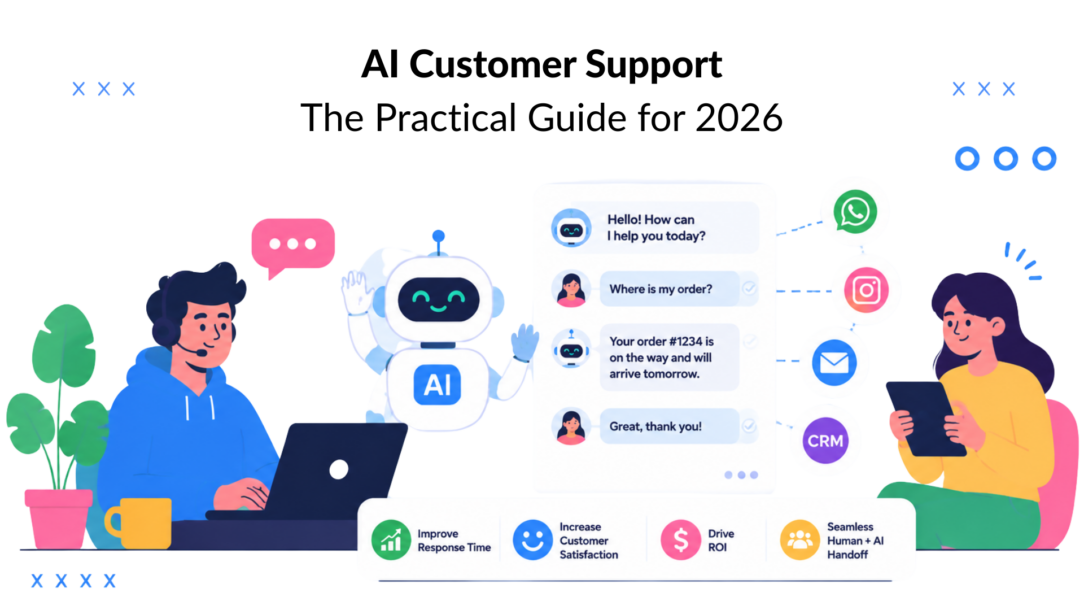
A customer sends a late-night message about a delayed order. Your team doesn’t see it until morning; the cart is gone, and now you’re answering a frustrated follow-up instead of fixing the issue before it costs the sale. That’s the pressure behind AI customer support, not the buzz around chatbots, but the daily gap between when customers need help and when a human can respond highlights the need to implement AI tools.
The shift is already underway. McKinsey reports that 78% of organizations use AI in at least one business function and 71% use generative AI regularly, while customer-service-specific estimates suggest 80% of support teams will be implementing generative AI by 2025, and 95% of customer interactions could be AI-powered by 2025 (AI adoption and customer support statistics are crucial for understanding trends in customer satisfaction). This is particularly relevant when assessing the effectiveness of conversational AI in service operations. Cost pressure is just as blunt, with self-service at about $1.84 per contact versus $13.50 for an agent-assisted interaction in the Gartner benchmark cited by the source, which is roughly a 7x difference (customer service cost benchmark).
That’s why AI support is no longer a side experiment. It’s becoming the operating layer under routine service, triage, and self-service, especially in e-commerce, SaaS, and any business where customers expect answers outside office hours. The central question isn’t whether to adopt it, it’s how to do it without creating broken handoffs, bad answers, or a support experience that feels fast but fails to resolve anything.
Why AI Customer Support Has Stopped Being Optional
The strongest argument for AI support is simple. Customers don’t wait for your shift to start; they expect immediate responses from your customer service team. They send the message at 11 p.m.; they expect the status update immediately, and they’ll move on if the answer doesn’t arrive while they still care.
That’s why the adoption curve matters. The market data in the verified sources shows support teams moving from curiosity to routine use, with chatbots and generative AI spreading fast across customer operations (AI adoption and customer support statistics, AI customer service adoption and ROI data). In practical terms, AI is no longer a “future-proofing” project. It’s how modern support teams keep up with volume without making customers wait.
The cost of waiting is not just slower replies
Manual support can still work for low volume, but it breaks down quickly when contact spikes, channels multiply, or the same questions keep coming back. AI changes the economics by taking routine work off the queue and reserving humans for exceptions, escalations, and retention moments that need judgment.
Practical rule: Implementing AI can significantly improve customer satisfaction. If a request is repetitive, rules-based, and tied to a clear system of record, it should be the first candidate for automation.
That doesn’t mean every issue belongs in AI. It means your support model should reflect customer behavior, not internal comfort with old workflows. A shopper doesn’t care whether the answer came from a bot; they care whether the package arrived, the refund landed, or the account issue got fixed without a back-and-forth.
The businesses that feel the most pressure to move first are usually the same ones with the highest repetition. DTC brands, SaaS teams, and subscription businesses see the same account questions over and over, and every one of those can either become a cheap resolved interaction or a costly human conversation. That’s the operational fork in the road.
How AI Customer Support Actually Works
A useful way to think about AI customer support is as three layers working together. The first layer understands what the customer wants. The second layer finds the right facts. The third layer takes action or returns a response.
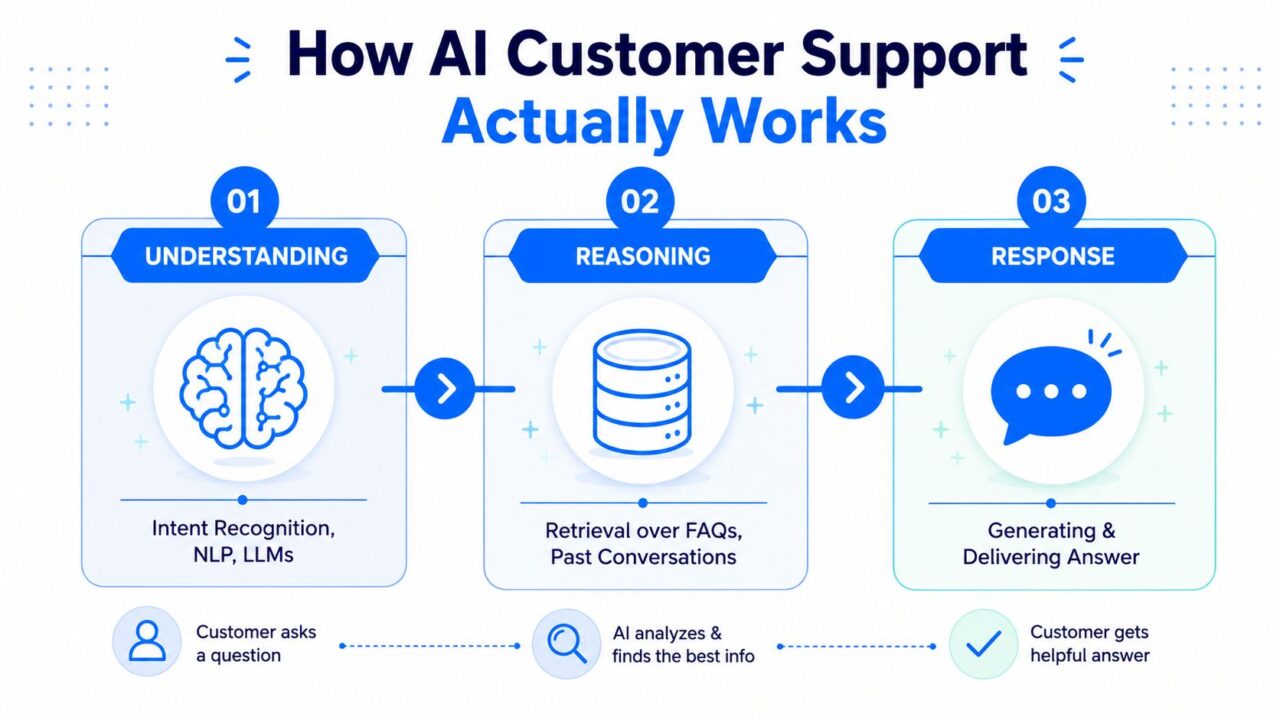
AI Customer Support Process Diagram
Understanding comes from intent recognition and language models
When a customer types “Where’s my order?” the system has to recognize the intent before it can help. That’s the understanding layer, usually powered by intent recognition, natural language processing, and large language models that parse messy, real-world messages rather than perfect commands.
A front-desk agent can understand shorthand, typos, and half-finished questions. The agent doesn’t need the customer to use the right phrase. They need to know what the customer wants.
Reasoning requires live context, not just a help article
The second layer is where many demos fall apart. A generic chatbot can repeat policy language, but a production support agent needs to retrieve details from FAQs, manuals, past tickets, and product data, then use that context to decide what answer fits the situation. For technical queues, this matters even more because good diagnosis depends on product telemetry, error logs, configuration state, and code-level context, not just a knowledge base (technical support and customer support AI).
That’s why static retrieval alone isn’t enough. A real support system has to connect what the customer asked with what the business knows right now, leveraging AI in customer service.
Response means action through secure tools
The last layer is what separates a demo from a working system. A strong setup combines LLM reasoning + retrieval-augmented generation, or RAG, + backend tool calls so the AI can do things like check an order, update a CRM record, create a ticket, or pull billing status through secure APIs (enterprise AI customer service guidance).
A bot that can only answer questions is useful. A bot that can safely read and write into business systems is operational.
That production-grade standard also depends on sub-second response latency is critical for maintaining high service quality in customer service solutions, observability, and encrypted data pipelines so teams can trust what the AI is doing and audit it later (enterprise AI customer service guidance). In plain language, the system has to be fast enough to feel conversational, transparent enough to debug, and secure enough to protect customer data.
Where AI Support Lives in Your Stack
The easiest place to start is usually where customers already reach out. Website chat sits at the front door, social DMs catch high-intent questions, email and SMS handle slower back-and-forth, and your CRM or helpdesk stays the system of record for all customer inquiries. The value comes from connecting those pieces so the customer does not have to restart the conversation every time the channel changes, which is vital for effective customer relationships.
A website widget works well for order questions, shipping updates, and pre-purchase hesitation because it sits close to the moment of intent. Facebook Messenger and Instagram DMs fit social care because the customer is already in a conversational mindset and often expects a quick reply. WhatsApp matters for international and mobile-first audiences, while email and SMS are better when the issue needs a thread, a confirmation, or a delay that does not call for live back-and-forth.
Context matters more than channel
The channel itself matters less than what the system knows when the message arrives. If a customer starts in chat and moves to email, the AI should keep identity, prior steps, and the reason the conversation stalled. That is what turns multichannel support into connected support instead of a set of disconnected contact points.
Your helpdesk and CRM are where that continuity should land. A warm handoff should carry the transcript, identifiers, and the last action taken so the human can pick up the issue without asking the customer to repeat themselves, enhancing personalized support. The CRM and ticketing layer is where the operational work lives, not just the customer-facing widget, and CRM and ticketing system integration shows how that system of record fits into the flow of customer requests and enhances service operations.
The highest-impact integrations come first
Not every connection needs to happen on day one. The most useful early integrations are usually the ones that let AI answer status questions, create tickets, and route the right conversation to the right team.
- Website chat widget: Best for high-intent support and pre-sale questions, because the user is already active on your site.
- Social DMs: Best for brands that get recurring questions on Facebook and Instagram, especially if response time affects conversion.
- Email and SMS: Best for follow-up flows, confirmations, and cases where the customer does not need an instant reply.
- CRM and helpdesk: Best for preserving identity, past contact history, and agent visibility across the whole lifecycle, which is essential for implementing AI in customer service.
If you do not connect these seams, AI becomes a polite interface on top of fragmented operations. If you do connect them, it becomes part of the workflow, streamlining customer service solutions.
Real Use Cases and Conversational Flows
A DTC skincare brand usually sees the same pattern over and over. A customer DMs Instagram asking where an order is, then follows up on the website if nobody replies fast enough. AI can capture the order number, check the status, answer the routine question, and escalate only if something is wrong with the shipment or the customer needs a refund review.

AI Customer Digital Support
A support flow should resolve, not just chat
A good conversation flow has a clear job at each node.
- Capture: Ask for the minimum needed detail, like order number, email, or product name.
- Qualify: Decide whether this is a simple status request, a billing problem, or a case that needs a human.
- Resolve: Pull the live answer from the right system and confirm it back to the customer.
- Escalate: Pass the full context to a human when the issue is sensitive, unclear, or outside the rules.
That structure matters because a chat window can look active while the experience is still failing. If the bot keeps asking for the same detail, or sends the customer in circles, it hasn’t resolved anything. It has just delayed the inevitable handoff to an AI agent.
Agencies need the same logic, just across more brands
A digital marketing agency managing multiple clients on Facebook and Instagram faces a different kind of volume problem. The questions are less about shipping and more about lead qualification, campaign FAQs, booking intent, and routing to the right account owner or sales rep. AI can sort that incoming traffic, answer standard questions, and surface sales-ready conversations before the thread cools off.
In that setting, the flow needs a different shape to better accommodate customer inquiries. It has to identify whether the message is a new lead, a client issue, or a support request for a specific brand, then route it without mixing accounts. That’s where conversational design becomes operations, not copywriting.
The best flows feel boring in the right way. They ask less, move faster, and hand off cleanly when they can’t finish the job.
An Implementation Roadmap That Actually Holds Up
The rollout that survives contact with reality usually starts narrower than leaders want. The first decision is data, not tone or personality. The AI needs to know what it can read, what it can write, and which systems are authoritative for each answer.
Your first checkpoint is simple. If the system can’t reliably access the right knowledge base, order data, CRM fields, or ticketing records, it’s not ready to own the conversation. Build the data foundation first, because weak inputs create confident wrong answers.
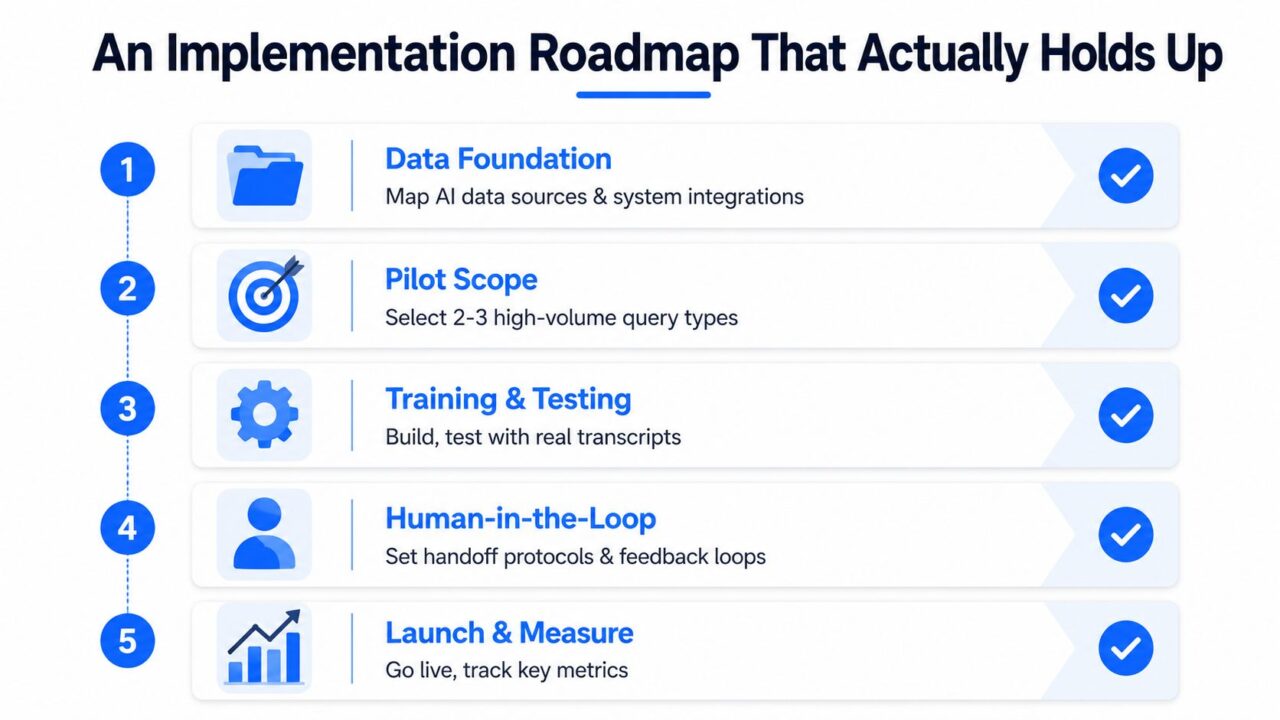
AI Customer Support Implementation Roadmap
Choose real use cases, not wish lists
The next decision is scope. Pick the top 10 to 20 questions your team gets, then narrow the first pilot to the highest-volume, lowest-complexity ones. Don’t start with the hardest case just because it’s politically visible.
A useful pilot usually has one purpose. It either reduces repetitive tickets, improves triage, or makes one channel faster and more consistent, ultimately enhancing customer satisfaction. If it tries to do all three at once, nobody can tell whether it worked.
Handoffs need to be explicit
The third decision is escalation. Human agents need full context, including what the AI already tried, what the customer said, and where the conversation stalled. Without that, the handoff becomes a reset, which feels slow and disrespectful.
The support team should define hard rules for when AI stops. Emotion, policy exceptions, repeated confusion, and ambiguous requests all deserve a human review path. That’s how you protect both efficiency and trust.
Test with messy transcripts
The last decision is validation. Real transcripts, edge cases, and adversarial prompts tell you more than polished sample questions ever will. The AI should be tested against the way customers typically write, including short replies, sarcasm, partial details, and mixed-language messages to improve customer interactions.
A v1 in days, then iteration, usually beats a six-month build that nobody trusts. The first launch is not the finish line; it’s the first production learning loop.
Measuring What Matters Beyond Deflection
A support team can ship faster replies and still leave customers stranded, which negatively impacts customer relationships. That usually shows up when deflection looks healthy on paper, but the same people keep coming back because the first answer did not solve the problem, highlighting the need for better service quality. The key test is whether the customer had to return for the same issue.
The most useful metrics are the ones that expose that gap. Track repeat contact within 48 hours, escalation rate, the CSAT gap between AI-handled and human-handled conversations, end-to-end resolution time, and abandonment at the handoff point. Those measures show whether the AI is closing the loop or just shifting work to a later conversation.
Build a dashboard around failure modes
A useful dashboard does not need to be elaborate. It needs to show where the system breaks so the team can fix the right part of the flow.
| Metric | What It Tells You | Target Direction |
|---|---|---|
| Repeat contact within 48 hours | Whether the issue was resolved | Down |
| Escalation rate | How often AI needs a human | Down for simple flows |
| CSAT gap between AI and human conversations | Whether AI is delivering comparable experience quality, especially in handling customer queries, is a vital consideration. | Narrow the gap |
| End-to-end resolution time | How long the customer waited for a final answer can impact their overall customer experience. | Down |
| Abandonment at handoff points | Where customers drop out during escalation | Down |
If you want a fuller view of conversation quality, keep the analytics layer close to the handoff and reply history to improve support operations. That is where teams usually find the hidden friction, and the conversation analytics view is the kind of place those patterns become visible.
Practical rule: If deflection goes up but repeat contact also rises, the economics are getting worse, not better.
The main takeaway is straightforward. Volume saved is not the same as problems solved. If the AI is fast but customers keep returning with the same issue, you have moved cost around instead of removing it.
Compliance, Privacy, and Accessible Handoffs
Compliance and accessibility belong together because both are about preserving trust. Customers need to know what data enters the system, how long it’s stored, and who can see the transcript afterward to improve customer experience. They also need a clear escape hatch when the AI can’t help.
For GDPR-sensitive workflows, the support stack should minimize the data it collects, use consent prompts where appropriate, and make the human option obvious. If a customer doesn’t want to continue in automation, or the request involves sensitive details, the path to a person should be immediate and simple. For a practical privacy reference, it helps to review our privacy policy, which details how we implement AI in customer service to protect customer relationships, from Lead Printer as an example of how data-handling language can be presented clearly to users.
Accessibility has to be built into the handoff
The under-discussed part is what happens when the AI is the wrong tool for the customer. Some people use screen readers to enhance their customer experience. Some can’t complete the self-serve flow. Some have a problem the bot wasn’t designed to solve.
The handoff should preserve context so the customer never has to repeat screenshots, account details, or prior steps. That matters for accessibility and for basic human patience. A good support system doesn’t just transfer ownership; it transfers understanding.
If you’re setting permissions and roles, the operational controls belong in the same governance layer as privacy. The permission management layer is where teams usually decide who can see what, which is central to keeping transcripts and customer records properly bounded.
Scaling AI Support Without Losing the Human Touch
Scale starts with restraint. Begin with the highest-volume, lowest-complexity questions, then expand only after the data shows the AI is handling them reliably. After that, add proactive support like order updates, back-in-stock alerts, and renewal reminders, because those interactions reduce inbound pressure before it starts.
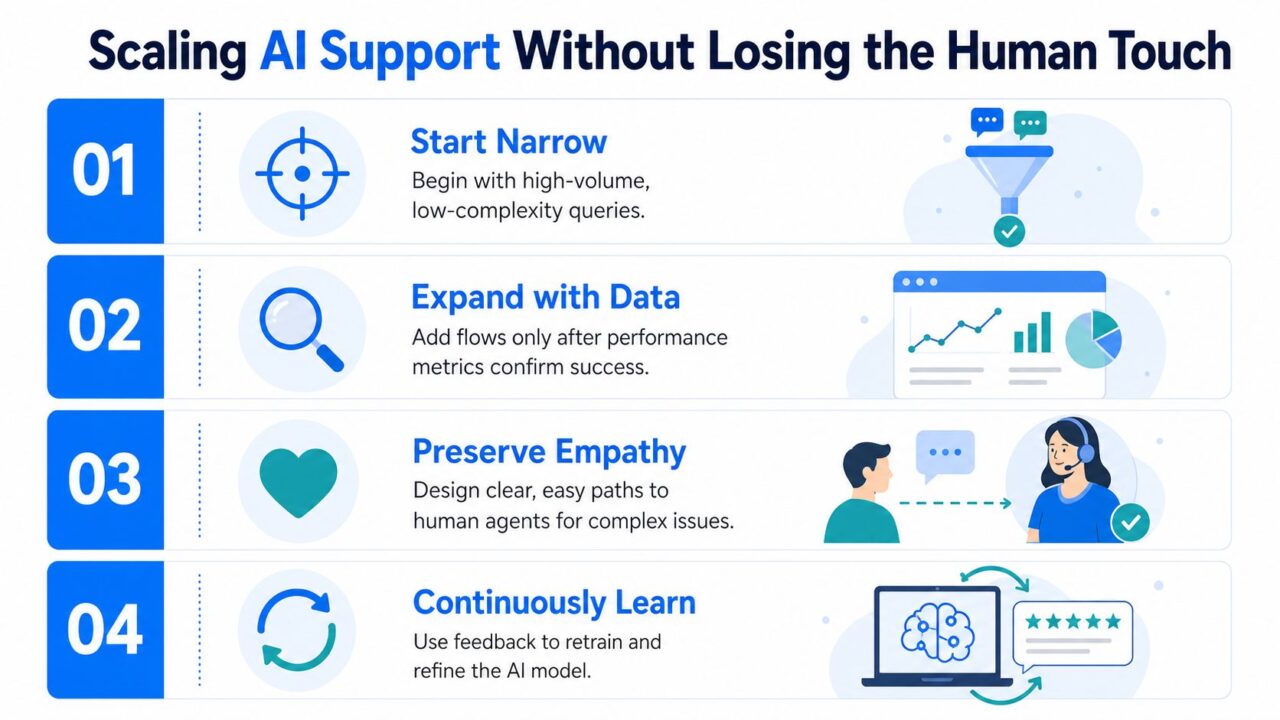
AI Customer Support Strategy
Your team’s job changes too, especially with the integration of conversational AI in support operations. Fewer reps should spend their day typing the same answers. More of them should supervise flows, handle exceptions, and improve the logic when the system misses.
- 30 days: Launch one narrow flow, usually the most repetitive question set.
- 60 days: A crucial timeframe for evaluating service quality in customer service solutions. Review failure points, tighten handoffs, and expand only if repeat contact is under control.
- 90 days: Add one proactive use case and one new channel if the data supports it.
The next frontier is agent-assist for human reps, voice, and predictive support that reaches out before the customer asks. The teams that win won’t treat AI like a plug-in. They’ll treat it like a craft, measured carefully and improved every week.
If you’re ready to turn support from a reactive queue into a system that resolves customer issues, Clepher gives you a practical way to do it with AI-powered chatbots, no-code flows, website chat, and support handoffs across Messenger, WhatsApp, Instagram Direct Message, and your site. Start with one high-volume use case, connect the right channel, and see how Clepher can help your team build a support experience that responds faster and hands off cleanly when it should.
