
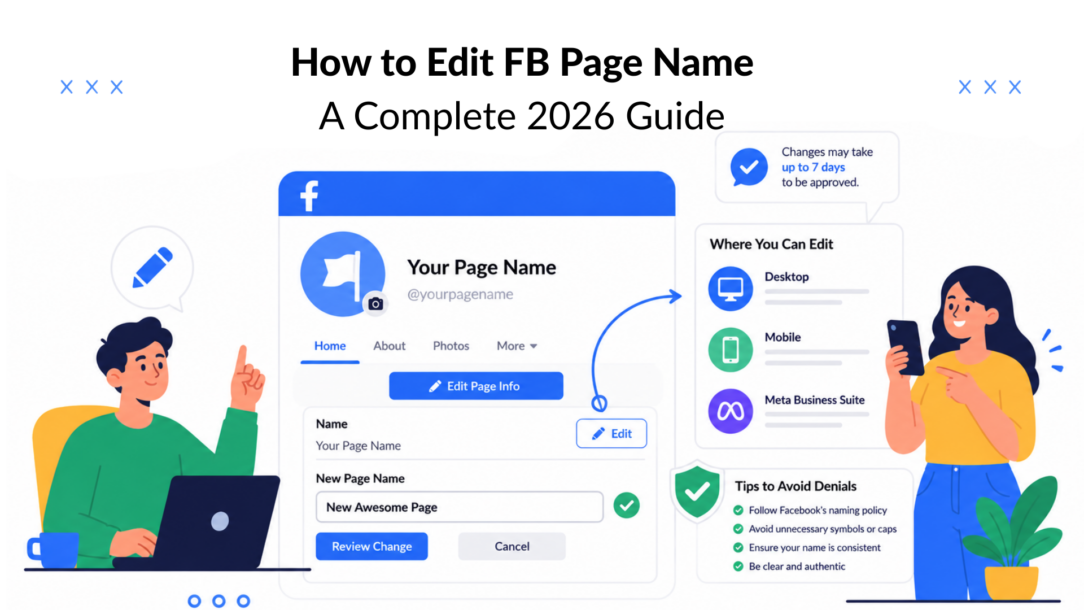
You’re probably in the middle of a rebrand, a merger, or a cleanup job where the Facebook Page name no longer matches what people know the business as. The frustrating part isn’t finding the setting; it’s realizing Facebook doesn’t treat a Page name like a quick typo fix anymore. It’s a reviewed change, which means a smart rename starts with planning, not clicking around.
Why Your Facebook Page Name Matters for Business
A Page rename usually happens when a business changes hands, expands, or tightens its brand. I’ve seen teams rush into the edit because the new logo is ready, the website is live, and sales wants everything aligned by Monday. Then the Page name sits in review while the launch goes out anyway, and the mismatch creates avoidable confusion.
That’s why the name matters as more than a label. It shapes discoverability, acts as a trust signal, and keeps continuity across your messaging ecosystem, especially when your Page is tied to ads, Messenger, and ongoing campaigns. Facebook’s own Help Center makes the shift clear: Page name changes are now reviewed requests, not instant self-serve edits, and that approval gate exists to reduce misleading or impersonation-style changes before they go live (Facebook Help Center on Page renaming).
For businesses, that controlled review changes how you plan launches. If you’re managing a client portfolio, a renamed Page can affect how the brand appears across audience touchpoints, so you need the new name ready before creative, ad copy, and customer support scripts go live. A practical way to think about it is this: the Page name is part of the brand system, not an isolated admin field.
Practical rule: If the new name changes how customers search for you, recognize you, or tag you, treat it like a brand release, not a settings update.
For broader Page strategy, it also helps to think about naming in the same way you’d think about audience growth and community structure. Sight AI’s Facebook group playbook is a useful companion if your rename is happening alongside a larger Facebook presence rebuild.
If you’re also auditing how the Page appears to visitors, this Facebook Page view guide helps you check the experience from the outside, which is the angle most admins forget.
How to Edit FB Page Name on Desktop
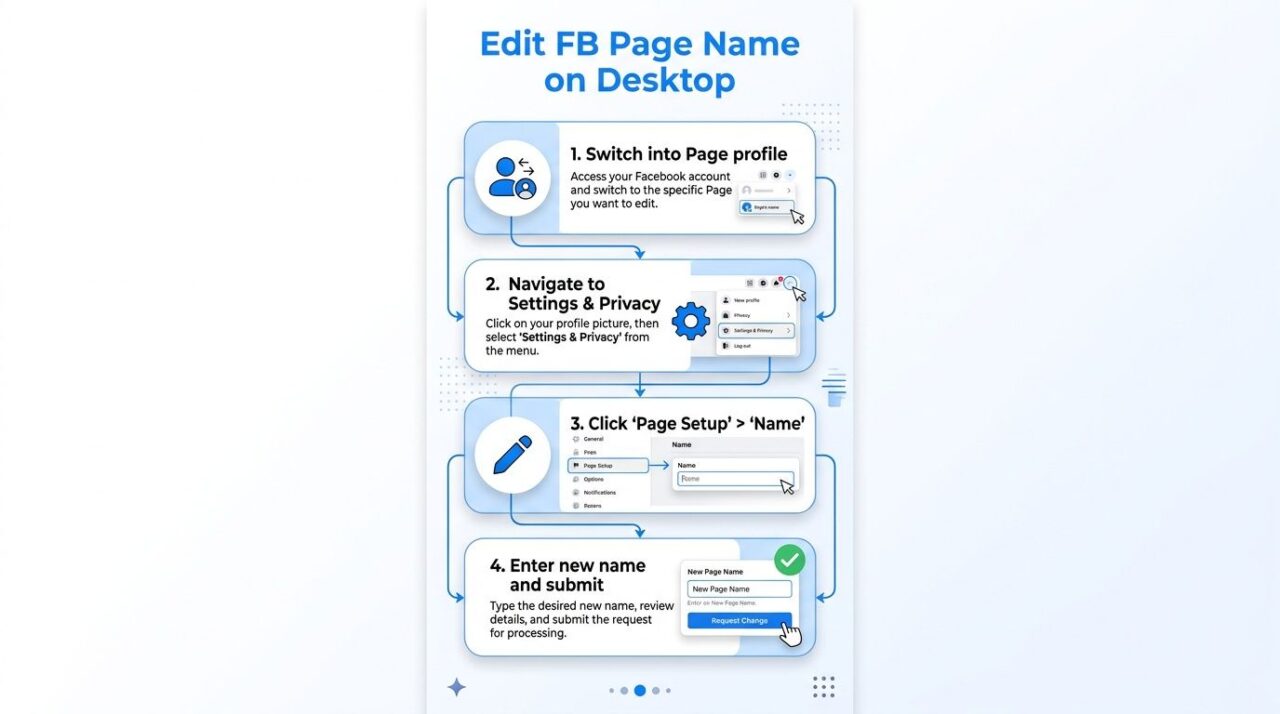
A desktop rename is the cleanest option when you want to change your Facebook page name and check every detail before you submit it. The workflow looks simple on screen, yet the part that matters most happens after you click submit. Facebook sends the request into a review queue, so the new name on Facebook does not go live on the spot.
How To Edit Facebook Page Name Guide
Start by switching into the Page profile, which allows you to manage the name on Facebook and other details. You want to rename. From there, open Settings and privacy, then Settings, then go to Page setup and choose Name. Facebook’s Help Center describes the same core path, and its business guidance uses a very similar route through About, then General and Name, then Edit (Facebook Help Center, Facebook Business Help).
The submission flow is straightforward, but each step deserves a careful check.
- Open the Name field. Click the top-right button to initiate the name change on Facebook. Next to the current Page name, you can find the option to change your name on Facebook.
- Type the new name carefully. Check spelling, capitalization, and brand consistency before you continue.
- Submit the review request. Choose Review Change or Request Change, depending on the interface you see.
- Confirm with your password. Facebook asks for verification before it accepts the request.
The name can be edited, but the change is not immediate when you log in to change your page. Facebook decides whether it goes live after review.
Do not submit a test version of the name just to see what happens. Repeated edits while a review is pending create avoidable confusion, and they can leave your team guessing which version is under consideration. The 60-day restriction also matters in practice. If the Page has been renamed recently, you may not be able to request another change for that period.
If your team is updating public replies or automated responses at the same time, this Facebook Messenger auto-reply guide can help you keep the support layer aligned while the name change is pending.
Why desktop is the safer choice
Desktop gives you more room to compare the new name against brand assets, legal naming, and campaign materials before you send the request. That matters when you are renaming a client Page after a merger or correcting a business identity that has drifted over time. One clean submission is easier to defend than several rushed edits.
It also helps you spot problems before Facebook does. On a larger screen, it is easier to notice a mismatch between the Page name, the username, and the copy in your ads or pinned posts. That kind of mismatch is where avoidable denials start.
Renaming Your Page via Mobile App and Meta Business Suite
Mobile is useful when you’re away from your desk and need to make a fast update before a campaign goes live. Meta Business Suite makes more sense when you’re handling multiple client Pages, because it keeps the workflow closer to the rest of your publishing and inbox tasks, especially when you need to change your Facebook page name. The review process doesn’t change just because the interface does.
On the mobile app, the path is usually found through Settings & privacy → Settings → Page Settings → Name, then you enter the new name and submit it for review. In Meta Business Suite, you’re typically working through the Page management layer rather than the consumer-style Page view, but the idea stays the same, find the name field, edit it, and send the request for approval. Clepher’s own Facebook guidance on customizing your Page URL is a good reminder that name and username are separate fields, so don’t assume one edit will fix both.
For a social media manager, the mobile route is the emergency option. A client may approve a merger announcement while you’re on the road, and you can submit the rename right away instead of waiting until you’re back at a desktop. For agencies, Meta Business Suite is cleaner because it reduces the chance of editing the wrong asset when you manage several Pages at once.
A few trade-offs matter in practice:
- Mobile is faster for urgent changes, but it’s easier to miss a detail on a small screen when you try to change your Facebook page name.
- Business Suite is better for multi-Page management, but you still need to verify the exact Page before you submit.
- The approval gate stays the same, so neither method bypasses Facebook’s review.
If you also manage Instagram handoffs or cross-channel visibility, Trendy’s cross-platform growth tips are useful context for keeping the brand consistent after the rename.
Facebook Page Name Rules and Compliance Guidelines
Facebook’s naming rules are simple in principle and frustrating in practice because they’re enforced against real brands, not abstract examples. The official guidance says the name should be simple, specific, and grammatically correct, and it should accurately reflect the Page’s purpose. Facebook Page name guidelines help you understand how to change your Facebook page name effectively. That sounds obvious until a client wants to stuff the Page title with keywords, city references, and a promo phrase all at once.
A local restaurant should use its real trade name, not something like “Best Pizza in Town Denver Special Deals.” Unless those extra words are part of the official brand, they make the name look manipulative. The same logic applies to agencies handling multiple client Pages; if the name doesn’t clearly match the business, it can slow approval or trigger a review.
How To Edit Facebook Page Name Naming Compliance
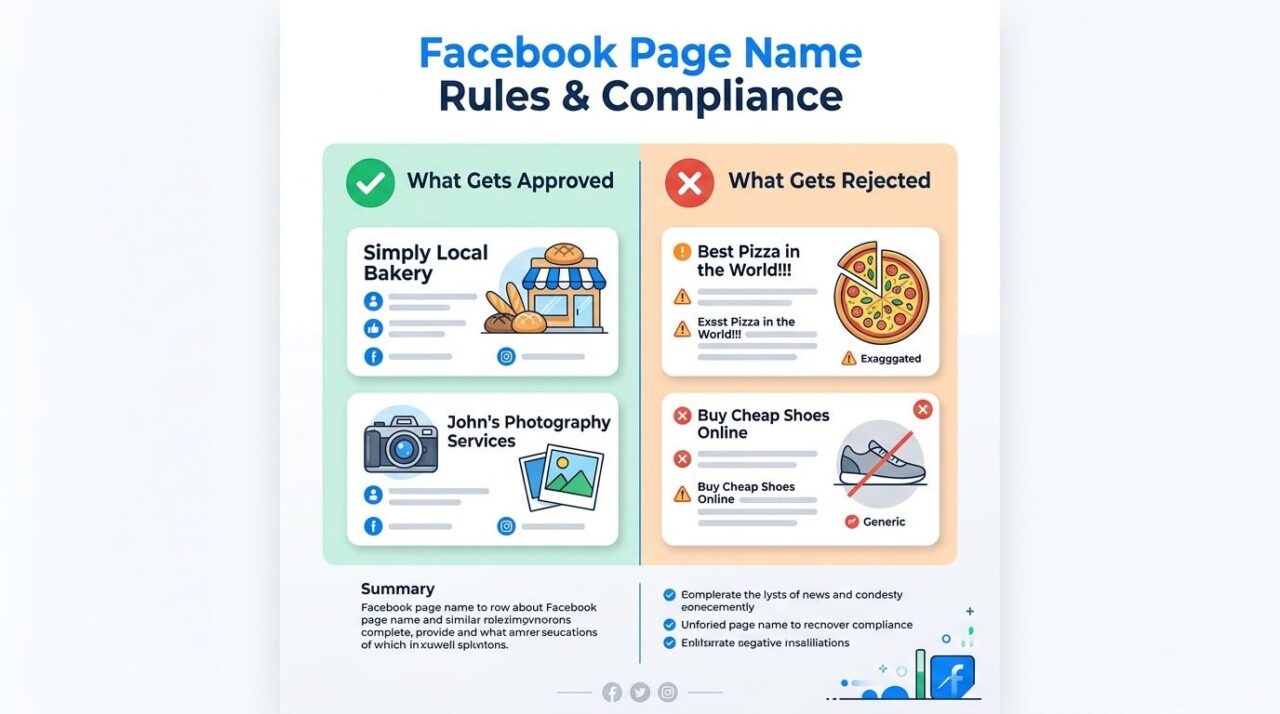
What usually gets approved
Names that mirror the actual brand tend to perform best in review. A title like Local Bakery reads as a real business name. John’s Photography Services does too, because it’s specific without trying to game the system.
What usually gets rejected
Keyword-stuffed names, exaggerated claims, and promotional language are the common problems. A name like “Your Business Name” is essential when you want to change your page. Best Pizza in the World!!! looks promotional, while Buy Cheap Shoes Online reads like an ad, not a Page identity.
A good rule is to keep the name close to how customers already know the business. If you’re guiding a client through a rename after a legal change or rebrand, align the Page name with the website header, signage, and email signature before you submit. That consistency matters because Facebook is looking for a legitimate identity match, not a search-engine trick.
Practical rule: If you’d hesitate to put the same name on a storefront sign, it probably doesn’t belong in the Page title.
The cleanest submissions are usually the least clever ones, especially when you want to change your name on Facebook. They use the brand, follow the grammar rules, and skip the urge to “help” discovery with extra descriptors.
Understanding the Review Timeline and 60-Day Cooldown
A rename request can stall in review even when the new Page name looks clean. Independent how-to guides published in 2025 and 2026 consistently describe Facebook’s approval window as taking days, not minutes, with guidance ranging from 1 to 14 days, some saying approval should be a day or two, another saying typically less than 7 days, and one tutorial noting Facebook usually takes about 3 days and may ask for extra information (SocialRails guide). In practice, that means the updated name may not appear right away, and the delay can catch teams off guard if they plan as if the change happens instantly.
The bigger constraint is the 60-day cooldown. Once a Page name has been changed, Facebook can block another rename request for a while, so the Page stops behaving like a flexible campaign asset and starts acting like a fixed business identifier. That creates real planning pressure for rebrands, mergers, and seasonal campaigns, because a name that feels temporary on your side may still be locked on Facebook’s side.
How to schedule around the review window
If a rebrand is tied to a launch date, submit the request well before creative goes live. Agencies should map the rename to the marketing calendar, not the other way around. If the Page name is still pending when press releases, ads, or email announcements go out, customer support gets the fallout.
A straightforward planning approach works better than improvisation:
- Submit early, because the decision may take days.
- Avoid follow-up edits, because repeated submissions can make the review harder.
- Plan one final name, because the cooldown limits how quickly you can change it again.
- Coordinate messaging, so the website, Page, and ad copy all reflect the same name.
If the request gets denied, the clock still matters because you can’t assume you can just resubmit instantly. The safest recovery path is to fix the wording, confirm the name matches the actual business, and wait until the account is eligible again if the cooldown applies. That matters even more for agencies, since one sloppy resubmission can disrupt a launch timeline across multiple client assets.
Common Errors and How to Avoid Denials
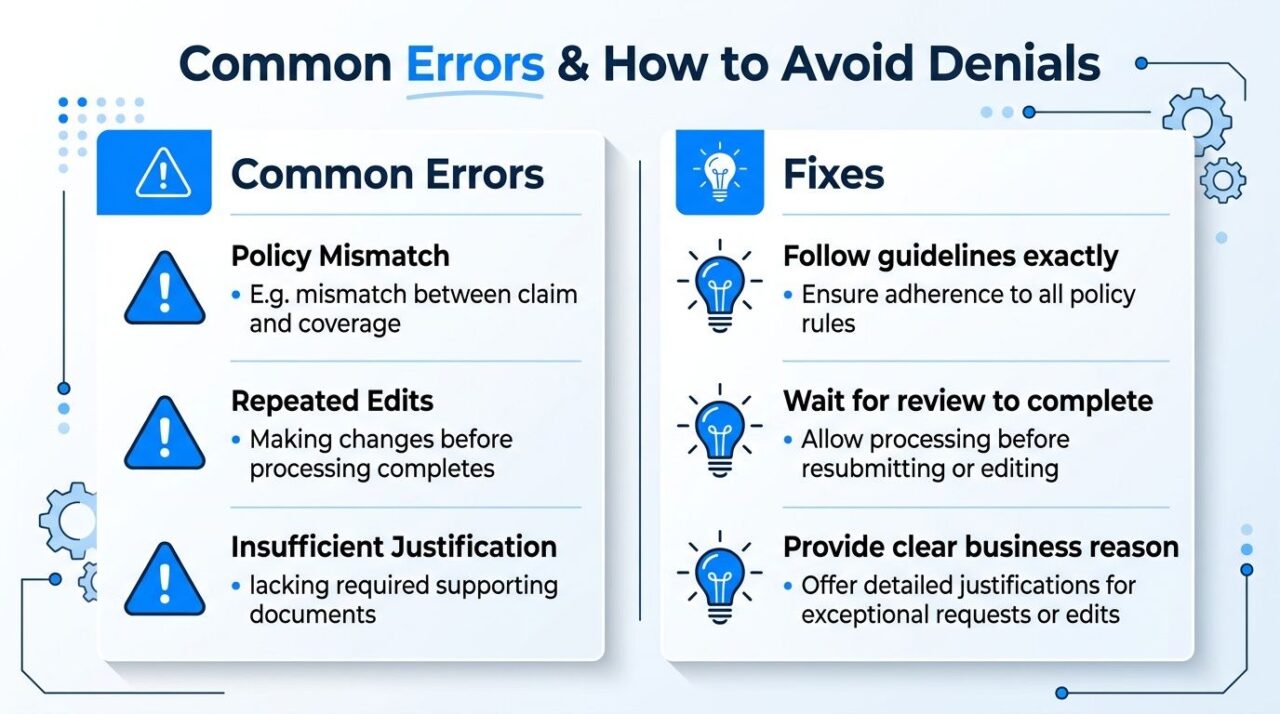
A rename request can look straightforward and still get denied for a simple reason: the name does not line up with what Facebook expects to see on the Page. The most common problems are a policy mismatch, a name that sounds promotional instead of factual, and repeated edits while a request is already under review. Once that review is in motion, the safest move is to stop changing the field and wait for a clear decision.
How To Edit Facebook Page Name Error Prevention
The fixes that help
- Policy mismatch. Adjust the name so it reflects the business identity and stays within Facebook’s naming rules.
- Repeated edits can complicate the process when you want to change your Facebook page name. Leave the field alone once the request is submitted. Multiple changes make the review harder to read.
- Weak justification. Use a name that clearly matches a brand change, merger, or legal update, not a marketing slogan.
If the Edit button is grayed out, the Page may already be restricted, or another request may still be pending. In that situation, keep admins from resubmitting blindly. Check whether someone else already sent the change and confirm whether the account is still inside the cooldown period.
A denial usually means the wording, brand fit, or timing did not satisfy the review. The cleanest recovery path is to simplify the name and remove anything promotional, vague, or disconnected from the actual business. If the new name is legitimate but still fails, review the Page identity, category settings, ownership details, and linked assets before trying again.
A denial is usually a signal about fit, not a broken button. If you treat it that way, you stop wasting time on repeated submissions that only make the next review harder.
Your Page Rename Checklist and Next Steps
A clean rename usually comes down to preparation, timing, and follow-through. Before you submit, confirm the Page hasn’t been changed within the last 60 days, make sure the name follows Facebook’s standards, and write down the business reason for the update. After submission, leave the request alone until Facebook finishes its review.
Use this quick checklist:
- Confirm eligibility. Check the cooldown status before you touch the name field.
- Validate the name. Keep it simple, specific, and tied to the business.
- Prepare the roll-out. Line up ads, support replies, and public posts so they all match.
- Submit once. Avoid duplicate requests while the review is open.
- Update the rest of the ecosystem. Refresh the username if needed, and revise anything that still shows the old name.
After approval, don’t stop at the Page title. Update linked assets, notify your team, and review any automated workflows that still refer to the old name. If the Page also needs a cleaner URL or username, handle that separately, because the Page name doesn’t automatically change the web address (Clepher guide on custom Facebook Page URLs).
A well-planned rename does more than tidy up a profile. It protects continuity, reduces confusion, and keeps the brand consistent across the places customers see it.
Clepher helps businesses automate conversations on Facebook, Messenger, Instagram, and their websites, which makes it easier to keep support and lead capture aligned when a Page name changes. If you’re managing a rename and want the messaging side to stay organized, visit Clepher and see how its no-code flows, broadcasts, and AI agents fit into that workflow.
