
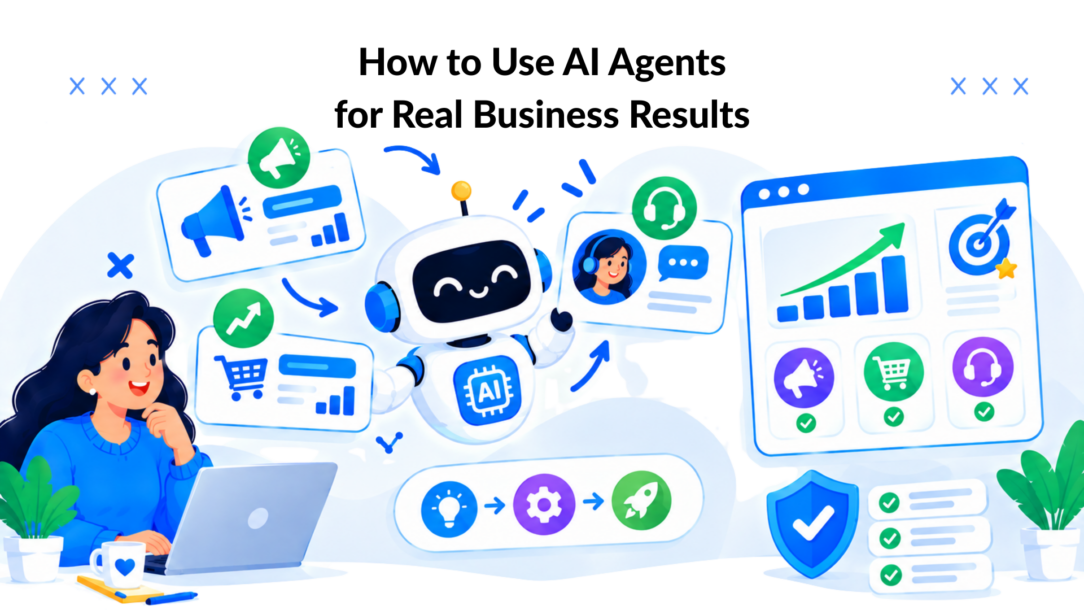
Teams asking how to use AI agents are already sitting on the raw material. They have repetitive support questions, leaky lead handoffs, abandoned carts, slow speed-to-lead, and a team that keeps answering the same thing in five different channels.
What usually goes wrong is simpler. They start with a tool, a prompt, and a vague idea of “automation,” then wonder why the bot sounds smart but creates more cleanup work than it saves. If you want real business results, treat the agent like an operator with a job, limits, and a scoreboard.
That matters more now because adoption is moving faster than reliable production use. In McKinsey’s 2025 survey, 62% of organizations were at least experimenting with AI agents and 23% had scaled one somewhere in the company, but no more than 10% had scaled agents in any single business function, which tells you exactly how to approach this: narrow workflow first, then expand after reliability and ROI are proven (checked summary of the survey data).
The Shift From Chatbots to Teammates
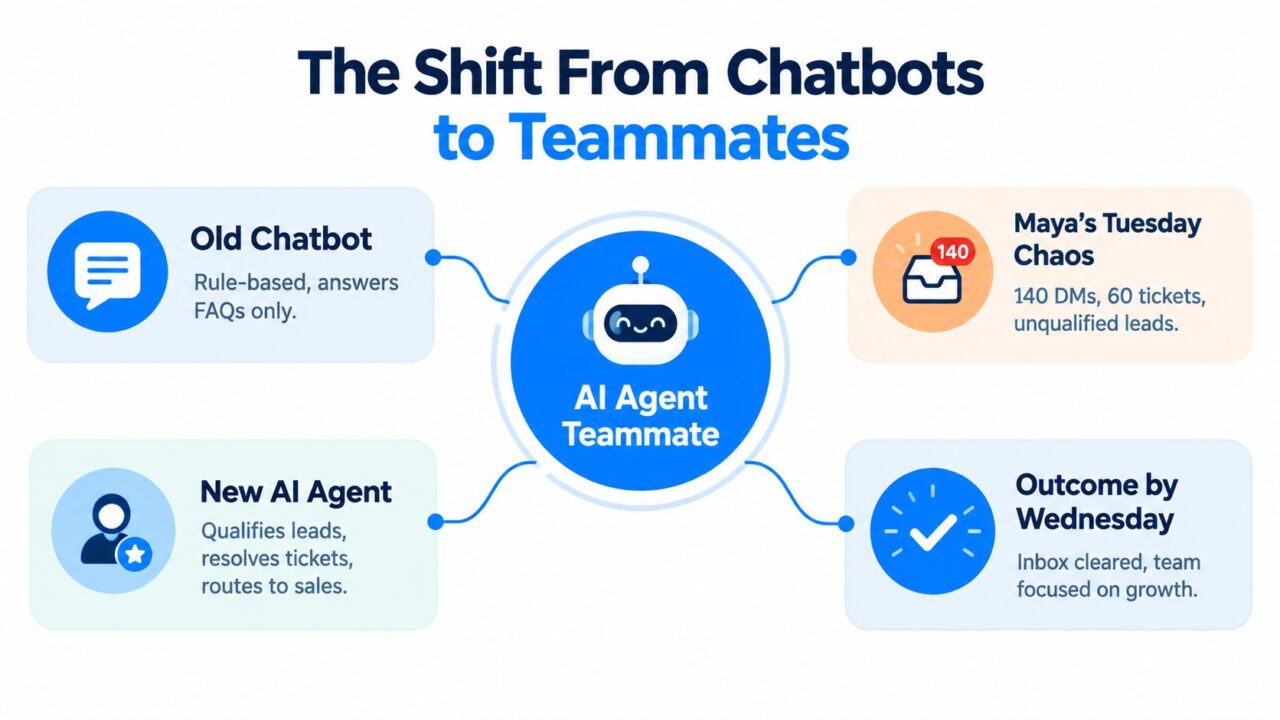
Maya runs growth for a DTC skincare brand. On Tuesday morning, her inbox is a mess. Instagram DMs are full of shipping questions, support has a backlog, and sales wants cleaner leads instead of random “just browsing” conversations.
By Wednesday, that workload can look very different when an agent is doing real work instead of faking conversation. The agent can triage incoming DMs, answer policy-safe support questions, collect missing details, route sales intent, and escalate edge cases with context attached.
How to Use AI Agents AI Teammates
What changed
Old chatbots were menus with lipstick. They matched keywords, dumped people into canned paths, and broke the second a buyer asked something slightly unusual.
An AI agent is different. It has a role, access to tools, memory of the conversation, and a defined job to complete. If you’re still fuzzy on that distinction, this plain-English breakdown of what AI agents are is a useful baseline.
Think roles, not prompts
If you’re learning how to use AI agents, stop asking, “What prompt should I write?” Start asking:
- What job does this agent own? Lead qualification, order-status support, booking, onboarding, reactivation.
- What tools does it need? CRM lookup, calendar booking, product catalog, order tracking, refund policy.
- What counts as success? Booked meeting, resolved ticket, captured lead, completed handoff.
Practical rule: If you can’t describe the agent as a job title with a measurable outcome, it’s too vague to ship.
This is also where brands save themselves from bad automation. Before you put an agent in front of customers, read a grounded resource like this avoid AI marketing mistakes guide. Most production failures aren’t model failures. They’re bad scope, weak guardrails, and sloppy handoffs.
The mental shift is simple. Don’t build a chatbot that “can answer stuff.” Build a teammate that owns one repetitive, high-value workflow.
Define the Role Before You Touch Any Tool
The fastest way to burn budget is to shop platforms before you’ve written the job description. Good teams do the opposite. They define the role first, then pick the stack that fits the role.
Write the agent like a hire
Every agent needs four pieces of definition. If one is missing, the build gets messy fast.
| Component | What to Write | Example |
|---|---|---|
| Job title | The narrow function this agent performs | Support Tier 1 for order-status and shipping questions |
| Outcome | The single business result it owns | Resolve routine order inquiries without human takeover |
| Data and tools | Systems, documents, and actions it can use | Shopify orders, help center, shipping tracker, return policy |
| Guardrails | What it must never do, plus escalation rules | No policy exceptions, no manual refund promises, always offer human handoff on disputes |
Narrow wins first
The best early agent is boring. That’s a compliment.
Start with one workflow that is repetitive, bounded, and measurable. In marketing and e-commerce, practical use cases keep showing up around lead qualification, speed-to-lead response, audience segmentation, campaign reporting, ad optimization support, customer reactivation, sales handoff, and personalization at scale (marketing workflow examples).
A few strong first-build examples:
- Outbound qualifier: Screens inbound leads, asks qualification questions, routes sales-ready contacts to a rep.
- Booking concierge: Answers common pre-call questions, handles scheduling, and reschedules missed meetings.
- Cart recovery agent: Re-engages hesitant buyers, answers product questions, and routes discount requests to policy logic.
- Tier-1 support agent: Handles order tracking, return-window questions, and status updates.
Decide the scoreboard before launch
If the role is clear, the scoreboard should be clear too. Waiting until after launch to talk metrics is backwards.
Use a small, hard set of success criteria:
- Efficiency metric: Cost per conversation or time saved on repetitive replies
- Quality metric: Resolution rate or successful completion rate
- Experience metric: Handoff quality, thumbs rating, or post-chat satisfaction
- Business metric: Meetings booked, qualified leads passed, or recovered revenue conversations
A broad agent sounds impressive in a demo. A narrow agent survives contact with customers.
One more practical point. Keep deterministic code for validation, routing, and data transformation instead of asking the model to improvise those tasks. One implementation guide recommends defining the outcome first, mapping the current process step by step, limiting each step to one model call, and testing workflow accuracy, latency, and edge cases before deployment (agent workflow implementation guide).
Design the Conversation With Fallbacks and Handoffs
Conversation design is where polished demos go to die. The issue usually isn’t the opening message. It’s what happens when the user is unclear, frustrated, or asks for something that needs policy control.
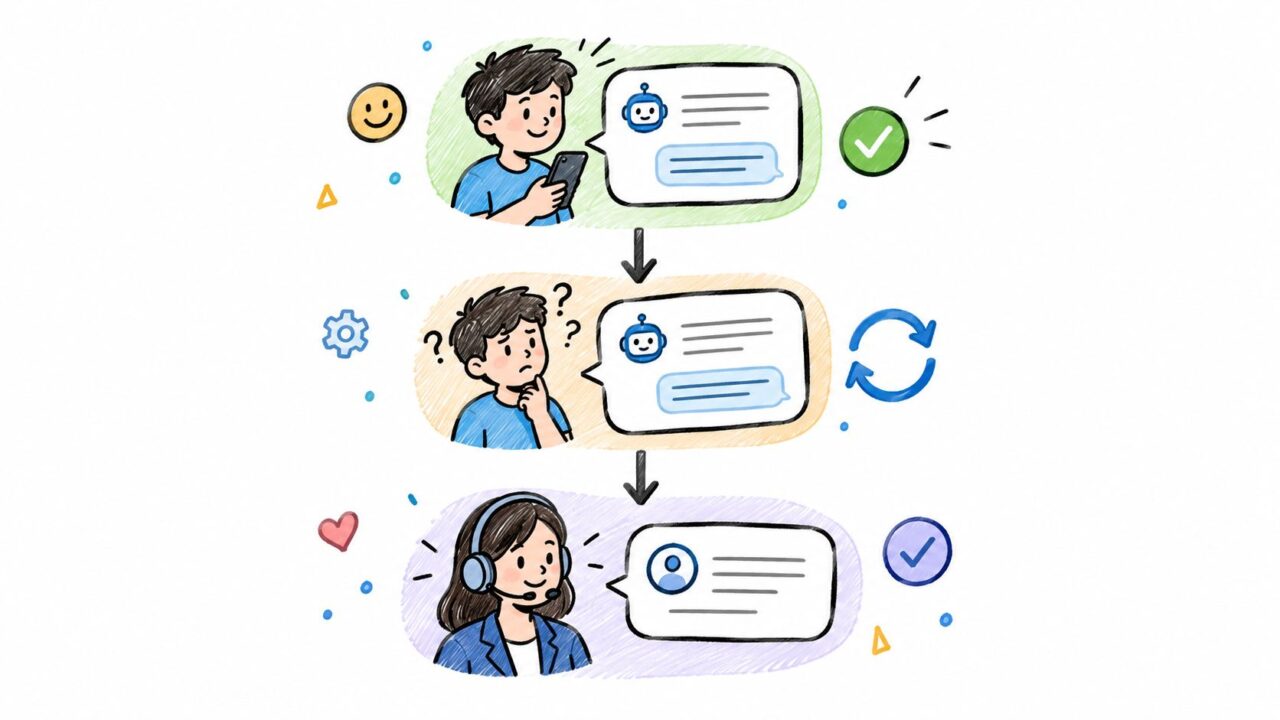
Build three layers, not one
A production conversation needs three stacked layers.
-
Happy path
This is the clean route. Greet, identify intent, gather the minimum needed context, complete the task, confirm the outcome.
-
Fallback path
This catches ambiguity. If the user is vague, changes topic, or gives incomplete information, the agent should narrow choices instead of rambling.
-
Handoff path
This handles risk. If the customer asks for a human, shows frustration, or hits a policy edge, the agent should escalate with context attached.
A real e-commerce flow
Take a delayed-order question.
The shopper writes: “Where is my package? This was supposed to be here already.”
A useful agent flow looks like this:
- Identify the job: order-status support
- Pull order context: order number, email, or authenticated profile
- Check tool output: tracking status, shipment age, delivery exception
- Offer the next step: updated ETA, replacement policy, or support escalation
- Trigger handoff if needed: negative sentiment, repeat failure, or policy exception
How to Use AI Agents Customer Support
Write instructions like operating policy
Don’t prompt the agent like you’re chatting with ChatGPT. Write operating instructions.
Bad:
- “Help customers with orders.”
Better:
- You are a support agent for order-status inquiries.
- Use the tracking tool first.
- If tracking shows a delivery exception, explain the status in plain language.
- If the shipment is delayed beyond the brand’s stated threshold, offer the approved next step.
- If the customer asks for compensation, policy exceptions, or a manager, escalate with transcript summary.
Fallbacks should be decisive
Weak fallback logic sounds like this: “I’m sorry, can you rephrase?” Then it says that three more times.
Strong fallback logic gives the customer two clean options.
For example:
- If intent is unclear: “I can help with your order, returns, or product questions. Which one do you need?”
- If data is missing: “Send your order number, or use the email from checkout and I’ll look it up.”
- If confidence drops: “I’m not confident I can complete this correctly. I can connect you to support now.”
Customers don’t care that your agent tried hard. They care that it either solved the problem or handed them to the right person without wasting their time.
One more rule. Set explicit handoff triggers before launch. “Talk to a person,” refund disputes, emotionally charged complaints, repeat misunderstandings, and any high-value transaction should never depend on the model “figuring it out.”
Deploy Across Website, Instagram, and WhatsApp
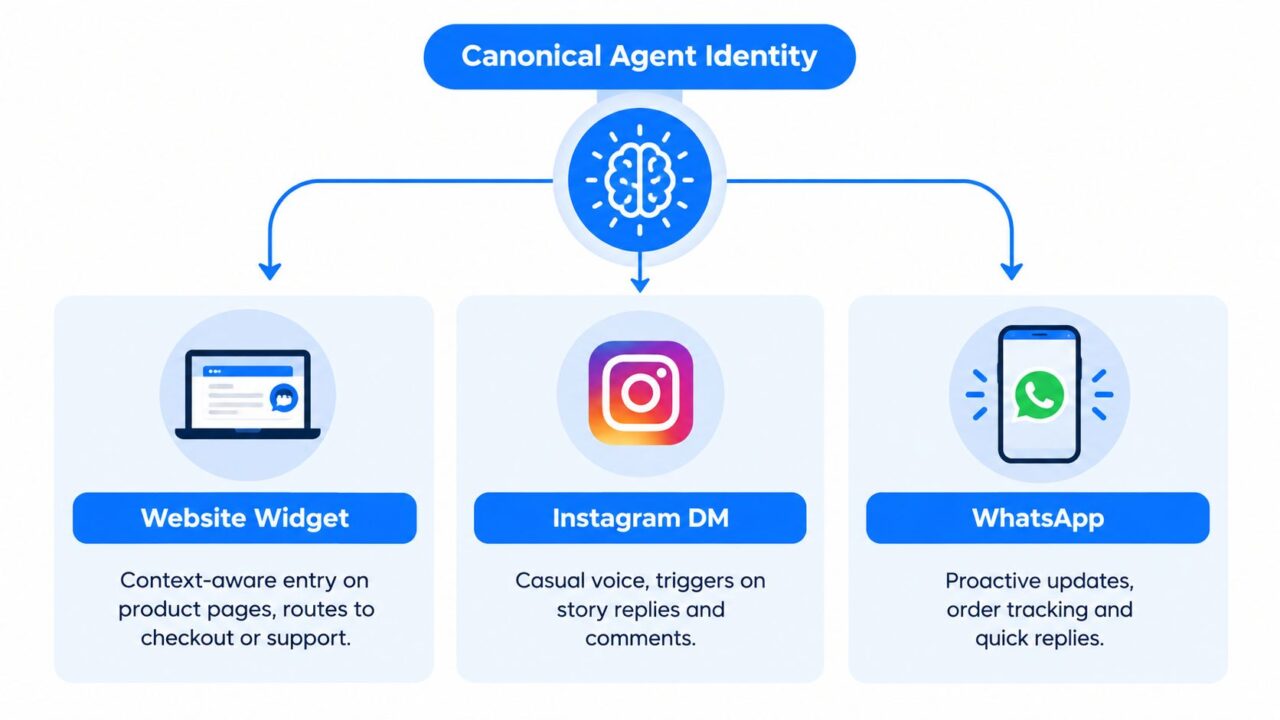
Most brands don’t need three separate agent personalities. They need one canonical agent identity with channel-specific behavior.
How to Use AI Agents AI Identity
Keep the brain central and the surface local
The role, policy rules, and business logic should stay consistent. The entry triggers, tone, and message length should change by channel.
If you’re managing multi-surface conversations, a platform that centralizes web chat and social messaging helps keep context intact. For example, Clepher’s multi-channel messaging platform is built around website chat, Messenger, WhatsApp, and Instagram DM in one environment.
Tune by channel
Website widget
The website is your highest-intent surface. Product pages should trigger sales-oriented flows. Help pages should trigger support flows. Don’t drop the same generic opener on every page.
Instagram DM
Instagram is faster, messier, and more mobile. Use short replies, quick options, and triggers tied to comments or story replies. Long back-and-forth qualification sequences usually die here.
WhatsApp is strong for updates, reminders, support continuity, and direct follow-up after opt-in. Keep messages compact and operational. Buyers use it like a utility channel.
A lot of teams also need creative assets to support these channel plays. If you’re pairing agent conversations with ad testing, UGC-style creatives, or social campaigns, a tool like ShortGenius AI ad generator can help produce the creative inputs without slowing the launch cycle.
Stage the rollout
Do not launch on all channels at once unless you enjoy debugging in public.
Roll out in this order:
- Start where demand already exists: Your heaviest inbound channel gives the fastest learning.
- Prove one workflow first: Support or lead qualification is usually easier than broad sales assistance.
- Expand only after transcript review: Fix the handoff gaps before adding another surface.
Independent marketing guidance also points to agents continuously monitoring engagement across web activity, email clicks, content consumption, and intent data, then tailoring messages and routing leads with better timing and context (multi-signal personalization overview). That works best when the identity is centralized instead of fragmented.
Test, Guardrail, and Supervise in Production
This is the part most “how to use AI agents” articles skip, and it’s the part that decides whether your deployment survives month two.
Reliability is lower than the hype suggests
Current benchmark evidence says agents are still unreliable in real work. In workspace-task testing, average agent pass rates were 45.1% across configurations, the best system reached about 60%, and human experts with tools reached 80.7% (workspace benchmark findings). That gap is why blind autonomy is a bad operating model for customer-facing workflows.
The same research points to recurring failures like hallucinated data interpretation and incomplete exploration. In plain English, the model may sound confident while skipping a needed check or misreading what a tool returned.
Test the full trajectory
A conversation isn’t successful because the first two replies looked polished. It’s successful when the entire chain of actions reaches the correct business outcome without unsafe behavior.
Recent reliability research argues that agents should be evaluated on consistency, predictability, and safety, because many failures only appear across the full sequence of tool calls and intermediate steps, not in the final answer alone (trajectory-level reliability argument).
Audit the path, not just the reply. A correct greeting followed by a wrong refund action is still a failed run.
Build guardrails like you’re expecting failure
Use hard controls, not vibes.
| Failure Mode | Detection Signal | Guardrail Response |
|---|---|---|
| Policy violation | Mentions prohibited topics or unsupported promises | Block response, show approved language, route to human |
| Tool overuse | Excessive repeated lookups or looping actions | Cap tool calls per turn and force fallback |
| Ambiguous intent | Low-confidence classification or conflicting user cues | Offer limited choices and narrow the path |
| Escalating frustration | Negative sentiment, repeated complaints, all-caps, direct human request | Immediate handoff with transcript summary |
| Sensitive data exposure | User shares personal or payment information in free text | Redact where possible and shift to approved secure flow |
A mature setup also needs monitoring after launch. If you want a useful reference point for that discipline, this overview of performance monitoring for conversational systems is the right lens.
Incident-focused research on agentic systems also flags recurring failure patterns like runaway costs, wrong actions, security exploits, and cascading multi-agent failures, especially as organizations mix cloud tools, open-source components, enterprise platforms, and orchestration layers (agent incident patterns and governance concerns). That’s why every serious deployment needs approval rules, action limits, and human review for high-impact tasks.
Measure Outcomes and Optimize the Loop
If you don’t tie the agent to a business scoreboard, you’ll end up celebrating activity instead of results.
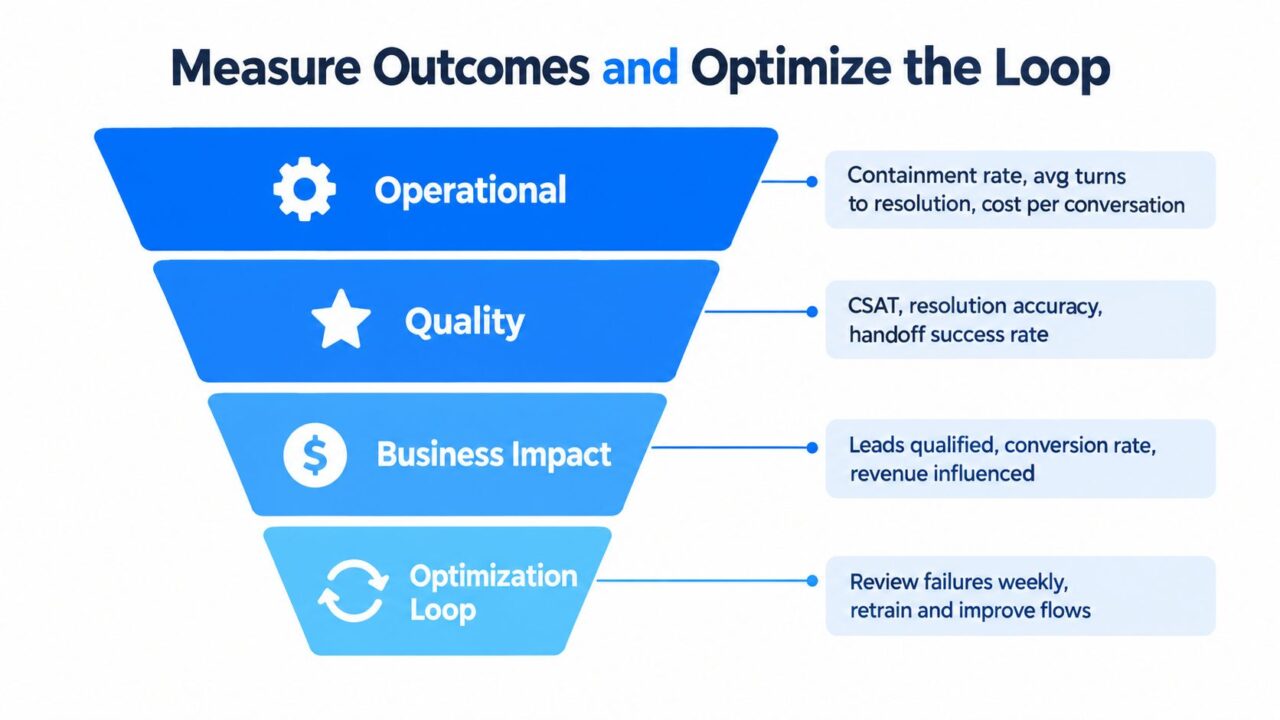
How to Use AI Agents Performance Funnel
Track four layers
Use one dashboard, but separate the layers. Mixing them hides problems.
- Operational layer: containment rate, average turns to resolution, response latency, cost per conversation
- Quality layer: successful resolution, handoff success, transcript QA outcomes, customer feedback signals
- Business layer: qualified leads passed, meetings booked, recovered carts, influenced revenue conversations
- Learning layer: repeat failure intents, weak prompts, policy-edge clusters, broken tool paths
Run a weekly review ritual
You don’t need an enterprise AI committee. You need discipline.
Every week, review:
- The worst conversations first. Pull low-rated or failed transcripts.
- The handoff reasons. Look for recurring missing data, broken logic, or policy confusion.
- The top unresolved intents. These usually reveal where the role is too broad, or the tool access is too thin.
- One prompt version at a time. If you change five things at once, you won’t know what helped.
Weekly transcript review beats endless prompt tweaking. The transcript tells you where the workflow broke, not where your intuition thinks it broke.
Judge success like an operator
Enterprise adoption data already shows the market moving beyond novelty. One 2026 source reported 79% of organizations said AI agents were being adopted in some form while only 11% were running them in production, and another 2026 survey found 72% of companies were using or testing AI agents, including 40% with multiple agents in production (2026 adoption roundup). The winning difference isn’t “who turned one on first.” It’s who built orchestration, monitoring, and task design around the deployment.
That same operating mindset shows up in broader enterprise reporting too. A 2026 enterprise AI agents report from Databricks emphasizes governance and evaluation as high priorities for organizations building at scale (state of AI agents report page).
For marketers, the practical upside is clear. IBM describes AI agents in marketing and e-commerce as able to manage campaigns, create personas, personalize content, and optimize ad performance in real time. IBM also notes customer care and sales support as early areas for strong performance gains and ROI, and cites Gartner’s projection that by 2028 at least 15% of day-to-day work decisions will be made autonomously through agentic AI, up from 0% in 2024 (IBM use cases and Gartner projection).
The loop is simple. Measure business outcomes, inspect failures, patch the workflow, then test again.
Your Rollout Checklist and Common Pitfalls
Most failed launches are predictable. The team tried to automate too much, skipped fallback design, and treated go-live like the finish line instead of the start of tuning.
Use this launch checklist
- Define one narrow role: Pick a single workflow with a clear owner and business outcome.
- Write operating rules: Document tools, forbidden actions, escalation triggers, and approved responses.
- Map the conversation path: Happy path, fallback path, and handoff path all need to exist before launch.
- Instrument the metrics: Track quality, operations, and business impact from day one.
- Run supervised launch mode: Keep humans watching live conversations closely in the first stretch after release.
- Review transcripts fast: Patch broken paths quickly while the volume is still manageable.
Avoid the mistakes that keep repeating
The first killer is over-scoping. Teams try to build a sales rep, support rep, and retention manager in one agent. That creates noisy prompts, muddy logic, and bad analytics.
The second killer is weak handoff design. If the customer asks for a person, the agent should stop trying to win and route cleanly.
The third killer is neglect. Product offers change. Refund rules change. Shipping times change. If nobody updates the agent, it starts serving stale information with confidence.
A final opinionated point. Launching an agent is not the achievement. Running a reliable workflow that improves week after week is the achievement. That’s the answer to how to use AI agents in business without creating more mess than momentum.
Clepher helps businesses build AI agents for website chat, Instagram, Messenger, and WhatsApp with flow design, routing, segmentation, and analytics built around real customer conversations. If you want to turn repetitive support, lead qualification, and sales handoffs into measurable workflows instead of prompt experiments, visit Clepher.
