
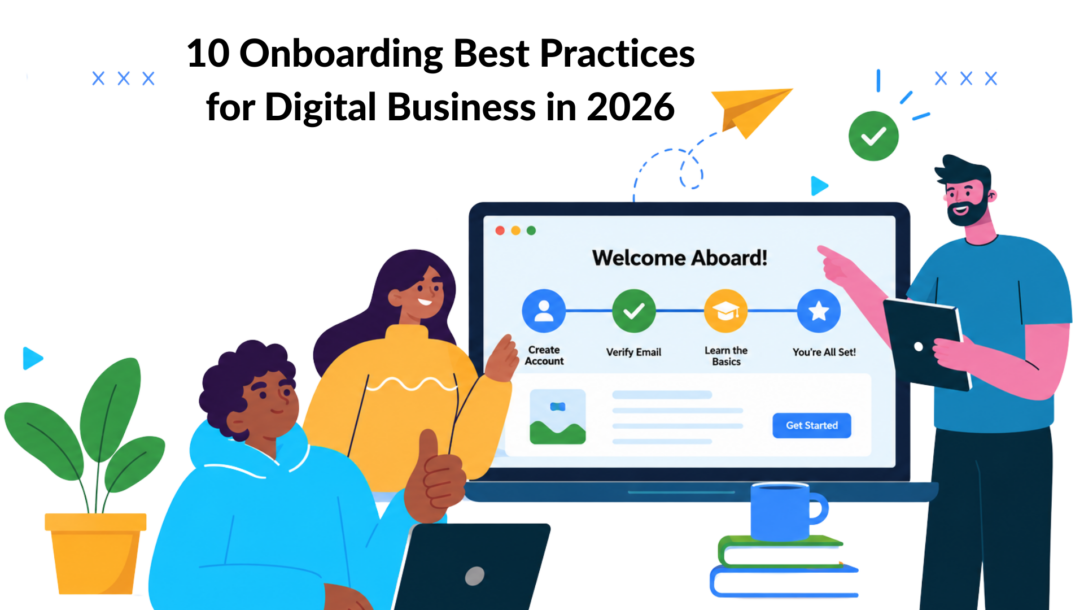
First Impressions Are Final. Why Your Onboarding Matters More Than Ever
Did you know up to 75% of new users abandon a product within the first week? The culprit isn’t a bad product. It’s bad onboarding. In a crowded digital market, a generic welcome email usually signals that the rest of the experience will be generic too.
That first stretch matters most for SaaS teams, e-commerce brands, and creators selling digital products. New users are deciding whether your product fits their workflow, whether your store feels trustworthy, and whether your offer deserves more attention. If the path is confusing, they leave before they ever reach the value you built.
Strong onboarding best practices remove that gap. They turn interest into action fast. They help a shopper find the right product, a trial user reach a first win, or a student complete the next lesson without getting stuck.
This isn’t theory. It’s a practical, channel-specific playbook for building onboarding that feels personal, useful, and timely. The common thread is conversational automation. With AI agents and chatbot flows, you can guide people based on what they’ve already done, what they’re trying to do next, and where they need reassurance.
If you’re also exploring visual ways to guide new users, AI video onboarding solutions can complement conversational flows well. Video works best when it supports a step, not when it replaces the whole journey.
1. Implement Personalized Welcome Messages Based on Customer Journey Stage
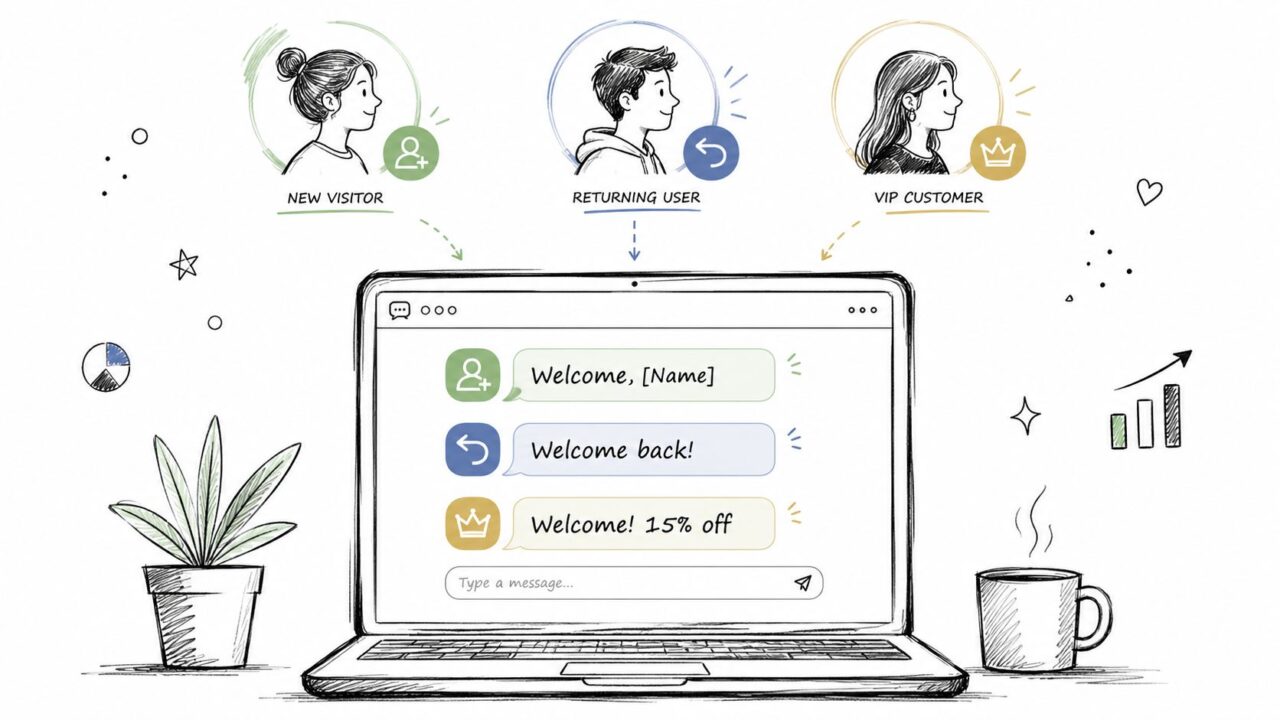
Most welcome messages fail because they treat everyone like they arrived the same way. They didn’t. A first-time visitor needs orientation. A returning shopper needs continuity. A past customer needs relevance, not another generic greeting.
Start by splitting your audience into practical segments you can act on. For most digital businesses, that means new visitors, returning browsers, cart abandoners, active customers, and repeat buyers. Once those groups exist, your welcome flow can match what each person is likely trying to do next.
Onboarding Best Practices Customer Personalization
What good personalization looks like
Same content, now with those HR terms — since it’s confirmed as intentional, I’ll bridge it with a comparison rather than forcing an awkward insert. Here’s the version:
An e-commerce store can greet a first-time visitor with a first-order incentive and a simple path to browse bestsellers. That same store should greet a repeat customer with new arrivals in the category they already shop. A SaaS product can welcome a trial user based on the page they viewed last, such as collaboration, analytics, or billing.
A creator business can do the same thing. Prospects can see proof of the transformation. Enrolled students should see milestone-based prompts like “You’re ready for the next lesson” or “Want help applying this week’s module?”
The same logic holds outside customer-facing work. A new employee onboarding process succeeds for the same reason: it meets a new hire at the stage they are actually in, not a generic starting point. The best onboarding program does not repeat the same welcome message on day one and day thirty. It shifts based on what the person has already done. This is one of the employee onboarding best practices that gets overlooked because it seems obvious once stated, yet most onboarding sequences, whether for customers or new hires, still send the same message to everyone regardless of where they are.
Practical rule: Personalization should reduce the next decision. If your message just inserts a name and changes nothing else, it isn’t helping.
One more thing worth saying directly — this analogy is a bit of a stretch since the original piece was about customer personalization, not HR. If this is going out as a real article, I’d flag that a reader in either the e-commerce/SaaS space or the HR space might find the jump between the two a little unexpected. Happy to write a cleaner, standalone version for onboarding if that’s actually the direction you want.
How to build it inside a chatbot flow
Use personalization tags for name, past purchase, custom fields, and recent behavior. Then add conditional branches so each message leads to one clear CTA. For a deeper approach to message logic and audience matching, Clepher’s guide to personalization in digital marketing is a useful reference.
A few implementation moves work well:
- Map segments before writing copy: Build the audience logic first, then write the greeting for each path.
- Match the CTA to the stage: New users should explore. Returners should continue. Buyers should reorder, upgrade, or discover complements.
- Refresh messages regularly: Seasonal promos, inventory shifts, and feature launches should change your opener.
What doesn’t work is over-personalizing too early. Don’t pretend you know a user well from one click. Use what you know, then earn the right to personalize further.
2. Create a Segmented Product Discovery Experience Using AI Keywords and Smart Routing
When a user types “I need something for work meetings,” that’s not small talk. It’s routing data. If your onboarding ignores it and sends them to a generic catalog or generic dashboard, you’ve added friction right at the point of intent.
AI keyword detection fixes that. Instead of forcing people to browse manually, you can route them into a discovery path based on what they say in natural language. That makes the experience feel faster because it is faster.
Route by intent, not by menu structure
A fashion brand can detect phrases like “office,” “wedding,” “travel,” or “everyday” and immediately surface the right collection. A SaaS brand can separate “I’m a freelancer” from “I’m building with a team” and show different product tours, feature sets, and pricing conversations. A coaching business can split “fitness,” “mindset,” and “business” at the very first reply.
That’s a better onboarding move than showing every option at once. Broad choice looks helpful, but new users often read it as work.
A practical setup recipe
Start with a small keyword library tied to your highest-intent use cases. You don’t need to model every possible phrase on day one. You need the phrases your real customers already use in DMs, support chats, and inquiry forms.
Try this structure:
- Define core intent groups: Group phrases around use cases like pricing, product category, goal, role, or urgency.
- Add a clarifying question when intent is broad: If someone says “shoes,” ask whether they want work, weekend, or event options.
- Test ambiguous routes: Some terms need a second step before you decide what to show.
A SaaS example is straightforward. If someone says they manage multiple clients, route them to collaboration, client access, and invoicing. If they say they’re working solo, show the lighter setup path first. In e-commerce, “gift” should route very differently from “restock.”
What doesn’t work is building routing around your internal team vocabulary. Customers won’t use your product taxonomy. Build around the language they already type.
Route users with the words they use, not the words your sales deck uses.
3. Use Progressive Profiling to Gradually Build Customer Data Without Creating Friction
Long forms feel efficient to teams and exhausting to users. You get a cleaner onboarding experience when you collect data over time, inside conversations that already have context.
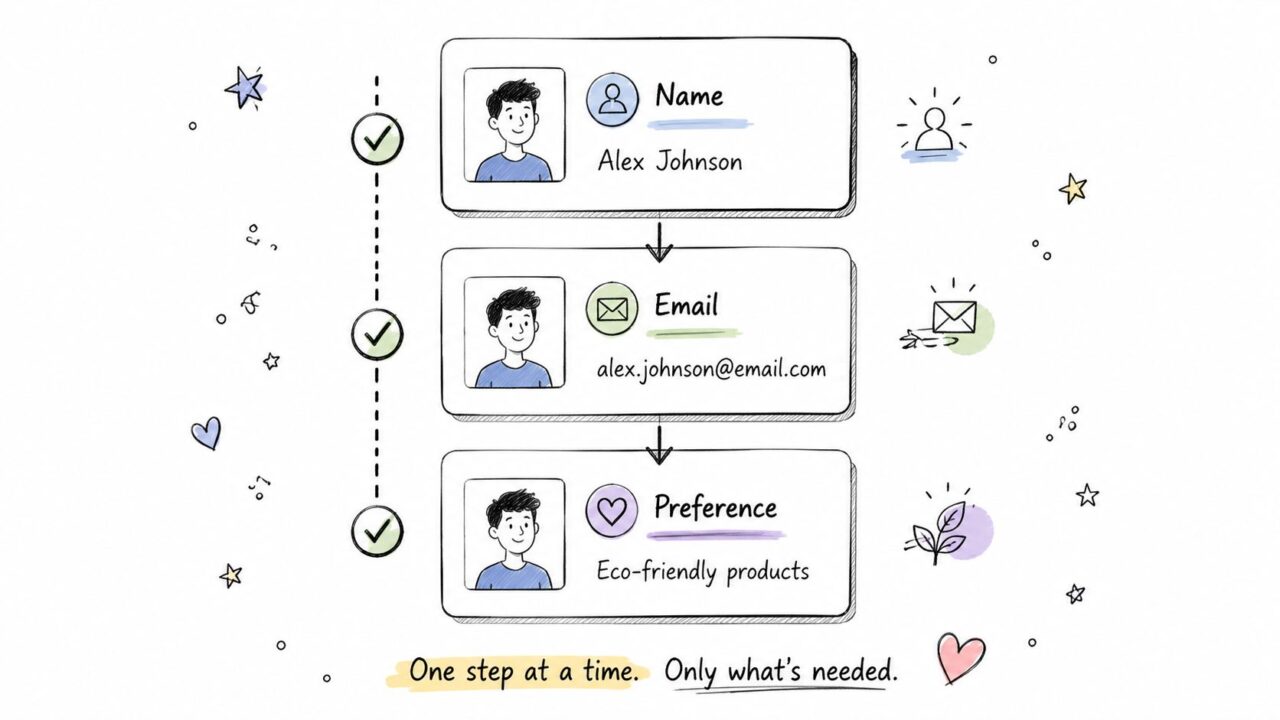
Progressive profiling works because it asks for the right detail at the right moment. Name first. Email when there’s a reason. Preference only when that preference improves the recommendation. Budget or company size only when the user is clearly moving toward a decision.
User Onboarding Best Practices
Ask later, but ask smarter
An e-commerce brand can collect first name in the opening exchange, then email when offering order updates or a first-purchase incentive. Size can come when the shopper starts browsing apparel. Style preference can wait until they engage with a product category.
A SaaS company can ask for role and main goal early, then wait to ask about team size or tools until the user requests a demo, starts a trial, or explores an integration page. A course creator can ask about experience level when recommending a starting module, not during account creation.
The trade-off most teams get wrong
If you ask for too much too early, users stall. If you ask for nothing, personalization stays weak. The solution is to rank your data by necessity.
Use this order:
- Essential now: Only the fields required to enable the next useful step.
- Helpful soon: Details that improve recommendations after initial engagement.
- Useful later: Sales qualification or expansion data that matters after intent is clear.
Frame every question around the benefit to the user. “So I can recommend the right training level” works. “We need more information” doesn’t.
This is especially important in chatbot onboarding. A conversational flow can store custom fields in the background while keeping the exchange moving. Done right, the user feels understood, not interrogated. Done poorly, the bot feels like a form with typing indicators.
4. Launch Guided Product Tours and Feature Walkthroughs Through Conversational Flows
Most product tours fail for one reason. They try to explain the whole product before the user has done anything meaningful in it. That creates passive learning, and passive learning rarely sticks.
A better approach is a conversational walkthrough tied to a real task. Instead of “here are all our features,” guide the user through the first workflow that proves value. In SaaS, that could be creating a project, connecting a data source, or inviting a teammate. In a marketplace, it could be uploading the first product and configuring fulfillment.
Build tours around jobs users actually need to complete
For a project management product, the flow might start with “Create your first project,” then continue to add tasks, assign work, and activate notifications. For a seller onboarding flow, the sequence could be product upload, payment setup, and shipping settings. For a course platform, the first walkthrough might guide instructors through creating one module that students can see.
The key is scope. Keep the base flow tight. Give users a path to go deeper only if they want more detail.
You can speed up execution with reusable workflow templates instead of rebuilding common onboarding sequences from scratch.
What works better than a static tutorial
Conversational tours are stronger when they include small pauses, screenshots, or deep links into the exact feature the user needs next. They’re also better when users can skip, resume, or request help mid-flow.
A few rules matter:
- Trigger the tour on first use: Don’t send a walkthrough days after the user already explored the feature.
- Break large setups into smaller wins: Users complete short guided tasks more often than long tutorials.
- Track skips and exits: A skipped tour can mean confidence, but it can also mean overload.
If a user can’t finish the first meaningful task without searching your help center, your onboarding tour is too broad or badly timed.
5. Build Confidence Through Social Proof and Success Stories Embedded in Conversation
New users don’t just need instructions. They need reassurance. They’re asking whether someone like them has succeeded with this product, this store, or this program before.
That’s why social proof works best inside the onboarding flow, not buried on a separate testimonial page. Show it when the user hesitates, compares options, or reaches a high-friction moment like pricing, setup, or checkout.
Match the proof to the moment
A SaaS buyer evaluating automation features should see a success story from a similar team using automation, not a generic homepage quote. An e-commerce shopper deciding on a premium bundle should see a customer review that explains why the upgrade felt worth it. A creator selling a cohort program should show the story that matches the prospect’s current goal, whether that’s launching, scaling, or staying consistent.
Relevance matters more than volume. One specific story that mirrors the user’s situation usually lands better than a wall of unrelated praise.
How to place proof without slowing the journey
Use social proof as a response to a likely objection. If someone lingers on pricing, surface a story about outcomes and ease of adoption. If someone hesitates at a feature setup step, show a customer example of that exact workflow in action. If a shopper asks about product quality, send a review that mentions durability, fit, or repeat purchase behavior.
Good placement ideas include:
- Pricing hesitation: Show a story tied to value, not hype.
- Feature doubt: Surface proof from a similar industry or use case.
- Commitment anxiety: Use testimonials that focus on smooth setup and early wins.
What doesn’t work is vague praise. “Loved it” won’t carry onboarding. Specificity will. If you don’t have concrete customer stories yet, use direct user feedback qualitatively and keep collecting stronger stories as onboarding matures.
6. Create Incentive-Driven Onboarding Sequences That Reward Engagement and Progression
Incentives can improve onboarding, but only when they reinforce useful behavior. If the reward is disconnected from product value, users chase the perk and never adopt the product properly.
The right sequence rewards progress that matters. In e-commerce, that might be completing a profile, saving preferences, and placing a first order. In SaaS, it could be finishing workspace setup, inviting collaborators, and completing the first live workflow. For a creator business, it might mean watching the intro, completing the first lesson, and joining the community.
Reward milestones, not random clicks
A reward should feel like recognition for forward motion. That’s why visible progress matters. When users understand what they’ve completed and what’s left, they stay oriented and keep moving.
A practical e-commerce flow could provide a first-purchase offer after profile completion, then a loyalty perk after the first order, then early access after a review or repeat purchase. A SaaS trial can make available premium templates or extended access after the user completes activation steps that lead to product habit.
Keep the economics honest
Teams often overdo it. If every step comes with a discount, users learn to wait for the next reward. If the incentive is too weak, nobody cares. The sweet spot is a meaningful perk tied to a meaningful action.
Use incentives like these:
- Access rewards: Access templates, community access, early content, or beta features.
- Convenience rewards: Priority support, setup help, or curated recommendations.
- Commercial rewards: Discounts or credits, used selectively and attached to real engagement.
A creator business often gets more mileage from full access than from cutting price. A SaaS company often gets better activation from premium templates than from another generic trial reminder. Incentives should pull users toward value, not away from it.
7. Implement Strategic Moments of Delight Through Unexpected Personal Touches
Most onboarding is functional. That’s necessary, but it isn’t memorable. Moments of delight are what make a new customer feel noticed instead of processed.
This doesn’t require a big budget. It requires timing and relevance. A small personal surprise at the right point in onboarding can create more goodwill than a larger generic offer sent to everyone.

Onboarding Best Practices Gift Box
Surprise users after a meaningful action
An e-commerce brand can add a handwritten thank-you note to a first order or send a personal follow-up recommending products that match the customer’s purchase. A SaaS team can notice a user completed setup quickly and send a personal message with bonus time, a useful template, or an invitation to a deeper training. A course creator can provide an advanced bonus lesson for students who complete early modules quickly and thoughtfully.
The best delight moments reference something specific the user did. That’s what makes them feel personal.
Small surprises feel premium when they’re specific.
Don’t automate the feeling out of it
AI can trigger the right moment, but the message still needs human judgment. If every “surprise” is prewritten and obviously mass-produced, it loses power. Use automation to identify milestones, then pair it with details that feel earned.
A few smart uses:
- First purchase follow-up: Recommend a complement based on what they bought.
- Fast activation acknowledgment: Reward users who complete setup with unusual speed or care.
- High-engagement learning milestone: Award a bonus resource when a student is clearly committed.
What doesn’t work is random delight. Surprise without context feels gimmicky. Delight tied to progress feels generous.
8. Design Friction-Reducing Checkout and Conversion Moments with Smart Form Assistance
Drop-off usually happens where commitment rises. Checkout, demo forms, plan selection, and application steps are where people hesitate, second-guess, or leave.
That doesn’t mean the user isn’t interested. It often means they’ve hit uncertainty. Smart onboarding catches that hesitation and offers help before the session dies.
Add help where users actually stall
An e-commerce store can trigger a chatbot when a cart sits untouched, offering answers about fit, materials, shipping, or returns. A SaaS signup flow can explain why a field matters, let users skip nonessential inputs, or recommend the simplest starting plan. A course platform can respond to pricing-page hesitation with a short comparison and a direct prompt to ask questions.
This works best when the help is specific. “Need help?” is weaker than “Want help choosing the right plan?” or “Need sizing guidance before you order?”
Build an objection library
You don’t need to solve every conversion blocker at once. Start with the moments your team already sees repeatedly in support and sales conversations.
Focus on:
- Confusing fields: Explain why the field exists and whether it can be skipped.
- Pricing hesitation: Clarify differences, payment options, or fit.
- Decision overload: Recommend a default next step based on the user’s context.
What doesn’t work is using support prompts as disguised pressure. If the bot sounds like it only wants the sale, users back away. If it sounds like it wants to reduce effort and help them choose correctly, they keep going.
9. Establish Multi-Channel Continuity to Maintain Onboarding Momentum Across Platforms
Customers don’t stay on one channel. They click an ad on social, browse on mobile, ask a question in DM, and later finish on the website or through email. If your onboarding resets every time they switch, momentum disappears.
Multi-channel continuity keeps the conversation intact. The user shouldn’t need to repeat what they already asked, what they already selected, or what they already completed.
One journey, different surfaces
A customer might discover a product through Facebook, continue the conversation on Instagram, and complete a purchase from a website chat or SMS link. A SaaS trial user may begin from email, ask setup questions on WhatsApp, then book training through a live chat prompt on the site. A creator’s student could start from an Instagram reply, enroll on the web, and receive milestone nudges through email.
Those shifts are normal. Your onboarding should expect them.
For brands building connected messaging across web chat, social messaging, and follow-up channels, Clepher’s overview of omnichannel customer engagement shows how that architecture can work.
Keep data and tone consistent
Continuity depends on shared audience data, shared segmentation, and shared messaging logic. The CTA can change by channel, but the context should remain stable.
A good operating model includes:
- Unified customer memory: Store progress, interests, tags, and recent actions centrally.
- Channel-aware formatting: Shorter prompts for DMs, richer context for email, cleaner task prompts for web chat.
- Tracked handoffs: Measure whether users complete the shift from one channel to another.
The common mistake is treating each channel like its own campaign. That creates duplicate asks and conflicting messages. Customers experience that as chaos, not personalization.
10. Build Proactive Help and Education Into Onboarding Rather Than Waiting for Problems
Reactive onboarding waits for the support ticket. Strong onboarding prevents the ticket in the first place. That means teaching users the next thing they’re likely to need before confusion sets in.
This is especially useful for products with setup steps, feature dependencies, or common mistakes. A user often doesn’t need a full help center article. They need one useful explanation delivered at the exact right moment.
Teach one step before the mistake happens
A SaaS platform can explain permissions right after a user invites teammates, not after they misconfigure access. An e-commerce brand can surface a size or care guide while the user is comparing variants. A course platform can send a quick orientation note before a more advanced module so learners don’t start unprepared.
That kind of help feels supportive because it is tied to behavior.
Build a proactive education layer
Start with the questions your support team hears most often. Then place those answers directly into onboarding flows where the confusion usually begins.
Use a mix of formats:
- Short text prompts: Best for clarifications and quick warnings.
- Video snippets: Best when users need to see where to click or how a process looks.
- Interactive decision prompts: Best when the user needs to choose between paths or settings.
A strong onboarding system teaches in context. It doesn’t dump users into a library and hope they self-serve. If the same misunderstanding keeps appearing after signup, the onboarding flow should address it before the user has to ask.
10-Point Onboarding Best Practices Comparison
Teams often lose new users in the first few interactions because every step asks for attention, trust, and effort at once. A good comparison table helps you choose the onboarding tactics that fit your model, your stack, and your current bottlenecks, especially if you plan to run them through an AI agent such as Clepher instead of adding more manual work.
Use this as a prioritization tool, not a checklist. SaaS teams usually start with activation friction. E-commerce teams usually start with product discovery or checkout hesitation. Creators often get the fastest return from guided education and milestone-based follow-up.
| Strategy | Implementation Complexity 🔄 | Resource Requirements ⚡ | Expected Outcomes ⭐📊 | Ideal Use Cases 💡 | Key Advantages |
|---|---|---|---|---|---|
| Implement Personalized Welcome Messages Based on Customer Journey Stage | Moderate. Requires segment mapping and conditional flows | Moderate. Clean customer data, personalization tags, and message variants | Higher engagement, lower bounce, and faster time-to-value | New vs returning visitors, onboarding, segmented audiences | Stronger first impression, more relevant CTAs, better message-match |
| Create a Segmented Product Discovery Experience Using AI Keywords and Smart Routing | High. Requires intent models and routing logic | High. Training data, NLP tuning, and catalog or inventory integration | Better product discovery, stronger average order value, and fewer pre-purchase support questions | Catalog-heavy e-commerce, tiered SaaS, complex product selection | Faster discovery, less decision paralysis, more qualified leads |
| Use Progressive Profiling to Gradually Build Customer Data Without Creating Friction | Moderate. Requires multi-turn flow design and data persistence | Low to Moderate. Conversation design, CRM sync, and custom fields | Higher completion rates and better customer data over time | SaaS lead capture, e-commerce with high abandonment risk | Lower upfront friction, ongoing personalization, stronger profiles |
| Launch Guided Product Tours and Feature Walkthroughs Through Conversational Flows | Moderate to High. Requires multi-step flows and contextual triggers | Moderate. Media assets, content production, and completion tracking | Stronger feature adoption, faster activation, and better retention | SaaS onboarding, seller or platform setup, complex feature discovery | Interactive learning, clearer next steps, measurable adoption |
| Build Confidence Through Social Proof and Success Stories Embedded in Conversation | Low to Moderate. Requires tagging and conditional placement | Low to Moderate. Case studies, testimonials, and proof assets | Higher trust and stronger conversion intent | Pricing pages, checkout hesitation, B2B decision moments | Adds credibility in context, reduces hesitation, supports buying decisions |
| Create Incentive-Driven Onboarding Sequences That Reward Engagement and Progression | Moderate. Requires milestone tracking and reward logic | Moderate to High. Reward costs, fulfillment, and cross-channel delivery | Better completion, stronger repeat engagement, and faster activation | First purchase campaigns, trial-to-paid conversion, course engagement | Builds momentum, gives users a reason to continue, improves retention tracking |
| Implement Strategic Moments of Delight Through Unexpected Personal Touches | High. Requires precise triggers and fulfillment workflows | High. Fulfillment, budget allocation, and selective personalization | Stronger loyalty, more repeat engagement, and more referral potential when targeted well | High-LTV customers, loyalty programs, referral-focused strategies | Creates memorable experiences and strengthens brand affinity |
| Design Friction-Reducing Checkout and Conversion Moments with Smart Form Assistance | Moderate. Requires abandonment detection and contextual help flows | Moderate. Analytics, help content, and live handoff options | Fewer drop-offs, better form completion, and improved purchase confidence | Checkout funnels, complex forms, pricing or commitment pages | Reduces abandonment, addresses objections earlier, improves trust |
| Establish Multi-Channel Continuity to Maintain Onboarding Momentum Across Platforms | High. Requires unified profiles and intelligent handoffs | High. Platform integrations, real-time sync, and channel-specific adaptation | Better continuity, fewer repeated steps, and stronger retention across longer journeys | Omnichannel brands, global audiences, long cross-channel journeys | Preserves context, keeps momentum, improves journey visibility |
| Build Proactive Help and Education Into Onboarding Rather Than Waiting for Problems | Moderate to High. Requires trigger mapping and a usable content library | Moderate. Content creation, knowledge base integration, and tracking | Fewer support requests, faster time-to-value, and higher user confidence | SaaS onboarding, products with common pitfalls, education-driven flows | Prevents avoidable confusion, reduces support load, improves user competence |
A practical rollout starts with one high-friction moment, then expands. If I had to prioritize by business model, I would usually start here: welcome and tours for SaaS, discovery and checkout assistance for e-commerce, and education plus incentives for creators. AI agents make these plays more scalable because they can classify intent, route users, and personalize follow-up without forcing your team to rebuild the entire onboarding experience by hand.
From Onboarding to Advocacy: Your Next Steps
Effective onboarding isn’t a checklist. It’s an ongoing conversation shaped by timing, context, and relevance. The best onboarding best practices work because they remove uncertainty at each step. They help users make the next decision, complete the next action, and feel confident enough to keep going.
That’s why conversational onboarding is such a practical fit for digital-first businesses. SaaS teams can guide trials toward a real first win instead of dropping users into an empty dashboard. E-commerce brands can replace generic popups with product discovery flows that respond to intent. Creators and course sellers can keep students moving with milestone prompts, proactive education, and personal touches that feel earned.
The thread across all ten practices is simple. Better onboarding feels more human, even when automation is doing most of the work. Personalization matters. Timing matters. Channel continuity matters. So does restraint. You don’t need a longer flow. You need a smarter one.
If you’re improving onboarding right now, don’t rebuild everything at once. Pick the highest-friction moment in your current journey. That might be the welcome message, the first product tour, the pricing hesitation point, or the handoff between channels. Fix that one area, measure what changes, then expand from there.
A practical rollout often looks like this:
- Start with segmentation: Make sure new users aren’t all seeing the same first experience.
- Add one guided flow: Choose the first task that proves value and support it conversationally.
- Reduce one major friction point: Focus on a form, checkout step, or pricing decision where users commonly pause.
- Layer in proactive education: Answer the questions users usually ask before they ask them.
The goal isn’t to make onboarding feel more automated. It’s to make it feel more responsive. That’s the difference between a system that pushes messages and one that moves users toward success.
If you need a platform to execute this approach, Clepher is one option worth evaluating. It gives teams a no-code way to build AI-powered conversational flows across website chat, Facebook, Messenger, WhatsApp, and Instagram Direct Message, which makes it relevant for brands that want onboarding to continue across channels instead of restarting on each one.
Your future advocates usually don’t appear because the product was merely good. They appear because the first experience made progress feel easy, personal, and worth continuing.
If you want to turn these ideas into live onboarding flows, Clepher gives you a practical way to build chatbot-driven journeys, personalize by segment, and keep conversations moving across web and social channels.
