

A customer asks whether your product is available in an Instagram comment. A lead downloads your guide and disappears. A buyer adds products to a cart, then leaves without completing the order. In each moment, the next reply can either create momentum or add friction.
Response templates aren’t copy-and-paste scripts. They’re flexible starting points built around timing, context, a clear next step, and a human tone. A good template gives your team structure while leaving room for the detail that proves someone read the message.
This list covers ten practical moments, from abandoned carts and product questions to lead qualification, onboarding, win-back campaigns, refunds, and service recovery. Adapt placeholders such as [first name], [product name], [order number], [date], and [link] before publishing a flow.
Clepher can turn those individual replies into repeatable conversations across website chat, Facebook Messenger, WhatsApp, and Instagram Direct Message. Use tags, segments, conditions, AI keywords, custom fields, and follow-up flows to send the right starting message, then route complex conversations to a person. For email-based campaigns, an HTML email template can also help you check the message structure before it reaches subscribers.
1. Abandoned Cart Recovery Message
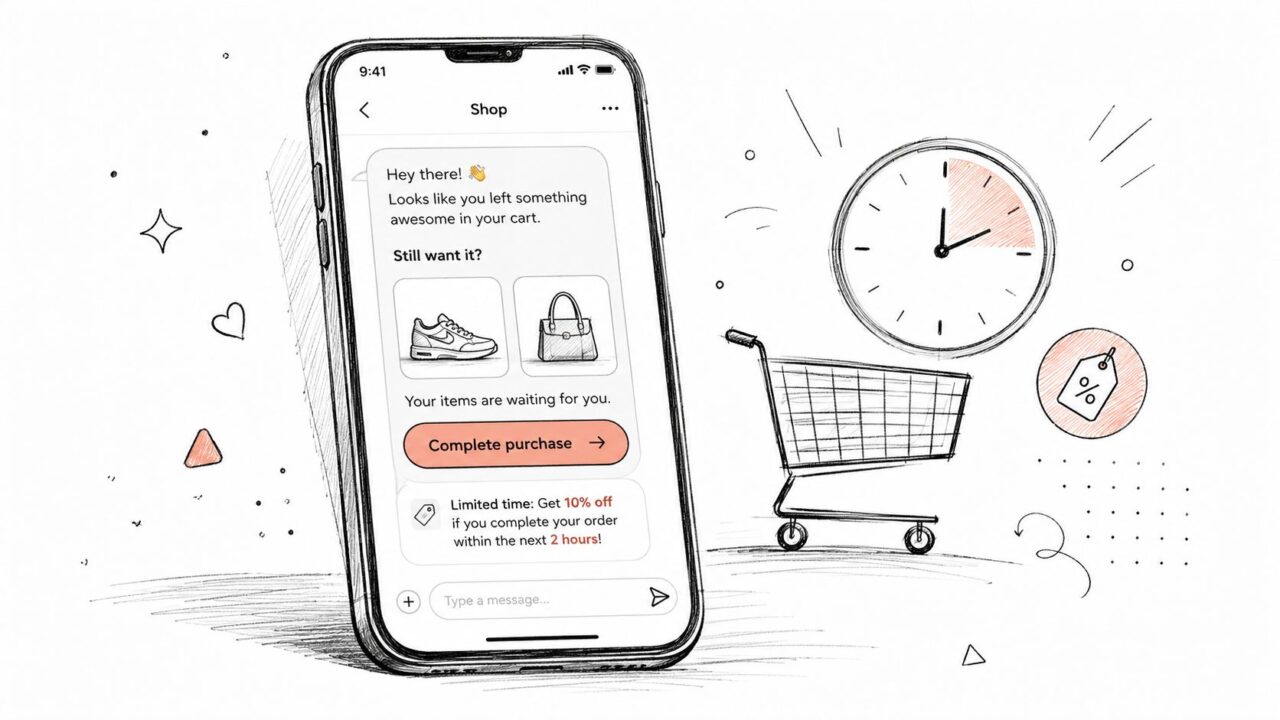
A cart reminder should feel like helpful timing, not surveillance. The customer already showed purchase intent, so the message can focus on what they left behind, remove a possible obstacle, and make returning to checkout easy.
A direct message might read:
Hi [first name]! 👋 You left [product name] in your cart. You can pick up where you left off here: [cart link]. If you had a question about size, delivery, or payment, reply and I’ll help.
For a promotion, add the incentive only when it makes commercial sense:
Your items are still waiting, [first name]. Complete your order by [specific deadline] with code
: [cart link]. Need help before checking out? Just reply.
Use Clepher personalization tags to insert the customer’s first name and product names. A DTC clothing brand might mention a hoodie and jeans, while a local boutique could refer to a leather jacket and summer dress. Specificity makes the reminder useful, but avoid listing details that could expose sensitive information on a shared device or public notification.
Build the recovery sequence
Start with a short reminder after the abandonment event, then create a second follow-up for people who haven’t engaged. The first message should return the customer to the cart. The next can answer a common concern, highlight shipping information, or offer a final reason to complete the purchase.
- Use urgency carefully: “Limited stock” works only when stock is limited.
- Test the motivation: Compare urgency-led copy with a discount-led message by segment.
- Stop after conversion: Remove buyers from the recovery flow as soon as the order is completed.
- Measure the path: Track clicks, completed purchases, replies, and unsubscribes rather than judging the message by clicks alone.
For broader planning, review these top abandoned cart email strategies. Clepher can also support abandoned cart recovery through channel-specific flows and follow-ups.
Response Templates Cart Abandonment
2. Customer Support Issue Resolution Response
A frustrated customer doesn’t need a polished paragraph first. They need acknowledgment, ownership, and a credible explanation of what happens next.
For a SaaS problem, use a structure like this:
Thanks for reaching out, [first name]. I understand your dashboard isn’t loading, and that’s frustrating. I’m checking your account now, and I’ll update you by [specific time]. If we need more information, I’ll ask for it in this conversation so you won’t have to start over.
For an order issue:
I’m sorry your order hasn’t arrived, [first name]. I checked the tracking, and it’s delayed at [location], not marked as lost. I’m contacting the carrier now and will message you again by [date]. Would you like a text update when the package moves?
The template should pull relevant information from Clepher custom fields where appropriate. Referencing an order status, account type, or known issue is far more useful than saying the team is “looking into it.”
Give the customer a reliable next step
Avoid “soon,” “shortly,” and “as quickly as possible.” Those phrases transfer uncertainty to the customer. Use a specific time or date, and create a reminder for the agent or flow even if the customer doesn’t reply.
- Acknowledge the impact: Name the inconvenience without exaggerating it.
- State the action: Explain what you’re checking, changing, or escalating.
- Set the update point: Give a realistic time for the next message.
- Keep the voice human: Contractions such as “it’s” and “I’m” sound more natural than formal corporate language.
- Use light warmth: One or two relevant emojis can soften the exchange, but they shouldn’t replace accountability.
Templates are especially valuable when teams measure operational performance. Support programs commonly track first response time, resolution time, follow-up response rate, and SLA compliance, while some B2B teams use 4-hour routine-ticket and 1-hour urgent-ticket benchmarks for internal judgment, as described by Kenect’s guidance on templatizing customer text responses. Use those measures to improve the flow, not to pressure agents into sending rushed replies.
3. Sales Follow-Up After Lead Magnet Download
The download confirmation is a sales moment, but it shouldn’t sound like a sales ambush. Thank the prospect, name the resource, and ask a simple question that helps you understand what they want next.
A SaaS message could say:
Hey [first name]! 🎉 Your “[resource name]” is ready here: [download link]. Which part are you hoping to apply first, lead capture, follow-up, or support? Reply with one word and I’ll point you toward the most useful next step.
A coach or course creator might write:
[first name], your “[resource name]” is on its way. Are you trying to systematize what you already publish, or are you deciding what to post first? Tell me where you’re stuck and I’ll send a practical suggestion.
If the prospect has shown stronger intent, offer a low-friction action:
If you’d rather talk it through, you can choose a time here: [calendar link]. There’s no need to prepare a presentation. Bring the problem you’re trying to solve.
Turn replies into qualification signals
Use the resource name dynamically so the message feels connected to the action that triggered it. Clepher tags can add the first name and segment information, while AI keywords can help classify replies.
- Education intent: Replies such as “how does it work?” can enter an explainer sequence.
- Pricing intent: A question about cost can route toward pricing information or a sales conversation.
- Implementation intent: Questions about integrations or setup deserve a more specific technical reply.
- Low intent: A polite acknowledgment can receive useful content without immediate sales pressure.
Test different next steps by segment, such as a demo, consultation, or group webinar. Keep the first question easy to answer. A response gives your team context that a form alone may not capture.
The practical objective is not to push every downloader into a call. It’s to create a relevant second interaction, then let the conditions in the flow determine whether the prospect needs education, proof, or human assistance.
4. Win-Back Campaign for Inactive Subscribers
Silence doesn’t always mean rejection. A subscriber may have changed priorities, missed your messages, or decided that your content no longer fits. A win-back message should acknowledge the absence without guilt, provide a specific reason to return, and make it easy to tell you what changed.
For an online store:
Hey [first name], we haven’t seen you in a while. We’ve added [new collection or product] since your last visit, and you can explore it here: [link]. If you’d rather hear about something else, reply with what you’re looking for.
For a coaching business:
[first name], I’ve added a new lesson on [topic] since we last spoke. Would you like access, occasional updates, or no more messages? Reply with ACCESS, UPDATES, or STOP. No hard feelings either way.
Segment before you write
Use Clepher fields such as last engagement date and last purchase date to separate dormant buyers from subscribers who never became customers. Those groups need different reasons to return. A former buyer might respond to a product update, while a quiet lead may need educational content or a clearer explanation of the offer.
Build a sequence with distinct jobs:
- First message: Reintroduce the value and invite a low-effort reply.
- Value reminder: Share a relevant product, guide, or new feature.
- Final message: Offer a clear choice, including a graceful unsubscribe path.
A discount can work, but it shouldn’t be the only idea. Test content, product access, service improvements, and preference-based updates. Clepher’s segmentation and A/B testing features can help compare offers within relevant groups, while analytics can show which campaigns generate replies, purchases, or clean exits.
A win-back flow succeeds when it improves the relationship, not when it merely keeps an inactive contact on the list.
Make re-engagement one click where possible. A reply such as “YES” can trigger the next flow, while “STOP” should end promotional messages cleanly.
5. Apology and Service Recovery Message
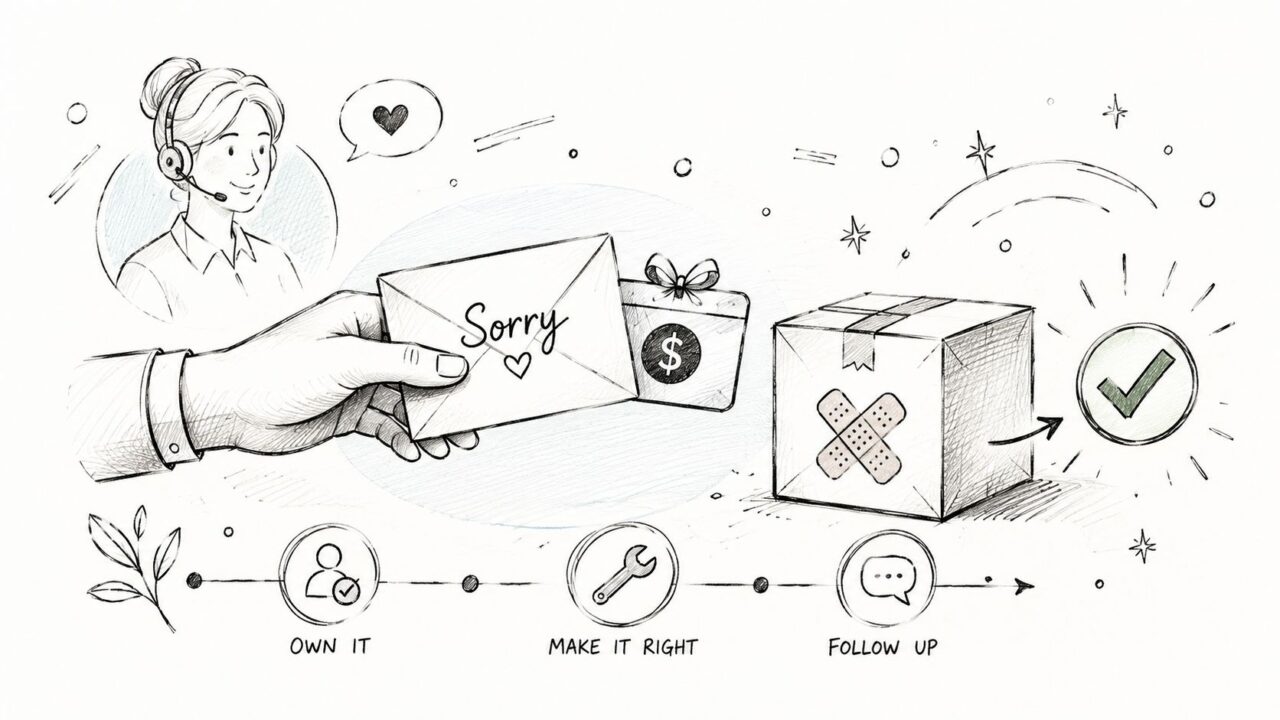
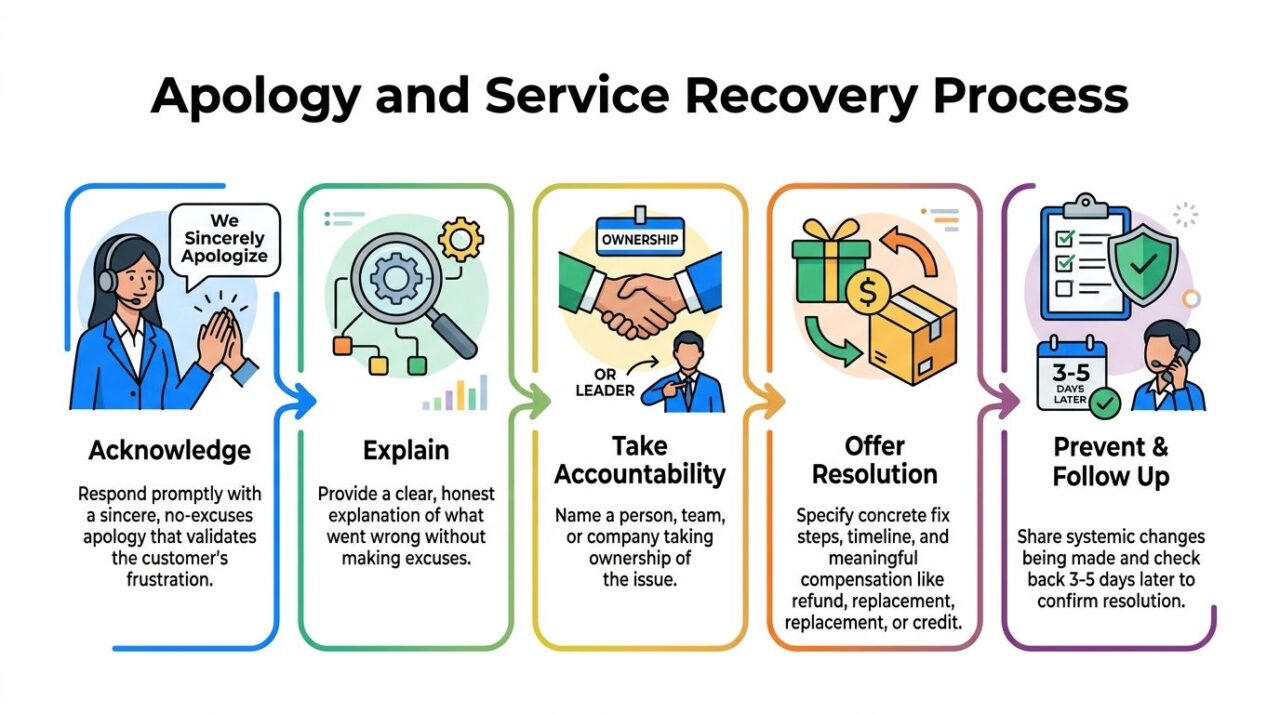
A service recovery reply needs more than the words “we’re sorry.” It should identify the failure, accept responsibility, explain the fix, and give the customer a clear way to confirm that the problem is over.
For a delayed shipment:
[first name], I’m sorry your order missed its promised delivery date. That’s on us. I’ve [specific action], and I’ll send you another update by [date]. We’ve also added [specific compensation] to your account. If the package doesn’t move by then, I’ll arrange the next solution directly.
For a damaged product:
Hi [first name]. I saw your message about the broken [product detail]. That isn’t the standard we set. I’m sending a replacement through [shipping method] today, and you won’t need to repeat the issue to another agent. I’ve also flagged the failure for our quality team. I’ll check back by [date] to confirm it arrived.
Own the failure without overexplaining
Corporate phrases such as “we regret any inconvenience” create distance. Use a name, a role, and a concrete action. Compensation may be appropriate, but it shouldn’t substitute for solving the underlying problem.
- Name what happened: Be direct about the missed expectation.
- Accept responsibility: Don’t hide behind “unforeseen circumstances” when your process caused the issue.
- Describe the remedy: State what will happen, who owns it, and when.
- Follow up: Confirm that the replacement, credit, or correction reached the customer.
- Share internal learning: Use recurring complaints to identify a process or product problem.
Critical issues may need a live Clepher chat conversation rather than a delayed broadcast. Route sensitive or emotional replies to a human agent, and use a follow-up condition to check whether the customer confirms resolution.
Response Templates Customer Service
6. Post-Purchase Onboarding and First-Use Guide
The purchase confirmation closes a transaction. Onboarding helps the customer reach the first useful outcome before confusion or inactivity takes over.
A SaaS sequence might begin like this:
Hey [first name]! 🎉 Welcome to [product]. Your account is ready: [login link]. Start with [first action], and reply here if you get stuck.
Then send a focused next step:
Ready to build your first flow? This short walkthrough shows the process:
When you finish, reply DONE and I’ll send the next recommendation.
A later message can address friction:
Need help? Here are the common setup questions: [help link]. If your screen looks different, reply with a screenshot or describe what you see.
For a course, replace “first flow” with the first lesson, module, or exercise. The wording should reflect the product tier and the customer’s intended use, not just the fact that a payment was completed.
Let behavior choose the next message
Don’t send every onboarding instruction at once. Space the messages so the customer can take action, then use conditions to respond to what they did.
- Setup completed: Send an advanced guide or introduce the next feature.
- No engagement: Send a gentle reminder with one smaller action.
- Question received: Route the conversation to support or a product-specific flow.
- Partial progress: Explain the next step and remove the most likely obstacle.
A progress marker such as “Step 2 of 5” can make a multi-message journey easier to follow. Track which messages get opened and which steps customers skip. Repeated skips often indicate unclear instructions, excessive effort, or a product experience that needs attention.
Use these onboarding best practices when you design the sequence. The following video can add a visual explanation for customers who learn better by watching:
Response Templates Service Recovery
7. Refund Request Handling and Retention Counter-Offer
A refund request is both a service task and a source of customer insight. Respond quickly, acknowledge the request, and ask what happened without making the customer defend the decision.
A useful opening is:
Hey [first name], I’ve received your refund request. I’m sorry the experience didn’t meet your expectations. What went wrong, and what outcome would feel fair to you?
If the reason suggests a recoverable problem, offer choices:
If the issue is fit, I can arrange a swap. If the product isn’t right for you, I can process the refund. If setup is the problem, I can arrange a guided session. Which option would help most?
For SaaS:
[first name], I’m sorry the tool hasn’t worked as expected. Is the main issue setup, missing functionality, price, or something else? I can connect you with support, review another plan, or process the refund. You won’t need to argue your case.
Separate retention from resistance
A counter-offer should solve a real problem, not create another obstacle. Extended access, training, feature guidance, or a different product may be useful. A forced call, hidden cancellation process, or repeated discount offer will damage trust.
Clepher conditional branching can route different replies to different paths:
- Product issue: Send the conversation to support.
- Price concern: Provide relevant plan information or a sales option.
- Setup problem: Offer training or onboarding help.
- Changed mind: Process the request gracefully.
Ask open questions such as “What isn’t working?” instead of leading questions that push the customer toward a preferred answer. If the customer insists on leaving, make the refund process clear and frictionless. A later, permission-based follow-up can invite them back only when you have a meaningful improvement to share.
8. Social Media Comment and DM Response to Product Questions
A public product question is visible to more than the person who asked it. Answer the question in the comment first, then move to a private conversation only when the customer needs account-specific help or a deeper recommendation.
For an Instagram sizing question:
Great question! 👍 [Product name] is available in XL. The sizing chart is here: [product link]. If you tell me your usual fit, I can help you compare the measurements.
For a software integration question:
Yes, [product] connects with Shopify through [integration method]. Are you trying to sync orders, customers, or both? Reply here or message us, and we’ll point you to the right setup guide.
Make the public reply useful
“DM us” by itself creates work for the customer and makes the brand look evasive. Give the basic answer publicly, then invite the private step for personalization.
- Answer directly: Include availability, compatibility, or the relevant product detail.
- Add a useful link: Send people to the product page, sizing guide, or help article.
- Use a keyword trigger: Let Clepher recognize common phrases and start the appropriate response.
- Keep the comment concise: Move long troubleshooting or personal account details into Messenger, WhatsApp, or Instagram Direct Message.
- Review recurring questions: Use analytics to identify FAQ topics for content and product-page improvements.
One or two emojis can add warmth, but don’t let them obscure the answer. For complex questions, write a partial public response and offer a private video or guided explanation. The handoff should feel like an upgrade in help, not a way to hide information.
9. Limited-Time Offer and Flash Sale Announcement
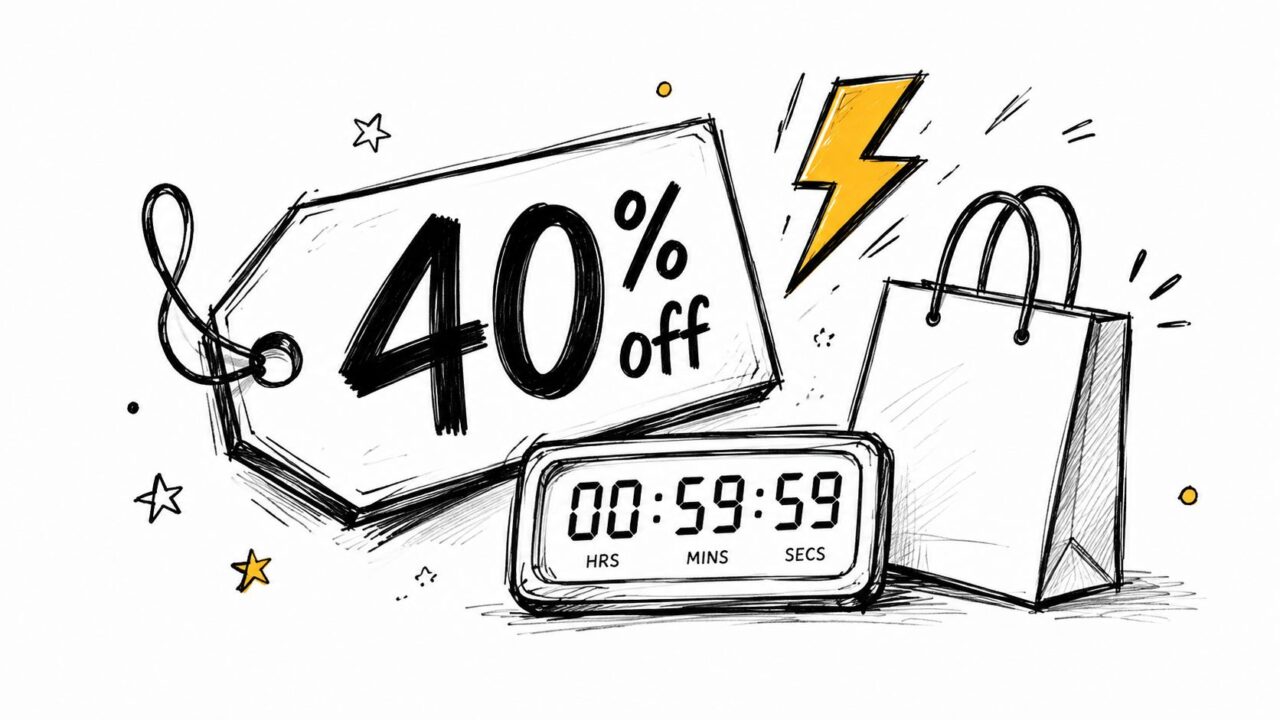
A promotion needs a real audience, a real deadline, and a clear action. Generic urgency sent to everyone can make even a legitimate offer feel like noise.
For a segmented e-commerce broadcast:
⚡ [first name], your [segment name] offer is ready. Save [offer] on [product category] with code
. The promotion ends at [specific time and time zone]: [offer link]. Questions about sizing, delivery, or stock? Reply here.
For a course or membership:
Your community access offer ends at [specific time]. Use
here: [link]. If you’re deciding whether it fits your goals, reply with your main challenge and we’ll help you choose.
Only state scarcity when it reflects reality. “Only three spots left” should describe actual availability, not manufacture pressure. The same applies to “biggest sale of the month” and similar claims.
Match the offer to the segment
Clepher tags and segments can separate VIP customers, repeat buyers, new subscribers, and leads. Each group may need different framing, eligibility, or exclusions.
- VIP segment: Lead with early access or a stronger loyalty benefit.
- New subscriber segment: Explain the product and reduce purchase uncertainty.
- Repeat buyer segment: Recommend a relevant complement or replenishment.
- Past purchaser segment: Mention what has changed since their last order.
Use the rich message builder to make the CTA easy to find. Send a reminder before the deadline only to people who haven’t converted, and stop the promotion immediately after purchase. Track conversion by offer and segment so you learn which message creates qualified action, not just attention.
Response Templates Sales Discount
10. Lead Qualification and Discovery Call Booking Response
Booking confirmation is an opportunity to reduce uncertainty before the sales conversation. Confirm the time, explain the format, share what the prospect can expect, and ask for the context the representative needs.
A B2B SaaS reply could read:
Hey [first name]! 🎉 Your demo is confirmed for [date] at [time and time zone] with [representative]. We’ll review your use case, answer questions, and discuss possible next steps. What are you hoping to improve first, lead capture, support, follow-up, or another process? Reply here so [representative] can prepare.
Follow with the meeting link and a practical reminder:
Your call link is here: [meeting link]. If your plans change, you can reschedule here: [calendar link]. You don’t need a presentation. A short description of your current process is enough.
Qualify without turning the confirmation into a form
Ask one or two questions that affect the conversation. Useful prompts include the current tool, the main workflow problem, the people involved, and the desired outcome. Avoid asking for information the prospect has already provided in the form or conversation.
Use tags and custom fields to pass the answers to the sales team. AI keywords can identify buying signals, while conditions can route technical questions to someone with the right expertise. A prospect asking about integrations should not receive the same follow-up as someone comparing plans.
The guide to qualifying sales leads can help shape the questions around fit and intent. Keep the flow helpful, not interrogative. A well-prepared representative can use the answers to make the call relevant from the opening minute.
Comparison of 10 Response Templates
| Template | Implementation Complexity 🔄 | Resource Requirements ⚡ | Expected Outcomes ⭐📊 | Ideal Use Cases 💡 | Key Advantages ⭐ |
|---|---|---|---|---|---|
| Abandoned Cart Recovery Message | Medium, automated triggers + data sync | E‑comm integration, templates, channel setup | ⭐ High recovery (10–30% carts reclaimed); immediate revenue uplift 📊 | 💡 DTC e‑commerce, shoppers who abandoned carts across Messenger/WA/IG | ⭐ High ROI, one‑click recovery, personalized incentives |
| Customer Support Issue Resolution | Medium‑High, escalation paths & SLAs | Support staff, knowledge base, escalation tooling | ⭐ Improves NPS; reduces refunds/churn (25–40% fewer refunds) 📊 | 💡 Technical issues, complaints, post‑purchase problems across channels | ⭐ Empathy-first, documents resolution, prevents escalation |
| Sales Follow-Up After Lead Magnet Download | Low‑Medium, instant trigger + personalization | Marketing automation, calendar links, sales handoff | ⭐ Higher conversion when timely (20–40% lift vs delayed follow‑up) 📊 | 💡 Prospects who download guides, templates, or lead magnets | ⭐ Captures peak intent, qualifies leads fast, low friction |
| Win‑Back Campaign for Inactive Subscribers | Medium, segmentation + sequencing | Segmented lists, offers, analytics | ⭐ Reactivates ~5–15% dormant users; cost‑effective vs acquisition 📊 | 💡 Customers inactive 30–90+ days, subscription churn mitigation | ⭐ Low‑cost reactivation, feedback capture, scalable broadcasts |
| Apology and Service Recovery Message | Medium, needs fast coordination & accountability | Rapid response team, compensation budget, follow-up process | ⭐ Converts 60–80% complaining customers back; reduces negative WOM 📊 | 💡 Service failures, quality issues, high‑impact customer complaints | ⭐ Restores trust, builds emotional loyalty, prevents escalations |
| Post‑Purchase Onboarding and First‑Use Guide | Medium‑High, multi‑message flows & conditional logic | Content (videos/guides), automation, conditional branching | ⭐ Reduces support tickets 20–40%; increases retention & feature adoption 📊 | 💡 New customers for SaaS, digital products, complex physical products | ⭐ Speeds time‑to‑value, increases LTV, scalable self‑service |
| Refund Request Handling & Retention Counter‑Offer | Medium, branching + personalized handling | Support + flexible refund policy, routing rules | ⭐ Recovers 15–30% refund requests; gathers actionable feedback 📊 | 💡 Refund/return requests where retention is possible | ⭐ Retains recoverable customers, learns churn reasons |
| Social Media Comment & DM Response to Product Questions | Low, quick templates + smart redirects | Responsive team or automated replies, keyword triggers | ⭐ Builds social proof; converts 10–20% of DMs into sales conversations 📊 | 💡 Public product Q&A, influencer/community engagement on IG/FB | ⭐ Free marketing, drives private conversations, boosts credibility |
| Limited‑Time Offer & Flash Sale Announcement | Low‑Medium, broadcast + segmentation | Creative, inventory & fulfillment coordination, countdown assets | ⭐ Drives 2–5x normal daily revenue on sale day; high immediate volume 📊 | 💡 Inventory clearance, seasonal promotions, VIP sales | ⭐ Urgency‑driven spikes, easy A/B testing, rapid reach |
| Lead Qualification & Discovery Call Booking Response | Low, confirmation + pre‑call qualification | Calendar integration, short pre‑call form, reminder automation | ⭐ Increases show rates and lead quality; fewer no‑shows 📊 | 💡 Inbound leads showing purchase intent needing a demo/discovery | ⭐ Higher show‑rate, better‑prepared sales calls, efficient qualification |
Turn Useful Replies Into Repeatable Conversations
The value of a response template isn’t the paragraph itself. The value is the repeatable decision around it. Someone triggers a cart reminder, replies with a sizing question, misses an onboarding step, asks for a refund, or signals buying intent. Your system then sends a relevant starting point and knows what should happen next.
Start with one customer moment that has clear business value. Abandoned carts, support delays, and new purchases are often good candidates because the trigger is easy to identify. Don’t build ten complicated flows at once. Choose one, document the intended customer experience, and improve it before expanding.
Replace generic placeholders with approved fields. At minimum, review the first name, product or service name, order or account context, deadline, link, and sender identity. A field should remain blank rather than display an incorrect value. For sensitive situations, limit the information shown in notifications and route the conversation to a secure channel.
Define the trigger and escalation path before writing the copy:
- Trigger: What event starts the conversation?
- Audience: Which tag, segment, or customer state qualifies?
- First reply: What can the flow resolve immediately?
- Condition: What customer action changes the next message?
- Escalation: When does a human take over?
- Exit: What stops the flow after purchase, resolution, unsubscribe, or disqualification?
Clepher can connect tags, segments, custom and global fields, conditions, AI keywords, broadcasts, analytics, and live human handoffs. That lets a marketing team personalize a promotion, route a pricing question, or send a support conversation to an agent without treating every contact as identical. The platform supports conversational flows across website chat, Facebook Messenger, WhatsApp, and Instagram Direct Message, so teams can adapt the same operational logic to the channel where the customer started.
Measure the conversation, not just the send
Templates are now treated as operational assets in many software environments. For example, a Jira-based template platform exposes “Used in,” “Used by,” and “Last used” fields, and limits default usage-history reporting to the most recent 90 days unless an advanced plan provides unlimited history, as documented by Appfire’s template usage documentation. The broader lesson is practical. If you can’t see which template was used, when it was used, and what happened afterward, improvement becomes guesswork.
Choose one success metric for the first test. Depending on the flow, that could be completed purchases, resolved conversations, qualified replies, completed setup, refund completion time, or confirmed handoffs. Then watch the failure signals too, including unsubscribes, repeated questions, abandoned branches, and complaints about irrelevant messages.
The broader service case is also measurable. One customer-service article reports that businesses using structured message templates saw a 73% increase in customer satisfaction scores, and presents one hour as a widely cited first-response benchmark, as reported by Keeping’s customer-service email template guidance. Treat those figures as context from that industry article, not as a promise for every business. Your own audience, channel, offer, and operational capacity determine what works.
Templates also help collect structured feedback after an interaction. A chatbot survey flow can ask whether the response was accurate, whether the conversation was clear, whether the issue was resolved, and whether a human agent was needed, following the measures suggested in this chatbot user-satisfaction survey template. Those answers can reveal where automation helps and where it creates friction.
Use this final review before activating a flow:
- Consent: Confirm that the customer has permission to receive messages on the selected channel.
- Channel fit: Adjust length, formatting, buttons, links, and tone for the platform.
- Personalization: Check every dynamic field and include only relevant context.
- Clear CTA: Give the customer one obvious next action.
- Fallback support: Make human assistance easy when the template can’t resolve the issue.
- One success metric: Decide what improvement you’ll measure before launch.
The best response templates don’t make conversations feel automated. They make the right action easier, preserve context, and give people a fast path to resolution or purchase without removing judgment from the process.
Clepher gives you a no-code way to build response flows for marketing, sales, onboarding, and support across website chat, Facebook Messenger, WhatsApp, and Instagram Direct Message. Create a targeted flow with tags, conditions, AI keywords, personalization, analytics, and human handoffs, then visit Clepher to turn your most valuable customer reply into a repeatable conversation.

Related Posts
10 Lead Capture Software Tools Compared for 2026
October 18, 2026WhatsApp Chatbot for Ecommerce: A Practical 2026 Guide
October 17, 2026What Is Lead Scoring and How It Drives Real Sales Results
October 16, 2026
Founder Clepher