
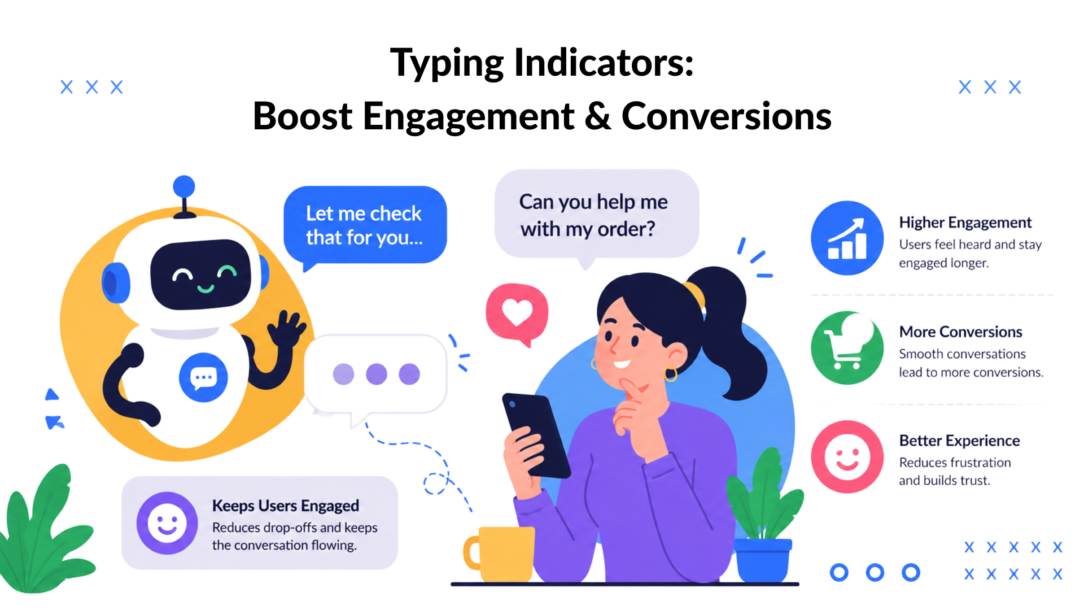
The most popular advice about typing indicators is also the least reliable: turn them on everywhere, make the bot feel human, and watch engagement rise. That approach ignores the user on the other side of the conversation. A first-time lead may need reassurance that the chatbot is processing a request, while a repeat customer may see the same animation as needless delay from a system that should answer immediately.
Typing indicators work when they reduce uncertainty at the right moment. They fail when they announce activity without delivering useful progress, especially when a response is already fast or the audience understands automated chat. The practical question isn’t whether your chatbot should use typing indicators. It’s which users should see them, in which flows, and for how long.
Why Typing Indicators Are Not Always the Answer
A silent pause creates ambiguity. Is the bot working, disconnected, or ignoring the customer? A typing indicator can answer that question quickly, which makes it valuable in lead qualification, onboarding, and other flows where a new visitor doesn’t yet know how the system behaves.
But the same cue can create a different expectation for an experienced user. Someone who has used your support bot repeatedly may already expect immediate answers. Showing a typing animation before every short FAQ response adds an extra conversational beat without adding information. If the reply arrives almost instantly, the indicator can feel artificial. If it remains visible while the system struggles, it highlights the delay rather than fixing it.
Research supports this audience distinction. Earlier human-chatbot interaction work found that graphical typing indicators increased perceived social presence for novice users, but not for experienced users, as documented in the AIS-published study on graphical typing indicators. That doesn’t mean experienced users dislike every progress cue. It means familiarity changes the value of the signal.
Treat the indicator as a design variable
A strong chatbot team evaluates typing indicators alongside three conditions:
- Audience familiarity: New visitors may need social reassurance. Returning customers may prefer speed and compact responses.
- Conversation stakes: A booking, qualification, or recovery flow benefits more from visible processing than a routine answer.
- Actual response timing: The cue should represent genuine work, not manufacture suspense.
Practical rule: Never use a typing indicator to disguise slow infrastructure. Use it to explain a short, meaningful processing pause while engineering works to reduce the pause itself.
This is why a global on/off setting is often too crude. Segment the experience by entry source, customer history, flow type, and response path. A lead arriving from an ad may see a brief indicator while the bot checks qualification logic. A repeat customer asking for store hours may receive the answer without any animation.
The objective isn’t to make every interaction look human. It’s to make each interaction feel clear, responsive, and appropriate to the user’s expectations.
What Typing Indicators Are and How They Evolved
Typing indicators began as a response to a basic limitation of text chat: users couldn’t see the social cues that normally signal someone is preparing to speak. In a physical conversation, a pause, glance, or hand movement can show that a reply is coming. Early chat systems needed a lightweight digital substitute.
IBM developers Jerry Cuomo and Richard Redpath created one of the first known implementations while working on a chat server in 1997, as documented in this historical account of the early typing indicator implementation. U.S. Patent No. 5,990,887 was recorded on November 23, 1999. The patent describes feedback that tells recipients that at least one sender is preparing a message while hiding the typed text until the sender completes it.
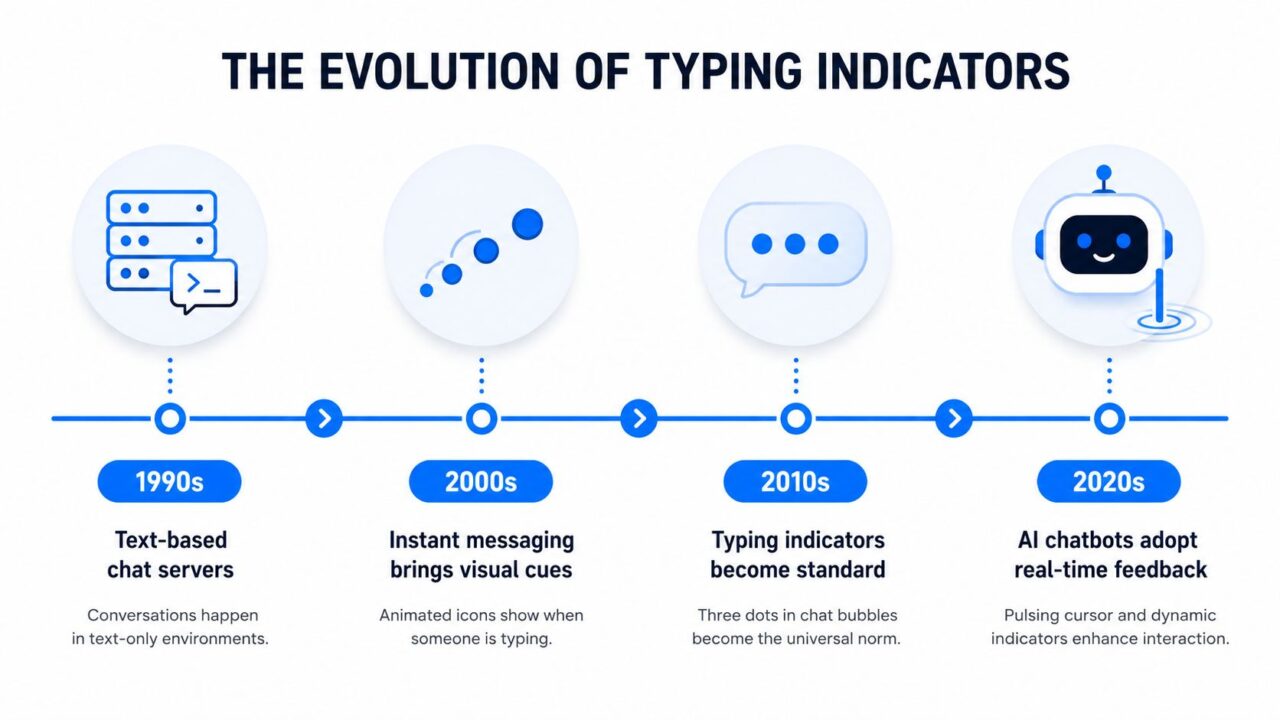
Typing Indicators Evolution Timeline
That core mechanic still shapes modern chat. A user sends a question, the recipient begins composing, and the interface displays a small signal such as animated dots or a “typing” label. The recipient sees conversational intent, but not the unfinished message. Once the message is sent, the indicator disappears.
From chat rooms to customer journeys
The feature later became familiar through consumer messaging apps such as WhatsApp, Messenger, and Instagram Direct Message. In these products, typing indicators support turn-taking and reduce uncertainty during pauses. Users don’t need to wonder whether the other person is still present.
Business chatbots use the same idea for a different reason. A bot may be checking an account record, evaluating a condition, generating a reply, or waiting for another service. The indicator gives the interface a temporary presence state while that work happens.
That distinction matters. A person may type slowly, revise a thought, or stop composing. A bot has no such inner process. Its indicator should therefore correspond to a real response-generation state, not run continuously as decoration. The best implementation is brief, scoped to the conversation room, and cleared as soon as the system sends the response.
The feature has survived because it solves a durable communication problem. It doesn’t reveal content, guarantee quality, or make a slow system fast. It gives the user a clearer interpretation of a pause.
How Typing Indicators Change User Behavior and Perception
Typing indicators influence more than visual polish. A 2023 CHI study evaluated multiple indicator designs and found that richer feedback could affect perceptions of conversational involvement and social presence, particularly in interaction-rich communication, as reported in the ACM CHI research on typing-indicator variants. A separate controlled study found that response delays made participants view partners as significantly less involved, more frustrating, and less likable, even when a typing indicator was visible.
That boundary is essential for marketing and support teams. The indicator can help users interpret a pause, but it can’t erase the emotional cost of waiting. A customer who needs an answer still experiences the delay. The cue changes the meaning of the silence, not the duration of the silence.
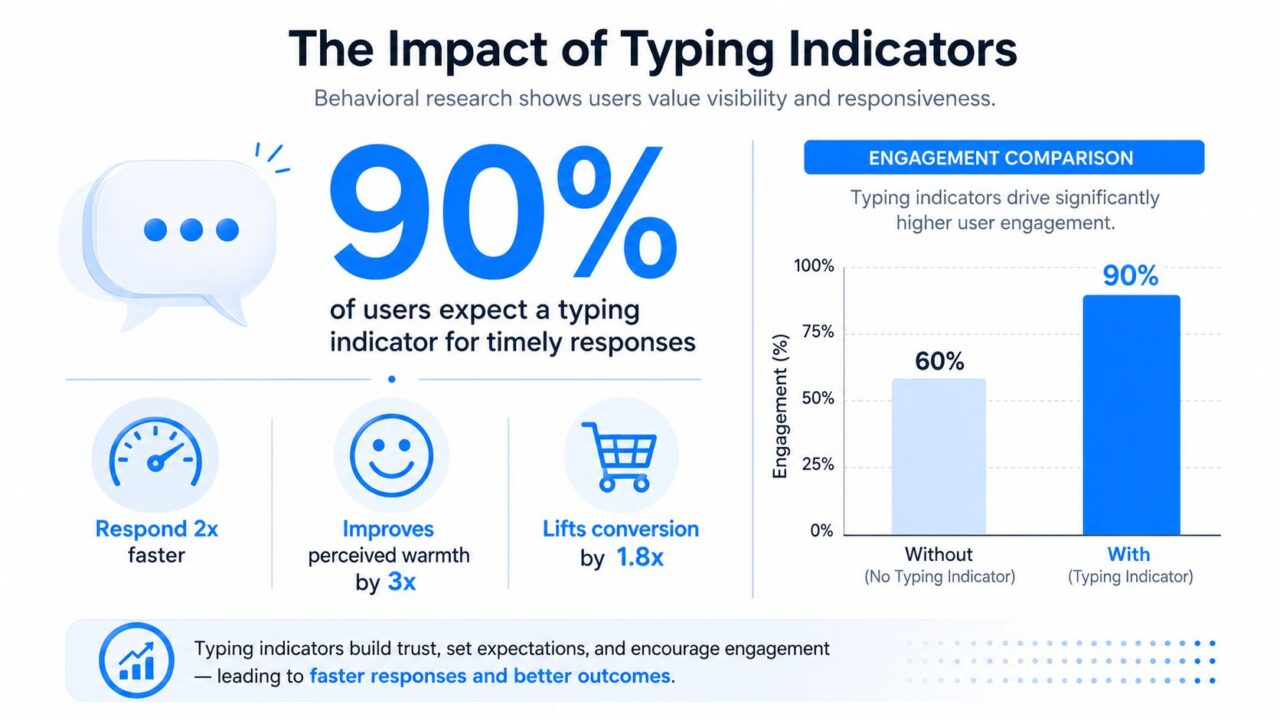
Typing Indicators Engagement Comparison
Richer feedback helps task-focused conversations
The CHI work found that live typing was perceived as more communicative, helpful, and effective for task-based interaction. It also increased perceived social presence while lowering reported frustration and stress. The trade-off appeared in everyday personal messaging, where participants considered live typing less suitable because it reduced selective self-presentation.
That distinction maps neatly to business use cases. A guided lead flow, appointment conversation, or onboarding sequence has a clear task and benefits from momentum. A casual brand conversation may be better served by a clean, completed response that gives the user control over what the bot reveals.
For teams measuring behavior, the right dashboard should separate the indicator from the underlying response experience. Clepher users working on a website chatbot for lead capture can examine where users pause, abandon, or continue, then use conversation analytics to compare flow behavior rather than treating the animation itself as a conversion mechanism.
A useful operational threshold comes from research on conversational delay handling. Users preferred a typing indication, such as a speech bubble or live typing, over seeing nothing while waiting, while latency above 4 seconds degraded the experience in intelligent-agent conversations, according to this study of delay handling in text-based chatbot interfaces. Show a cue early when real processing is underway, but treat a delay beyond roughly four seconds as an engineering and conversation-design problem.
The practical sequence is straightforward: acknowledge quickly, show meaningful progress during genuine work, and deliver the answer in a compact form. If the backend needs more time, send partial feedback or split the response instead of leaving the user watching an animation.
Implementation Patterns for Real-Time Typing Events
Typing indicators should behave like ephemeral presence events, not permanent records. The interface needs to know that someone is composing now. It usually doesn’t need a database row documenting every moment of composition.
A reliable lifecycle has four parts:
- Start once. The client emits a typing-start event when the user begins composing or when the bot begins response generation.
- Debounce updates. Further emits are suppressed for roughly 2 to 3 seconds, following practical real-time chat guidance from WebSocket.org’s chat implementation guide.
- Clear inactivity. The recipient hides the indicator after about 5 seconds of inactivity, so a disconnected tab or abandoned draft doesn’t leave stale presence on screen.
- Stop on send. Broadcast a stop event immediately when the message is sent, rather than waiting for a timeout.
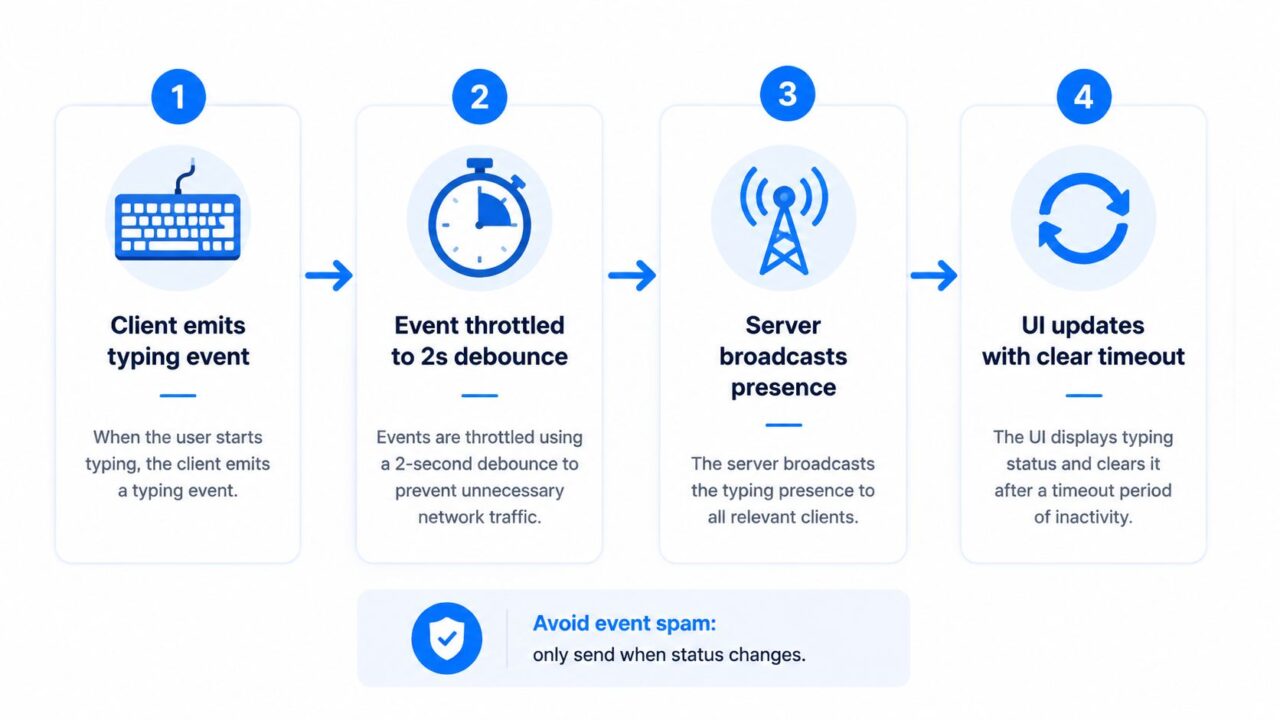
Typing Indicators Process Flow
Keep state close to the live conversation
WebSockets are a natural fit because the server can broadcast a room-scoped event to connected participants. The client updates the visible state, starts a clear timer, and removes the indicator when a stop event or timeout arrives.
Polling can support the same experience, but it introduces more coordination. The client must ask for presence repeatedly, distinguish current state from stale state, and handle missed transitions. That overhead makes it even more important to avoid persisting every typing change.
Client-side logic can trigger the initial event, while server-side authorization decides who receives it. This division prevents one user from broadcasting presence into unrelated rooms and gives the product team a clear place to enforce privacy rules.
Architecture check: If your typing indicator generates a database write for every keystroke, the implementation is tracking the wrong thing.
The interface also needs graceful failure. If the connection drops, the client should clear the visible state locally. If the bot finishes generating a reply, the server should stop the indicator before or as part of message delivery. A message send must always outrank a timer.
For teams using a no-code flow builder, the engineering conversation still matters. Ask whether the platform emits one start event, throttles repeats, scopes the event to the active conversation, and clears it when the response arrives. Those details determine whether the feature feels responsive or noisy. Clepher’s chat widgets for websites are one example of a product area where marketers should evaluate the visible experience alongside the underlying event lifecycle.
When to Use Typing Indicators and When to Skip Them
The strongest deployment pattern is selective. New users often need cues that establish social presence, while experienced users may value directness more than simulation. The conversation’s purpose matters just as much as the audience.
A lead qualification flow is a good candidate. The bot may need to evaluate answers, personalize the next question, or route the visitor based on conditions. A short indicator can make that processing feel intentional. Onboarding and booking flows benefit for a similar reason, since the user is completing a task and needs confidence that the next step is being prepared.
Cart recovery can also justify the cue when the system is checking product or customer context. The indicator should disappear as soon as the bot has a useful response. It shouldn’t appear before every button label or short confirmation.
High-volume FAQ automation is different. If the answer is already available immediately, an indicator adds little. Repeat-customer support can also work better without it when returning users already understand the bot’s behavior and expect rapid retrieval.
| Scenario | User Type | Recommendation | Reason |
|---|---|---|---|
| Lead qualification | First-time visitor | Use selectively | The cue can reduce uncertainty while the flow evaluates responses. |
| Booking or onboarding | New or mixed audience | Use during meaningful processing | Task-focused conversations benefit from visible progress. |
| Cart recovery | Returning shopper | Test at processing points | It can maintain momentum during context checks, but shouldn’t delay quick answers. |
| Routine FAQ | Experienced user | Usually skip | An instant answer doesn’t need a simulated wait. |
| Complex support lookup | Any user | Use with faster feedback | The cue explains processing, but it can’t compensate for a long delay. |
| Rapid-fire notifications | Any user | Skip | Repeated flashes create noise and set unnecessary expectations. |
This audience-aware approach aligns with broader principles for creating loved products with UX. Good UX isn’t about adding human-like details indiscriminately. It’s about choosing signals that help a specific person complete a specific task.
A practical test compares the complete interaction, not just indicator exposure. Review response time, continuation, abandonment, and handoff behavior by user familiarity and flow type. If experienced users move through the flow faster without the cue, remove it from that segment. If new visitors hesitate during processing, retain it where the signal answers a real question.
How Clepher Uses Typing Indicators to Drive Results
Clepher places typing indicators inside the broader flow rather than treating them as a standalone engagement trick. Its no-code builder supports conversational flows across Messenger, Instagram Direct Message, WhatsApp, and website widgets, allowing marketers to control where a typing cue appears without writing the event-handling code themselves.
The strategic value comes from matching the cue to a decision point. In a lead qualification flow, the bot can show typing while it evaluates answers and prepares the next question. The indicator supports the feeling that the response relates to what the visitor just said, rather than appearing as a generic scripted block.
A cart recovery flow uses a different pattern. The bot may pause briefly while it applies conditions, checks customer fields, or selects the next message. Showing typing during that narrow processing window keeps the conversation active. The bot should then deliver a clear offer, product reminder, or support option without extending the artificial pause.
Personalization makes the cue more useful
Typing indicators become more deliberate when combined with personalization tags, conditions, custom fields, global fields, and segmentation. A brand can vary the experience for a new lead and a known subscriber, rather than presenting identical timing to everyone. An AI agent may need a visible processing state for an open-ended question, while a fixed keyword response can appear immediately.
Clepher also connects typing behavior to broader automation capabilities, including live chat, analytics, A/B testing, personas, broadcasts, and integrations. That lets teams evaluate the full flow: whether the user answered the next question, clicked a message, requested a handoff, or left during the wait.
The product should be configured with the same discipline as a custom build. Don’t place indicators before every message. Use them at moments where the bot is working, particularly when a new user might interpret silence as failure. For repeat customers and fast retrieval flows, a clean immediate response may be the better experience.
The transformation is operational, not cosmetic. A well-timed cue makes the flow easier to understand, while segmentation prevents that cue from becoming friction. That combination is more useful than enabling typing indicators across every channel and hoping the animation carries the experience.
Best Practices and Privacy Considerations
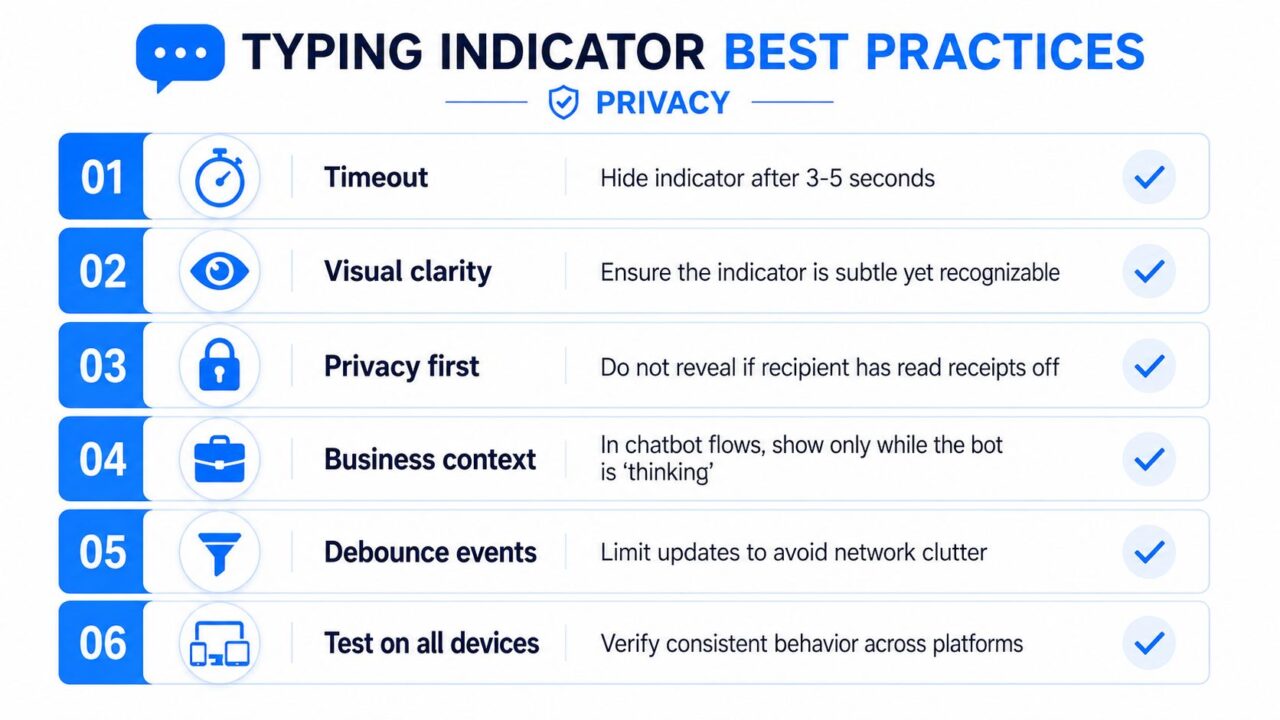
A practical checklist should cover both behavior and data handling. Use these rules when reviewing a chatbot flow:
- Set a timeout: Hide the indicator after roughly 3 to 5 seconds of inactivity, consistent with real-time chat guidance.
- Keep visual clarity: Make the cue subtle and recognizable, not a distracting animation.
- Protect privacy: Don’t expose typing behavior or related presence data more broadly than the conversation requires.
- Match business context: Show the cue while the bot is processing, not before an instant reply.
- Debounce events: Limit updates so the network receives status changes rather than a stream of keystrokes.
- Test every device: Verify consistent behavior across browsers, phones, channels, and connection conditions.
Typing Indicators Best Practices
Privacy deserves more attention than it usually gets. A 2024 privacy study argued that typing patterns can help identify web users, while related text-entry research found that passive sensing was perceived as more private when raw text wasn’t collected and the policy was explicit, as described in this privacy research on typing patterns and user identification. The safest default is to display only the minimal presence state needed for the conversation and avoid retaining detailed behavioral telemetry without a clear purpose and appropriate consent.
Review your retention, disclosure, and consent choices with the same care you apply to other customer data. Clepher teams can use GDPR consent management to align chatbot behavior with their broader permission strategy. For small businesses evaluating wider digital tooling, even platform capabilities for artisans should be assessed through that same lens: useful automation still needs transparent data practices.
Pair the cue with fast partial feedback or shorter response segments when processing takes longer. A typing indicator can preserve context briefly, but it isn’t permission to let latency grow.
Clepher gives marketers a no-code way to place typing indicators inside segmented flows across website chat, Messenger, Instagram, and WhatsApp. Visit Clepher to build and test audience-aware chatbot experiences that use progress cues where they help, while keeping fast conversations clean.
