
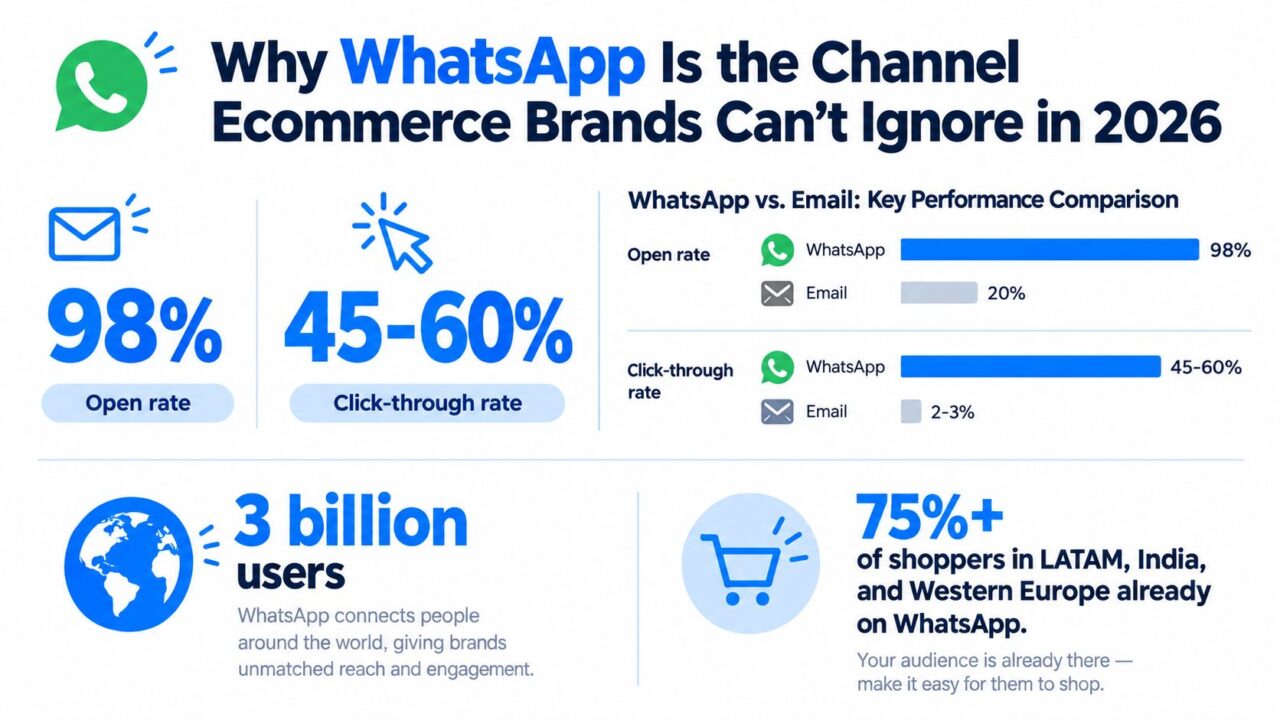
98% open rates and 45 to 60% click-through rates are why smart ecommerce teams stopped treating WhatsApp like a support side channel and started treating it like a revenue surface, according to a 2026 benchmark on WhatsApp API campaign performance from ChatArchitect.
That changes how you should build a WhatsApp chatbot for ecommerce.
Teams make the same mistake. They wire up one abandoned-cart flow, celebrate the open rate, and never answer the harder questions. Which flows deserve priority? How do you stay inside policy? What revenue should WhatsApp get credit for?
A useful WhatsApp program isn’t just a bot. It’s a full-funnel operating layer that touches acquisition, conversion, post-purchase support, and retention.
Why WhatsApp Is the Channel Ecommerce Brands Can’t Ignore in 2026
98% open rates and 45 to 60% click-through rates change the math on channel priority. Those are the performance levels ChatArchitect reported for WhatsApp API campaigns in 2026, and they explain why revenue teams are shifting high-intent moments into chat instead of leaving them in slower channels ChatArchitect.
The advantage is speed to action. A shopper asks about sizing, stock, shipping, payment, or returns in the same thread where your brand can recover a cart, confirm an order, or push a reorder reminder. That closes the gap between intent and conversion.
WhatsApp Chatbot for Ecommerce Marketing Stats
Reach matters, but incrementality matters more
WhatsApp already has the scale to matter. Meta has said more than 200 million businesses use the WhatsApp Business app monthly, and widely cited reporting also notes that 175 million people message a business on WhatsApp every day WhatsApp Business usage data.
For ecommerce operators, the better question is not whether customers are there. It is whether WhatsApp drives revenue you would not have captured through email, SMS, or onsite prompts. In practice, it often does, because the conversation happens inside a persistent thread where the shopper can ask one more question before buying.
That makes WhatsApp useful across the funnel, not just for abandoned carts.
- Pre-purchase conversion: Answer fit, availability, delivery, and bundle questions before the shopper drops.
- Checkout recovery: Handle payment friction, coupon questions, and cart objections while purchase intent is still high.
- Post-purchase revenue: Turn shipping updates, delivery confirmations, and support interactions into upsells, replenishment prompts, and review requests.
Brands that treat WhatsApp as a single automation flow miss the bigger opportunity. The channel works best as a revenue layer with clear attribution rules, holdout testing, and flow-level measurement.
Email and SMS still matter. WhatsApp fills the gap they leave.
Email is still your lowest-cost owned channel. SMS is still strong for short, urgent prompts. WhatsApp sits in the middle and often wins when the customer needs context before acting.
That distinction matters operationally. Email can carry long-form merchandising. SMS can nudge. WhatsApp can answer, persuade, and convert in one thread.
It also gives you cleaner buying signals. Replies, question types, drop-off points, and handoff rates tell you where revenue is leaking. That makes WhatsApp useful beyond campaign sends. It becomes a feedback loop for merchandising, CX, and lifecycle teams.
The same compression of attention-to-action shows up in other social commerce systems, which is why broader Veo3 AI monetization insights are relevant here too.
If you are evaluating stack decisions, start with the mechanics of WhatsApp for business automation. Bot quality depends less on clever copy and more on correct setup, policy-aware flows, and attribution you can defend in a revenue review.
How a WhatsApp Chatbot Actually Works
A WhatsApp chatbot for ecommerce looks simple from the customer side. They send a message. The brand replies. Sometimes a bot answers first, sometimes a human does.
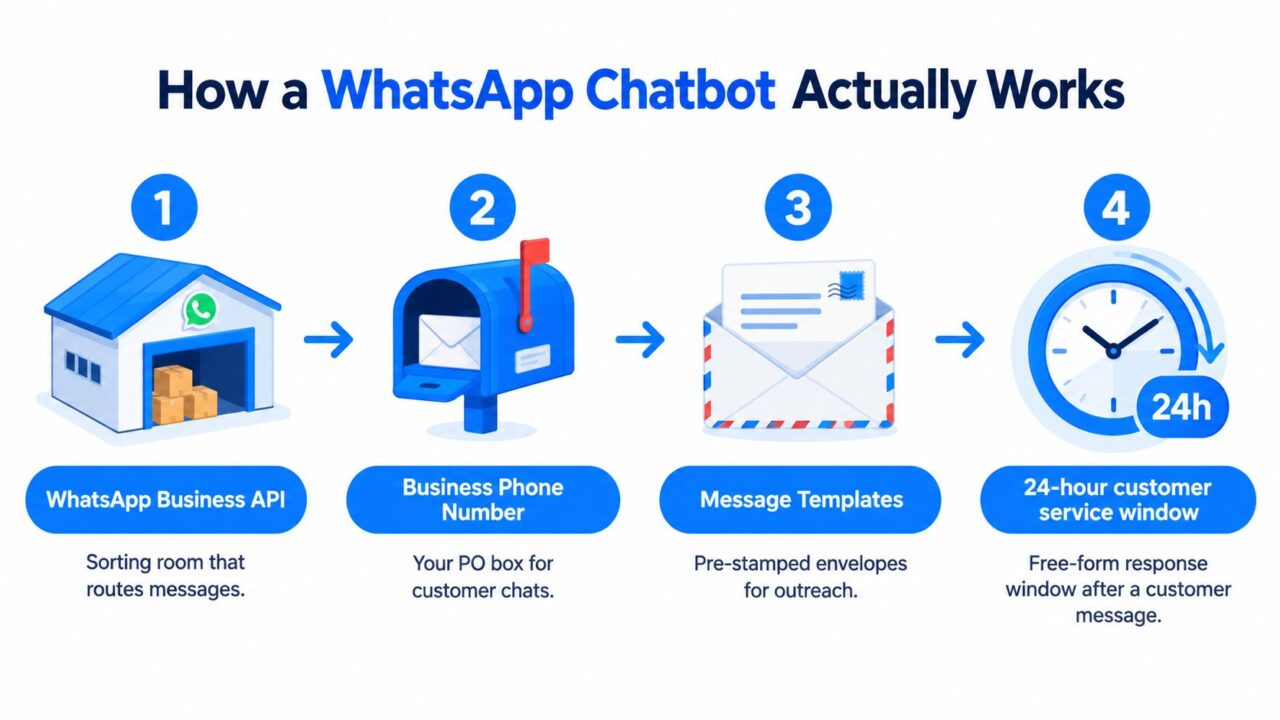
Under the hood, it’s closer to a postal system.
WhatsApp Chatbot for Ecommerce Chatbot Workflow
The postal analogy that actually helps
Think of the stack like this:
- WhatsApp Business API: The sorting room. Messages come in, rules process them, events fire out.
- Business phone number: Your PO box. Customers recognize the sender and continue the thread there.
- Message templates: Pre-stamped envelopes. You need these for outbound messages when the free-form reply window is closed.
- 24-hour customer service window: The open counter. During that period, you can speak naturally in response to the customer.
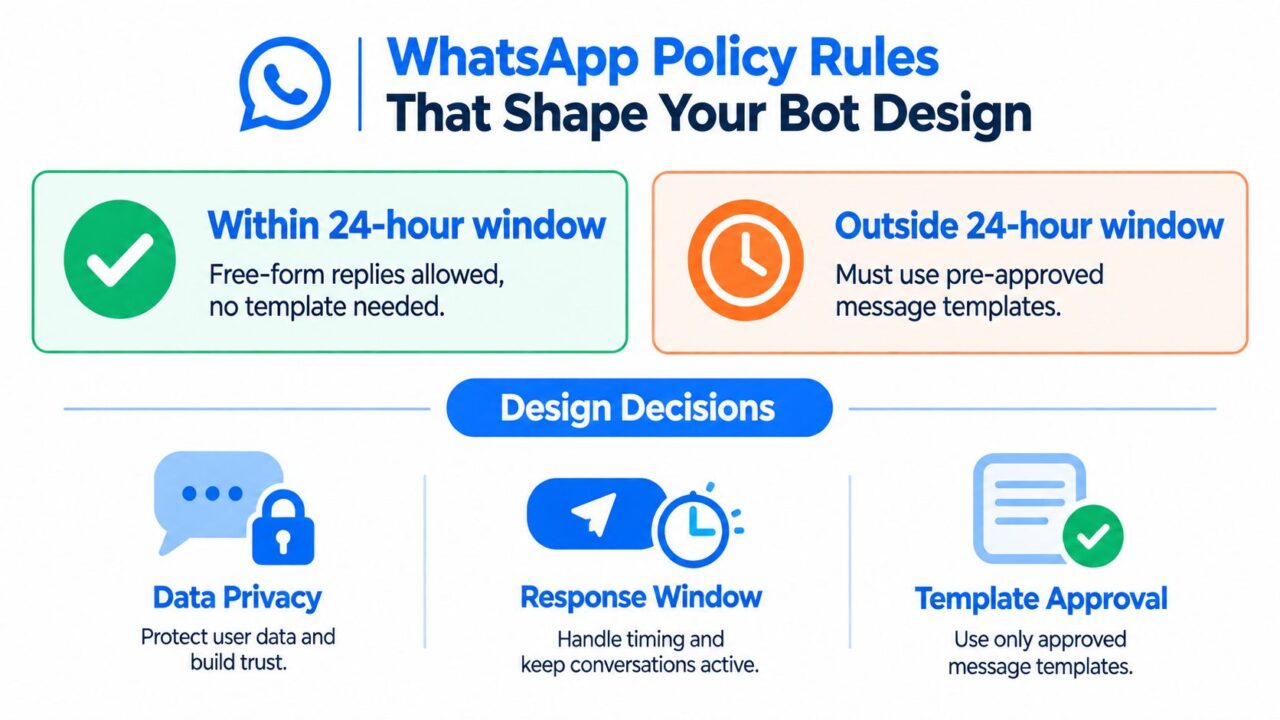
WhatsApp’s business messaging policy states that a business can reply to a user without a template only within 24 hours of the last user message. After that, only approved templates can reopen or continue the conversation WhatsApp Business policy rules.
That single rule shapes almost every flow decision you’ll make.
What the message path looks like in production
Here’s the normal path for an ecommerce bot:
- A shopper opts in from checkout, a PDP, a pop-up, or an order-status page.
- That event hits your provider through a webhook or native integration.
- Bot logic checks context. Is this a live service window or a template-required situation?
- The system sends either a free-form session reply or an approved template.
- If the customer replies, the session opens, and the bot can continue with richer back-and-forth logic.
- If the case gets messy, the conversation gets routed to a human inbox.
Independent API guidance from Infobip puts it plainly. Inside the active messaging window, businesses can send unlimited free-form messages with rich and interactive content. Outside that window, they can only send pre-approved templates in the marketing, utility, or authentication categories Infobip WhatsApp integration guidance.
The four building blocks to understand before launch
Before you design a single flow, lock these down:
- Brand identity: Verification and display setup affect trust and recognition.
- Routing layer: You need either a shared inbox or API webhook logic so messages reach the right system or agent.
- Template operations: Approval queues matter. Utility messages are operationally simpler. Marketing messages usually need more care.
- Bot layer: Your “chatbot” is just the decision engine on top. That can be rules-based, AI-assisted, or a mix of both.
This short walkthrough on API chatbot architecture is the right mental model if your team still thinks the bot itself is the whole product.
Business Benefits That Move Real Numbers
A WhatsApp bot should earn its place in your stack the same way any paid channel or retention program does. It needs to create incremental revenue, cut avoidable support cost, or improve the customer journey enough to raise conversion and repeat purchase.
Use those three lenses for every flow.
Revenue impact
Cart recovery gets attention because it is easy to measure, but treating WhatsApp as a one-flow recovery tool leaves money on the table. The stronger play is to use it across the full funnel. Product discovery, back-in-stock alerts, price-drop notifications, post-purchase cross-sell, replenishment reminders, and win-back all belong here if you can tie them to consent, attribution rules, and margin.
There is still a reason operators start with cart recovery. One retail and D2C benchmark reported 15 to 22% cart recovery via WhatsApp API versus 3 to 6% for email or SMS, with the best results tied to sending the message within 30 minutes of abandonment WhatsApp cart recovery benchmark.
That does not mean every recovered order is incremental. Some shoppers would have converted anyway through email, paid retargeting, or direct return visits. Measure holdouts. Suppress a clean control group. Decide in advance whether WhatsApp gets last-click credit, assist credit, or a separate incrementality view. If you skip that work, you will overstate impact and keep the wrong flows.
Cost reduction
Support savings are real, but only when the bot connects to live systems and resolves the boring tickets completely. Partial automation often creates extra work because the customer still ends up in the queue after answering three useless questions.
The practical target is simple. Automate high-volume intents with clear system lookups. Order status, return eligibility, shipping policy, stock checks, address changes before fulfillment, and simple subscription actions usually pay back first.
Analysts at eGrow reported that WhatsApp chatbot programs improved response speed by as much as 225% in customer-service contexts, while chatbot-driven lead conversion reached around 28% in the programs they summarized WhatsApp commerce reporting.
If your agents spend half the day answering WISMO and return-policy questions, that is not a staffing problem. It is a systems and flow-design problem.
Experience quality
Customer experience affects revenue more than many ecommerce teams admit. Fast answers reduce drop-off during consideration. Clear post-purchase updates reduce refund anxiety. A persistent message thread also gives the brand a better shot at the second order because the customer already knows where to reply.
The key is context. Your AI chatbot for ecommerce stack should read cart state, order status, catalog data, and customer history before it sends or answers anything. Without that context, the bot is a dressed-up FAQ widget, and your so-called personalization is just canned copy.
I would judge experience quality with hard metrics, not vibes. Look at first-response time, resolution rate, repeat contact rate, conversion after assisted conversations, and repurchase rate by customers who engaged on WhatsApp versus matched cohorts who did not.
| Benefit Category | What actually drives it | Primary KPI | What to watch for |
|---|---|---|---|
| Revenue | Time-sensitive recovery and lifecycle messaging with cart, catalog, and order context | Incremental conversion rate | Holdout design, channel overlap, margin after discounting |
| Revenue | Post-purchase retention flows such as replenishment, cross-sell, and win-back | Repeat-purchase rate | Attribution rules across email, SMS, and paid media |
| Cost | Full resolution of repetitive support intents | Automation rate | Whether the bot resolves the case or just delays an agent handoff |
| Cost | Faster handling for inbound service conversations | First-response time, cost per resolved ticket | API, OMS, WMS, and helpdesk integration quality |
| Experience | Persistent, contextual conversations across the buying journey | CSAT, repeat contact rate, assisted-conversion rate | Message relevance, escalation quality, template constraints |
A WhatsApp bot that only improves open rates is a weak program. A WhatsApp bot that changes conversion, repeat purchase, and support cost is a revenue layer. That is the standard to build against.
Ecommerce Use Cases Worth Building First
Don’t build too much too early.
Start with the flows that touch money or ticket volume immediately. In practice, that means five use cases deserve attention before anything fancy.
The highest-leverage flows
Cart recovery
Problem: the shopper leaves with intent still warm.
Trigger: cart abandonment event from Shopify or your checkout stack.
Bot action: send a short reminder fast, then follow up later only if the shopper doesn’t convert.
Result: this is the easiest flow to attribute and usually the first one to justify the channel.
Order tracking and delivery updates
Problem: customers ask where their package is, and agents waste time checking carrier status.
Trigger: shipping and fulfillment webhooks.
Bot action: send transactional updates and let the customer ask follow-up questions in-thread.
Result: fewer repetitive support tickets and better post-purchase confidence.
FAQ deflection
Problem: support queues fill with repetitive questions.
Trigger: inbound questions around shipping, returns, sizing, or policy.
Bot action: answer instantly, then escalate edge cases to a human.
Result: faster first response and lower agent load.
The flows that expand revenue, not just support
Catalog browse and product discovery
Problem: shoppers know the category but not the SKU.
Trigger: inbound product inquiry or campaign response.
Bot action: offer guided product discovery, quick replies, and links to relevant items.
Result: better assisted conversion, especially for considered purchases.
Win-back and lapsed-customer reactivation
Problem: previous buyers go quiet.
Trigger: inactivity window based on your own lifecycle rules.
Bot action: send template-based re-engagement with a clear reason to return.
Result: retention lift, if you segment carefully and don’t over-message.
Practical rule: Build flows in order of event clarity. Cart and shipping events are cleaner than broad “engagement” ideas, so they’re easier to attribute and optimize.
| Use Case | Trigger | Bot Action | Primary KPI |
|---|---|---|---|
| Cart recovery | Cart abandonment | Send reminder sequence, answer objections, return shopper to checkout | Recovered carts |
| Order tracking | Fulfillment or carrier status update | Push order updates and handle follow-up questions | Support deflection |
| FAQ deflection | Inbound support question | Resolve common intents or route to agent | Automation rate |
| Catalog browse | Product inquiry or campaign reply | Guide discovery with conversational prompts | Conversion rate |
| Win-back | Customer inactivity | Re-engage with template-led outreach | Repeat purchase |
WhatsApp Policy Rules That Shape Your Bot Design
Policy isn’t legal fine print. It’s product design.
If you ignore the rules, your bot won’t just underperform. It will break the exact flows you were counting on.
WhatsApp Chatbot for Ecommerce Policy Rules
The 24-hour rule changes timing decisions
Inside the customer-service window, your bot can act like a conversation. Outside it, your bot has to act like a campaign system using approved templates.
That means:
- Cart recovery should happen quickly, not eventually.
- Shipping support works well because customers often reply and keep the session open.
- Win-back has to be built as a template-led flow from the start.
If your team waits too long to follow up, the system doesn’t care that the message is relevant. It still requires a template.
Template categories shape flow architecture
Outside the open window, your choices are constrained to approved template types described in the WhatsApp ecosystem guidance already covered earlier: marketing, utility, and authentication.
Use a simple rule set:
- Utility: Order confirmations, shipping updates, delivery changes, return-related updates.
- Marketing: Win-back, promotions, product drops, cart nudges after inactivity.
- Authentication: Login or verification-related messages, if your commerce experience needs them.
Don’t blur categories. If a shipping message starts acting like an upsell broadcast, you’re asking for quality problems.
Opt-in and opt-out aren’t optional operations
Your bot needs explicit consent capture, identity disclosure, and suppression handling that your team can audit.
At minimum, set up:
- Clear opt-in entry points: Checkout checkbox, order-status page, post-purchase prompt, or lead form.
- Suppression logic: If someone opts out, your broadcast system must respect that immediately.
- Re-permission path: Don’t force unsubscribed users back into flows without a clean new opt-in.
The best policy-safe flow is usually the one with the least ambiguity. Operational messages should stay operational. Promotional messages should be clearly promotional.
A good WhatsApp chatbot for ecommerce is never just “creative.” It’s compliant by design.
Integration Options and Picking the Right Stack
There are three viable ways to launch a WhatsApp ecommerce bot. The wrong choice usually comes from overestimating your team’s technical appetite.
Three realistic paths
Direct API build
You work closer to Meta’s infrastructure, own more of the logic, and get maximum flexibility. This suits teams with engineering bandwidth and a real reason to customize.
BSP platform
You use a Business Solution Provider with a shared inbox, flow builder, template tooling, and analytics. This is the fastest route for most brands. Clepher, Wati, and Twilio Conversations all fit this general category in different ways.
Hybrid stack
You use a platform for WhatsApp delivery and pair it with Zapier or Make to connect Shopify, Klaviyo, your CRM, or helpdesk. This is often the most practical middle ground for lean teams.
For teams comparing orchestration and message ops across channels, it also helps to review adjacent campaign management tools so your WhatsApp layer doesn’t end up isolated from the rest of your retention stack.
How to choose without wasting a quarter
Pick based on control, speed, and who will maintain it after launch.
| Approach | Setup Time | Monthly Cost @ 10k msgs | Control Level | Best For |
|---|---|---|---|---|
| Direct API build | Longer | Varies by provider and conversation mix | Highest | Engineering-led brands with custom logic needs |
| BSP platform | Faster | Varies by platform and conversation mix | Moderate | DTC teams that want speed, inbox tools, and flow builders |
| Hybrid with Zapier or Make | Medium | Varies by app stack and message volume | Moderate to high | Lean teams connecting Shopify, CRM, and support tools without a full custom build |
Here’s the blunt recommendation. If you’re a mid-sized ecommerce brand and this is your first WhatsApp build, start with a BSP or hybrid stack. Direct API is worth it only if your team already knows why the extra control matters.
Implementation Roadmap From Idea to Live Bot
Most WhatsApp projects fail because the team launches too broadly. Start with one flow, prove contribution, then expand.
Abandoned-cart recovery is usually the right first build. It has clear event triggers, clear attribution, and proven patterns.
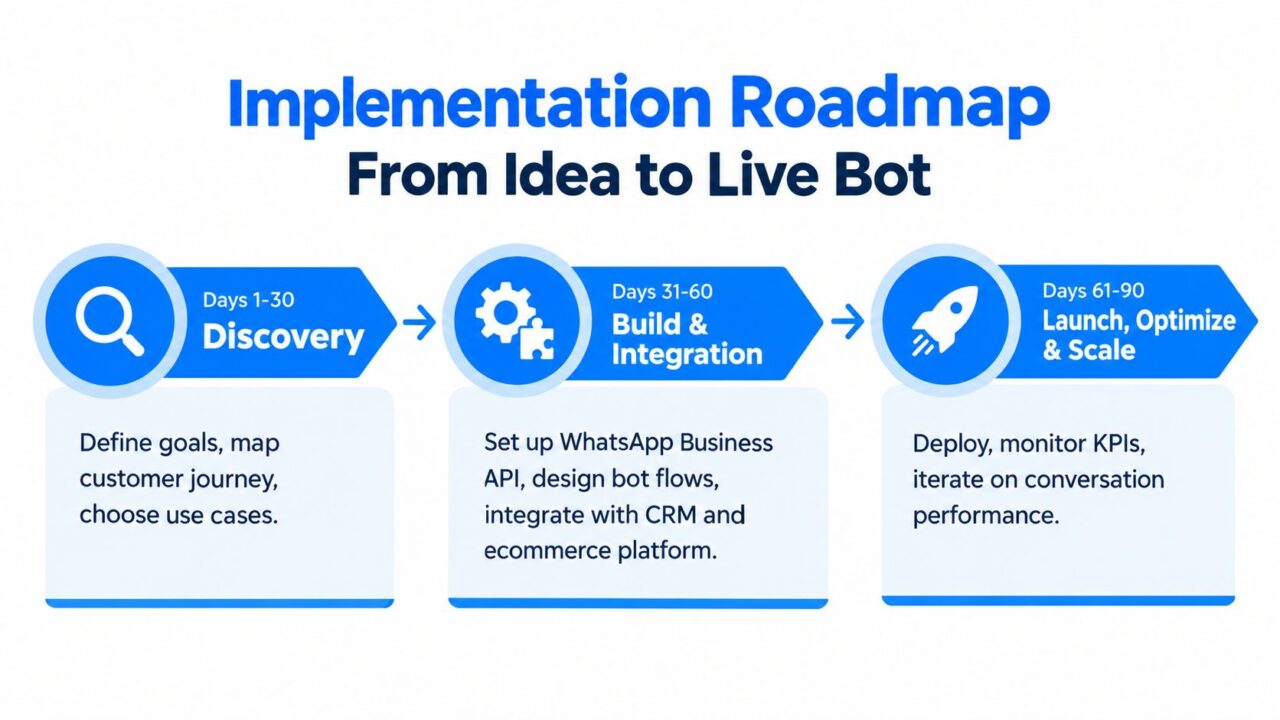
WhatsApp Chatbot for Ecommerce Implementation Roadmap
Days 1 to 30
Get the foundation right.
- Founder or ecommerce lead: Define the commercial goal. Pick one KPI that matters.
- Growth marketer: Audit opt-in points, audience segments, and message triggers.
- Developer or technical operator: Review order data, cart events, customer IDs, and webhook availability.
- Support lead: List the top inbound intents and escalation rules.
Deliverables should include provider selection, use-case priority, data schema audit, and the first three draft templates.
Days 31 to 60
Build the smallest thing that can go live without embarrassing the brand.
Set up the business number, connect your commerce data, submit templates, and create the first journey. For abandoned cart, keep the logic simple. Trigger quickly after abandonment, reference the cart context, and route replies to either bot logic or a human queue.
Add one handoff standard your team can manage. “Talk to support” isn’t a handoff plan. Assign ownership, working hours, and fallback rules.
Days 61 to 90
Launch, review, and tighten.
Watch for three things first:
- Template performance: Are messages getting delivered and replied to?
- Conversation handling: Is the bot resolving simple objections or creating dead ends?
- Attribution discipline: Are you measuring recovered orders cleanly, not inflating channel credit?
Start deterministic. Add AI only where language variability creates real friction, such as product discovery or messy support queries.
For many ecommerce brands, rules-based flows are enough for cart recovery, order updates, and top FAQs. Add AI or NLU layers later when the operational basics are stable.
KPIs, Benchmarks, and the Operator’s Checklist
WhatsApp messages routinely get seen fast. That does not mean your program is healthy or profitable.
Judge a WhatsApp chatbot for ecommerce on three outcomes: incremental revenue, support deflection, and channel durability. If you cannot prove those three, you do not have a revenue layer. You have message volume.
The five KPIs that actually matter
Start with incremental recovered revenue.
This is the KPI that separates a real channel from a reporting trick. Count orders that would likely not have happened without the WhatsApp touch. Holdout tests beat platform-reported attribution every time.
Next is reply rate.
Open rate has value because it confirms attention, but replies show intent. A customer who answers a cart reminder, asks about shipping, or clicks into a product flow is giving you a stronger buying signal than a passive open ever will.
Third is automation rate. Measure the share of conversations your bot resolves without human help, while still achieving the right outcome. A high automation rate with poor conversion or low CSAT is a broken bot hiding behind an efficiency metric.
Fourth is time to first useful response. Not just first response. Useful response. If the first message is generic and the answer arrives too late, the customer has already moved on.
Fifth is opt-out rate by flow. This is the policy KPI operators ignore until quality drops, templates get throttled, or the number loses reach. High opt-out rates usually mean one of three things: weak consent capture, bad timing, or messages that ask for attention without adding value.
If you want one revenue benchmark to sanity-check your program, use the broader full-funnel view. One 2026 benchmark release tied WhatsApp to 12.21% of total online revenue for brands running more than abandoned-cart flows, and also reported 91.93% open rates on post-purchase flows plus 25.62% repeat-purchase conversion within 60 days full-funnel WhatsApp benchmark data. Use numbers like that as directional context, then validate incrementality inside your own attribution model.
Vanity metrics vs operator metrics
Operator metrics answer a budget question. Should this channel get more volume, more engineering time, and more paid acquisition support for opt-ins?
Vanity metrics cannot answer that.
- Operator metrics: incremental recovered revenue, reply rate, automation rate, opt-out rate, cost per resolved conversation, assisted conversion rate
- Vanity metrics: total messages sent, total opens with no downstream action, broad engagement with no order linkage
| KPI | Definition | Benchmark or Target Use | What It Signals |
|---|---|---|---|
| Incremental recovered revenue | Revenue from orders influenced by WhatsApp that likely would not have happened otherwise | Use holdouts or matched cohorts, not last-click alone | Real commercial lift |
| Reply rate | Share of recipients who respond or take a meaningful action | Compare by flow, template, and audience segment | Message relevance and purchase intent |
| Automation rate | Conversations resolved by the bot without agent intervention | Track alongside conversion, resolution, and CSAT | Bot usefulness, not just containment |
| Time to first useful response | Time until the customer gets a relevant answer or next step | Keep it tight on cart, shipping, and order-status flows | Speed of resolution |
| Opt-out rate by flow | Share of users who unsubscribe after a message or sequence | Watch this weekly, especially after template changes | Consent quality and channel health |
The operator’s monthly checklist
Review the program like an owner, not a channel manager.
- Attribution model: Separate direct recovery, assisted revenue, and holdout-measured lift. If WhatsApp gets credit for orders email or direct would have closed anyway, your budget decisions will get worse.
- Template health: Check approvals, delivery failures, quality ratings, and any templates with weak reply rates.
- Flow profitability: Review revenue per conversation by use case. Cart recovery, post-purchase cross-sell, winback, and support deflection should not be blended into one average.
- Opt-in source quality: Compare onsite popups, checkout consent, support entry points, and post-purchase opt-ins by downstream revenue and unsubscribe rate.
- Suppression rules: Confirm opt-outs and recent purchasers are excluded across every connected tool.
- Human handoff: Read real transcripts. Find loops, bad fallback copy, and cases where the bot should have escalated earlier.
- Policy risk: Audit message timing, template wording, and re-engagement logic before Meta forces the correction for you.
One more rule. Do not let WhatsApp become the channel that takes credit for demand created somewhere else. It should earn budget because it adds lift across the funnel, from conversion to repeat purchase to support efficiency.
If you want to launch without stitching together your own inbox, flow builder, and automation logic, Clepher gives ecommerce teams a way to run WhatsApp Business API journeys with no-code flows, segmentation, broadcasts, and agent handoff in one system. It’s a practical fit if you need to ship cart recovery, support automation, and post-purchase messaging fast, then prove revenue before expanding the program.

Related Posts
WhatsApp Chatbot for Ecommerce: A Practical 2026 Guide
October 17, 2026What Is Lead Scoring and How It Drives Real Sales Results
October 16, 2026
Founder Clepher